14 construction project management software features [2026]

By
Marketing Team
@Onetrace
Construction project management software is a digital platform designed to help teams plan, coordinate, track, and deliver projects more efficiently at every stage of the build.
Despite the industry’s historically slow digitalisation, as many as 81% of construction professionals now support the use of digital project management tools.
That’s because these platforms offer numerous measurable benefits, including improved productivity, clearer communication, and better operational control—all crucial in an industry as detail-driven as construction.
But to fully unlock those benefits, you need software that works as hard as your teams do.
With this in mind, let’s break down the 14 construction project management software features that can make the biggest impact on your operations.
Key takeaways
Modern construction projects need more than basic scheduling
Today’s teams need software that supports planning, reporting, compliance, field operations, and real-time collaboration across projects.Real-time visibility helps prevent delays and cost overruns
Live dashboards, mobile updates, approvals, and progress tracking help teams catch issues before they escalate.Field usability is critical for adoption
Fast mobile tools, offline access, simple workflows, and reliable syncing make it easier for site teams to actually use the software day to day.Strong integrations reduce admin and disconnected data
Software with APIs and integration capabilities helps keep payroll, reporting, accounting, and operational systems connected.Onetrace brings all key features into one platform
Onetrace combines scheduling, compliance, reporting, workforce management, and field operations in one mobile-friendly construction platform.
14 construction project management software features every contractor needs
At first glance, 14 must-have features might sound excessive.
But construction projects aren’t what they used to be.
Teams once relied on basic scheduling and task tracking alone, and that was usually enough to keep projects moving. Today, they’re juggling distributed teams, tighter deadlines, heavier compliance demands, and far greater volumes of project data than ever before.
These 14 construction project management software features help bring all of that under control.
1. Scheduling and planning
Construction projects are notoriously vulnerable to delays, with poor planning remaining the biggest cause of missed deadlines in 36% of cases. That’s why planning and scheduling tools are essential for keeping teams aligned, workloads balanced, and projects moving on time.
The right software should make it easy to coordinate field teams, adjust schedules, and maintain real-time visibility into all projects.
Key capabilities include:
Drag-and-drop task and team allocation
Real-time schedule updates
Milestone and progress tracking
Flexible calendar and project views
2. Document and drawing management
Construction projects generate huge volumes of documentation, much of which is constantly changing.
The problem is that outdated drawings, scattered files, and missing specifications can create costly mistakes long before work even reaches the site.
To prevent this scenario, teams need a reliable way to store, organise, and access documentation from one central location.
Capabilities worth prioritising here include:
Version control and revision tracking
Role-based permissions and access control
Linked project documents and supporting files
Support for photos, certificates, contracts, and site records
3. Budgeting and cost control
Cost overruns have become one of the biggest challenges in construction project management, with studies showing that as many as 75% of projects exceed their original budgets.
As projects grow more complex, keeping costs under control requires far more than spreadsheets and manual reporting.
Strong budgeting and cost control features give contractors better visibility into project performance, helping teams track spending, monitor productivity, and catch budget issues before they escalate.
Useful capabilities include:
Real-time job cost tracking
Productivity and revenue reporting
Material and labour rate management
Cost analysis by project, team, or operative
Flexible pricing structures and rate sets
Exportable financial and productivity reports
4. Variation order management
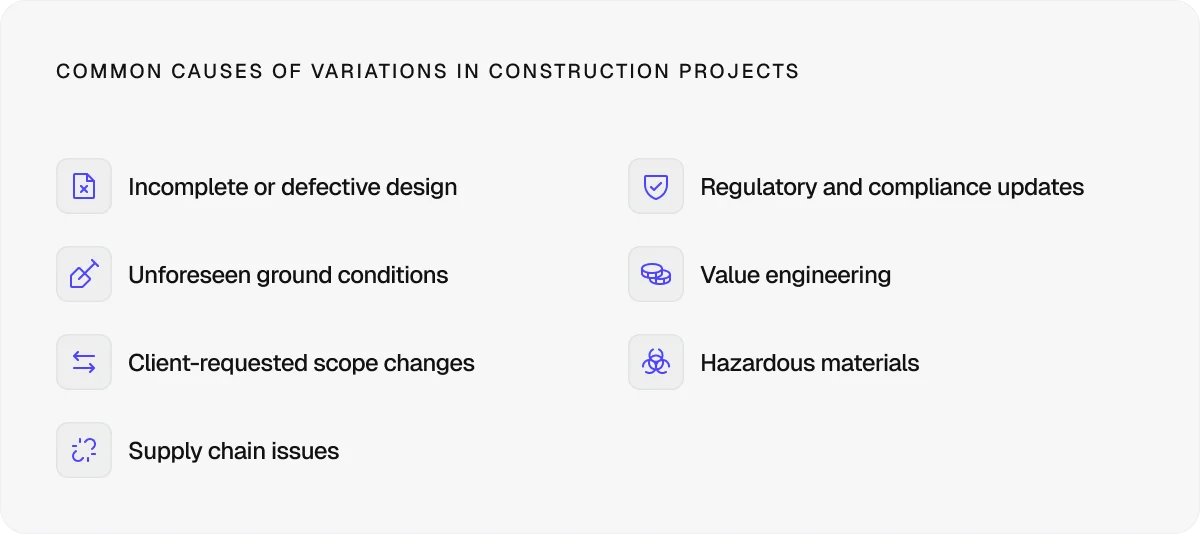
Changes are almost inevitable in construction, and there’s not much you can do to avoid them. What you can do, however, is manage their impact on budgets, timelines, and client expectations.
This can be done by keeping track of what changed, where it changed, and how it affected the original scope of work.
Your project management software should help you document variations in real time through tools like:
Variation fields tied to specific locations or tasks
Records of additional work outside the original scope
Linked drawings, specifications, and supporting evidence
Time-stamped audit trails for approvals and updates
Filters for tracking variations across projects and operatives
Variation reports for client communication and sign-off
5. Field operations
No matter how good your planning is, projects ultimately succeed or fail on the site.
If field teams can’t easily access tasks, update progress, or capture site information in real time, delays and miscommunication are a given.
Your project management software should connect the office to the site effortlessly, giving operatives tools like:
Mobile access to tasks and to-do lists
Real-time status updates
Clock-in and clock-out tracking with GPS stamps
Before, during, and after site photos
Digital document review and sign-off
6. Maps and location intelligence
On busy construction sites, vague directions like ‘second floor’ or ‘near the plant room’ rarely cut it.
The bigger and more complex the project, the more important precise location tracking becomes for keeping teams efficient and avoiding unnecessary delays.
Modern construction software should allow operatives to quickly understand where work is required and how to get there.
This is made possible through:
Interactive maps and built-in navigation
Precise site location tagging
Zone and core-based site organisation
Drawing-linked work locations
Mobile directions for operatives on-site
Location-based task and workflow tracking
Pro tip:
Your software doesn’t need to reinvent location tracking from scratch.
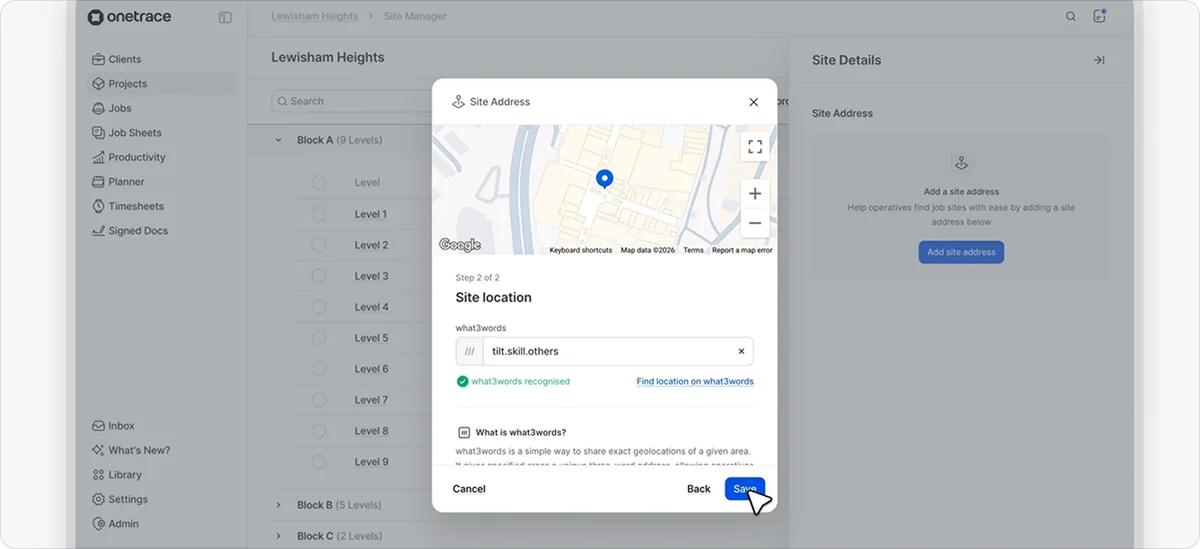
For example, Onetrace integrates with what3words, which divides the world into 3-by-3-metre squares and assigns each one a unique three-word address.
This approach helps teams pinpoint exact work locations without relying on confusing coordinates or vague site directions.
7. Offline capability
Construction work doesn’t stop just because the signal drops.
Whether teams are working in basements, remote sites, or concrete-heavy structures, unreliable internet is still a daily reality for many projects.
That’s why offline capability is one of the most important features of great construction software.
Teams should still be able to access critical project information and continue working without interruption through features like:
Offline access to drawings and project files
Downloadable site information on mobile devices
Automatic syncing once the connection is restored
Protection against lost updates or duplicated work
8. Workforce, equipment, and asset management
With more than 140,000 construction vacancies currently affecting projects across the UK—alongside inexplicable increases in material and equipment costs—construction teams have very little room for inefficiency.
Every misplaced material, scheduling gap, or attendance issue directly impacts project performance.
To keep projects running smoothly, contractors need software that gives them tighter control over labour, materials, and on-site resources through capabilities like:
Productivity monitoring by team, operative, or project
Material usage and cost tracking
Asset and installation tracking
Exportable reports for invoicing and resource planning
9. Integration with existing tools
Construction businesses already juggle enough disconnected systems without adding more data silos into the mix.
If project information lives within spreadsheets, accounting platforms, HR systems, and field apps that don’t communicate with each other, manual admin and duplicate data will never stop slowing your teams down.
That’s why strong integration capabilities matter.
Your project management software should fit into your existing tech stack and keep information flowing smoothly between systems.
Pro tip:
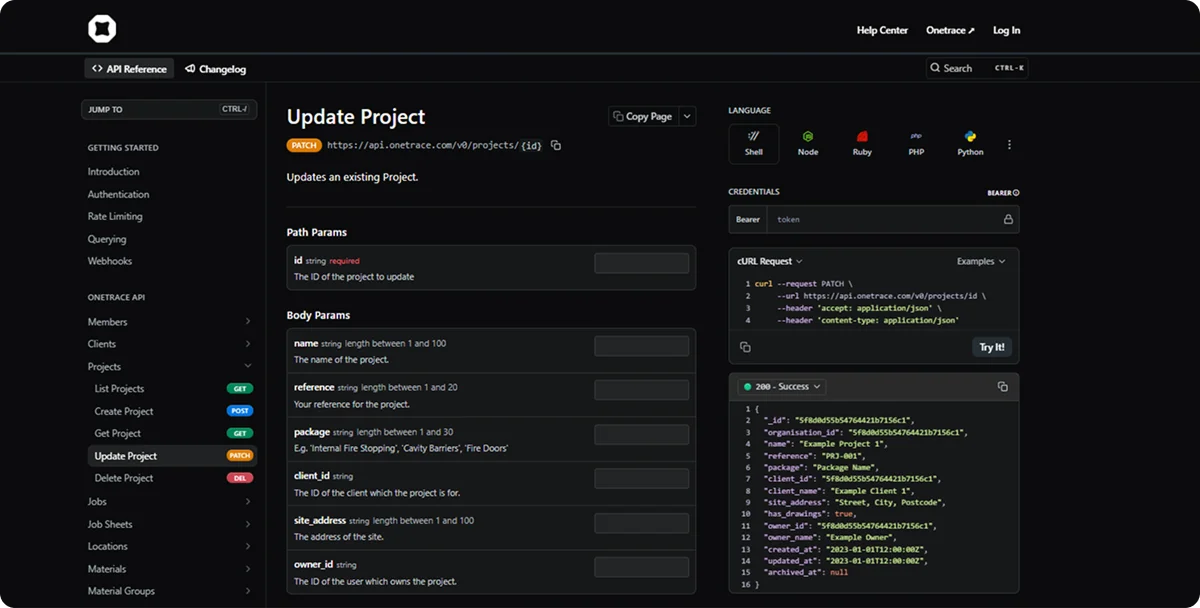
Software with APIs and webhooks might be a better long-term option than relying solely on built-in integrations, especially as your tech stack grows.
With Onetrace’s APIs, for instance, you can automatically send, update, and sync project, workforce, compliance, and operational data in real time.
This helps reduce manual admin work and makes integrations between payroll, accounting, reporting, and field operations much easier as your business scales.
10. Safety and compliance management
In an industry where roughly 50,000 workers are injured every year, safety and compliance can’t be treated as box-ticking exercises.
Missing documentation, unsigned RAMS, or poor audit trails can put both workers and businesses at serious risk.
The right software should make compliance easier to manage, monitor, and apply to every project, through tools like:
Centralised storage for inspections, certificates, and safety records
Digital RAMS, Toolbox Talks, and safety documentation
Mobile document review and sign-off
Live tracking of viewed and signed documents
QR code-linked compliance records and installation histories
Automated compliance workflows and notifications
11. Quality management
Quality control is often overlooked in construction compared to safety compliance, despite poor quality processes contributing to rework costs of up to 25% of the total project value.
Quality management tools help teams maintain consistent standards, catch issues earlier, and create stronger accountability across projects, thanks to features like:
Digital quality checklists and inspections
Mobile punch lists and defect tracking
Photo-based evidence and issue logging
Real-time QA status tracking and reporting
Full audit trails for approvals and resubmissions
Pro tip:
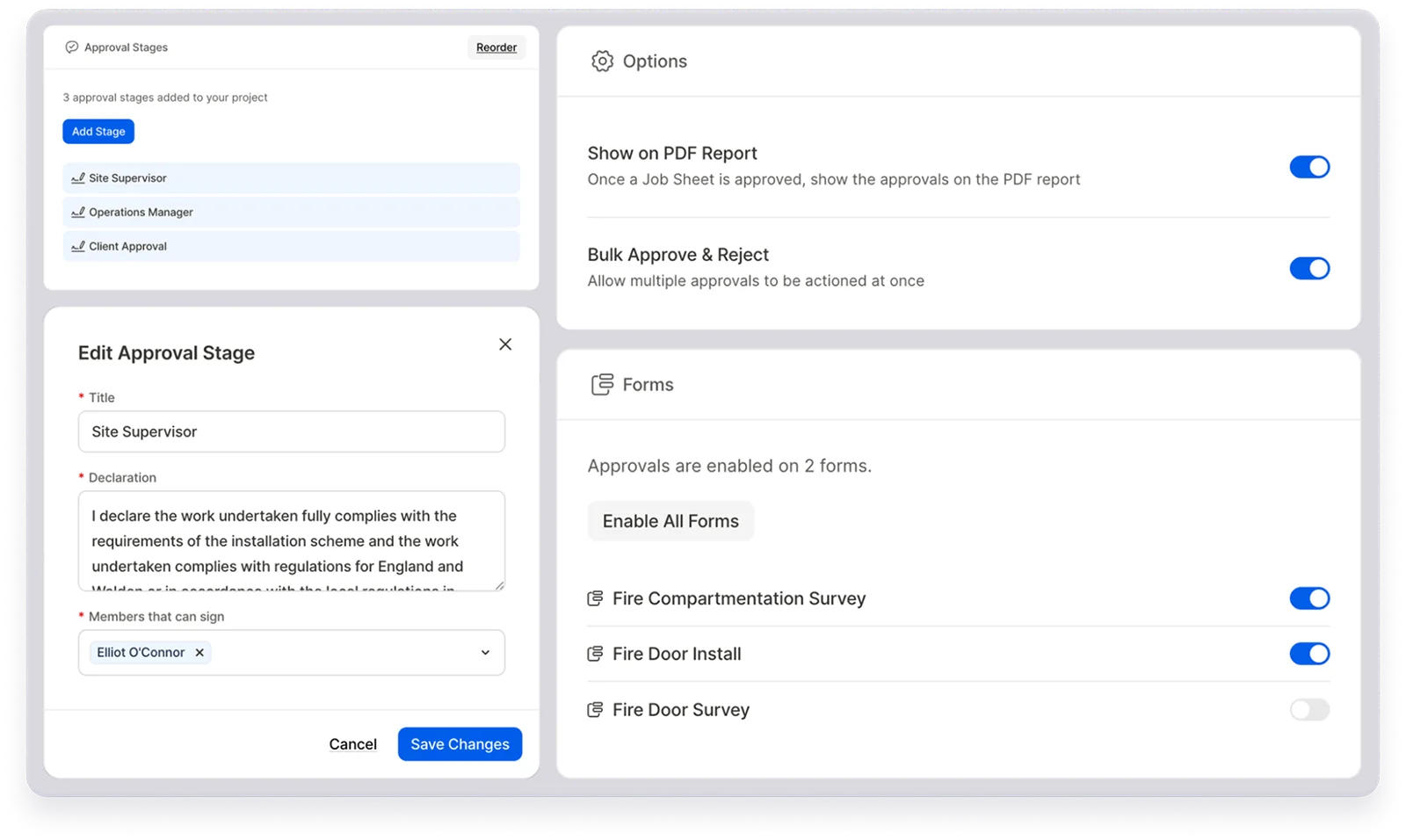
To ensure quality is properly maintained at every stage of the project, you should look for software with structured approval workflows.
For this purpose, Onetrace offers multi-stage approvals that digitise the quality control sign-off process.
Work can be reviewed by supervisors, managers, and clients in sequence, with every approval, rejection, and resubmission fully recorded to improve accountability and reduce rework.
12. Custom workflows and permissions
No two construction businesses operate exactly the same way.
Processes that work for a large main contractor may be completely unsuitable for a specialist subcontractor managing niche compliance requirements or field workflows.
That’s why flexibility matters.
Your project management software should adapt to your operations, not force your teams into rigid processes that create more admin than efficiency.
In practice, this typically means using:
Custom forms for different trades, surveys, and inspections
Role-based permissions and controlled data access
Customisable approval chains and workflows
13. Reporting and visibility
Without clear visibility into project performance, construction teams often end up reacting to problems instead of spotting them early.
Progress updates buried in emails, spreadsheets, and site notes make it difficult for managers to understand what’s happening on multiple projects in real time.
Strong reporting tools create a management layer above day-to-day operations, helping teams monitor projects more effectively.
These tools include:
Real-time dashboards and project status tracking
Progress visibility across drawings, locations, and job sheets
Filterable project insights and activity reports
Custom reporting for clients, auditors, and internal teams
14. Client and contact management
Construction projects involve constant coordination between contractors, subcontractors, consultants, and clients.
If contact details, project access, and stakeholder records are scattered across different systems, communication becomes impossible to manage.
Client and contact management tools help centralise relationship management, improve collaboration, and give teams clearer visibility into who’s involved in each project.
How Onetrace supports real-world construction workflows
When it comes to construction project management, Onetrace wins on two fronts: usability and operational depth.
Its fast mobile experience, simple workflows, and low training overhead make it easy for field teams to adopt.
At the same time, it still covers all the essential construction project management software features:
Scheduling and planning: Use the visual Planner to schedule operatives, manage workloads, and keep field teams synced in real time.
Document and drawing management: Store drawings, specifications, RAMS, certificates, and project files in one centralised Docs & Files hub.
Budgeting and cost control: Track productivity, material usage, labour rates, and project costs with built-in operational reporting.
Variation order management: Record scope changes, additional work, and project variations in real time with clear audit trails.
Field operations: Give site teams mobile access to tasks, forms, timesheets, documents, and photo capture tools from anywhere on-site.
Maps and location intelligence: Organise projects by zones, blocks, levels, and exact locations with built-in maps and what3words integration.
Offline capability: Keep projects moving in low-signal environments with offline drawings and automatic syncing once reconnected.
Workforce, equipment, and asset management: Monitor attendance, productivity, material usage, and QR-code-linked asset histories across projects.
Integration with existing tools: Connect operational data to external platforms using APIs, exports, and webhook-based automations.
Safety and compliance management: Digitise RAMS, Toolbox Talks, signatures, inspections, and compliance tracking with full audit visibility.
Quality management: Use multi-stage approvals to review, reject, resubmit, and sign off work digitally at every project stage.
Custom workflows and permissions: Configure custom forms, workflows, permissions, and project templates to match your operational processes.
Reporting and visibility: Generate branded PDF and Excel reports with live project insights, progress tracking, and proof-of-work records.
Client and contact management: Manage contractors, clients, and key contacts from one central hub with shared project visibility and organised stakeholder records.
Want to see these features in action?
Book a personalised demo to explore the platform and get started.
FAQ
What is construction project management software?
Construction project management software is a digital platform used to plan, coordinate, track, and manage construction projects from start to finish.
What are the features of project management software?
Common construction project management software features include scheduling, document management, reporting, compliance tracking, workforce management, approvals, and field operations tools.
What is the most popular construction project management software?
Some of the most popular construction project management software platforms include Procore, Autodesk Forma, Buildertrend, and Onetrace.
Marketing Team
@Onetrace
The Onetrace marketing team is passionate about sharing insights, ideas, and innovations that help construction businesses stay connected, compliant, and efficient. Combining industry expertise with a love for clear communication, we aim to deliver content that empowers professionals to work smarter and safer.