What are construction timesheets & how to make them? [Guide]

By
Marketing Team
@Onetrace
Construction timesheets are a basic part of how construction work is recorded, checked, and trusted. They show who was on site, what work was done, and how long it took.
In addition to being useful, construction timesheets are increasingly required by law.
For example, the European Working Time Directive sets strict rules on maximum weekly hours, rest breaks, and paid leave. In addition, recent court rulings have made it clear that employers need proper, reliable systems in place to record time worked.
With this in mind, let’s explain what construction timesheets actually are, what they should look like, and how to create them for your projects.
Key takeaways
Construction timesheets are a core site record, not admin fluff
They provide a clear, shared record of who worked, when, where, and on what. Used properly, they support pay, planning, compliance, and accountability across the whole project lifecycle.Digital timesheets outperform paper and spreadsheets on real sites
While paper and spreadsheets are familiar, they are more prone to errors. Digital timesheets reduce manual work, improve accuracy, and give real-time visibility, which matters most when teams move between sites and tasks change daily.Good timesheets focus on a few essential details
The most effective timesheets consistently capture worker details, time periods, hours worked, tasks, locations, breaks, and overtime. Keeping this information clear and consistent avoids disputes and makes records usable later.Process matters as much as the format
Clear rules, proper training, and secure storage make timesheets reliable. Without these, even the best template or tool will fall short on a busy site.Onetrace brings time tracking and trust into one system
Onetrace combines simple mobile clock-ins, GPS-backed records, live visibility, and flexible adjustments. This reduces disputes, backcharges, and admin overhead while giving contractors and subcontractors confidence in the data they rely on.
What are construction timesheets?
Construction timesheets are records used to log the time people spend working on a construction job. They show hours worked over a set period and are usually linked to a specific site, task, or project.
They apply to both directly employed workers and subcontractors, and they can be completed on paper, in a spreadsheet, or through a digital system. The table below breaks down the main strengths and limitations of these three methods.
Method | Pros | Cons |
Paper timesheets | - Simple to set up - Familiar on site - Independent of technology | - Easy to lose or damage - Prone to handwriting errors - Time-consuming to process |
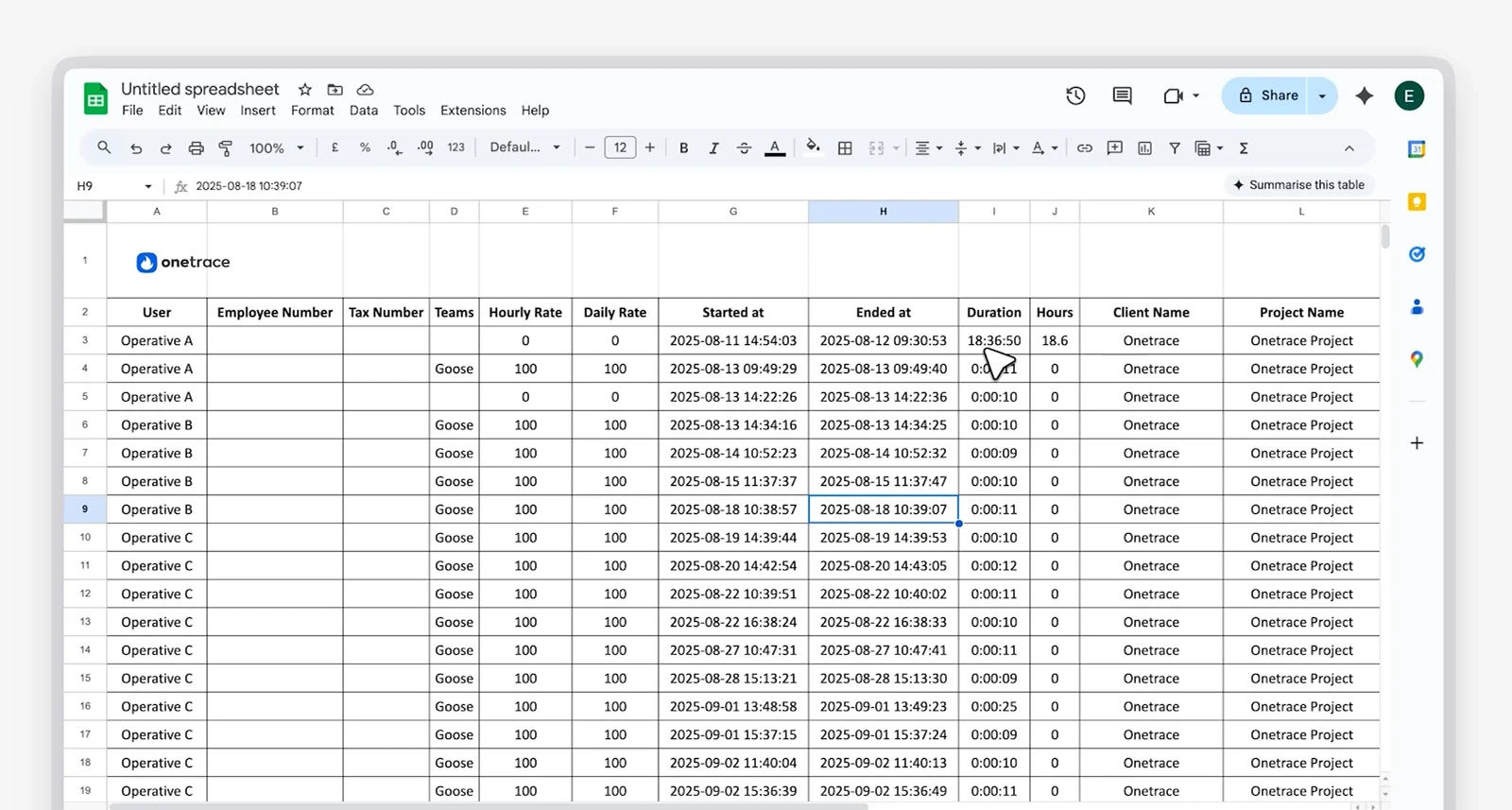
Spreadsheets (Excel, Google Sheets) | - Low-cost - More structured than paper - Easy to edit and share | - Dependent on manual entry - Prone to hidden errors - Limited for real-time use |
Digital timesheets (software or mobile apps) | - Real-time and site-ready - Accurate and consistent - Easy to store and audit | - Slower to set up initially - Dependent on basic training and device access |
In practice, digital timesheets are increasingly used on construction sites because they reduce manual work, improve accuracy, and make it easier to track time on a daily basis.
This is especially relevant for trades and subcontracted work where crews move between sites, tasks change day to day, and hours don’t always follow a fixed pattern.
Common examples include:
Fire protection and safety installers
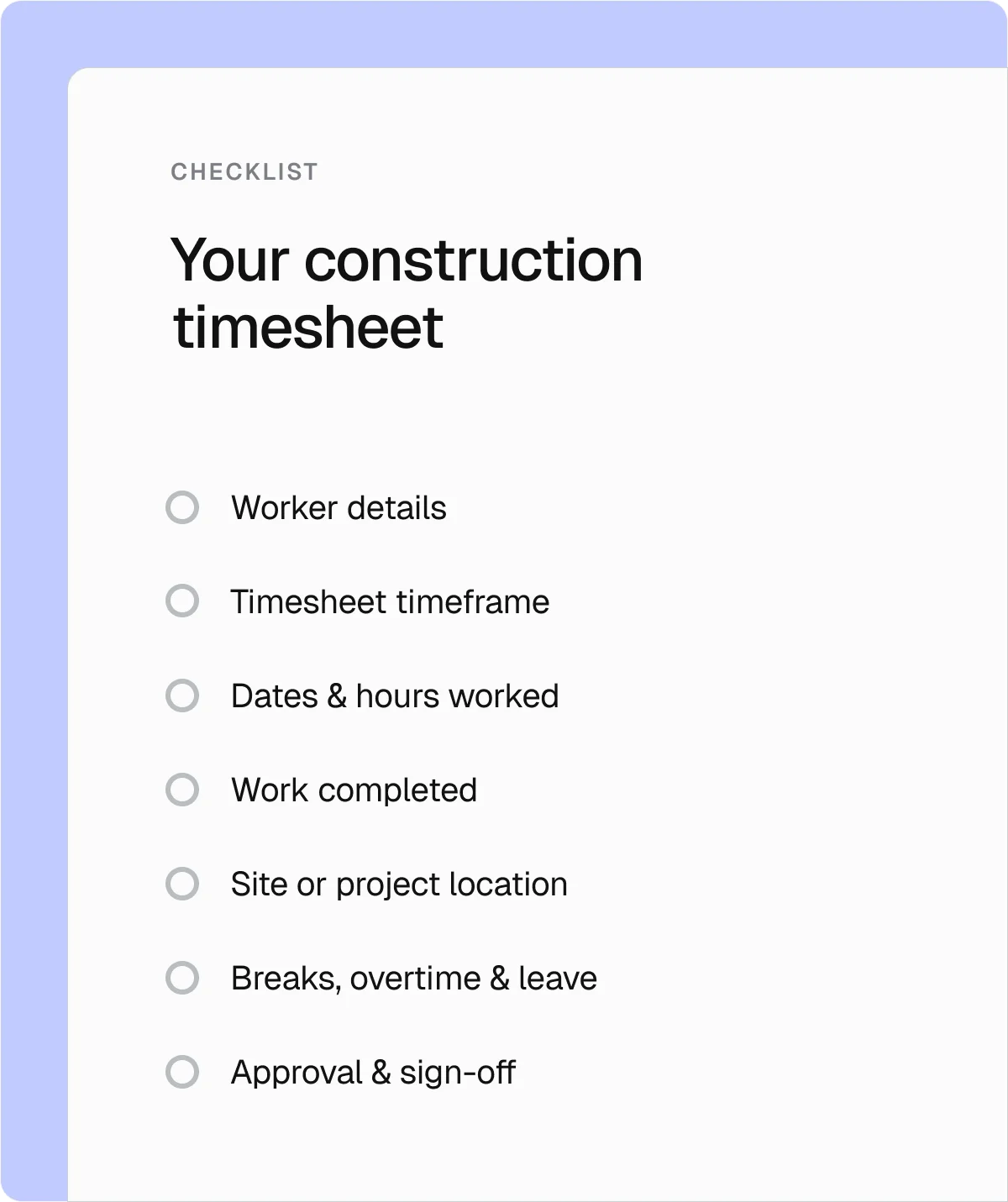
The 6 key details every construction timesheet should include
Construction work varies from trade to trade and site to site, but the key details every construction timesheet should include are broadly the same.
1. Employee information
Every construction timesheet should clearly identify for whom the hours are recorded. This avoids payroll mistakes and makes records easier to check later.
This section commonly includes:
Full name
Employee or worker ID
Trade or role
Contact details
Hourly rate (where pay is time-based)
2. Timesheet period
Construction timesheets should display the time period they cover to ensure hours are recorded consistently and paid in the right pay run.
Depending on how payroll is set up, the timesheet period may be shown as one of these two options:
Start and end date
Pay period or a reference number
3. Dates and hours worked
Construction timesheets need a clear record of when work was done and how long it took. This includes the exact date when the work took place, as well as start and finish times or total hours worked.
4. Tasks or activities
Construction timesheets should include what kind of work was carried out during the recorded hours. This doesn’t need to be detailed, just clear enough for those using the sheets to understand how time was spent.
This is often recorded as:
A brief task or activity description
A job stage or work type
A task linked to a project or cost code
The overall project the work relates to
In construction, cost codes are used to label different activities or trades, allowing labour hours to be tracked against specific parts of a project. So, instead of just recording total hours, the timesheet shows where that time was spent.
5. Location or site
Where work is carried out matters, especially on larger projects or when teams move between sites. Construction timesheets should make it clear which site the hours relate to.
This is usually recorded in one of two ways:
Site name and address
Project or job reference
6. Breaks and overtime
Construction timesheets should clearly separate different types of periods, not just show total hours worked.
Besides working time, there should be a log of:
Unpaid and paid breaks
Overtime hours
Sick leave or other absence types
Recording this methodically avoids disputes and supports compliance with employment or client agreements.
How to create and implement construction timesheets in 6 steps
The exact steps for creating construction timesheets will depend on the method you choose, whether that’s paper, spreadsheets, or a digital system.
That said, there are a few core steps you’ll need to follow, regardless of the approach you use, to ensure timesheets are clear, consistent, and workable on site.
Step 1: Define the purpose of the timesheet
Start by being clear about why you’re using a timesheet. This sets the level of detail you actually need.
Common purposes include:
Paying workers correctly
Tracking time by job or task
Supporting client billing
Meeting legal and compliance requirements
Pro tip:
A major advantage of using digital timesheet software is that you can capture all the right information at once, then use it in different ways as needed.
With Onetrace Timesheets, for example, you can filter timesheets by date or period when reviewing hours across projects or export accurate time data for payroll—all from a single source of information.
Step 2: Decide what information to track
Overloading timesheets with unnecessary detail defeats their purpose and makes them harder to complete and review. That’s why you should decide what information to capture on every timesheet, making sure your choice aligns with how workers are paid and how progress is reviewed.
In most cases, this means recording:
Who worked
When they worked
Where they worked
What type of work was done
Step 3: Create a clear and simple layout
Timesheets should be quick to read and easy to complete, even on a busy site. A clear layout also reduces mistakes.
Good practice includes:
Using clear labels and columns
Grouping related information together
Avoiding unnecessary fields
Adding short instructions where needed
With most digital timesheets, the layout is fixed, so it’s important to choose one that stays readable and practical in day-to-day use.
Step 4: Set clear rules for time entry
Timesheets only work if everyone records time in the same way. Setting clear rules and ensuring everyone on site knows them will help prevent late, incomplete, or inconsistent entries.
This means being clear about:
When time should be recorded (daily, weekly, or per shift)
How to record breaks, travel time, and overtime
What to do if time is missed or entered incorrectly
What happens if timesheets are submitted late
Matching the timesheet period to how people are paid can also be helpful. For example, daily timesheets suit hourly workers, while weekly or project-based timesheets may work better for task-based or longer-running jobs.
Once agreed, these rules should be written down, explained during onboarding, and easy to refer back to.
Step 5: Train employees and supervisors
Timesheets are only accurate when the people who complete them understand the importance of precision. Short, practical training helps everyone understand what’s expected.
The training should cover:
How to complete the timesheet correctly
Which common mistakes to avoid
When and how to submit time
Who to contact with questions
Good training improves accuracy and helps timesheets become part of the normal site routine rather than a last-minute task.
Step 6: Store and secure timesheet records
Timesheets should be stored somewhere safe, whether physical or digital, to ensure they’re easy to retrieve for audits or disputes.
You should also keep construction timesheets for the required retention period, which is typically at least six years in the UK.
Why accurate construction timesheets matter
The last thing anyone wants on a busy site is more paperwork, but construction timesheets couldn’t be further from that. When used properly, they reduce guesswork, improve visibility, and support better decisions across the project.
Below are some of the key benefits you get from using construction timesheets consistently:
Benefit | How timesheets help | What it means for your project |
Accurate pay and billing | Recording hours worked clearly and consistently | Fewer payroll errors and smoother pay runs |
Better cost control | Comparing planned hours to actual hours worked | Earlier warnings before costs drift off track |
Clear project visibility | Showing where time is spent across tasks or sites | Faster decisions when priorities or workloads change |
Improved planning and forecasting | Using past timesheets to review labour patterns | More realistic schedules and tenders |
Stronger resource management | Highlighting over- and under-used crews | Better crew balance across sites and trades |
Greater transparency | Supporting invoices with detailed time records | Lower risk of disputes and backcharges |
Compliance support | Keeping records of hours, breaks, and overtime | Clear evidence if audits, claims, or disputes occur |
Why use Onetrace for construction timesheets
When it comes to creating construction timesheets, paper and spreadsheets struggle once teams grow, sites multiply, or trust starts to fray.
Construction timesheet software removes manual effort, reduces disputes, and gives everyone a single, reliable view of time on site.
Onetrace takes this further by combining accurate time tracking with visibility and audit-ready records.
The Timesheets feature alone offers:
Simple clock in and clock out: Allow operatives to log their time with a single tap in the mobile app, making time tracking faster and easier on busy sites.
GPS-backed time records: Get clear evidence of where work starts and ends with location snapshots taken at clock-in and clock-out.
Live visibility across sites: See who’s on site, who’s clocked in, and how the day is progressing in real time.
Centralised management: Review hours by individual, team, project, or time period from one place.
Flexible adjustments with full control: Correct missed punches, record sick leave or holidays, and manage overtime to protect the accuracy of your records.
Easy exports for payroll and reporting: Export clean timesheet data over custom periods for payroll, billing, or integration with other systems.
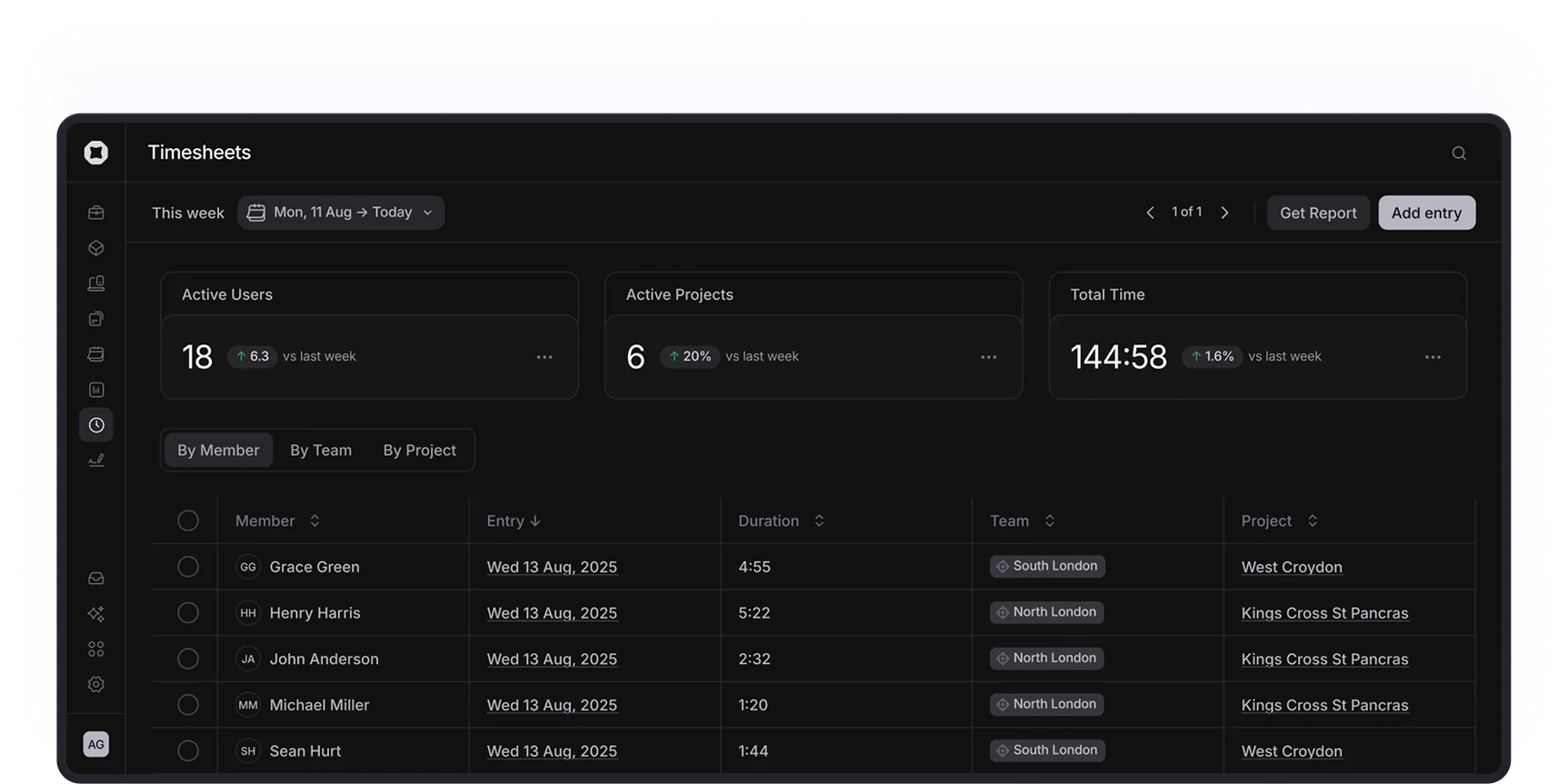
It’s also important to note that Onetrace timesheets record only clock-in and clock-out moments rather than continuously tracking your operatives. This gives administrators reliable evidence without overreach.
Take a guided walkthrough of Onetrace to see how construction timesheets actually work on busy sites.
Marketing Team
@Onetrace
The Onetrace marketing team is passionate about sharing insights, ideas, and innovations that help construction businesses stay connected, compliant, and efficient. Combining industry expertise with a love for clear communication, we aim to deliver content that empowers professionals to work smarter and safer.