Construction cost tracking: The 2026 ultimate guide

By
Marketing Team
@Onetrace
Construction cost tracking is the ongoing process of recording, reviewing, and managing project expenses in real time to ensure spending stays aligned with the budget throughout the lifecycle of a project.
This level of control has become critical as construction costs continue to rise across Europe—up 56% since 2010—with UK material prices now more than double what they were two decades ago.
This trend is continuing in 2026 due to labour shortages, supply chain disruptions, and energy price volatility.
To help you stay in control of your project finances in this environment, this guide provides a complete breakdown of construction cost tracking. This includes the key cost components to monitor, proven tracking methods, and the tools and best practices contractors use to protect margins.
Key takeaways
Construction cost tracking is about staying in control, not just recording costs
It gives you a real-time view of where money is going, how much has been spent, and whether the project is still within budget, while also providing the data you need to build more accurate quotes for future work.You need to track more than what’s been spent
Accurate tracking includes actual costs, ongoing work, committed costs, and changes, so you can see the full financial picture before problems appear.Different methods suit different projects, and most teams combine them
Job costing, cost codes, unit costs, EVM, and time and materials tracking each offer a different level of detail depending on project size, complexity, and contract type.The biggest challenge isn’t the method, it’s the data
Inaccurate labour hours, manual processes, and disconnected systems make cost data unreliable, which leads to poor decisions and missed overruns.Using the right tool makes cost tracking practical
Tools like Onetrace capture labour hours and material usage in real time, link them directly to project costs, and remove manual errors, making it easier to stay on budget and make confident decisions.
What is construction cost tracking? The basics
Construction cost tracking is the process of keeping an up-to-date record of all project expenses and checking them against the budget as the work progresses.
When done well, it gives you a simple answer to three key questions:
Where is your money going?
How much have you spent so far?
Are you still on track?
What costs should you track on a construction project?
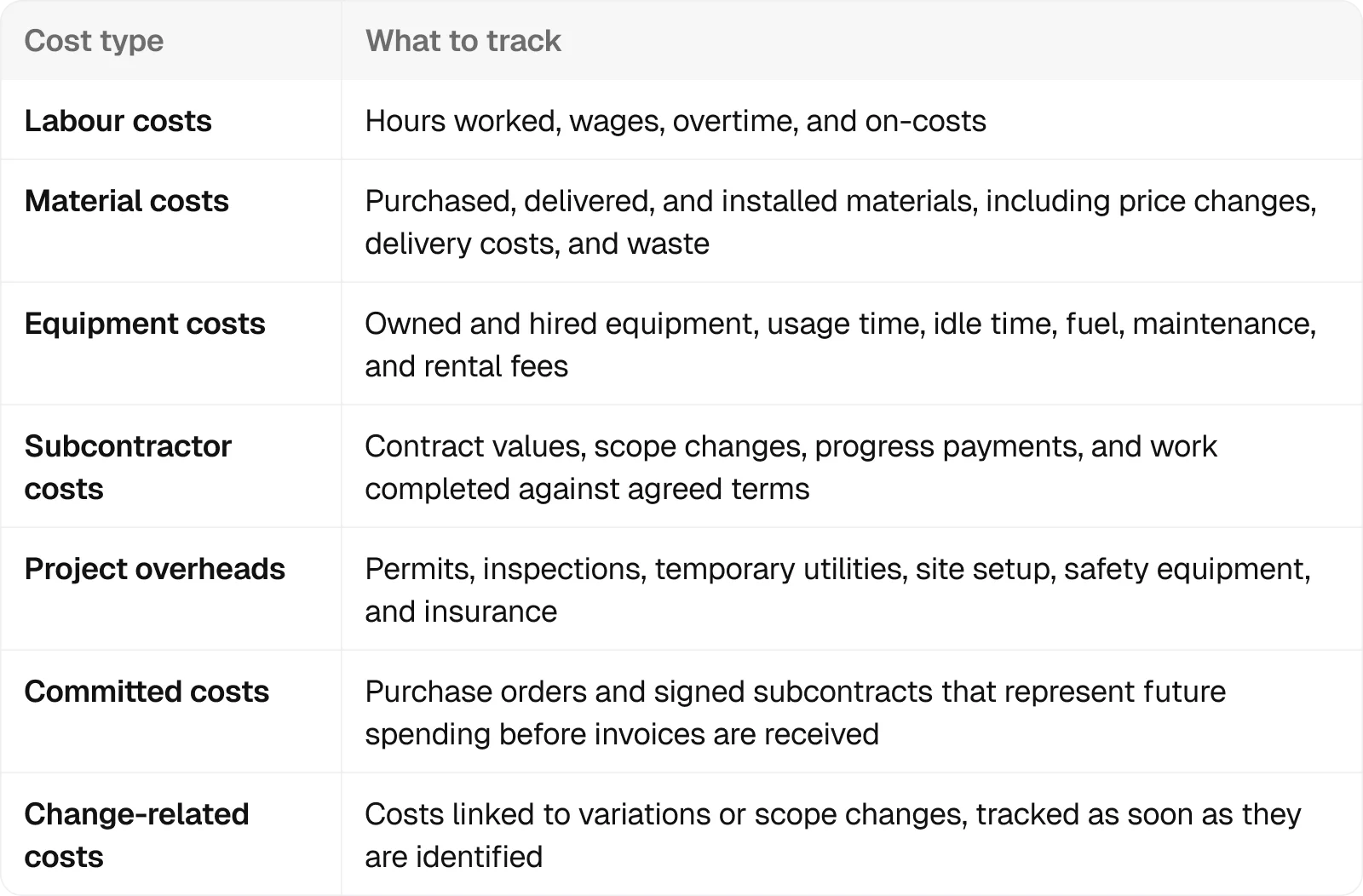
You should track all costs that affect your project budget, including what’s already been spent, what’s in progress, and what’s been committed but not yet invoiced.
In practice, this means tracking the following:
Who is responsible for tracking construction costs?
The project manager is ultimately responsible for construction cost tracking, but several team members contribute data throughout the project.
This includes:
Site supervisors and foremen: They record labour hours, track daily progress, and report equipment use so job costs reflect what is actually happening on site.
Accounting or finance team: This team processes invoices, payments, and expenses to ensure all financial data is accurate and up to date.
Project engineers or coordinators: They manage cost codes, track purchase orders, and maintain documentation so costs are properly allocated and easy to review.
Client or owner representatives: They use cost reports and forecasts to monitor performance, manage risk, and support informed decision-making.
When employees in each role understand their responsibilities, cost tracking becomes more reliable and much more useful for managing projects in real time.
How to track construction costs: 5 proven methods
There are several ways to track construction costs, and no single method works for every project.
The right approach depends on factors like:
How big your project is
What type of contract it is
How detailed your reporting needs to be
Whether you need costs tracked at the project level or broken down by specific tasks or activities
In practice, many contractors combine a few methods to get a more detailed picture of where money is going and how the job is performing.
Here are five proven methods used to track construction costs effectively:
1. Job costing: Tracking costs by project
Job costing is a method of tracking and assigning all project costs to a specific job so you can compare actual spending against the budget and determine whether the job is profitable.
It’s best-suited for projects where profitability is measured per specific job, which is the case for most contractors and subcontractors.
Job costing is especially useful when you’re running multiple projects at once and need to understand which assignments are making money and which are not, while there’s still time to act.
2. Cost code system: Tracking costs by activity or task
A cost code system refers to organising and tracking costs by assigning them to specific tasks, activities, or phases of work.
It works by using standardised codes to group costs—such as labour, materials, and equipment—into separate categories.
This lets you break a project down into smaller parts and see exactly where money is being spent, rather than looking at totals at a project level.
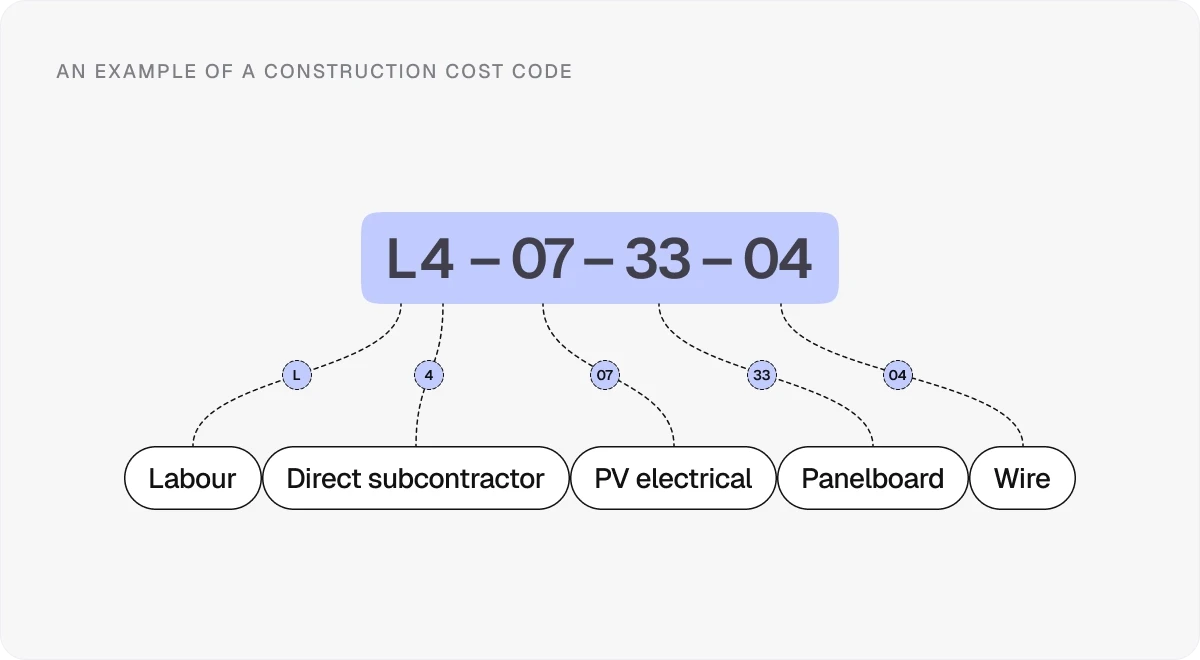
A cost code system is most suitable for larger or more complex jobs, where it helps you understand productivity, spot problem areas early, and keep tighter control over the budget.
3. Unit cost tracking: Tracking costs per unit of work
Unit cost tracking includes measuring costs against a specific unit of output, such as per square metre, linear metre, or cubic metre of work.
This method links total costs to the quantity of work completed, allowing you to compare them against estimates or past projects and see how efficiently the work is being delivered.
Unit cost tracking is ideal for repetitive or measurable work, where output can be clearly defined and compared. It can help you:
Improve estimates
Benchmark performance across projects
Understand how changes in productivity or pricing affect your overall costs
4. Earned value management: Tracking costs against progress
Earned value management (EVM) is a technique that tracks construction costs by comparing planned spending, actual costs, and the value of work completed.
Instead of only looking at the price, it ties spending to progress.
Each part of the project is given a budget, and progress is measured using:
Percentage complete
Units installed
Defined milestones
The value is then based on how much of that budgeted work has actually been delivered.
Earned value management is helpful when you want early visibility into problems and a straightforward view of where the project is heading if performance doesn’t change.
5. Time and materials tracking: Tracking costs as work happens
Time and materials tracking is a method of recording labour hours and material usage as work is carried out, so costs reflect what has actually been used on the job.
Instead of relying on fixed estimates, it captures real-time inputs, which makes it perfect for projects with:
Variable scope
Ongoing changes
Work being billed based on actual costs
Pro tip:
Most cost tracking methods only work if the data behind them is accurate and up to date. In practice, that means using a system that captures labour and material data as work happens.
Tools like Onetrace are built around this idea.
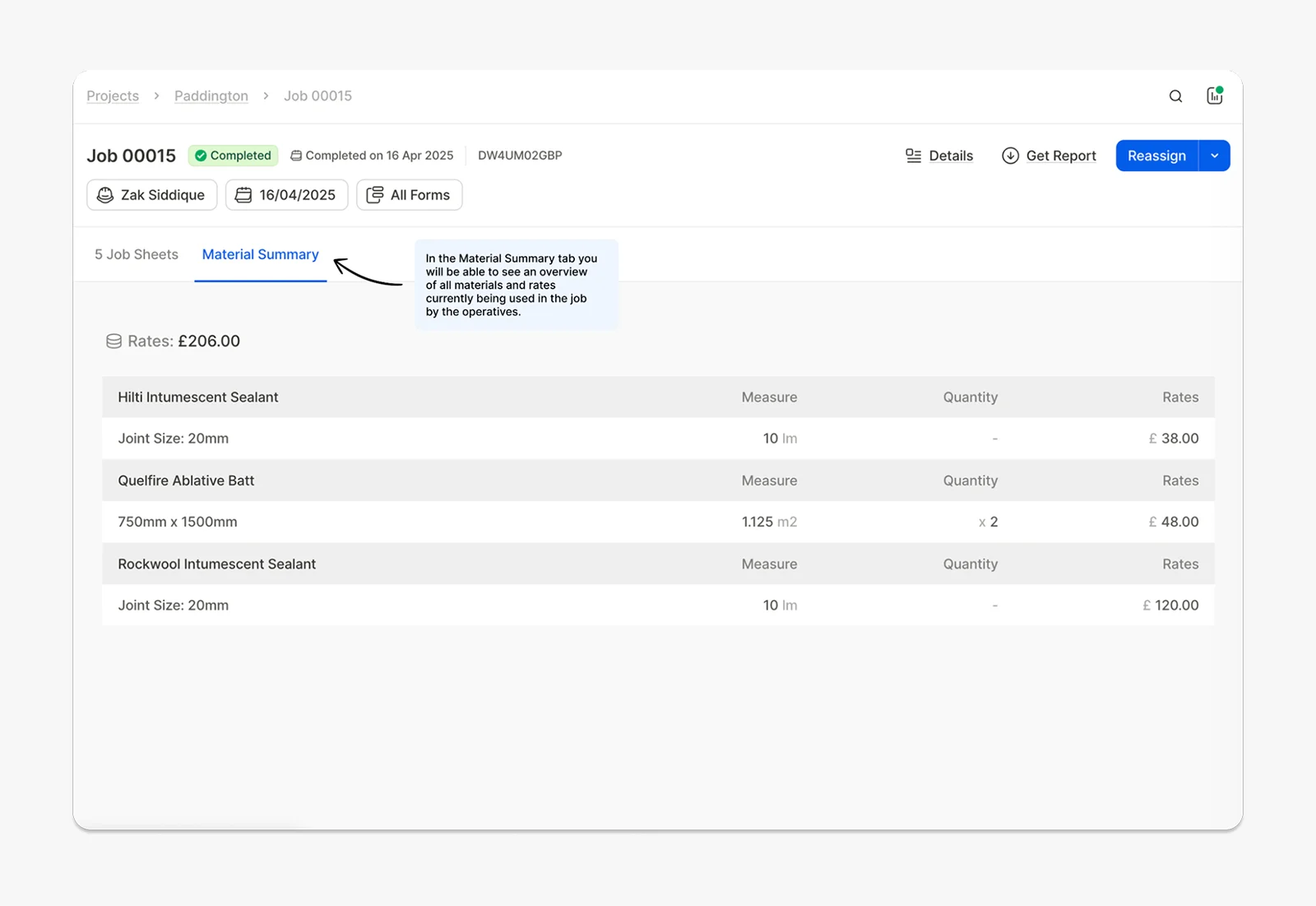
Instead of relying on manual entry after the fact, operatives can use the following directly on site:
Material tracking: Workers select materials through a form, and each item is automatically linked to a predefined rate. These selections are recorded against the job and fed straight into project costs, giving you real-time visibility into material spend.
Time tracking: Labour hours are captured as work happens and tied to specific jobs and activities, so your labour costs reflect actual time on site.
From methods to tools: 7 practical ways to track construction costs
In practice, construction cost tracking relies on a mix of tools that record labour, materials, and site activity in a way that’s accurate and easy to review.
Here are seven practical tools used to track construction costs day to day:
Cost tracking templates: Provide a structured way to record labour, materials, equipment, and other expenses against the project budget, making it easier to compare planned and actual costs.
Timesheets: Capture labour hours by worker, task, or cost code, ensuring labour costs are accurate and tied directly to the work completed.
Purchase order and commitment logs: Record approved orders and subcontracts so future costs are visible before invoices arrive, helping avoid budget surprises.
Daily field reports: Document site activity, installed quantities, and equipment use, providing a direct view of progress and associated costs.
Material and equipment logs: Track material usage and equipment run time, helping control waste, monitor productivity, and keep cost data accurate.
Payment schedules: Define when payments are made based on progress or milestones, making it easier to manage cash flow and keep spending aligned with project stages.
Change orders: Record any changes to scope, along with their cost impact, so adjustments are tracked properly and don’t quietly erode your budget.
What makes construction cost tracking difficult—and why it’s still worth it
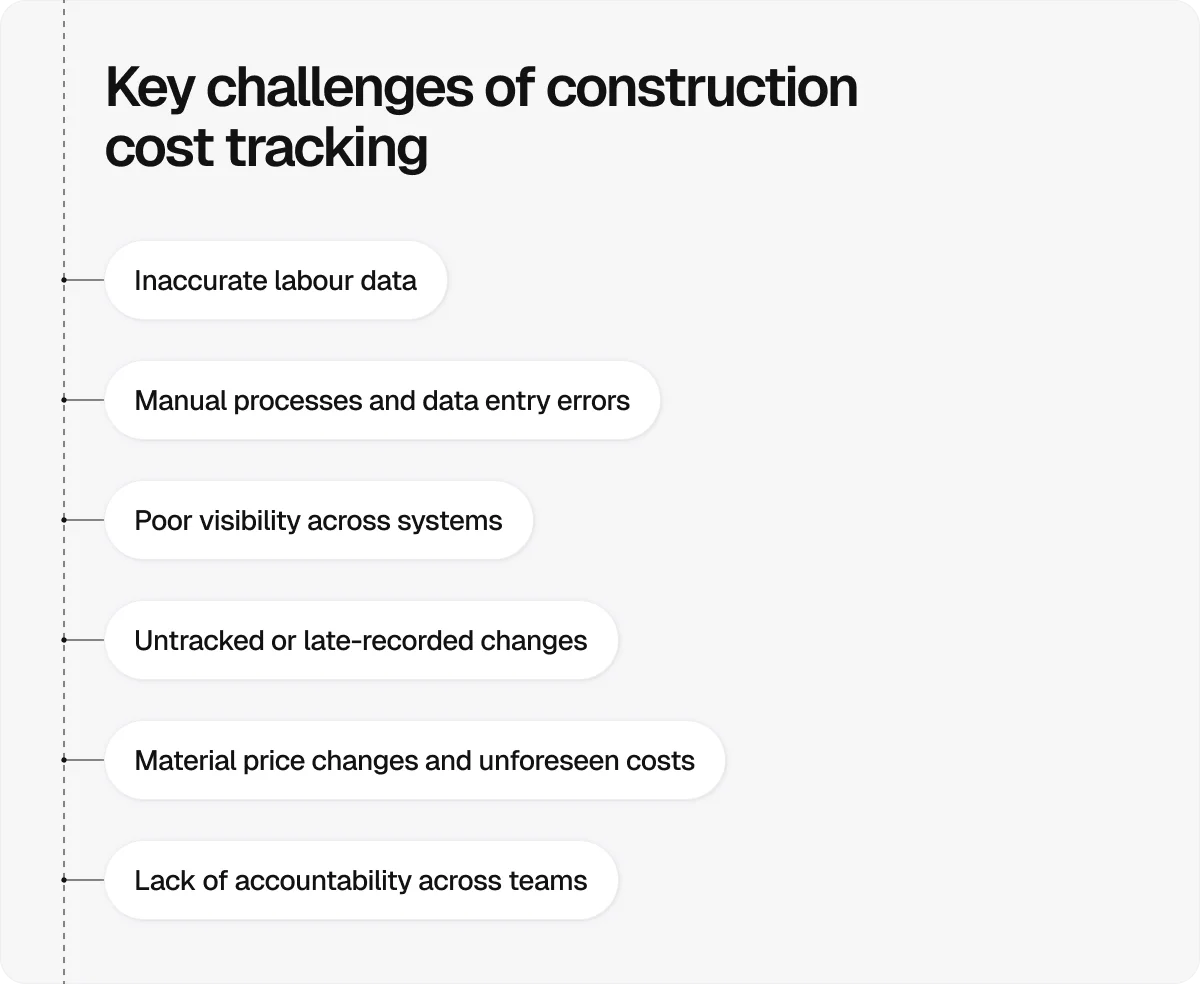
Construction cost tracking is challenging because day-to-day realities on site make it hard to capture accurate, timely data and keep everything aligned.
The most common challenges include:
Inaccurate labour data: Labour is one of the largest cost drivers, but hours are often rounded, entered late, or not tied to the right task, which distorts the true cost of work.
Manual processes and data entry errors: Paper timesheets, spreadsheets, and rekeying data across systems introduce errors and delays that reduce trust in the numbers.
Poor visibility across systems: Cost data is often spread across multiple tools, making it hard to get an up-to-date view of project performance.
Untracked or late-recorded changes: Scope changes and variations aren’t always captured early, allowing costs to build up before they are formally recognised.
Material price changes and unforeseen costs: Fluctuations in material prices or unexpected site conditions can push costs beyond the original budget.
Despite these challenges, cost tracking is one of the most important aspects of project management in construction.
When it’s done properly, it allows you to:
Spot problems early: Comparing actual costs to the budget as work progresses helps you catch overruns while there’s still time to fix them.
Stay in control of labour and productivity: Accurate time and cost data show where work is slowing down or becoming more expensive than planned.
Support reliable billing and cash flow: Well-documented cost data makes it easier to justify invoices and get paid on time.
Make better decisions on active projects: Up-to-date cost information allows you to adjust crews, sequencing, or procurement before issues escalate.
Improve accountability across the team: When costs are tracked clearly, it’s easier to see who is responsible for what and reduce disputes.
Build better estimates for future work: Consistent data helps you price future jobs more accurately and avoid repeating the same mistakes.
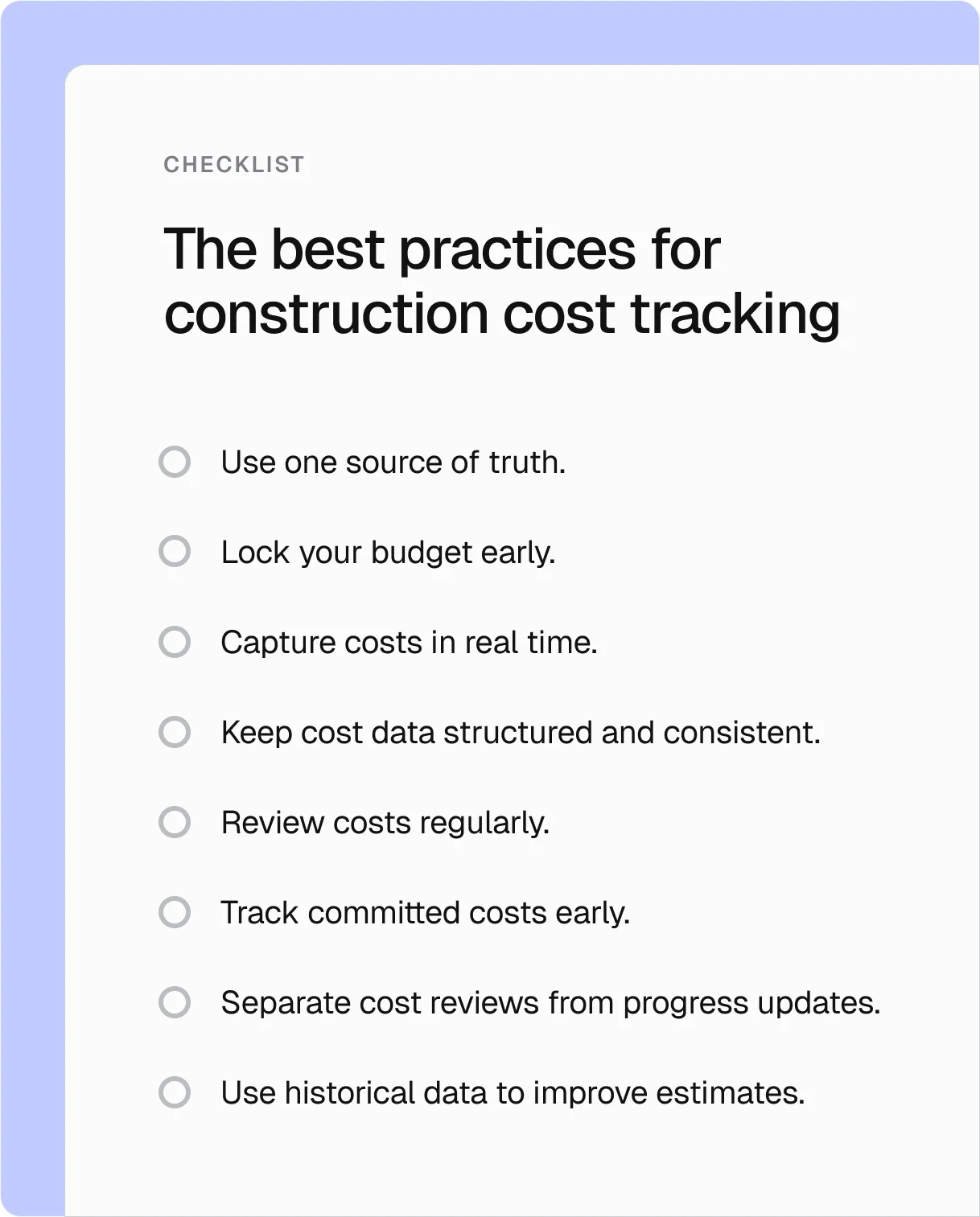
8 best practices for construction cost tracking
Consistent cost tracking practices keep cost data reliable and useful on live projects. Here are the eight best ones to keep in mind:
Store all cost data in a single system so everyone works from the same numbers, and reports stay consistent.
Set a clear financial baseline before work starts, and change it only through formal updates, so variances remain meaningful.
Record labour, materials, and site activity as they happen to avoid gaps, delays, and guesswork.
Use standard cost codes, units, and formats so costs can be compared and analysed.
Check actual costs against the budget weekly to catch issues before they grow.
Log purchase orders and subcontracts as soon as they’re agreed so future spend is visible.
Treat cost tracking as its own process to ensure financial issues get proper attention.
Learn from past projects to make future budgets more accurate and realistic.
Take control of construction costs with Onetrace
Tracking construction costs manually is difficult to do well.
When data is delayed, incomplete, or spread across multiple systems, it becomes harder to see what’s really happening on site. By the time issues show up, the chance to fix them has often passed.
That’s why most contractors rely on dedicated tools like Onetrace, which connects labour, materials, and progress in real time.
With Onetrace, cost tracking becomes a natural part of project execution, thanks to features like:
Real-time material tracking: Operatives log materials continuously, with each item automatically linked to predefined rates, giving you an accurate and up-to-date view of material costs.
Accurate time tracking with verification: Timesheets capture who is on site and when, with GPS tracking and live visibility, so labour costs reflect actual hours worked.
Automatic cost calculation: Every material, service, or job is tied to a rate, so project costs are calculated automatically as work is completed, reducing manual input and errors.
Clear visibility of productivity: Built-in productivity tracking shows how individuals, teams, and projects are performing, helping you understand where time and money are being spent.
Structured, consistent data capture: Custom forms ensure that site data is recorded consistently, with required fields, photos, and checklists that reduce the likelihood of missing information or errors.
Variation tracking in real time: Changes to scope are recorded as they happen, so their cost impact is visible immediately and doesn’t get lost or delayed.
Reporting that supports payment and accountability: Generate professional reports for clients and auditors, making it easier to justify costs, reduce disputes, and get paid faster.
When cost data is captured accurately and in real time, everything else becomes easier: tracking, reporting, forecasting, and decision-making.
Request a guided walkthrough with the Onetrace team to see how this works in practice.
Marketing Team
@Onetrace
The Onetrace marketing team is passionate about sharing insights, ideas, and innovations that help construction businesses stay connected, compliant, and efficient. Combining industry expertise with a love for clear communication, we aim to deliver content that empowers professionals to work smarter and safer.