How to write a construction progress report [+Examples]

By
Marketing Team
@Onetrace
A construction progress report is a point-in-time record of a project’s status, tracking performance against the programme, budget, and key objectives.
Its primary purpose is simple: keeping construction projects on track. But in an industry where 99% of professionals report delivering projects behind schedule to some degree, that’s easier said than done.
To help you stack the odds in your favour, this guide explains how to create effective construction progress reports.
Key takeaways
Construction progress reports keep projects accountable
A construction progress report measures actual progress against the plan, helping teams track performance, identify problems early, and keep stakeholders informed throughout the project.
Good reports support more than project tracking
Progress reports provide the evidence needed for interim valuations, payment certificates, and funding drawdowns, making them an important part of both project delivery and cash flow management.
The most effective reports cover both current performance and future risks
Alongside completed work and programme updates, reports include issues, delays, risks, change events, financial performance, health and safety, and a look-ahead schedule, providing stakeholders with a complete picture of the project.
Consistency and early reporting matter more than report length
Using a standard format, tracking measurable milestones, documenting issues early, and maintaining a regular reporting cycle makes reports more useful and easier to act on.
Construction management software can make reporting faster and more reliable
Platforms like Onetrace help contractors and subcontractors capture site data, photos, variations, compliance records, and progress updates in real time. The resulting information can be used directly in stakeholder reports or to build comprehensive construction progress reports with far less manual effort.
Understanding construction progress reports: 3 key questions answered
A construction progress report is a project control document used to measure actual progress against planned progress throughout the construction phase.
Here’s what you need to know before writing one.
1. How often should a construction progress report be prepared?
Construction progress reports should be prepared weekly or monthly, depending on the size of the project and stakeholder requirements. Additional reports may also be required following major project milestones, significant changes, or unexpected delays.
Pro tip:
If your project involves critical path activities, milestone-based payments, or a high risk of delays, consider supplementing weekly or monthly reporting with daily site reports.
The more frequently you track progress, the easier it is to spot issues early and take corrective action.
2. Who prepares a construction progress report?
Construction progress reports are typically prepared by the person responsible for overseeing project delivery, such as a project manager, construction manager, contract administrator, or principal contractor.
On larger projects, progress information is often gathered through regular meetings with contractors, subcontractors, and consultants before being consolidated into a report for the client and other stakeholders.
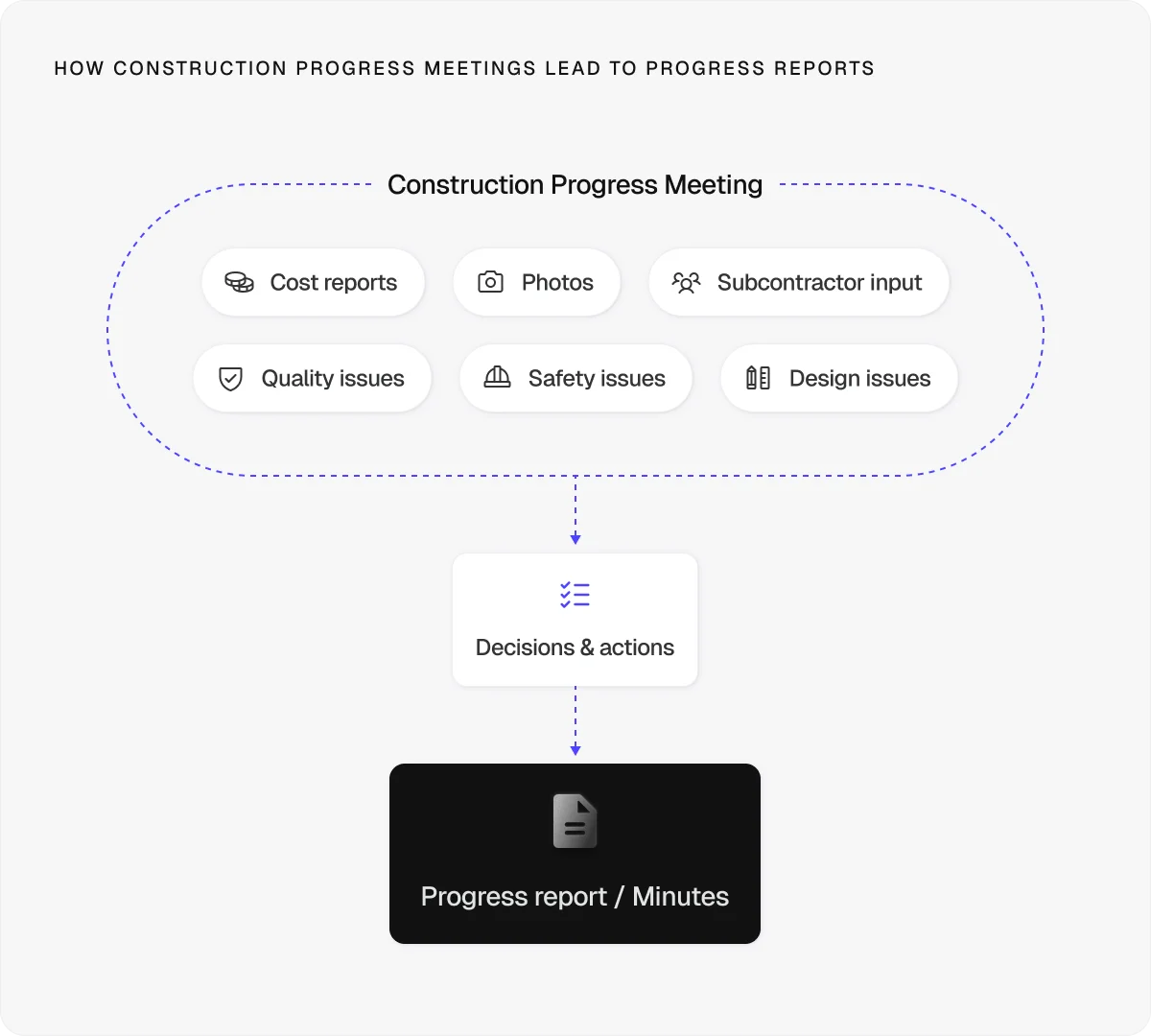
While many people contribute information, there should always be a clear owner responsible for reviewing, approving, and issuing the final report.
3. What is the purpose of a construction progress report?
Construction progress reports help teams:
Monitor progress against the agreed programme and key milestones
Identify risks early before they develop into delays or cost overruns
Improve communication between clients, contractors, subcontractors, and consultants
Support decision-making with up-to-date information on project performance
Create accountability by recording progress, issues, and agreed actions
Track costs and resources throughout the construction phase
Maintain a traceable project record for audits, disputes, and future reference
These reports also play an important role in the payment process.
Under the Housing Grants, Construction, and Regeneration Act 1996, parties to most construction contracts lasting longer than 45 days are entitled to interim payments.
This means that rather than waiting until the end of a project, contractors can apply for payment at agreed intervals based on the value of work completed.
To assess those payments fairly, clients, quantity surveyors, and contract administrators need reliable evidence of progress. Construction progress reports provide that evidence by documenting completed work, progress against site activity, and any factors affecting delivery.
This information is then used to support interim valuations, payment certificates, and funding drawdowns.
What to include in a construction progress report: 13 key sections
When writing your construction progress report, make sure it includes the following 13 sections to give stakeholders an accurate picture of project performance and any issues that need attention.
1. Executive summary and project details
Start your report with key details so readers can quickly identify the project and reporting period.
These details include:
Project name
Project ID or reference number
Report date
Project location
Current project phase
Report author
Principal contractor
Main project contact
The executive summary should then provide a high-level overview of the project’s current status.
Keep it brief and focus on the information decision-makers care about most, including:
Overall project status or RAG rating
Progress made since the last report
Key milestones achieved
Schedule and budget performance
Health and safety updates
Major risks, issues, or delays
Forecast completion status
Example
Construction of the new primary school in Leeds remains on programme, with overall completion at 62%. External brickwork to Blocks A and B was completed during the reporting period, and first-fix mechanical and electrical works are now underway. No reportable health and safety incidents occurred. Material lead times for ventilation equipment remain under review, but no impact to the planned completion date is currently forecast.
2. Work completed and work in progress
This section shows what has been completed since the last reporting period and what is currently underway.
Focus on the main tasks, their status, and their percentage completion where relevant.
This information helps stakeholders understand how work is progressing on site and provides evidence for interim valuations and payment applications.
Example
Trade / Area | Activity | Status |
Groundworks | Surface water drainage installation | Complete |
Steelwork | Structural steel frame – Block A | Complete |
Roofing works | Roof deck installation | 85% complete |
M&E services | Cable containment installation | In progress |
3. Programme performance, KPIs, and key milestones
Programme performance is measured by comparing actual progress against the baseline schedule and project targets.
Alongside key milestones, include Key Performance Indicators (KPIs), such as overall completion percentage, forecast completion date, budget performance, and RAG status.
Any changes since the previous report should be explained, together with any corrective action being taken.
Example
KPI / Milestone | Planned | Actual / Forecast | Status |
Construction start | 03/02/2026 | 03/02/2026 | Complete |
Structural frame completion | 15/05/2026 | 15/05/2026 | Complete |
External envelope completion | 18/07/2026 | 22/07/2026 | Slight delay |
Overall project completion | 65% | 62% | Behind plan |
4. Issues and delays
Construction projects rarely go exactly to plan.
Use this section to document any issues affecting progress, including delays, design queries, site constraints, material shortages, and complaints from neighbouring properties.
Weather-related disruptions should also be recorded where relevant.
This is a common requirement, as 40% of construction project delays are attributed to extreme weather or climate events.
Example
ID | Issue | Impact | Action |
I-01 | Ventilation equipment delivery delayed by two weeks | Potential impact on first-fix M&E works | Supplier agreed to expedited delivery; installation sequence revised |
I-02 | Noise complaint from neighbouring residential property | Restricted working hours for external works | Temporary acoustic barriers installed and working hours adjusted |
5. Risk management
Effective risk management helps teams identify potential problems before they affect the programme, budget, or quality.
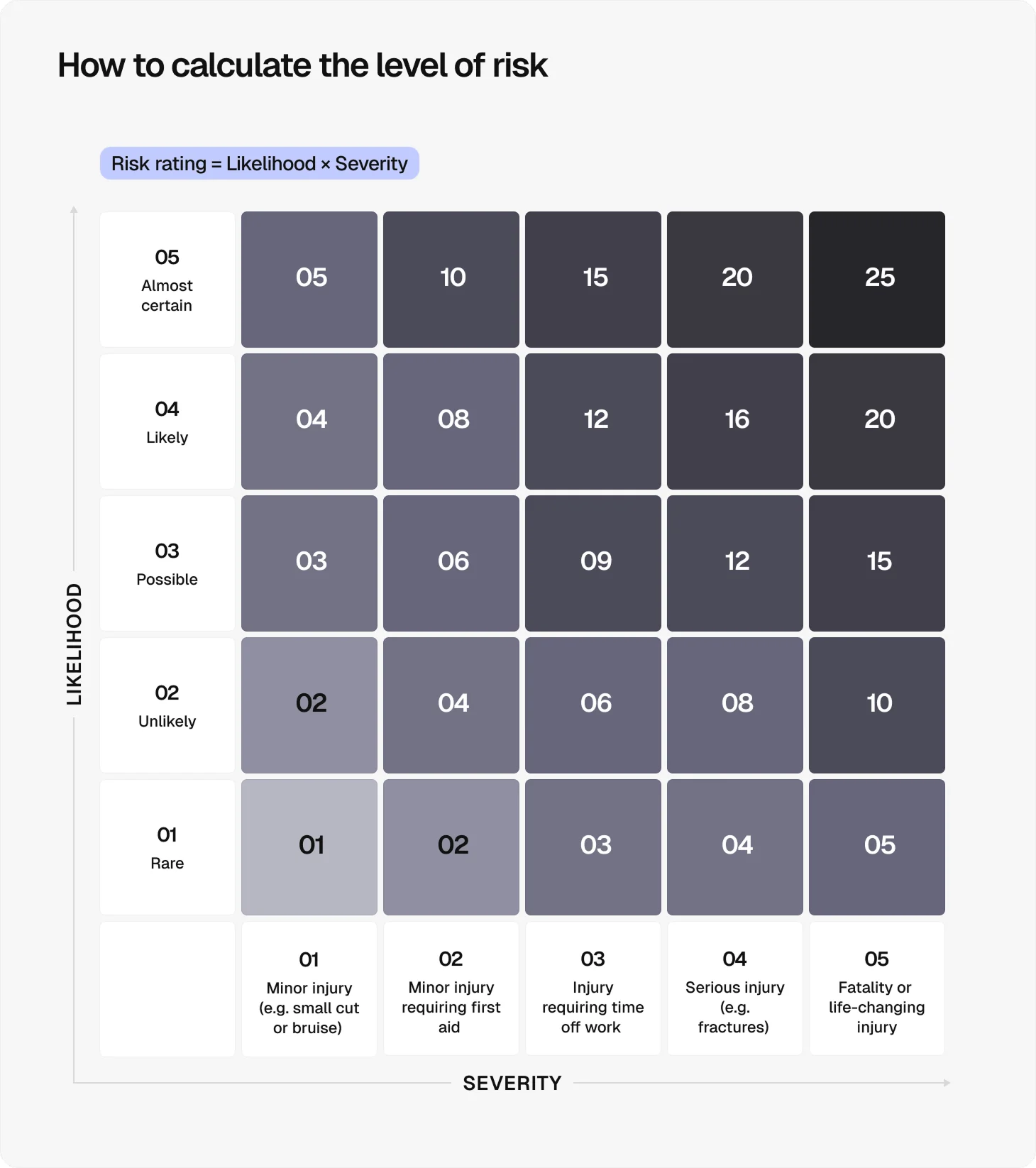
Record each risk, assess its likelihood and impact, and outline the actions being taken to reduce or eliminate the risk. A risk matrix can help prioritise risks based on their severity and ensure mitigation efforts focus on the areas of greatest concern.
Any changes to risk ratings since the previous report should be explained, together with updates on mitigation measures and the status of the risks (open or closed).
Example
6. Change events
Any approved or proposed changes to the project scope, design, programme, or budget should be recorded here.
Include the status of each change and explain its potential impact on project delivery.
Consistent change tracking helps prevent disputes, supports claims management, and keeps progress reporting accurate.
Example
ID | Change | Status | Impact |
CE-01 | Additional cycle storage requested by the client | Approved | Minor redesign of external works; no impact on practical completion |
CE-02 | Relocation of the ventilation plant | Under review | Potential impact on M&E coordination |
7. Quality control and inspections
Quality control helps ensure completed work meets project requirements and reduces the risk of costly rework.
Given that 17% of construction leaders cite on-site errors and rework as a major cause of missed deadlines, inspections and quality checks should be documented throughout the project.
This should include inspections, quality checks, non-conformances, and any corrective actions taken during the reporting period.
Example
Inspection | Area | Date | Result | Notes |
Brickwork inspection | Block A | 14/05/2026 | Passed | Work completed in accordance with the specifications |
First-fix electrical inspection | Block B | 21/05/2026 | Passed with observations | Minor cable labelling issues rectified on site |
8. Financial performance
Financial reporting shows whether the project remains within budget and whether funding is sufficient to support upcoming work. Include actual costs, forecast costs, budget variances, cash flow updates, and any planned drawdowns.
Where relevant, try to reference interim valuations, payment certificates, and off-site materials included in valuations.
Example
Financial metric | Budget | Current forecast |
Project value | £8.2m | £8.2m |
Cost to date | £4.9m | £4.9m |
Forecast final cost | £8.2m | £8.35m |
Budget variance | - | +£150,000* |
Funding drawn | £4.5m | £4.5m |
*The forecast increase is primarily due to higher-than-anticipated mechanical equipment costs. No additional funding is currently required.
9. Health and safety
Health and safety performance deserves dedicated attention in every construction progress report.
According to the latest Health and Safety Executive figures, around 50,000 construction workers sustain non-fatal workplace injuries each year, while 35 workers lost their lives in 2024/25 alone.
To make your site safer, use this section to report accidents, near misses, safety observations, and corrective actions taken during the reporting period.
Many teams also include safety inspections, Toolbox Talks, and any emerging hazards that require monitoring.
Example
Metric | Value | Notes |
Reportable incidents (RIDDOR) | 0 | No incidents recorded |
Near misses | 1 | Unsafe storage area identified and rectified |
Toolbox Talks | 3 | Manual handling, working at height, and site traffic management |
10. Regulatory compliance
Planning approvals, permits, and regulatory requirements can have a direct impact on project delivery.
As many as 61% of construction professionals cite planning and regulatory delays as one of the biggest barriers to construction activity. So, in this section, record the status of planning approvals, permits, inspections and any project-specific compliance requirements.
Outstanding approvals, compliance concerns, or regulatory changes should be highlighted together with their potential impact on the programme.
Example
Requirement | Status | Notes |
Building Control inspections | Ongoing | All inspections passed to date |
Drainage approval | Approved | Received during the reporting period |
Environmental permits | Compliant | No breaches reported |
11. Photos and supporting documentation
Photo documentation provides visual evidence of progress and helps validate the information contained elsewhere in the report.
Photos and supporting documents can also create a useful audit trail, particularly when recording completed work, site conditions, inspections, or delays.
Example
Examples of supporting evidence include:
Progress photos of completed and ongoing works
Drone imagery showing site-wide progress
Before-and-after photos of key activities
Inspection and test records
Site diary extracts
Approved drawings and design revisions
Building Control inspection reports
Delivery records for major materials and equipment
Interim valuation or payment certificates
Health and safety audit reports
12. Client actions
Progress reports should clearly identify any decisions, approvals, or instructions required from the client.
Recording these actions helps maintain momentum and ensures outstanding items aren’t overlooked between reporting periods.
Example
Example actions include:
Approval of a design change
Sign-off of a payment application
Confirmation of material selections
Approval of revised programme dates
Acceptance of a variation order
13. Look-ahead schedule
Most sections of a construction progress report focus on what has happened, but a look-ahead schedule focuses on what comes next.
Outline the key activities planned for the next reporting period, together with any resource requirements, dependencies, or approvals needed to keep work progressing as planned.
Example
Planned activity | Trade | Planned start | Planned finish |
Roof membrane installation – Block A | Roofing works | 08/06/2026 | 12/06/2026 |
Window installation – Block A | External envelope | 15/06/2026 | 26/06/2026 |
Progress photography and drone survey | Site management | 26/06/2026 | 26/06/2026 |
How to improve your construction progress reports: 10 best practices
To improve your construction progress reports, follow these 10 best practices:
Keep reporting consistent by using the same format and metrics throughout the project.
Maintain a regular reporting cadence to make trends, delays, and emerging risks easier to identify.
Track progress against measurable milestones so performance can be assessed objectively.
Report issues early before they develop into programme or budget overruns.
Focus on exceptions and changes rather than repeating information that hasn’t changed since the previous report.
Explain variances by providing context for any changes to programme, cost, or scope.
Keep reports concise and relevant by focusing on information stakeholders need to make decisions.
Share reports promptly with stakeholders to reduce communication gaps and support faster decision-making.
Maintain a complete audit trail by linking updates to supporting records, inspections, approvals, and project documentation.
Use construction management software to improve accuracy, collaboration, and visibility across the project team.
Streamline construction progress reporting with Onetrace
Creating a construction progress report shouldn’t mean chasing updates, sorting through photos, and manually compiling evidence from multiple systems.
The right digital tools can make reporting faster, more accurate, and easier to maintain throughout the project lifecycle.
Onetrace helps contractors and subcontractors capture project data as work happens, creating a reliable record that supports every stage of construction progress reporting.
Here’s what the software allows you to do:
Standardise reporting from day one with templates that ensure every project follows the same structure and reporting requirements.
Track work completed and work in progress in real time through digital job sheets completed directly on site.
Monitor programme performance more accurately by organising work by block, level, and zone, making it easier to track progress against milestones.
Document issues, delays, and variations as they occur using drawings, pins, photos, and variation tracking tools.
Strengthen risk management with a complete audit trail of site activity, inspections, and corrective actions.
Capture photographic evidence instantly before, during, and after work to support progress updates, quality checks, and client sign-offs.
Improve quality control through custom forms, inspections, and multi-stage approval workflows that identify issues earlier.
Support financial reporting with real-time cost tracking, rates management, and variation records.
Maintain compliance records in one place with centralised document management, signed documents, and approval histories.
Track labour and resource allocation using timesheets, productivity reporting, and workforce scheduling tools.
Onetrace also offers a strong reporting functionality for job sheet reports, location reports, drawing reports, approval reports, and productivity reports.
These reports can be branded and exported in PDF or Excel format, allowing you to share them directly with clients, principal contractors, auditors, and other stakeholders.
Alternatively, the structured information captured within those reports can be used to create more comprehensive construction progress reports.
Ready to spend less time compiling reports and more time delivering projects?
Book a personalised demo with the Onetrace team to see how the platform’s features can simplify construction progress reporting.
FAQ
What are examples of progress reports in construction?
Common examples of progress reports in construction include daily site reports, weekly progress reports, monthly progress reports, contractor progress reports, and client-facing project status reports.
How to make a daily progress report in construction?
Create a daily progress report by recording completed work, labour and equipment on site, safety incidents, delays, site conditions, and planned activities for the following day.
What does a good progress report look like?
A good progress report is accurate, concise, and easy to understand. It clearly explains what has been completed, what is in progress, which issues are affecting delivery, and what happens next.
Marketing Team
@Onetrace
The Onetrace marketing team is passionate about sharing insights, ideas, and innovations that help construction businesses stay connected, compliant, and efficient. Combining industry expertise with a love for clear communication, we aim to deliver content that empowers professionals to work smarter and safer.