What is construction workforce tracking? [A complete guide]

By
Marketing Team
@Onetrace
Construction workforce tracking is the process of maintaining an accurate, real-time record of who is on site, where they are, and what they’re doing so work can run safely, on schedule, and up to defined standards.
It’s become essential for making the best use of limited resources in a sector under pressure, where more than 140,000 vacancies remain unfilled, around 750,000 workers are set to retire by 2036, and 1 million additional workers will be needed by 2032.
Considering these numbers, you have to make the most of the workforce you already have, which includes having reliable insights into how it’s actually deployed.
To help you understand how to gather these insights, this guide breaks down what construction workforce tracking involves in practice, including key steps, benefits, and challenges.
Key takeaways
Workforce tracking gives you real control over labour
It replaces guesswork with clear data, helping you manage progress, costs, and planning with confidence.It goes beyond basic time tracking
Good tracking covers attendance, location, tasks, and qualifications, giving you a complete view of site activity.Manual methods are no longer enough
Paper and spreadsheets lead to errors and delays, while digital tools provide real-time visibility and reduce admin.The biggest impact is on efficiency and cost
Tracking helps cut wasted time, control labour spend, and improve planning using real data.The right tool makes tracking practical on site
Solutions like Onetrace handle common challenges with offline use, simple setup, and flexible pricing, making workforce tracking easier to apply in practice.
What is construction workforce tracking? The basics
Construction workforce tracking is the structured process of accounting for labour on site, ensuring that every worker’s time, presence, and contribution are accurately recorded and understood within the context of the project.
This process gives contractors a dependable view of how labour is being used across the job, so decisions around planning, progress, and costs are based on facts rather than assumptions.
What does tracking mean in construction?
Tracking in construction means having full visibility of labour across the site, including:
Clock-in and clock-out times: Workers’ start and finish times are recorded to create an accurate record of hours worked and site activity.
Time and attendance: Site teams keep track of who is present, who is late or absent, and how long each person is working.
Breaks, overtime, and absences: Working patterns are monitored to stay compliant with labour rules and keep overtime under control.
Worker locations: Managers can see where workers are across the site, allowing them to direct labour where it’s needed and avoid bottlenecks.
Tasks or trades: Workers are linked to specific tasks or trades, so it’s clear what work is being carried out and by whom.
Labour costs: Hours worked are tied to budgets or cost codes, making labour spend visible and easier to manage.
Certifications and training: Qualifications are checked and tracked to ensure workers are authorised to carry out the tasks they’re assigned.
How is workforce tracking carried out in construction?
Workforce tracking in construction is carried out using a range of methods, from simple manual records to more advanced systems that capture and organise labour data in real time.
The table below outlines the most common approaches, along with their strengths and limitations:
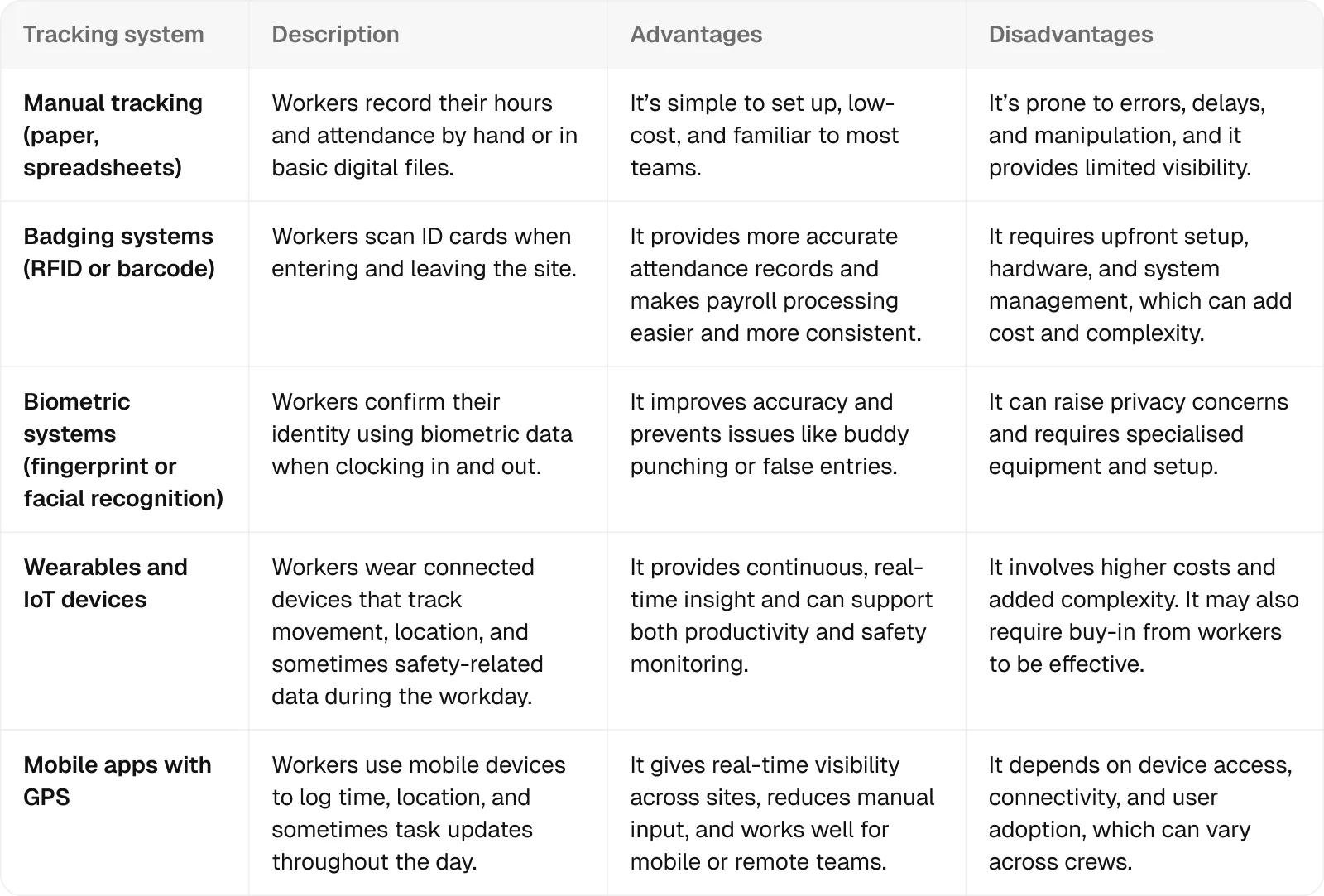
Mobile apps stand out as the most practical option for time and attendance tracking in construction, thanks to their balance between real-time visibility and ease of use on site.
To avoid the usual drawbacks—like reliance on connectivity or steep learning curves—you need a tool like Onetrace, which was designed for site teams, not tech specialists. This makes it simple to roll out and straightforward to use from day one, with minimal training required.
In addition, work can continue without an internet connection, as data is stored and synced once a signal is available.
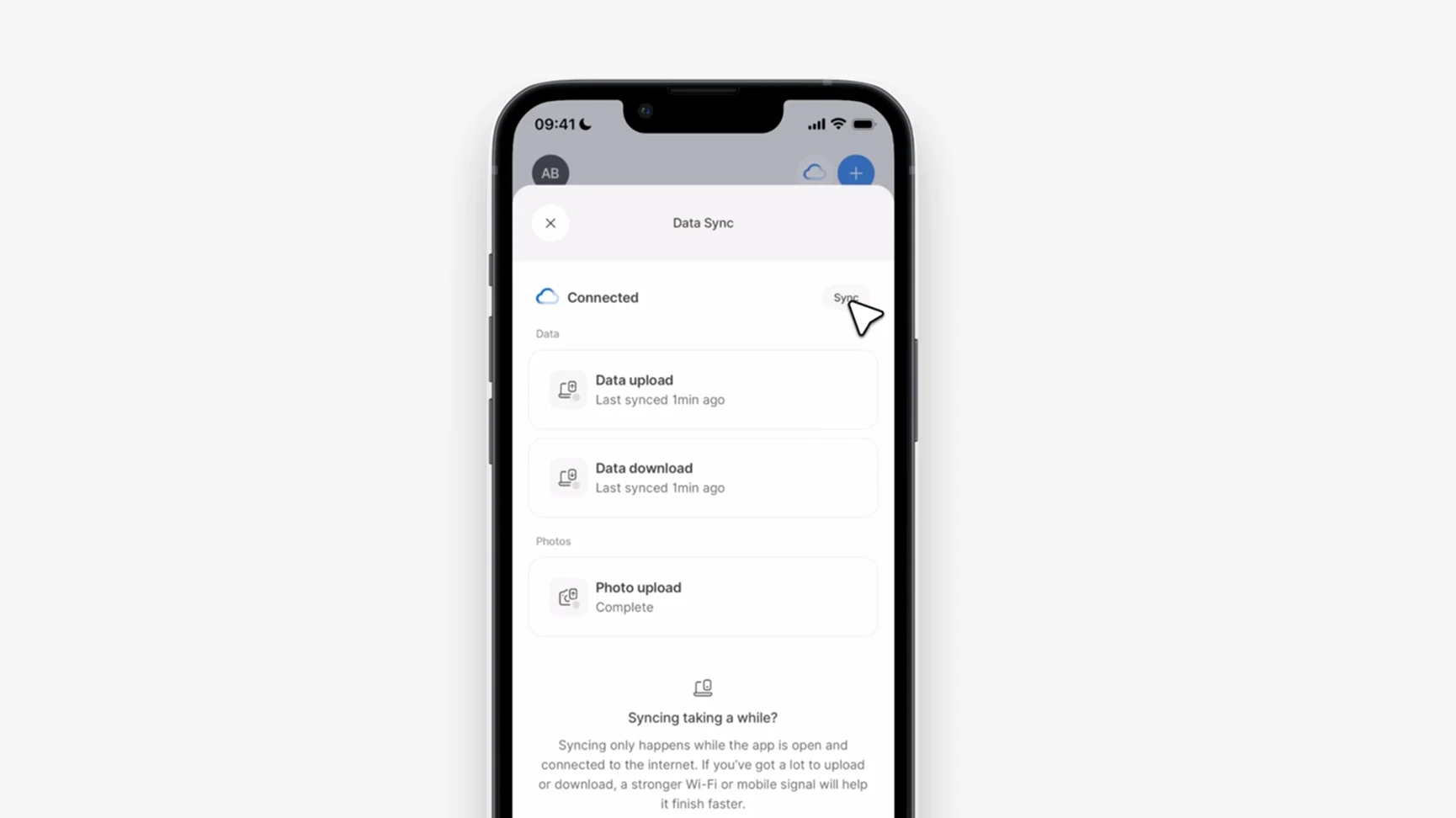
In practice, that means teams can track time, complete records, and keep projects moving without disruption, whether they’re online or not.
Who uses workforce tracking in construction?
Workforce tracking is used by everyone responsible for managing labour, costs, and progress on a construction project, including:
Project managers: They use it to understand labour usage across the project and make informed decisions about planning, timelines, and costs.
Site supervisors: They rely on it day to day to see who is on site, coordinate teams, and keep work running smoothly.
HR and payroll teams: They use it to ensure accurate records of hours worked, so workers are paid correctly and on time.
Contractors and subcontractors: They use it to track their own teams, stay accountable, and demonstrate progress and compliance on site.
What does construction workforce tracking look like day to day?
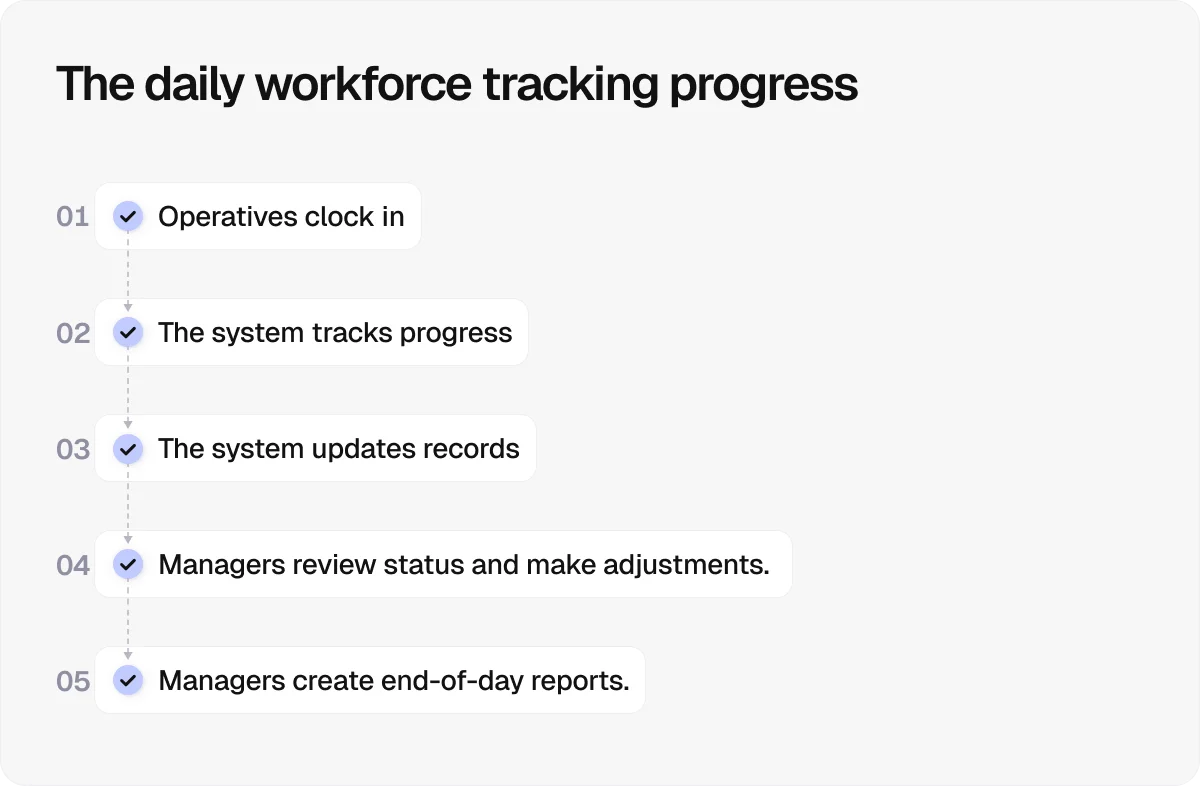
On a typical construction site, workforce tracking follows a simple, repeatable flow throughout the day:
Morning check-in: Workers clock in at the start of their shift, creating a traceable record of who is on site and ready to work.
Live tracking during the day: Labour activity is tracked as work progresses, giving teams visibility over who is where and what’s being worked on.
Ongoing data updates: Time, attendance, and workforce data are continuously updated in a central system, keeping records current without manual effort.
Midday oversight and adjustments: Managers review progress and labour allocation during the day, making quick changes if teams fall behind or priorities shift.
End-of-day reporting: Hours worked and site activity are finalised and fed into timesheets, payroll, and project records.
8 practical benefits of construction workforce tracking
Workforce tracking delivers practical on-site gains that make a direct difference to day-to-day operations. Here are eight of them:
1. Improving visibility across the site
Delays often happen because decisions are based on outdated or incomplete information.
Workforce tracking gives managers up-to-date insight into site activity, allowing them to respond quickly to issues, adjust labour allocation, and keep projects moving without unnecessary disruption.
2. Reducing wasted time and inefficiencies
Inefficiencies on site quickly add up, with issues like poor coordination and idle time slowing progress every day.
As a result of these inefficiencies, European construction teams can lose the equivalent of about 5,500 productive hours per year for every 50 workers.
Tracking helps surface these problems early by showing where time is being lost, so teams can fix bottlenecks, reduce downtime, and keep labour focused on productive work.
3. Strengthening cost control
Labour typically accounts for 30–40% of total construction costs, making it one of the biggest financial risks.
Workforce tracking replaces estimates with actual data, helping control overtime, prevent overpayment, and keep spending aligned with project budgets.
4. Improving accuracy in payroll and records
Inaccurate tracking leads to payroll errors and disputes, which can damage trust and delay projects.
Workforce tracking creates a reliable record of hours worked, ensuring workers are paid correctly and reducing the time spent resolving errors or rechecking data.
5. Increasing accountability across teams
When labour data is visible and recorded consistently, it becomes much harder to hide delays, missed hours, or unproductive time.
Workforce tracking creates a clear audit trail, helping teams stay accountable and making it easier to address issues before they affect the wider project.
6. Supporting better planning and forecasting
Without reliable data, planning upcoming projects is mostly guesswork.
Workforce tracking builds a record of how long tasks actually take and how teams perform, allowing contractors to plan more accurately, allocate the right resources, and price future jobs with greater confidence.
7. Strengthening safety and compliance
Construction remains the most dangerous industry in the UK, accounting for 35 out of 124 worker fatalities in 2024/25.
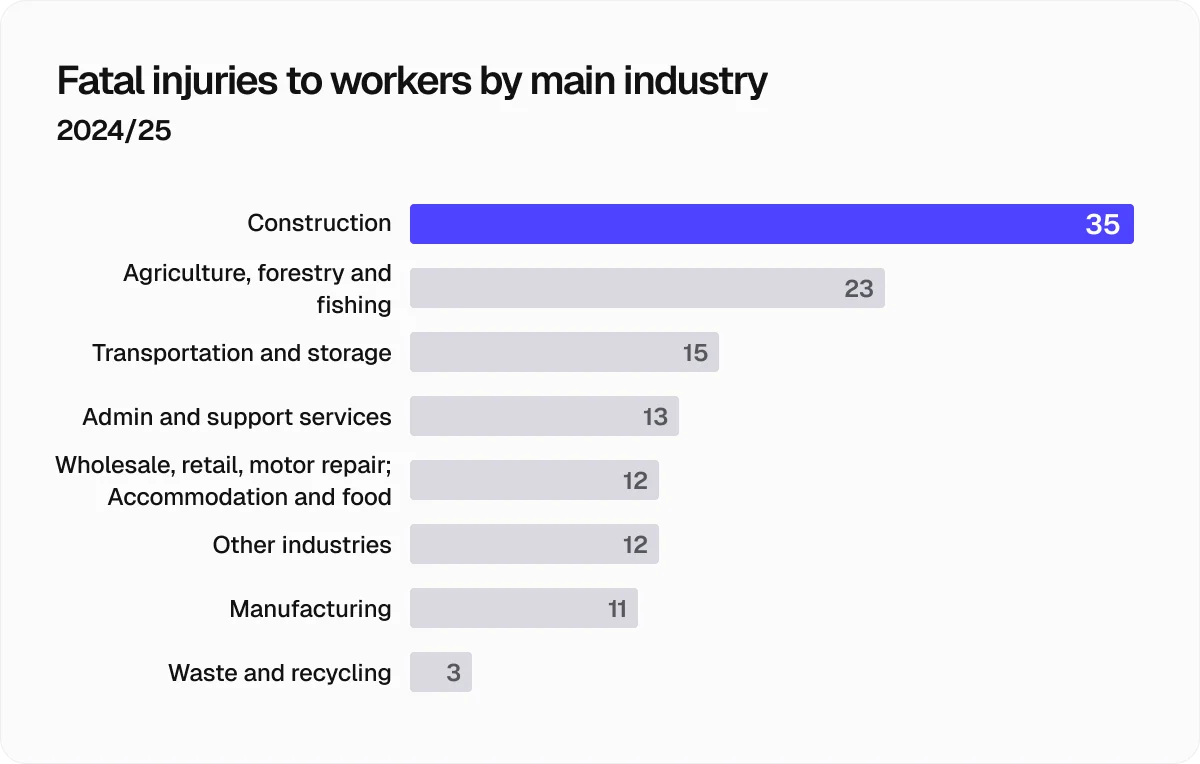
Workforce tracking helps reduce that risk by ensuring only qualified workers are on site, monitoring presence in real time, and providing accurate data for faster emergency response and compliance reporting.
8. Improving workforce satisfaction
Transparent records and accurate pay go a long way in retaining skilled workers.
Workforce tracking reduces disputes, simplifies processes like clocking in, and removes confusion around hours worked, helping create a more predictable and less frustrating experience for site teams.
7 common challenges of construction workforce tracking
Workforce tracking brings clear benefits. However, it also comes with practical challenges due to the nature of construction, which involves remote sites, moving teams, mixed skill levels, and tight timelines.
The table below outlines the seven main challenges and their potential solutions:
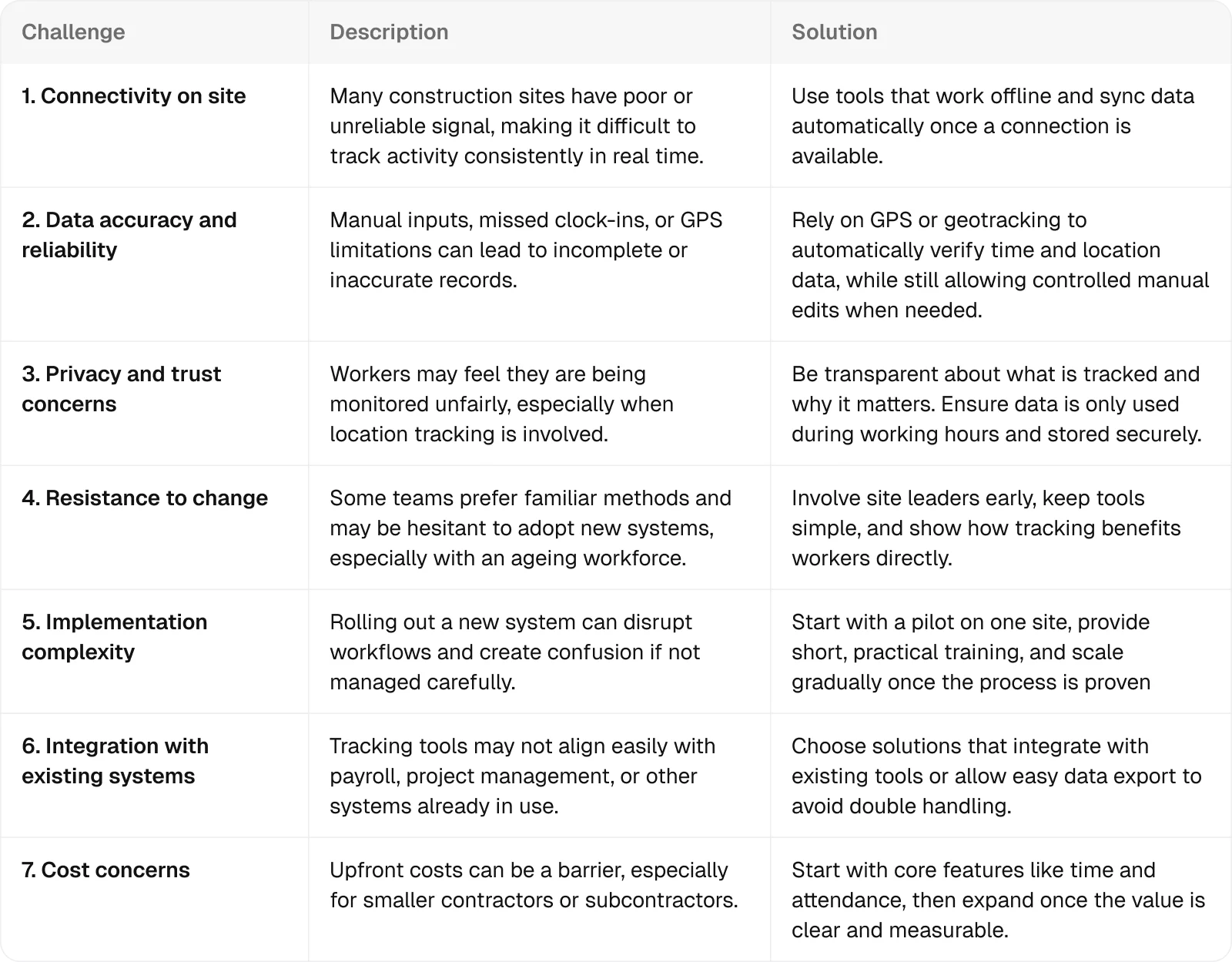
Luckily, most of these challenges can be managed by staying informed, fostering open communication on site, and choosing the right tracking tool from the start.
For example, to ease concerns around privacy, it helps to have an easy-to-understand GPS tracking policy that explains what is tracked and why. Pairing that with a tool like Onetrace—where tracking is limited to working hours and active tasks—makes the intent clear and avoids unnecessary monitoring.
Similarly, cost doesn’t have to be a barrier. Flexible pricing models, such as per-user subscriptions that scale with project needs, allow contractors to adjust usage as workloads change, rather than committing to fixed costs that don’t reflect reality.
Making construction workforce tracking work on real sites with Onetrace
If you want accurate data, real visibility, and control over labour, construction workforce tracking needs to be done digitally. Manual methods just can’t keep up with the pace and complexity of modern job sites.
Onetrace already covers the essentials—working offline when signal drops, scaling with your projects through flexible pricing, and staying simple enough for teams to adopt without friction.
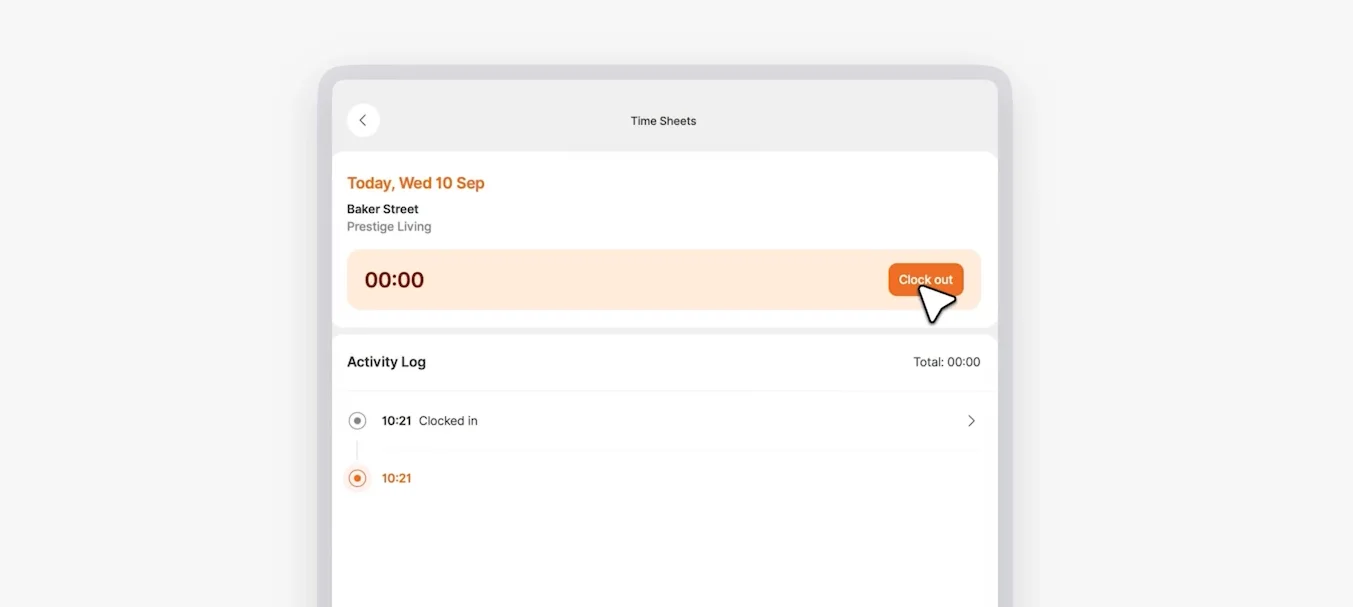
But it goes further than that.
The software also:
Keeps your data secure: Onetrace is built around strong security standards and compliance, so sensitive workforce and project data stays protected.
Fits into your existing setup: This tracking software works alongside your payroll, HR, and project systems to avoid double entry and keep everything aligned.
Adapts to how you work: Onetrace lets you shape forms and workflows around your projects, instead of forcing you into a rigid system.
Gives you a complete view of your workforce: Complete worker profiles bring together roles, certifications, and permissions so you always know who can do what.
Stays flexible when things change: You can make controlled adjustments for missed clock-ins, leave, or overtime to keep your records accurate.
The result is straightforward: better visibility, fewer errors, tighter cost control, and smoother day-to-day operations.
If you’re looking to put workforce tracking in place—or improve what you already have—schedule a tailored walkthrough with the Onetrace team and see how you can achieve these results in practice.
Marketing Team
@Onetrace
The Onetrace marketing team is passionate about sharing insights, ideas, and innovations that help construction businesses stay connected, compliant, and efficient. Combining industry expertise with a love for clear communication, we aim to deliver content that empowers professionals to work smarter and safer.