12 valuable fire stopping software benefits for contractors

By
Marketing Team
@Onetrace
Construction is becoming more digital, but the shift is still far from complete.
According to the AEC Technology Outlook 2026 report, just 11% of construction professionals are fully digital across all project phases. The picture changes at closeout and handover, where 64% of construction teams use digital solutions to some extent.
However, bringing digital tools in only at the final stage of a project isn’t enough for fire stopping contractors and subcontractors.
Fire stopping is different from many other trades because much of the work is hidden once the build is finished, making traceable records of what was installed, where, and with which products essential from the start.
This level of oversight is best achieved through a digital platform.
To help you understand all the ways these tools can make a difference for your business, this guide breaks down 12 practical fire stopping software benefits.
Key takeaways
Fire stopping software keeps installation records organised and accessible
It links locations, photographs, products, inspections, and other evidence to individual installations.It reduces admin and improves site recordkeeping
Teams can capture information once and reuse it for reports, quality checks, and handover documentation.It strengthens evidence and supports compliance
Structured records give contractors reliable evidence of completed work for audits, inspections, and handover.It improves project visibility and quality control
Digital workflows help teams track progress, manage defects, assign remedial work, and record approvals.Onetrace brings these capabilities together for fire stopping contractors
Built from experience in passive fire protection, Onetrace supports surveys, installations, inspections, and remedial work.
What is fire stopping software?
Fire stopping software is a digital platform that helps contractors and subcontractors plan, record, track, and manage fire stopping work throughout a building project and beyond.
It can be used for all the main fire stopping workflows, including:
Installation: Record fire stopping work as it’s completed, including the location, system used, installer, and supporting evidence like photos.
Fire stopping surveys: Assess existing fire stopping and compartmentation, record what is in place, and identify defects or areas that need remedial work.
Fire stopping inspections: Check completed installations against project requirements, record findings, and keep a clear digital record of each inspection.
Remedial work: Log defects, assign corrective work, and track repairs through to completion, with evidence showing what was fixed.
Maintenance: Keep an ongoing record of fire stopping assets and their condition, making it easier to manage future checks and repairs across a building.
12 key fire stopping software benefits
These 12 fire stopping software benefits help explain why more contractors and subcontractors are turning to digital tools to manage fire stopping work.
1. It makes photographic evidence easier to capture and retrieve
Photographs are vital for fire stopping because much of the work becomes hidden once the build moves on.
Fire stopping software lets operatives capture photos on site and link them directly to the relevant installation, so they aren’t left sitting in an unlabelled phone gallery or separate folder.
This approach also makes finding evidence much faster.
Teams can retrieve photos linked to a particular penetration, location, installer, or inspection status without sorting through hundreds of images manually.

2. It helps standardise the way site teams record fire stopping work
Different operatives may record the same type of fire stopping work in varying ways, which can make project records inconsistent and create extra work when information needs to be reviewed or brought together.
With fire stopping software, site teams receive a set format for recording each installation, with required fields for key details. Standardised options can also help teams classify work in the same way, rather than relying on individual descriptions.
Standardisation is particularly important for fire stopping because installations need to be assessed against specific systems, fire ratings, and installation requirements.
When the same information is recorded in a consistent format, project teams can compare installations more easily, identify missing details, and spot work that may need further attention.
3. It helps contractors demonstrate compliance with fire stopping requirements
Fire stopping contractors work within several layers of fire safety legislation and guidance, including:
The Regulatory Reform (Fire Safety) Order 2005: This law sets out ongoing fire safety duties for the Responsible Person in relevant non-domestic premises. Fire stopping records can support the inspection, maintenance, and management of fire safety measures once the building is in use.
The Building Regulations 2010: Part B of Schedule 1 covers internal fire spread and sets requirements for maintaining fire separation. Regulation 38 also requires relevant fire safety information to be passed to the Responsible Person at completion, so the work needs to be properly recorded for handover.
Approved Document B: This statutory guidance provides practical recommendations for meeting the fire safety requirements in Part B. This includes how to maintain fire resistance where services pass through fire-separating elements and how to fire-stop openings.
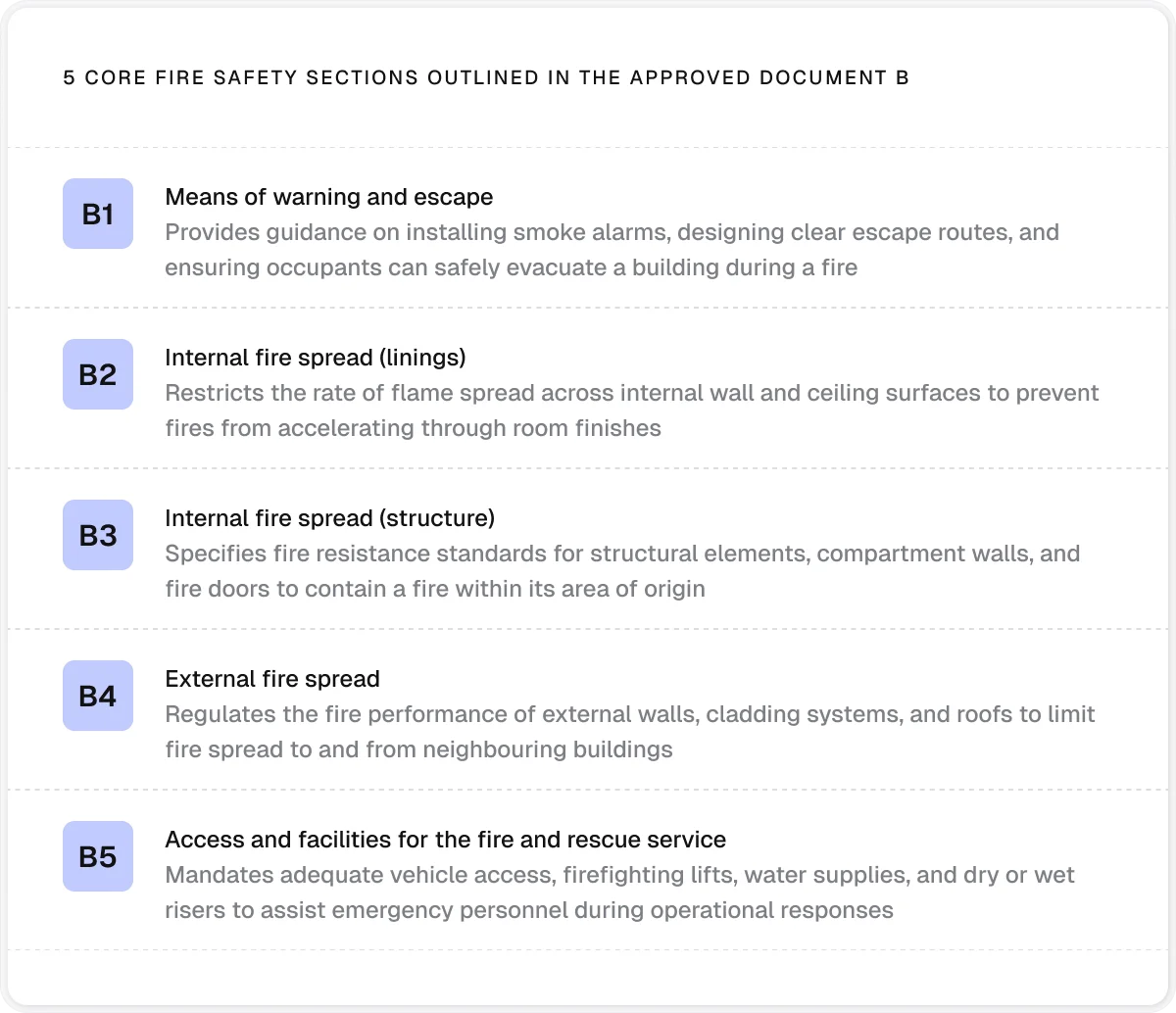
Fire stopping compliance software helps contractors meet these requirements by recording each installation as the work happens.
A single record can bring together the location, the system or product used, installation details, photographs, inspections, and sign-off.
Contractors can then use that evidence for quality control checks and audits instead of trying to rebuild the record from site notes and photographs later.
4. It gives subcontractors stronger evidence of the work they have completed
Disputes can arise months after a fire stopping installation, when the people involved try to establish who completed a particular seal, what product was used, or whether the work was finished before another trade closed up the area.
A handwritten sheet or a folder of site photos can be difficult to use as evidence in that situation.
A record made at the time of installation is far stronger, especially when it has enough detail to link the work to the specific location, installer, and date.
5. It reduces the administrative burden in fire stopping work
Fire stopping creates a steady stream of paperwork, from site records and inspection notes to penetration schedules, snagging information, and handover reports.
When this information is gathered in different formats, turning it into finished documentation can take significant admin time.
With passive fire stopping software, teams can capture information once while on site and use it again when producing reports.
Site records, photographs and inspection details can feed into standardised documents without someone having to retype information or build reports from separate files. This reduces paperwork and gives site teams more time to focus on the work itself.
In addition, this software lowers administrative burden by:
Reducing manual data entry
Removing duplicate record-keeping
Organising site photographs automatically
Reducing back-and-forth between site and office teams
Simplifying project filing and document management
6. It makes the location of every installation easier to understand
On larger projects, fire stopping can involve hundreds or thousands of individual installations spread across different floors, rooms, and service areas. Tracking each one becomes challenging when locations are recorded only through room numbers, written descriptions, or spreadsheets.
Digital floor plans give contractors a visual way to map this information.
A pin can show the position of an individual installation, while the associated record provides the detail needed to identify it.
This approach makes it easier to find specific work, check which areas are complete, and see where work remains outstanding.
7. It improves communication between subcontractors, main contractors, and clients
Fire stopping work often involves several parties, and information needs to move between the subcontractor carrying out the work, the main contractor managing the project, and the client receiving the finished work.
Fire stopping software gives project teams access to the same project information, so all stakeholders can remain aligned throughout the project.
Digital fire stopping tools also support communication when issues arise.
For example, a main contractor can record a required remedial action and assign it to the relevant subcontractor instead of relying on a separate email or handwritten instruction.
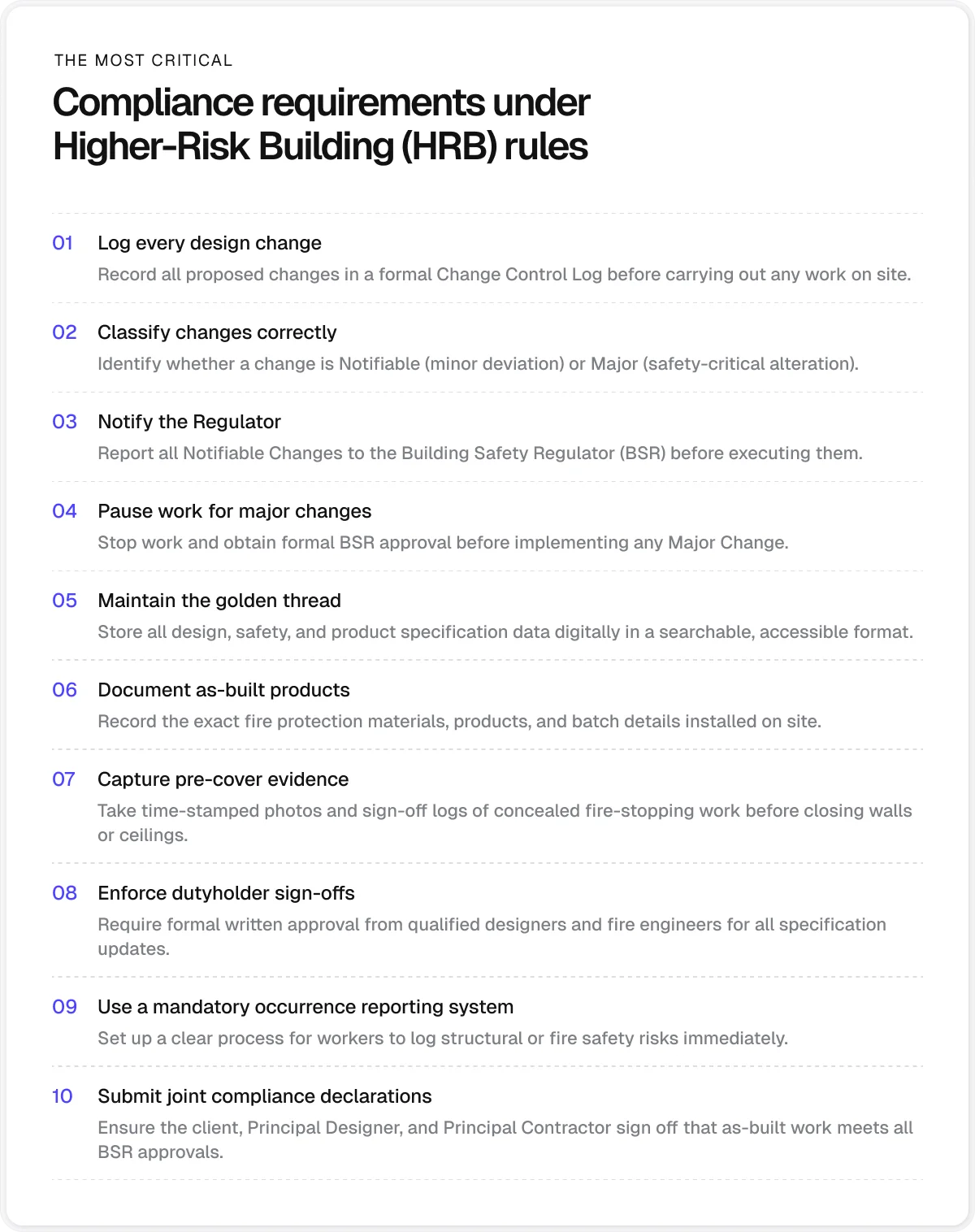
8. It supports the golden thread of building information
The golden thread is the record of information needed to understand how a higher-risk building has been designed, built, and managed safely. In England, this information needs to be:
Kept digitally
Maintained over time
Made available to the people who need it
Fire stopping software supports the golden thread by keeping installation records in a structured digital format.
Contractors can record fire stopping work and changes as they happen and link this information to the relevant record. This approach creates a digital history that can be used by other project teams and, later, by those responsible for managing the building.
9. It helps contractors keep information available after the work is complete
Fire stopping information can still be needed long after the installation has been finished, when the original site team is no longer involved. It may be required during:
An inspection
A defect investigation
Refurbishment
Future maintenance
Fire stopping software can keep installation records, photographs, and supporting information together, making them available when the project needs to be revisited.
10. It gives project managers a more immediate view of progress
Instead of waiting for an operative to submit an end-of-day or end-of-week report, digital fire stopping systems can provide a live view of recorded installations, outstanding defects, and project progress.
This functionality is crucial because fire stopping often involves a large number of individual installations that need to be completed and checked before other project activities can move forward.
A delayed update can leave project managers working with an outdated picture of what has been done and what still needs attention.
11. It can make handover documentation faster and more professional
A professional handover gives the client a complete and well-organised record that’s easy to review and use after the project is finished. Documents should follow a consistent format, use the same terminology throughout, and present the required information in a logical order.
With passive fire stopping software, information can be recorded once during the work and then reused throughout the handover process. This reduces the need to copy details between documents, which can lead to inconsistencies or missed information. Fire stopping software can also apply standard templates and formatting to the information produced from site records.
The result is a more uniform handover package that clients, building managers, and other project teams can effortlessly work through and refer to when needed.
12. It can help subcontractors demonstrate professional competence and quality assurance
Fire stopping software can’t prove that a contractor is competent. It can, however, support a subcontractor’s wider quality management process by providing a consistent record of how fire stopping work has been carried out and checked.
A structured digital record like this can strengthen the subcontractor’s professional position when working with principal contractors and clients. It’s particularly useful when they need to demonstrate that their work is being completed in line with internal quality procedures and that issues are identified and addressed through a defined process.
It can also give subcontractors valuable evidence to support their wider competence credentials, such as relevant training, experience, and third-party certification, when these are requested during procurement or project reviews.
Why use Onetrace as your fire stopping software
If you want to reap all the benefits of fire stopping software, choose a platform built around the realities of fire stopping work.
Onetrace started in passive fire protection, so its development has been shaped by the practical needs of recording surveys, inspections, installations, and remedial work.
That gives Onetrace a strong understanding of how fire stopping work is carried out and evidenced on site. So, rather than adapting a general construction tool to fire stopping, contractors and subcontractors can use one that’s already set up around the information they need to capture.
The table below outlines the key Onetrace features and the benefits they offer fire stopping construction professionals:
Onetrace feature | How to use it for fire stopping work |
Build separate forms for surveys, installations, and inspections, with mandatory fields and conditional questions so operatives capture the information each job requires. | |
Pin installations, survey findings, and remedial work to their exact position on project drawings, making individual locations easier to identify and revisit. | |
Photographic evidence | Capture before, during, and after photographs from the mobile app and keep them linked to the relevant work to support installation evidence and quality checks. |
Offline working | Give operatives access to drawings and project data when working in areas without a reliable signal, with data syncing when a connection is available. |
Single-entry data capture | Capture information once on site and reuse it for quality checks, client information, handover, and other project needs, reducing the need to re-enter the same details later. |
Material tracking | Record the materials used, including type, quantity, cost, and dimensions, so there’s a record of what was installed at each job. |
Create statuses that match your own workflow, helping teams track locations from survey through installation, review, and completion. | |
Approvals | Add quality checks to the workflow, with work approved or rejected and feedback sent back to the operative for correction where needed. |
QR codes | Link a physical location to its digital history, allowing future operatives to access previous survey, installation, and maintenance information from site. |
Docs & Files | Keep supporting information like certificates, product data sheets, RAMS, and job instructions with the rest of the project record. |
The results from Onetrace’s customers show how these features can affect day-to-day operations:
CLM Fireproofing reported a 50% reduction in admin and reporting time after adopting Onetrace.
Cotswold Fire Services says it saves around three hours of manual QA work each day, while using structured workflows to manage large projects with hundreds of fire stopping locations.
Golden Thread Fire Delay estimates that Onetrace cut more than 100 hours from information gathering on a major project involving thousands of locations.
Elite Fire Stop says Onetrace saved the equivalent of a full-time role by replacing paper records and manual data entry with direct site capture.
City Fire Proofing reduced the time needed to produce handover documentation on a large project from weeks to days, while also reducing the cost of remote fire door reviews from £10 to £4 per door.
Qualifire achieved a 100% quality control inspection rate and saved hundreds of hours through digital approvals and linked survey-to-remedial workflows.
If you want to learn more about Onetrace and see why fire stopping contractors are increasingly choosing the platform, schedule a personalised software walkthrough.
FAQ
What is a fire stopping system?
A fire stopping system is a tested combination of materials and components used to maintain the fire resistance of a building element where services, joints, or other openings pass through it. The system must be installed in accordance with its tested or assessed requirements.
What is the purpose of fire stopping?
The purpose of fire stopping is to prevent fire and smoke from spreading through openings in fire-resisting walls, floors, and other building elements. It helps maintain the fire resistance of these elements and protect escape routes and other areas of the building.
What is the best fire protection software?
The best fire protection software is one that fits your specific workflows and helps you record, manage, and evidence fire protection work. Onetrace is designed specifically for fire protection subcontractors and includes features for surveys, installations, inspections, remedial work, evidence capture, and reporting.
Marketing Team
@Onetrace
The Onetrace marketing team is passionate about sharing insights, ideas, and innovations that help construction businesses stay connected, compliant, and efficient. Combining industry expertise with a love for clear communication, we aim to deliver content that empowers professionals to work smarter and safer.