8 proven strategies to streamline subcontractor workflows

By
Marketing Team
@Onetrace
Subcontractor workflows are the structured sets of processes used to manage subcontracted work on a construction project, from onboarding and task allocation to communication, progress tracking, and payment.
For these workflows to run effectively, Tier 2 subcontractors and Tier 3 specialty contractors must coordinate with Tier 1 contractors, while also managing self-employed workers, who make up around 37% of the UK construction workforce.
The complexity behind this coordination, combined with manual processes and disconnected systems, often makes subcontractor workflows fragmented and inefficient.
As a result, subcontractors in specialist trades like electrical and plumbing can be 20% to 40% less productive than large-scale contractors.
To help you close the productivity gap, this guide sets out eight practical strategies to streamline subcontractor workflows and reduce admin.
Key takeaways
Subcontractor workflows break down due to fragmentation and manual processes
Multiple teams, disconnected tools, and manual admin create gaps in communication, visibility, and coordination. These gaps lead to delays, rework, and unnecessary back-and-forth.Lack of structure is a major cause of inefficiency
Without standard processes for onboarding, communication, and task management, teams spend more time figuring things out than getting work done.Automation and real-time visibility are essential for keeping work on track
Automating routine tasks and tracking progress in real time helps reduce admin, catch issues early, and keep projects moving without constant follow-up.Centralising workflows improves consistency and reduces admin
Keeping communication, documents, and project data in one place ensures everyone works from the same information. As a result, teams avoid duplication, version issues, and time wasted switching between tools.Purpose-built software like Onetrace offers a practical way to streamline workflows
Onetrace helps subcontractors manage data, track work, automate processes, and coordinate teams in one system. This reduces admin, improves visibility, and makes day-to-day project management more efficient.
Why subcontractor workflows break down
Subcontractor workflows break down because they rely on multiple teams and tightly linked stages of work.
When one part of the job runs late or isn’t properly handed over, it affects everything that follows, especially when coordination is managed through manual or disconnected processes.
The table below outlines the most common challenges behind these breakdowns and how they affect day-to-day work:
Challenge | Description | Consequence(s) |
Fragmented communication | Information being spread across emails, calls, and different tools, with no single source of truth | Misunderstandings, missed tasks, and duplicated work. |
Manual admin processes | Reliance on spreadsheets, paper forms, and manual data entry for tracking work, approvals, and payments | Slower workflows, higher admin load, and increased risk of errors |
Lack of standardisation | Different projects and teams following different processes, with no consistent way of working | Confusion, inconsistent outputs, and more time spent figuring out what to do next |
Poor visibility into progress | Limited real-time insight into task status, delays, or completed work | Late issue detection, reactive decision-making, and project delays |
Disconnected tools and systems | Project data sitting across multiple platforms that don’t integrate or update in real time | Time wasted switching between tools and reconciling information |
Scheduling conflicts | Multiple trades working on tight timelines without clear coordination | Delays, downtime, and rework when tasks overlap or dependencies aren’t met |
Unclear roles and responsibilities | Lack of clarity over who is responsible for specific tasks or approvals | Missed steps, duplicated effort, and accountability issues |
Given how these issues tend to overlap, improving one area in isolation is rarely enough.
A more effective approach is to use subcontractor management software like Onetrace, which brings key workflows into one place and helps reduce both fragmentation and admin overhead.
8 proven ways to streamline subcontractor workflow and reduce admin
Here are eight ways construction software for subcontractors can help reduce manual admin, improve coordination across tiers, and bring more structure to day-to-day workflows.
1. Centralising communication to reduce back-and-forth and missed updates
Consistent, well-structured communication is what keeps subcontractor workflows moving from start to finish.
When updates are delayed, scattered across emails, or passed on informally, it becomes easy to miss changes, duplicate work, or fall out of sync with other trades.
Construction software helps avoid communication issues by keeping all project updates, messages, and documents in one place. Thanks to this centralisation, everyone can work from the same information and have real-time visibility into tasks, changes, and timelines.
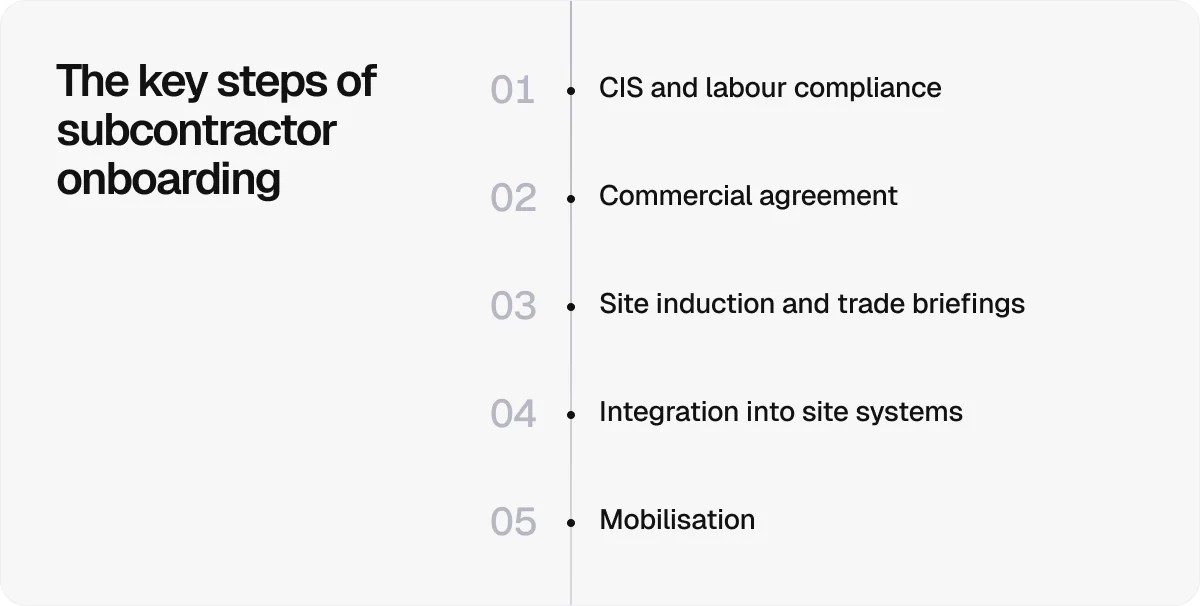
2. Standardising onboarding to set clear expectations from day one
Getting new trades up to speed quickly is key to keeping work on track.
When onboarding is inconsistent or rushed, it leads to confusion around site rules, safety requirements, and reporting processes. These gaps in understanding often show up later as errors, compliance issues, and extra admin to fix avoidable problems.
With construction software, you can turn onboarding into a repeatable process by collecting and verifying contracts, certifications, and safety documents in one place and defining onboarding steps for each new team member.
This makes it easier to set expectations early and get subcontractors ready to start work without delays.
3. Automating routine administrative tasks to reduce manual work
A large part of subcontractor admin comes from repeat tasks that need constant attention, such as chasing approvals, updating records, handling invoices, and managing changes.
Construction software can automate these routine tasks, so work moves forward without constant follow-up.
The tasks in question include:
Updating project records when tasks are completed or changes are made
Generating and sending invoices based on completed work
Tracking and logging budget adjustments and variations
Sending reminders for approvals, missing information, or expiring documents
Automating these tasks reduces the need for manual input, keeps records consistent, and frees up time for more important work.
Pro tip:
It’s not just individual tasks that need automating; the handover between stages matters just as much.
When transitions rely on manual updates or informal communication, work can stall, get missed, or proceed before it’s ready.
With Onetrace, you can define custom statuses that reflect each stage of your workflow, so everyone can see exactly what’s ready to start, in progress, or complete. Changing these statuses triggers automations, helping tasks move to the next stage without manual input.
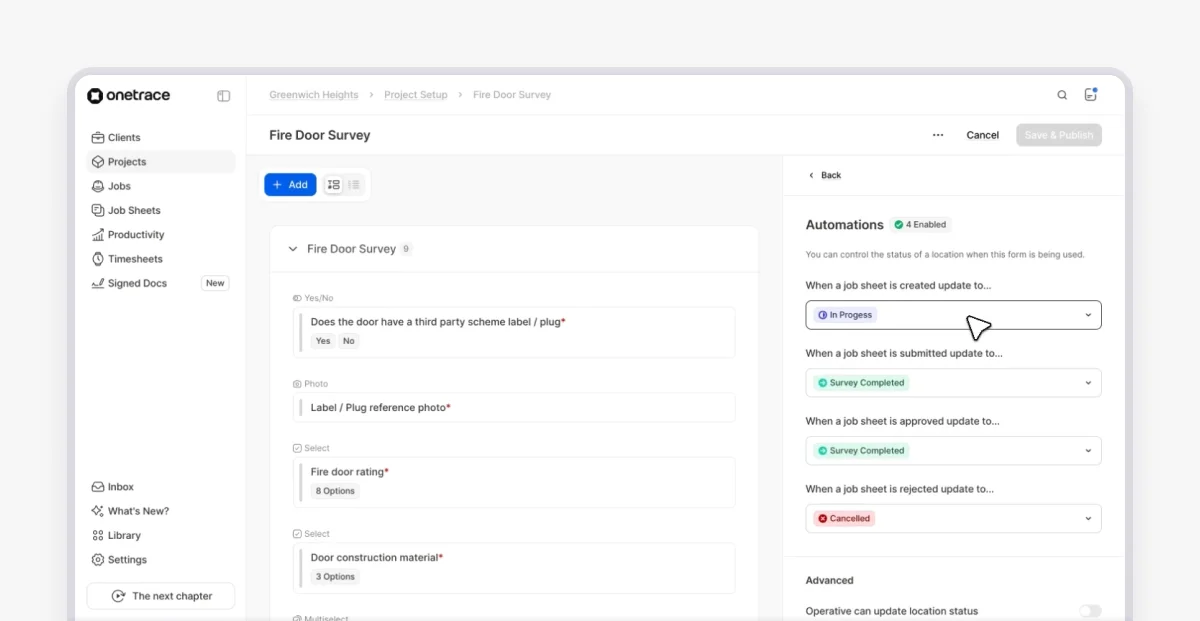
You can also set up automated approval flows between stages, ensuring work is reviewed and signed off before moving forward.
This keeps tasks moving in the right order, reduces rework, and builds accountability into every step.
4. Tracking progress in real time to stay on schedule
When progress isn’t visible day to day, issues tend to surface late, when they are much more challenging (and expensive) to fix.
That’s why you need real-time job tracking that construction software delivers. Through mobile updates, photos, and task statuses, you can clearly see what’s complete, in progress, or falling behind.
Visual tools like calendars, in particular, make it easier to spot delays early and keep work aligned across teams.
5. Managing documents digitally to avoid delays and version issues
Construction document management can make or break subcontractor workflows.
When documents are hard to find, outdated, or spread across emails and folders, it slows work down and increases the risk of errors.
On the other hand, proper document management keeps everything organised, up to date, and easy to access, reducing delays and preventing version issues. This starts with storing contracts, change orders, and site records in one system, where they can be updated, shared, and approved without relying on manual tracking.
Pro tip:
Digital signatures are a key part of efficient document management.
When sign-offs rely on paper or email, documents get delayed, overlooked, or left incomplete, which slows down work and creates compliance risks.
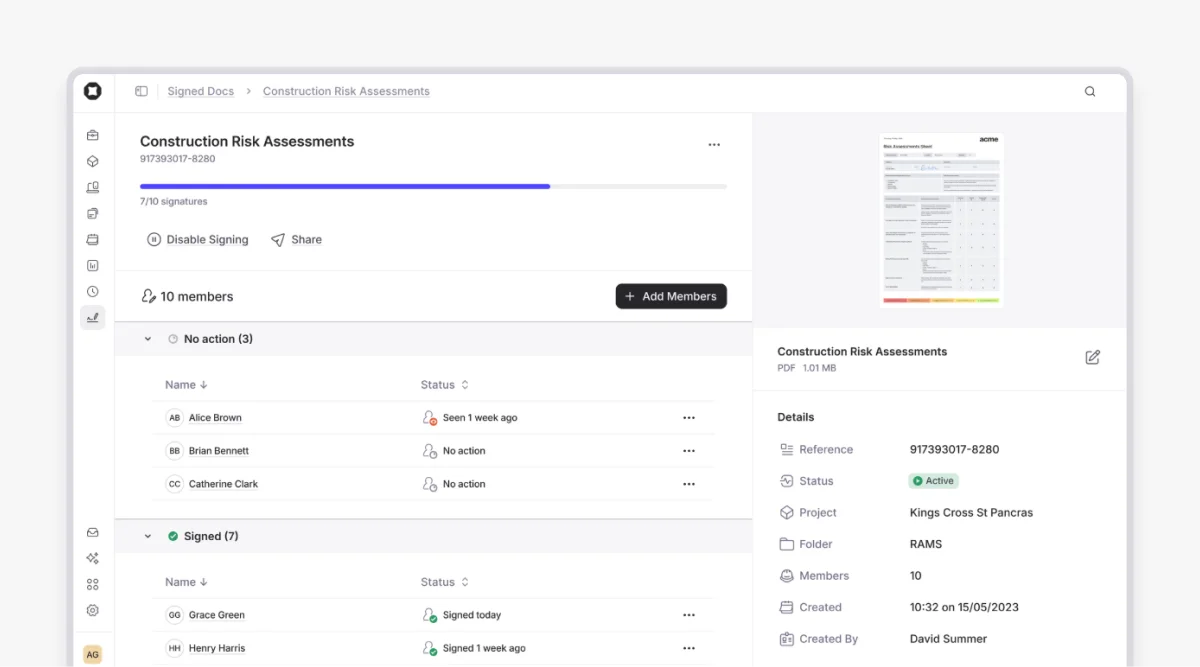
With Onetrace’s Signed Docs feature, you can:
Request signatures for RAMS, Toolbox Talks, and other documents in a few clicks
Notify operatives instantly when a document is ready to sign
Capture signatures directly on mobile, whether on the site or in the office
Track document status in real time, including who has viewed, signed, or is still pending
Keep a full, shareable audit trail for compliance and client reporting
6. Integrating tools and systems to avoid duplicate work
When tools don’t connect, the same data gets entered multiple times across systems, which is time-consuming and error-prone.
Integrating your project management, accounting, and communication tools keeps information in sync, so updates only need to be made once and flow through the rest of your workflow automatically.
7. Using workflow templates to keep projects consistent
Templates help standardise how subcontracting work is set up and delivered.
Instead of starting from scratch each time, you follow the same structure for tasks, documentation, and approvals, reducing setup time, avoiding missed steps, and keeping projects consistent.
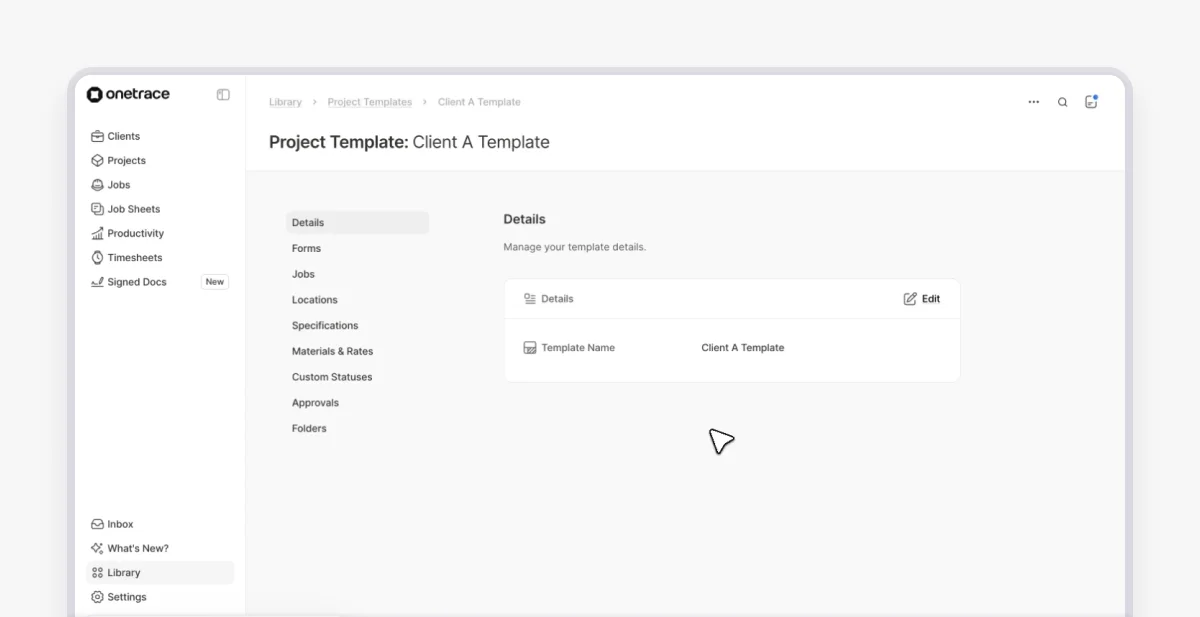
In Onetrace, you can:
Create and customise templates for different types of work
Set required forms and approval stages as part of the default setup
Define materials and rate sets for specific project types
Update templates over time to reflect new processes or requirements
8. Improving scheduling and resource planning to keep work on track
Construction schedules primarily depend on coordination between trades. If one task slips, it affects everything that follows, pushing back timelines, creating downtime, and adding pressure.
Better scheduling and resource planning help prevent these knock-on effects.
With the right subcontractor software, you can assign tasks, set dependencies, and see how work fits together across the project.
You also get a live view of labour, materials, and equipment, so you can ensure everything is in place when needed.
Streamlining subcontractor workflows starts with the right tools
Adopting new digital tools isn’t always straightforward in construction.
Many subcontractors face real barriers, including limited time, tight budgets, and the need to keep work moving while learning something new.
There’s also the concern that new systems will add complexity rather than remove it.
However, given how much the right software can help streamline subcontractor workflows and reduce admin, the investment is worth it. Plus, choosing a tool that’s simple to set up and easy to use makes a big difference.
That’s where Onetrace stands out.
Onetrace is purpose-built for subcontractors and designed around how work actually happens on site, helping you stay in control, keep records in order, and save time on and off site.
Its platform is built around two core areas:
Traceability: Capture and manage all project data in one place, including forms, photos, materials, and approvals. This product helps you maintain compliance, provide proof of work, and avoid chasing documents or fixing gaps later.
Workforce: Manage your team more effectively with tools for timesheets, planning, and job tracking. These tools improve visibility across your workforce and help keep work aligned with project timelines.
Together, these products simplify how your workflows run in practice, making day-to-day work easier to manage.
Schedule a personalised walkthrough of the Onetrace platform to see how it can fit into your daily operations and help you stay on top of projects.
FAQ
What is the onboarding process for subcontractors?
The onboarding process is the set of steps required to prepare a subcontractor to start work on a project. It includes setting up the contract, submitting compliance documents, reviewing site requirements, and confirming how work will be reported and managed.
What is a subcontractor management plan?
A subcontractor management plan is a document that sets out the rules, processes, and responsibilities for coordinating and overseeing subcontracted work on a project. It defines who does what, how work is tracked, how communication happens, and how payments and changes are handled.
Marketing Team
@Onetrace
The Onetrace marketing team is passionate about sharing insights, ideas, and innovations that help construction businesses stay connected, compliant, and efficient. Combining industry expertise with a love for clear communication, we aim to deliver content that empowers professionals to work smarter and safer.