7 smart construction scheduling examples for 2026 [Explained]

By
Marketing Team
@Onetrace
Construction scheduling is the process of planning, sequencing, and managing the work needed to deliver a project on time.
Given that more than 85% of construction professionals reported delays in 2022, it’s clear that not all scheduling approaches work as intended.
But the issue isn’t always choosing the wrong scheduling method. Sometimes, it’s failing to connect the schedule to what’s actually happening on site.
With this in mind, this guide breaks down seven construction scheduling examples that show how to manage crews and keep work moving as conditions change.
Key takeaways
Scheduling only works when crews can see and act on it
Making schedules accessible on mobile ensures operatives always know where they need to be. This reduces confusion, missed updates, and unnecessary delays on site.The right people must be scheduled for the right work
Effective scheduling isn’t just about filling time slots. It means assigning qualified workers with the correct certifications and making sure they are ready to carry out the job safely.Visibility of who is on site keeps projects on track
Knowing who has arrived, where they are, and whether work has started helps catch delays early. This avoids situations where issues are only discovered hours or days later.Short-term planning and flexibility keep crews productive
Lookahead planning and the ability to adjust schedules quickly help prevent double bookings, gaps in work, and idle time when plans change or delays occur.Using the right tools makes workforce scheduling manageable
Managing schedules across sites is difficult with spreadsheets or calls alone. Tools like Onetrace bring everything into one place, making it easier to assign work, move crews, and keep everyone aligned as conditions change.
1. Mobile-enabled scheduling
Most construction work happens on site, but scheduling is often managed elsewhere.
This creates a gap between what’s planned and what crews actually see, leading to missed updates, confusion, and delays.
Mobile-first construction scheduling closes that gap by making sure operatives always have access to their latest schedule on their phone.
For this to work, you need:
A central schedule managed by the office
Instant updates pushed to operatives’ devices
Clear daily views of assigned work and locations
Access to job details, instructions, and directions
For example, an admin reschedules a visit from Tuesday to Thursday. The operative should see the change immediately on their phone, along with updated site details, so they won’t turn up at the wrong time or place.
This approach keeps crews aligned with the latest plan, reduces back-and-forth communication, and helps ensure the right people are in the right place at the right time.
2. Compliance-driven scheduling
Regulatory compliance is a core part of construction work.
Projects must meet strict health and safety requirements, and failures to do so can lead to delays, fines, or work being stopped altogether.
A key part of this is making sure only qualified and approved workers are scheduled to carry out specific tasks.
Compliance-driven construction scheduling guarantees that work is only assigned when the right certifications and approvals are in place.
For this to work, you need:
Up-to-date records of worker certifications
Straightforward checks before assigning work
Confirmation that operatives understand site requirements
For example, a crane operation isn’t scheduled until the assigned operator’s certification has been verified.
Pro tip:
For compliance-driven scheduling to work, you need a central place to manage certifications and other crucial compliance documents.
Onetrace lets you store and track worker qualifications, so you always know who is certified to perform specific tasks.
You can also manage key documents through the Signed Docs feature, which allows you to:
Send RAMS or Toolbox Talks for signature
Track who has read and signed the relevant documents
Get instant updates on what’s still outstanding
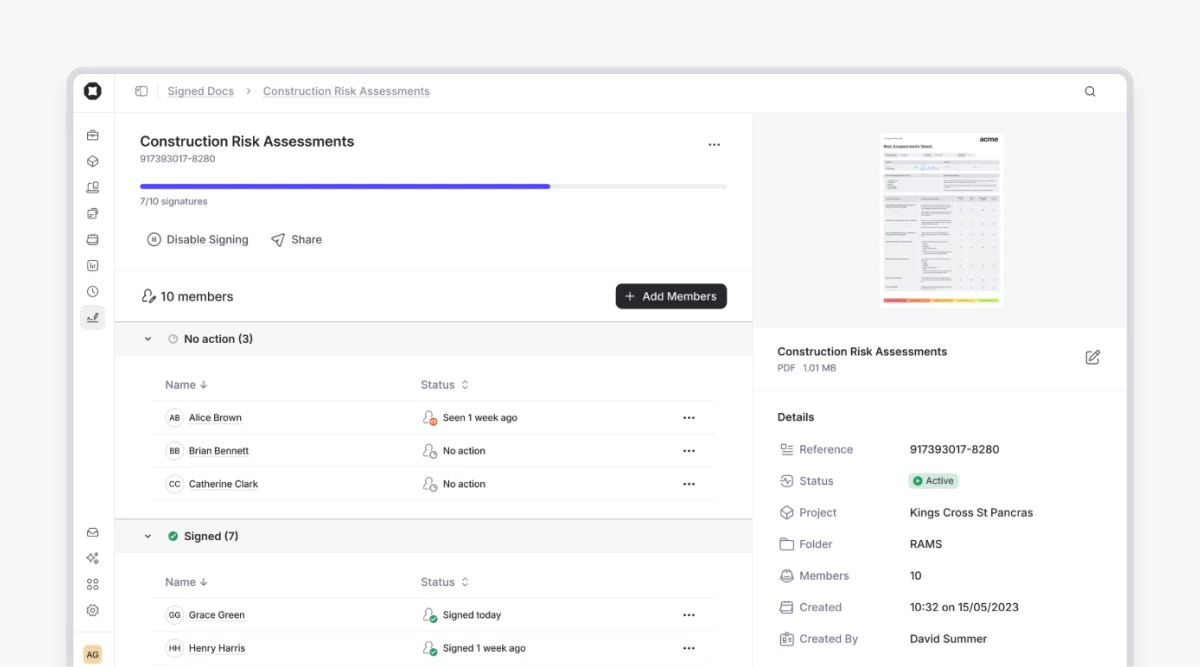
These features help ensure the right people are assigned safely, with full visibility of who is approved to be on site.
3. Location-based scheduling
A common issue on construction sites is a lack of visibility into what’s actually happening and where.
Crews are marked as ‘on-site’ in the schedule, but in reality, they could be late, at the wrong location, or not there at all. This leads to delays that aren’t picked up until it’s too late.
To avoid this scenario, you should rely on location-based scheduling, which links the schedule to real site activity and specific locations.
It typically involves:
Logging site entry and exit using geofencing
Linking operatives to specific sites or visits
Flagging when scheduled crews aren’t on site
For example, if the schedule shows a flooring crew starting at 7:00 a.m. but no one has checked in on site, the supervisor can flag a potential delay straight away.
By tying site activity and constraints directly to locations, you can remove guesswork, improve accountability, and ensure the schedule reflects real conditions on site.
4. Lookahead scheduling
The master schedule is often too detailed for day-to-day site use, making it harder for teams to see what actually matters in the short term.
As a result, crews can be booked too late, double-booked, or not ready when work is due to start.
The table below shows why lookahead schedules are more effective for managing day-to-day work on site:
Aspect | Master schedule | Lookahead schedule |
Timeframe | Full project duration | Next 2–6 weeks |
Level of detail | High-level, all tasks | Focused on upcoming work |
Main users | Project managers, planners | Site teams, supervisors |
Purpose | Overall planning and sequencing | Day-to-day coordination and preparation |
Updates | Periodic (weekly/monthly) | Frequent, often daily |
Use on site | Limited (too complex) | High (clear and actionable) |
By filtering the master schedule to a short-term view, you can:
See which crews are needed in the coming weeks
Identify clashes in labour or availability early
Give teams time to prepare and plan their work
For example, if the same plumbing crew is scheduled at two sites in the same week, the conflict is visible in time for the supervisor to adjust assignments before the issue causes delays.
5. Responsive construction scheduling
Construction schedules rarely go exactly to plan.
When one task slips, crews can end up arriving too early, waiting around, or being sent home.
Real-time construction scheduling helps you adjust crew assignments as soon as things change, so your workforce stays productive.
In practice, this means having:
A central schedule that can be updated quickly
Full visibility of current crew assignments
The ability to move operatives between jobs easily
For example, if a drainage crew is delayed due to unexpected ground conditions, the backfilling crew scheduled to follow can be moved later in the week. At the same time, another available job can be brought forward to avoid idle time for the crew.
This setup reduces downtime, prevents wasted labour, and helps keep crews working even when plans change.
Pro tip:
The ability to move operatives between jobs works best with a visual planner that lets you drag and drop assignments.
Onetrace’s Planner allows you to quickly reschedule visits by moving them to a different day, project, or operative.
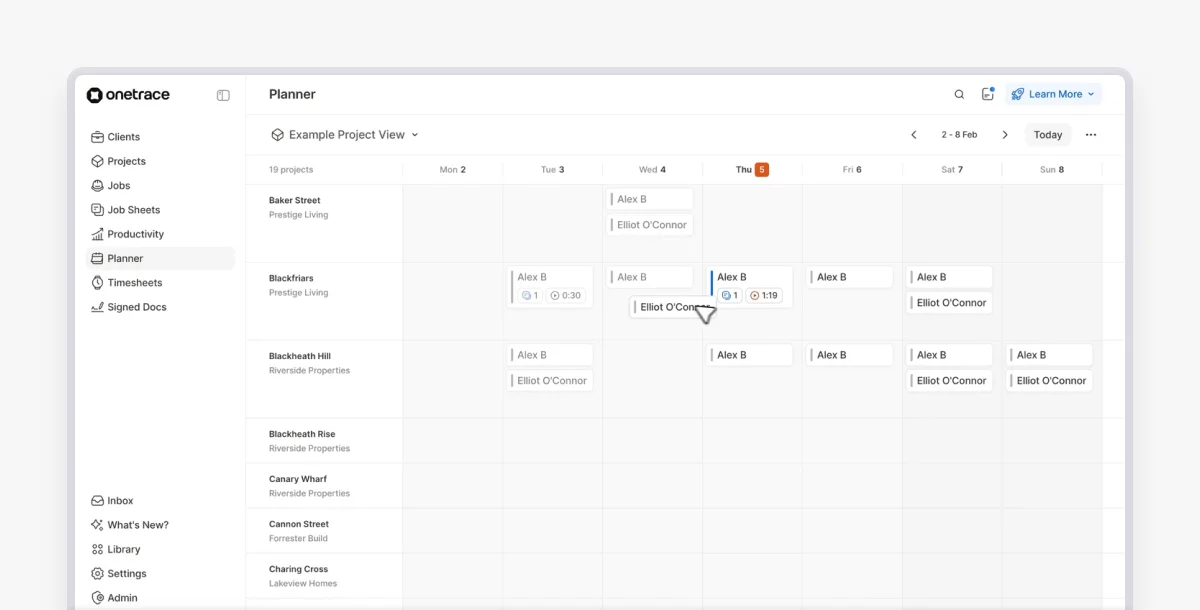
This makes it easy to react to delays without having to rebuild the schedule or chase crews with calls and messages.
6. Weather-responsive construction scheduling
Not every delay comes down to crews, coordination, or planning.
On many projects, the biggest disruptions are out of your control, with weather being one of the most common ones.
Over 70% of construction managers in the UK report weather-related delays, from heavy rain and flooding to extreme heat and freezing conditions. These can stop certain trades entirely.
Weather-responsive construction scheduling helps you adjust your workforce plan as conditions change, so crews aren’t left waiting or sent home unnecessarily.
Managing weather-related delays involves:
Identifying which crews are affected by the weather
Moving the impacted work to a later date
Reassigning available crews to other jobs where possible
Keeping the unaffected work moving
For example, if a roofing team can’t work due to heavy rain, they can be rescheduled later in the week, while internal trades can be brought forward to maintain progress.
7. Workload balancing construction scheduling
One of the most common scheduling issues in construction is uneven workloads.
Some operatives are overbooked across multiple sites, while others are underused or left waiting for work.
This doesn’t just affect productivity. It also impacts how people perform on site, with recent data showing that roughly half of construction workers experience stress, anxiety, and fatigue often.
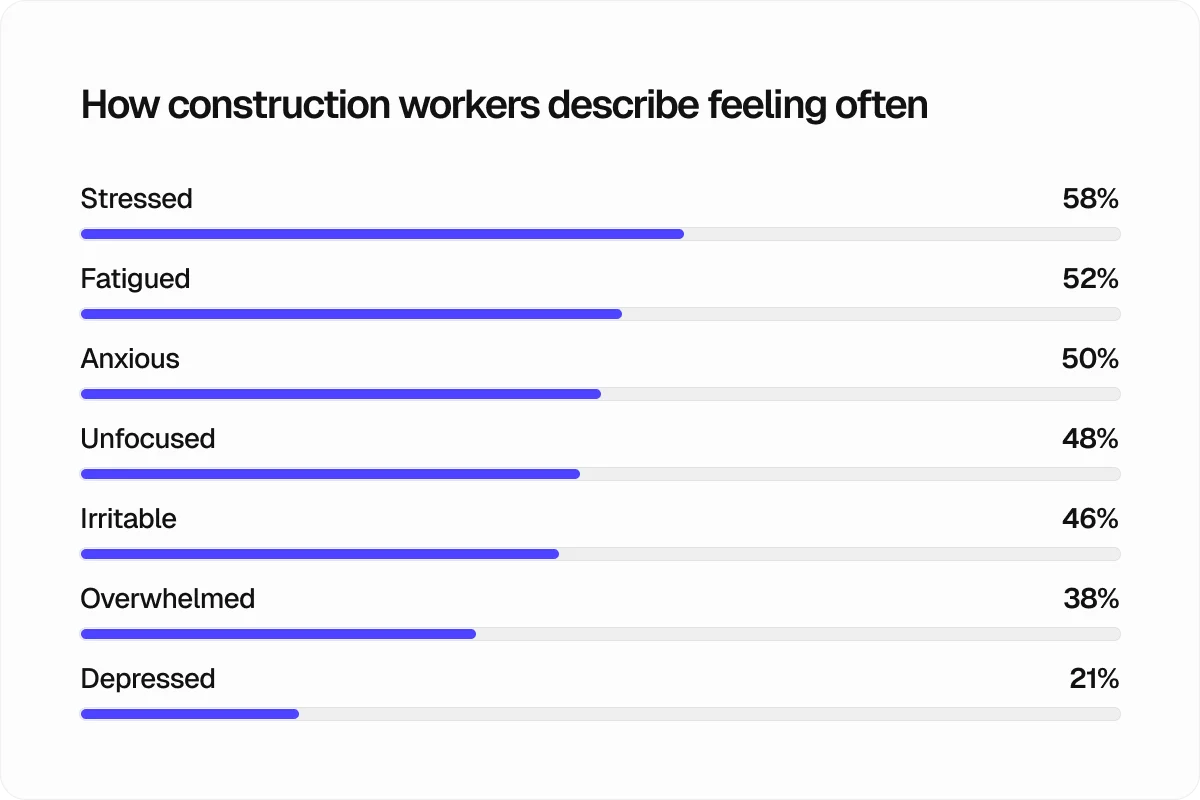
Workload balancing construction scheduling helps you spread work evenly across your team, so you’re making full use of your workforce without overloading individuals.
For example, if one HVAC crew is booked across two sites on the same day while another crew has availability, the work can be reassigned to balance the workload and avoid delays.
Bring scheduling closer to site reality with Onetrace
The construction scheduling examples above show one thing clearly: scheduling works best when it’s not treated as a standalone timeline.
After all, delays rarely happen due to a lack of a plan. They happen when the plan isn’t connected to who is available, where they need to be, and how quickly you can respond when things change.
That’s why construction scheduling tools like Onetrace make such a big difference.
Onetrace’s Planner gives you a central view of your workforce, so you can:
See who is scheduled across projects and sites
Assign and move operatives in seconds
Spot double bookings and gaps early
Adjust schedules quickly when plans change
Keep operatives updated with the latest information on their phone
Instead of juggling spreadsheets, calls, and messages, you can manage your workforce in one place and keep everyone aligned as the job evolves.
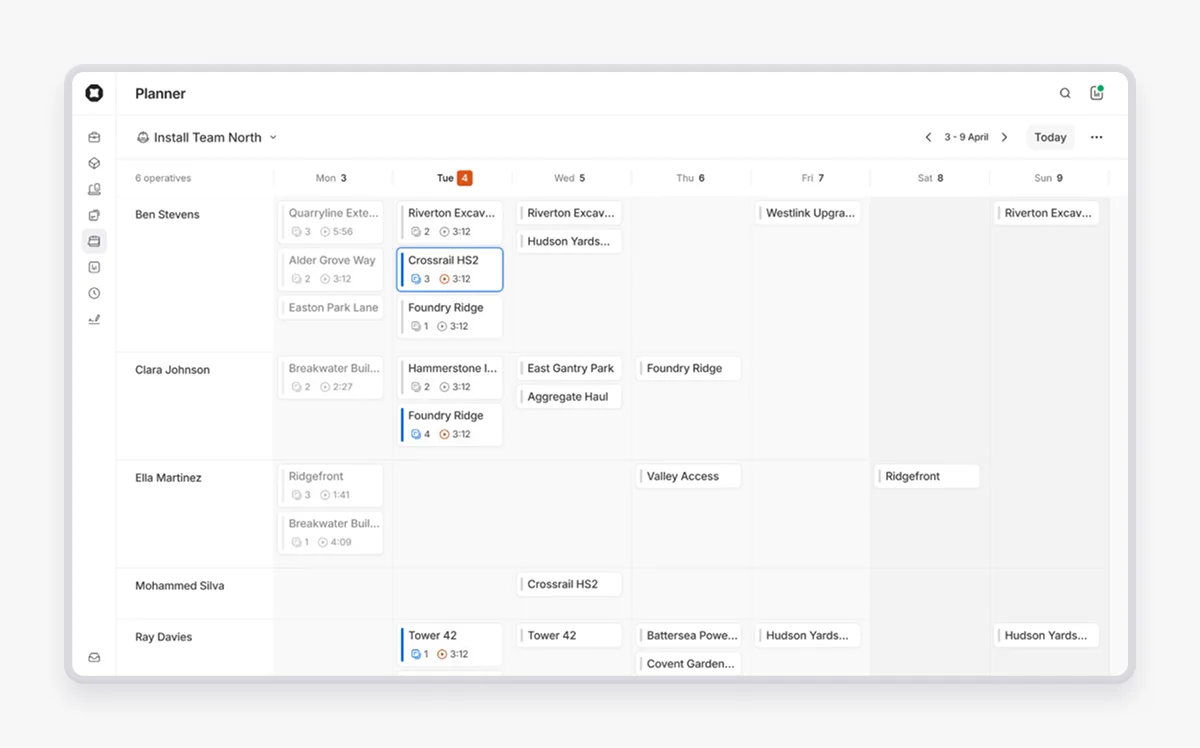
This makes it easier for you to:
Reduce downtime and missed visits
Keep crews productive across sites
Stay in control when schedules shift
Make faster, more informed decisions
If you want to see how this works in practice, book a demo with the Onetrace team and explore how it fits your projects.
It’s a quick, practical walkthrough focused on your day-to-day work, and if it’s a good fit, you can get started straight away.
Marketing Team
@Onetrace
The Onetrace marketing team is passionate about sharing insights, ideas, and innovations that help construction businesses stay connected, compliant, and efficient. Combining industry expertise with a love for clear communication, we aim to deliver content that empowers professionals to work smarter and safer.