10 best construction software for subcontractors in 2026

By
Marketing Team
@Onetrace
Staying ahead has always mattered in construction subcontracting. After all, margins are tight, schedules are demanding, small delays can impact the entire job, and the pressure is only increasing.
UK construction is still under pressure, with activity contracting every month since January 2025. Subcontractor usage briefly rose in August 2026 for the first time in almost two years, only to fall again in September as new orders dropped at their fastest pace since June. This doesn’t mean subcontractors are no longer needed, but it does mean competition for work is stronger and expectations are higher.
One of the most effective ways to stay ahead of these changes is to invest in subcontractor software that helps your business stay in control as projects grow more complex.
The right tool will offer real, practical benefits, including clearer schedules, better visibility across jobs, fewer surprises on site, and more confidence that work is being delivered as planned.
With that in mind, here are the 10 best construction software tools for subcontractors in 2026, based on how well they support real subcontractor workflows.
Key takeaways
There is no one-size-fits-all construction software for subcontractors
The right tool depends on your trade, project types, team size, and how work actually flows between the site and the office. Software should adapt to your business, not force you into unfamiliar processes.Purpose-built subcontractor tools consistently outperform generic platforms
Tools designed for general project management or GCs often fall short on the realities subcontractors face, such as tight margins, proof of work, compliance, and fast-moving site conditions.Ease of use and mobile reliability matter more than long feature lists
The best tools are those operatives can use confidently on site, even offline, with minimal training. Fast performance, simple workflows, and dependable mobile access directly affect productivity and data quality.Different tools excel at different stages of subcontractor work
Some platforms are strongest in estimating, others in field coordination, financial control, or commercial documentation. Understanding what each tool does best helps you avoid paying for features you don’t need.
How we chose each tool for this list [Methodology]
A quick note on how the list was made: we checked something most “best construction software for subcontractors” lists skip entirely, which is whether each tool is actually built for subcontractors or is general contractor, builder, or field-service software with a subcontractor page added. A long feature list, a big customer count, or a strong reputation with GCs doesn’t make a platform good subcontractor software. So tools designed mainly for other users were placed lower on the list unless they handle a specific stage of subcontractor work, such as estimating or field coordination, better than the alternatives.
Of the 10 tools below, 3 are purpose-built for subcontractors and trade contractors, covering daily site work, proof of work, compliance, or job costing. Another 2 are specialists that do one stage of subcontractor work very well, such as takeoffs or crew task management, without covering the full workflow. The remaining 5 were built primarily for general contractors, residential builders, or home-service businesses. Subcontractors can still use them, but their core workflows weren’t designed around subcontractor margins, evidence requirements, or GC-led projects. We’ve ranked accordingly, with subcontractor-first platforms ahead of the rest, and where a tool’s strength is narrow, we say so plainly rather than presenting it as a complete subcontractor solution.
Best construction software for subcontractors: An overview of the top 10 picks

1. Onetrace: Best overall for subcontractor operations

Onetrace is purpose-built construction software for subcontractors. It brings project data, compliance, workforce activity, and proof of work into one clear system, supporting everything from small surveys to large, multi-site projects.
If you want software that reflects how subcontractors actually work on site and in the office, it makes sense to start with a platform built for that. The subcontractor-first design, paired with clear project visibility and practical workflows, makes Onetrace the best construction software for subcontractors overall.
Onetrace best features
Through its products, Onetrace prioritises features that make work easier to record, review, and stand behind when it matters. This includes:
Custom forms and data capture: Create unlimited, job-specific forms with mandatory fields, conditional logic, photos, and checklists to capture consistent, reliable data and reduce on-site errors.
Photographic evidence and audit trails: Take before, during, and after photos on site, creating a clear record of completed work that supports compliance, sign-off, and dispute resolution.
Digital site and drawing management: Upload drawings, drop pins, and organise work by blocks, levels, zones, and cores to keep site data structured, searchable, and tied to exact locations.
Status and workflow tracking: Use custom statuses, colours, and labels to mirror and automate your real workflow, helping your team track progress clearly from survey to completion.
Mobile app for site teams: Give operatives a fast, offline-capable app to capture evidence, complete job sheets and timesheets, and sign documents on site, keeping work moving even without signal.
Approvals and quality assurance: Rely on multi-stage approval workflows with live feedback, speeding up remediation, improving quality, and spreading accountability across site teams and stakeholders.
Timesheets and attendance tracking: Record time and attendance with live visibility, GPS clock-ins, and daily activity views to keep labour on track and projects running to plan.
Compliance and signed documents: Centralise RAMS, Toolbox Talks, and other important documents with simple mobile signing, real-time status tracking, and complete signature trails for peace of mind.
Reporting and handovers: Generate branded PDF or Excel reports instantly, providing clear proof of work that reduces disputes and supports faster, more accurate payments.
Planning and scheduling: Use a visual calendar to plan work, assign teams, and reschedule quickly, keeping operatives aligned as priorities change.
Onetrace pricing
Onetrace offers flexible, per-user monthly pricing designed to match the changing demands of subcontractor workloads. Users can choose between two products—Traceability and Workforce—or subscribe to both.
2. eSUB Cloud: Best for commercial subcontractor project management

eSUB Cloud is construction management software built specifically for trade contractors working on commercial projects.
It fits this role well by focusing on document control, field-to-office coordination, and the structured workflows that are common on larger, more complex jobs.
eSUB Cloud features
eSUB places a strong emphasis on control, traceability, and coordination across commercial project teams, with features like:
Project documentation management: Centralise RFIs, submittals, drawings, and daily reports to keep commercial project records organised and accessible.
Field reporting and communication: Enable site teams to capture daily activity and issues digitally, keeping office teams aligned without relying on emails or paperwork.
Change and cost visibility: Track changes and impacts as they happen, helping you manage scope, costs, and accountability on commercial jobs.
eSUB Cloud pricing
eSUB Cloud doesn’t publicly disclose its pricing and sells through demos and sales quotes. Third-party sources suggest plans start from around $49 per user per month.
3. Buildertrend: Best for residential and remodel trades

Buildertrend is an all-in-one construction management platform used by contractors and subcontractors working primarily in residential and small remodel projects.
Its strength lies in bringing scheduling, job tracking, and communication into one place, which suits the faster pace and closer coordination typical of residential work.
Buildertrend features
Buildertrend focuses on keeping smaller projects organised and communication clear between trades, builders, and clients, with tools like:
Job scheduling and coordination: Plan tasks, manage timelines, and stay aligned with other trades on active residential jobs.
Centralised communication: See messages, updates, and approvals in one place, reducing missed information and unnecessary follow-ups.
Project records and photos: Store job photos and notes against each project to support clearer handovers and fewer disputes.
Buildertrend pricing
Buildertrend no longer publishes pricing. It provides custom quotes based on builder type, annual revenue, and company size, and all plans include unlimited users and projects.

4. Fieldwire: Best for field tasks and crew coordination

Fieldwire is jobsite management software that brings field teams and office staff together with real-time task tracking, plan access, and communication tools designed for construction crews of all sizes.
Its practical focus on connecting work on site with up-to-date plans and task lists makes it a strong fit for coordinating crew activity.
Fieldwire features
Fieldwire makes subcontracting work easier to assign, track, and complete, thanks to features like:
Task management: Assign work, update statuses, and track progress in real time to keep daily activities on schedule.
Plans and markups: Access current drawings with markup tools so crews always work from the latest information.
Mobile field reporting: Capture photos, notes, checklists, and punch lists on the go, reducing miscommunication and rework.
Fieldwire pricing
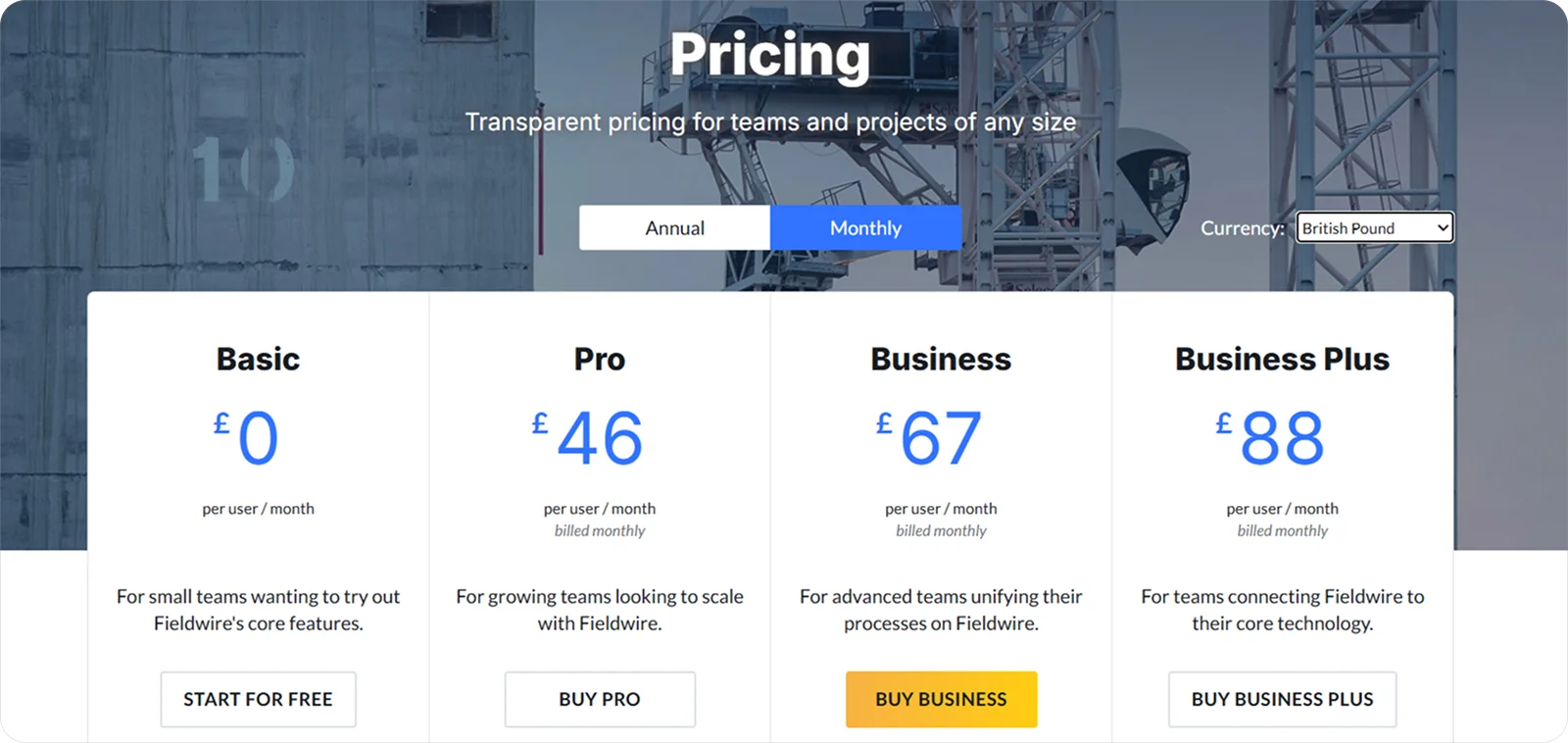
Fieldwire offers a free Basic plan for small teams, with paid per-user plans (Pro, Business, and Business Plus) starting from $46 per user per month. Higher tiers unlock custom forms, integrations, RFIs, submittals, and budget tools.
5. STACK: Best for estimating and preconstruction takeoffs

STACK is a cloud-based estimating and takeoff platform that helps subcontractors measure plans and prepare bids faster and with greater accuracy.
Its focus on quick, precise quantity takeoffs and cost visibility makes it especially useful for subcontractors who rely on accurate preconstruction estimates to win work.
STACK features
STACK gives subcontractors the key tools they need to move from plans to estimates without losing time, including:
Digital takeoffs: Measure quantities directly from uploaded drawings to speed up estimating and reduce manual errors.
Cost database integration: Apply up-to-date material and labour costs to takeoffs so bids are grounded in real economics.
Cloud access and sharing: Collaborate on takeoffs and share estimates with partners or clients instantly.
STACK pricing
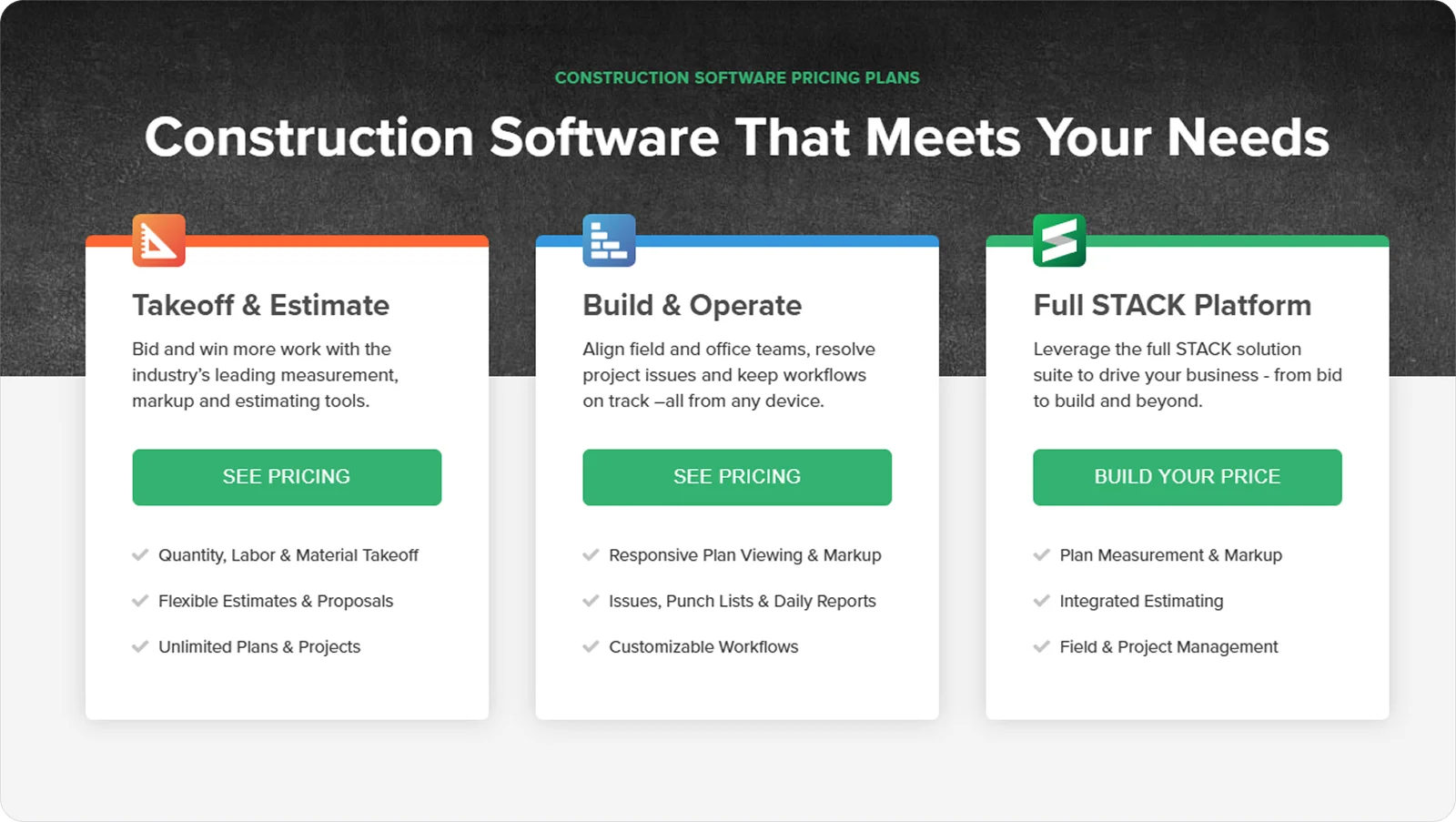
STACK offers three main plans: Takeoff & Estimate, Build & Operate, and the Full STACK Platform, with savings for annual billing. Its entry price is higher than most tools on this list, so it’s best value when estimating is a core part of your business.
6. Contractor Foreman: Best for growing subcontractors managing multiple workflows

Contractor Foreman is a construction management platform that covers a wide range of operational needs, from job tracking and scheduling to costs, time, and reporting.
It fits growing subcontractors well because it helps manage several parts of the business as teams, projects, and responsibilities expand.
Contractor Foreman features
Contractor Foreman aims to cover most subcontractor work core needs in one place, with features like:
Project and task control: Keep job details, schedules, and task lists organised so you can manage multiple active projects without losing oversight.
Cost tracking and estimating: Set budgets, track spend, and compare planned versus actual costs as work progresses.
Time and activity reporting: Record labour hours and site activity to support payroll, planning, and basic performance insight.
Contractor Foreman pricing
Contractor Foreman uses flat-rate tiered pricing, starting at $49 per month for the Basic plan (one user, billed annually) and rising to around $332 per month for the Unlimited plan. A 30-day free trial is available.

7. Jobber: Best for small subcontractors and service-based trades

Jobber is a business management tool built for small service-oriented subcontractors, such as maintenance, repair, and field service teams.
It earns its ‘Best for' designation by offering simple scheduling, client communication, and work order tools that fit fast-moving, customer-focused subcontracting work.
Jobber features
Jobber approaches subcontractor work with lightweight, practical tools, including:
Scheduling and dispatch: Set jobs and assign crews quickly to keep field work organised and responsive.
Client communication: Keep quotes, messages, and job updates in one place so customers stay informed without extra back-and-forth.
Work order tracking: Record work status, notes, and job details to support smoother handovers and fewer misunderstandings.
Jobber pricing
Jobber uses subscription pricing with plans that scale by features and team size.

8. Procore: Best for enterprise-scale coordination and GC collaboration

Procore is a comprehensive construction management platform used across large commercial projects to connect teams, documents, and workflows.
It’s well-suited for subcontractors working closely with general contractors, where structured processes, formal documentation, and shared systems are the norm.
Procore features
Procore supports subcontractors by helping them operate within complex, GC-led project environments through features like:
Central document and drawing control: Maintain versioned plans and project documents so your teams are always working from approved information.
RFI and submittal workflows: Manage formal communication and approvals required on enterprise projects, reducing delays and missed responses.
Change and cost awareness: Identify scope changes and related cost impacts to stay aligned with project updates.
Procore pricing
Procore uses a customised, subscription-based pricing model that varies based on company size, selected modules, and overall project scale.

9. Buildxact: Best for small builders and trade subcontractors getting started

Buildxact is construction estimating and project management software that helps builders and small trade teams move from plans to quotes and job tracking faster.
It’s well-suited for subcontractors at the beginning of their software journey because it simplifies core tasks such as digital takeoffs, estimating, and basic scheduling.
Buildxact features
Buildxact brings essential preconstruction and early project tools together, including:
Digital takeoffs and estimating: Speed up the measuring and pricing of materials and labour so bids and quotes can be prepared more quickly.
Cost tracking and budgeting: Link estimates to project budgets to help keep costs aligned with plans as work unfolds.
Job and schedule management: Turn estimates into jobs and organise basic task sequences and timelines with ease.
Buildxact pricing
Buildxact uses a subscription-based pricing model with multiple plan tiers that include training and support.

10. Knowify: Best for job costing and financial control

Knowify is construction business software that helps subcontractors track job costs, manage budgets, and connect financials from preconstruction to invoicing.
This focus on the financial aspects of subcontracting business provides greater clarity on costs and margins, supporting more accurate budgeting and stronger control over project finances.
Knowify features
Knowify’s focus on financial clarity and cost monitoring across jobs is visible in features like:
Job costing and budgeting: Break down costs by task or phase to see how actual spend compares to estimates.
Change order tracking: Record scope changes and their financial impact to help ensure variations are captured and billed correctly.
Integrated invoicing and billing: Link time, costs, and work outcomes to invoices, helping you get paid accurately.
Knowify pricing
Knowify uses subscription pricing, with plans that scale based on the features and support subcontractors need as their financial processes grow more sophisticated.

How to choose the best construction software for subcontractors
No platform can be universally declared the best construction software for every subcontractor. After all, trades, project types, team sizes, and ways of working vary widely, and what works well for one business may slow down another.
The aim is to find software that fits how you operate today, while still supporting where you want your business to go next.
Here are a few practical steps to help you do just that:
Start with your real workflows: Pay attention to how work actually moves between site and office, then prioritise software that supports that process without forcing major changes.
Test ease of use on site: Make sure operatives can use it confidently on mobile, with minimal training and no reliance on a constant signal.
Check integration and fit: Confirm it works alongside your accounting, design, or document tools to avoid duplicate entries and broken processes.
Assess value, not just cost: Balance pricing against the features you’ll genuinely use day to day, not the longest feature list.
Confirm support and scalability: Choose a platform that offers reliable assistance and can grow with your team as projects and workloads change.
What is the best construction software for your subcontractor business?
The table below compares the 10 best construction software platforms for subcontractors from this article, focusing on the areas that matter most when choosing software for real-world construction work.

All ratings are relative to the scope of this analysis, meaning they measure how well each product performs in the specific context being evaluated, not in general.
Each score combines feature analysis, aggregated user feedback from major review platforms, and comparative AI-assisted evaluation to ensure internal consistency and eliminate outliers.
Ratings are synthesised from recurring performance patterns rather than raw averages, and minor decimal differences indicate subtle variations in relative strength within the same performance tier.
Getting started with Onetrace
Subcontractors in construction have plenty of software options to choose from, including affordable platforms like Contractor Foreman, straightforward tools such as Jobber, and strong field-focused solutions like Fieldwire.
While these tools work well in specific areas, software designed for generic project management or general contractors often misses the mark for subcontractors.
Subcontractors benefit most from systems built around their workflows, pressures, and margins from the start.
That’s why Onetrace stands out, offering a more balanced mix of usability, reliability, and subcontractor focus than most alternatives.
Schedule a personalised Onetrace demo to explore how this tool can support your subcontracting projects and teams day to day.
Marketing Team
@Onetrace
The Onetrace marketing team is passionate about sharing insights, ideas, and innovations that help construction businesses stay connected, compliant, and efficient. Combining industry expertise with a love for clear communication, we aim to deliver content that empowers professionals to work smarter and safer.