7 most common construction document management challenges

By
Marketing Team
@Onetrace
Construction document management challenges refer to the difficulties construction teams face in creating, organising, sharing, and keeping track of project documents.
For the most part, these challenges stem from poor document management, which is particularly common in construction due to slower digital adoption and continued reliance on paper-based processes.
Data from a UK-based expense platform shows that construction professionals submitted 11,503 paper receipts through its system in 2025, compared to just 3,977 digital ones, highlighting just how much frontline activity still depends on paper.
The impact of this dependency is visible in day-to-day work, with one-fifth of UK construction workers feeling stressed by the amount of paperwork they need to handle.
To help you avoid these frustrating experiences, this guide breaks down the seven most common construction document management challenges and offers practical ways to deal with them.
Key takeaways
Construction document management keeps projects running smoothly
When documents are accurate, up to date, and easy to access, teams waste less time searching, avoid mistakes, and stay aligned across the site and office.Most problems come from scattered and manual processes
Documents spread across emails, folders, and paper systems create confusion, slow work down, and make it harder to trust the information being used.Poor document control leads to a real financial impact
Working from outdated or unclear documents often results in rework, which costs the UK construction industry billions each year and delays project delivery.Structure and access matter just as much as storage
It’s not enough to store documents in one place. Teams need clear organisation, version control, mobile access, and secure sharing.A well-implemented digital system solves most of these challenges
Platforms like Onetrace bring documents, teams, and site work into one place, helping you stay organised, reduce risk, and keep projects on track.
What is construction document management?
Construction document management is the system used to keep all project information accurate, up to date, and easy to access across the lifecycle of a build.
When it’s done well, it takes a lot of pressure off day-to-day work, as it helps teams:
Find information quickly without chasing emails or messages
Work with confidence, knowing they’re using the latest version
Keep everyone aligned across the site and the office
Meet compliance requirements without last-minute scrambles
Avoid costly mistakes caused by missing or unclear information
Close out projects smoothly with complete, well-structured records
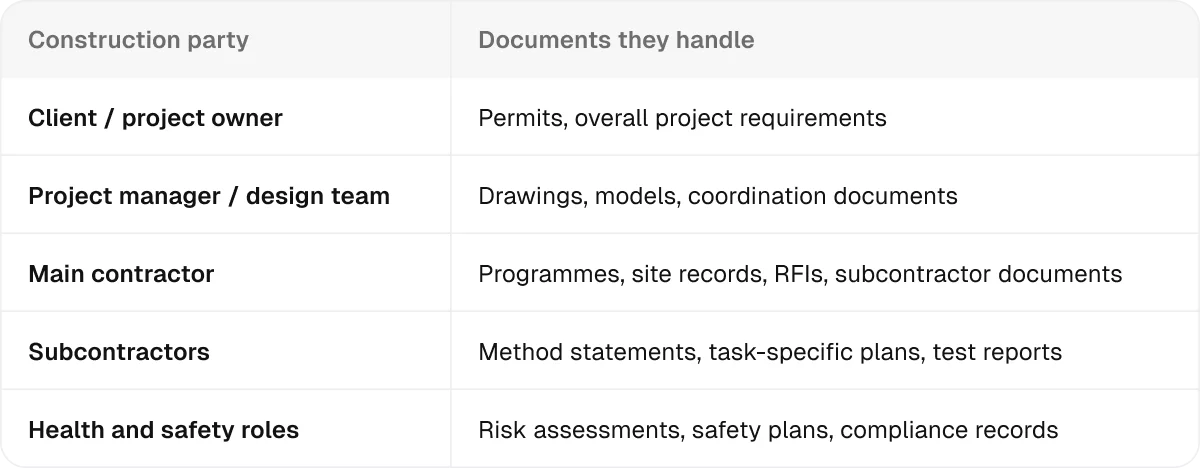
Multiple roles contribute to construction documentation throughout a project, each responsible for different parts of the overall picture:
7 construction document management challenges: What they are and how to solve them
Most document management problems in construction come down to the same root issue: information is handled manually, spread across tools, or not kept in sync across different roles.
That’s why the most effective way to deal with construction document management challenges is to use a digital system for managing project documents.
So, the solution to all seven challenges listed below is built around a specific capability that such systems provide.
1. Construction teams can’t find the documents they need
Across industries, 48% of employees struggle to find documents quickly, and construction is no exception.
On site, documents are often spread across emails, shared drives, paper folders, and personal devices. Since there’s no single place to look in, teams waste time chasing files or asking colleagues, slowing down the execution of the project.
How to solve it
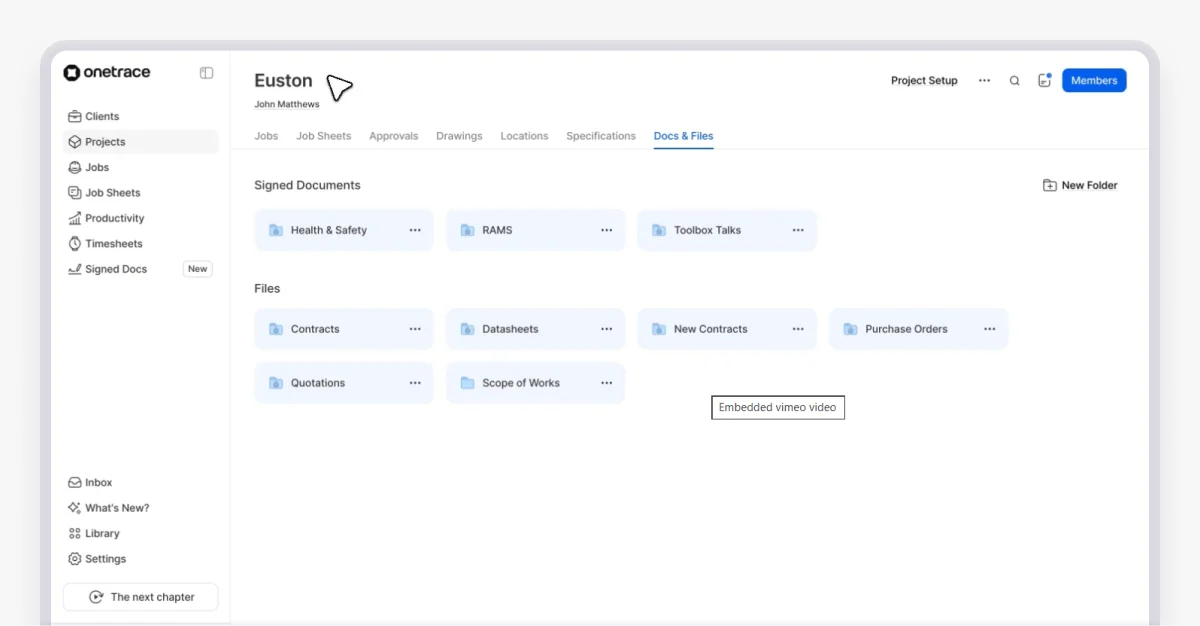
Use a digital document management system like Onetrace to keep everything in one place.
This way, you get a central repository for key files, including:
Project documents (drawings, floor plans, elevations)
Compliance records (fire safety certificates, risk assessments)
Technical information (equipment specifications, installation manuals, test results)
Product data (material details and manufacturer requirements)
Work instructions (specifications and approved installation solutions)
2. Documents aren’t organised in a clear or consistent way
Storing all your construction documents in one place isn’t enough on its own. Without a well-defined structure, that central system quickly becomes just another messy folder.
Documents end up named differently, filed in the wrong place, or duplicated across folders.
Inconsistent naming conventions are particularly damaging, as 37% of employees say these make documents harder to manage and trust.
How to solve it
A digital system gives you the tools to organise documents properly. But this organisation will only work if you apply pre-defined rules:
Set consistent naming conventions (e.g., Project–Location–Document type–Date).
Use a logical folder structure (e.g., by project, then by phase or trade).
Add tags or attributes to standardise data.
Review and clean up documents regularly.
These steps keep your system usable, not just centralised.
3. It’s unclear which version of a document is the latest
Design changes, evolving site conditions, compliance updates, and ongoing coordination between trades all lead to new versions of construction documents.
The challenge lies in what happens next.
When teams aren’t sure which version is correct, they either stop to double-check—slowing work down—or mistakenly move ahead using the wrong information.
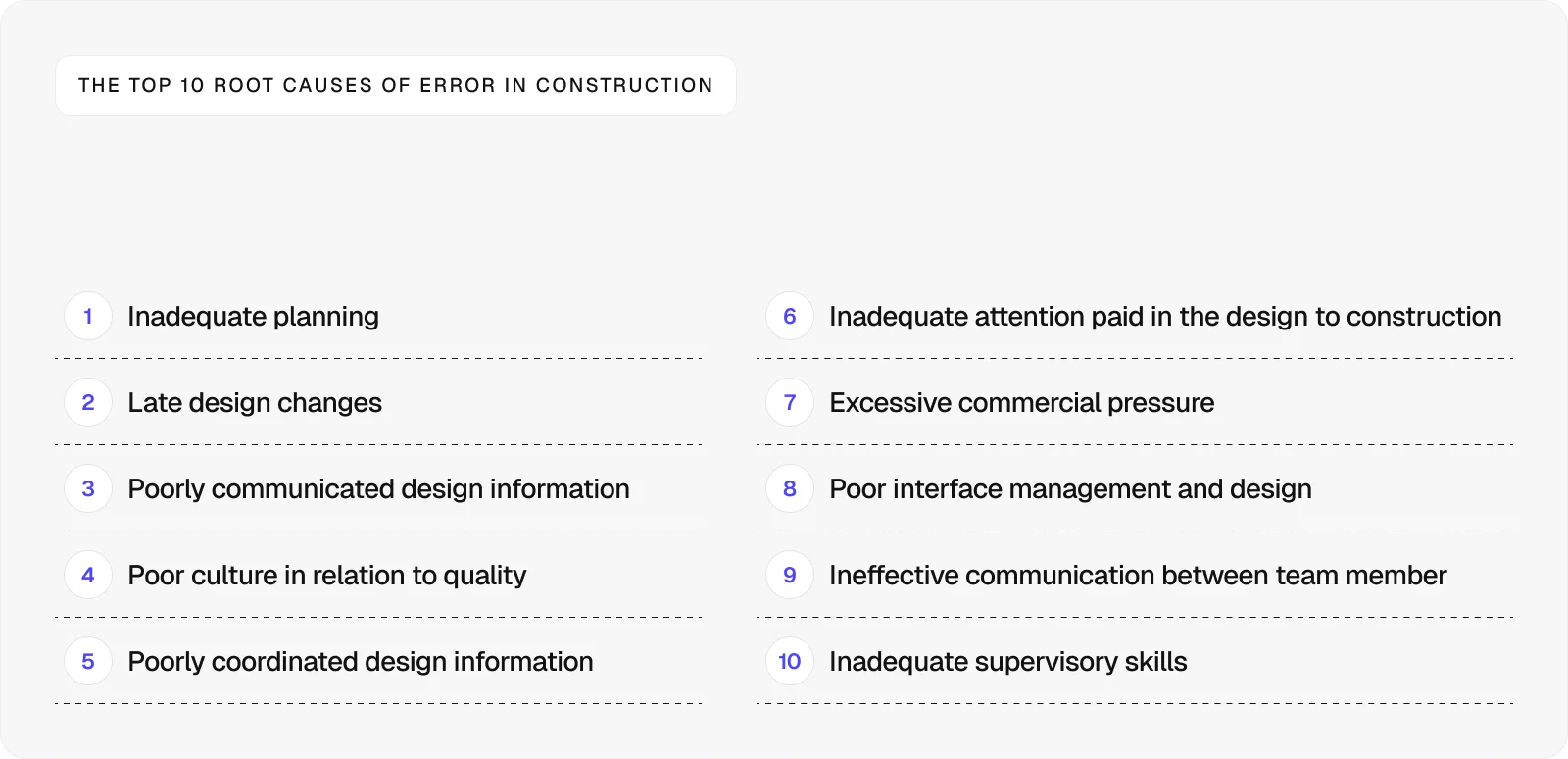
When work gets done based on outdated information, it typically has to be redone.
This rework is a major cost driver in construction, estimated at around £5 billion each year in the UK alone. When indirect and unmeasured costs are included, the total impact rises to 10–25% of project value, with the annual cost of errors estimated at around seven times the industry’s total profit.
How to solve it
A construction document management platform gives you a single source of truth, where each document has one current version.
To ensure it stays that way, you should:
Avoid duplicate files by updating one document, not creating new ones
Use version control, so every change is tracked automatically
Keep a full version history, so updates are visible and traceable
Notify teams of changes, so everyone is working from the latest version
4. Teams can’t access documents when they’re on site
As many as 81% of engineering and construction firms are adopting mobile platforms to support their work. This makes sense since, for the most part, construction doesn’t happen at a desk.
When teams lack mobile access to project documentation, they have to call the office and wait for documents to be sent, or make decisions without the full picture. This slows down progress, creates gaps in communication, and increases the risk of mistakes.
How to solve it
The solution here is simple: Invest in a platform with a strong mobile experience built for site teams.
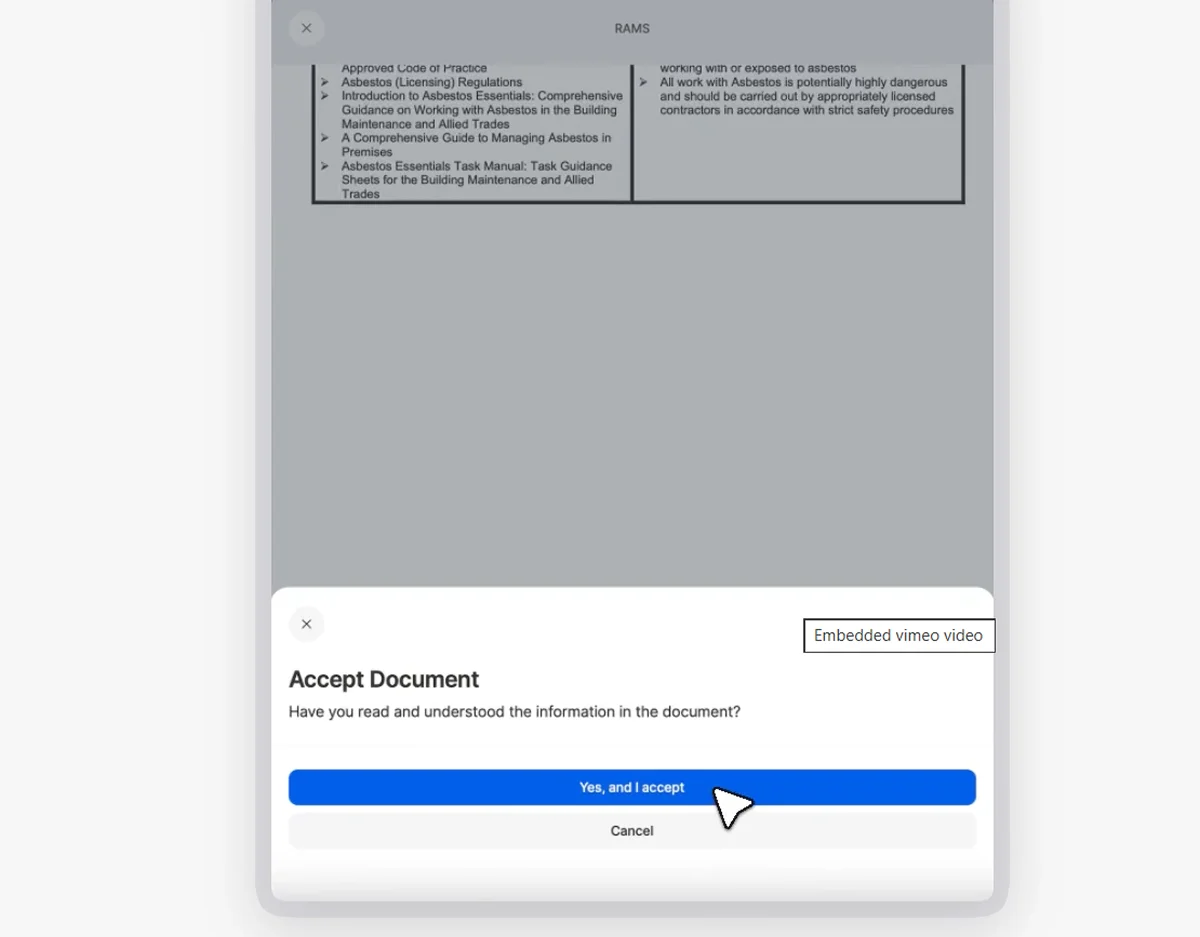
When using Onetrace’s iOS or Android app, you can:
Access key project information on site (e.g., drawings, site details, and daily tasks)
Work without signal and sync information when back online
Capture and upload photographic evidence in real time
Mark up drawings to show where work has been completed
Review and sign documents (e.g., RAMS, Toolbox Talks, and safety documents)
5. Project documents are hard to share outside the organisation
Construction projects rely on constant coordination between contractors, subcontractors, clients, and regulators. This requires documents to move between different parties quickly, but also in a controlled way.
In practice, teams often struggle to tick off both of these boxes.
Files are sent over email or shared through tools like cloud drives, with little control over who sees what or whether the right version is being used, which can lead to delays, confusion, and a lack of accountability.
How to solve it
Use a system that lets you share documents in a controlled and traceable way.
This means sharing documents securely without relying on email or file transfers, while granting limited access to external parties of your choosing.
6. Access to documents is either too restricted or too open
Managing access to project information is a constant balancing act.
Lock things down too tightly, and teams can’t get the information they need to do their job. Leave access too open, and sensitive data—like contracts, plans, or client details—can be exposed.
This challenge often leads to workarounds.
Teams share files informally to get things done, which creates even more risk and reduces control over who has access to what.
How to solve it
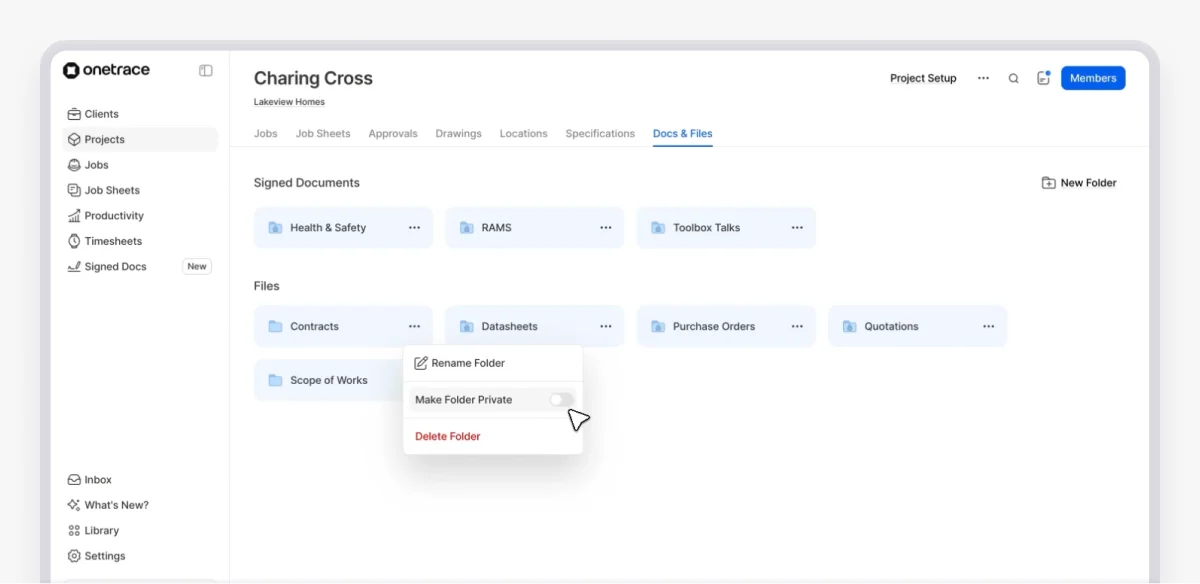
You need a system that lets you define access clearly and consistently based on roles and responsibilities.
With Onetrace, you can set role-based access so people only see what they need. This approach allows you to restrict access to sensitive documents, such as audit results or client data, to authorised users.
7. Project documents are disconnected from the work on site
On many construction projects, documents and site work are treated as separate parts.
Drawings, specifications, and certificates are stored in folders or systems, while site teams carry out work using printed copies, emails, or memory.
This approach slows decisions down and makes it easier to miss important details, especially on busy sites.
How to solve it
You need a system that links documents directly to the work being carried out.
In practice, this includes:
Keeping certificates, photos, and reports tied to individual activities
Linking drawings and specifications to the exact area or task on site
Opening the right document directly from the job you’re working on
Overcome construction document management challenges with Onetrace
A reliable digital system is the foundation of good document management in construction. Without one, information stays scattered, hard to control, and difficult to trust.
But choosing the right software is only part of it.
To get real value, the software needs to be properly set up, and your team needs to know how to use it.
The easiest way to make that happen is to choose a platform that’s intuitive, easy to navigate, and built for how site teams actually work, like Onetrace.
This easy-to-use construction site management software places a strong emphasis on proper document management, enabling you to overcome all the common challenges.
To see how this works in practice, book a personalised demo with the Onetrace team and start managing your construction documents with more clarity and control.
FAQ
What are some common documentation challenges?
The most common challenges include the inability to find documents, inconsistent organisation, unclear document versions, limited access on site, and difficulty sharing information with external partners.
What are the four C’s of documentation?
The four C’s of documentation are ‘Capture’, ‘Categorise’, ‘Control’, and ‘Convey’. In practice, this means collecting all relevant information, organising it in a well-defined structure, maintaining accuracy and version control, and making sure it’s shared with the right people at the right time.
What are the challenges of construction management?
Common challenges of construction management include poor communication, delays, cost overruns, and coordination between multiple teams. Document management plays a key role in all of these, as unclear or missing information often leads to mistakes and rework.
Marketing Team
@Onetrace
The Onetrace marketing team is passionate about sharing insights, ideas, and innovations that help construction businesses stay connected, compliant, and efficient. Combining industry expertise with a love for clear communication, we aim to deliver content that empowers professionals to work smarter and safer.