What is construction management software? [Complete Guide]

By
Marketing Team
@Onetrace
Construction management software is a digital tool that helps teams plan, track, and manage construction projects in one place, keeping information, tasks, and communication aligned across the job.
The need for this kind of software is growing quickly, driven by the increasing complexity of construction projects, tighter margins, and the inherent coordination challenges of working across multiple teams and sites.
This need is best seen in the size of the global construction software sector. It is expected to grow at around 12% per year and reach £23.35 billion by 2032, with Europe accounting for roughly a quarter of that market.
If you’re looking to stay competitive as the industry moves towards more efficient workflows, it’s worth understanding what construction management software is, which features matter, and how to choose the right fit.
Key takeaways
Construction management software brings everything into one place
It centralises documents, communication, and workflows so teams can manage projects more efficiently and work from the same up-to-date information.It solves real, costly problems in construction
From admin overload to rework and delays, the software reduces inefficiencies that directly impact time, cost, and project outcomes.The right system depends on how well it fits your work
Key characteristics like ease of use, mobile access, integrations, and flexibility matter more than feature lists alone, because they determine whether teams actually adopt and use the tool.Strong features support day-to-day execution
Core capabilities like document management, scheduling, cost tracking, and real-time communication help teams stay aligned, avoid errors, and keep projects on track.Choosing the right solution comes down to practical fit and support
The best results come from software that matches your workflows and is backed by proper onboarding and support. For subcontractors, solutions like Onetrace stand out by combining the right features, ease of use, and real-world fit to help teams stay compliant, productive, and in control.
What is construction management software? The basics
Construction management software is a central system that helps construction teams manage the entire project—from planning and scheduling to delivery—by bringing documentation,, operations, communication, and reporting into one place.
This software goes beyond basic project management tools.
It’s built for how construction actually works, connecting office and site teams, aligning work with project information, and giving everyone access to the latest information in real time.
Who needs construction management software?
Anyone involved in planning, delivering, or overseeing a construction project needs construction management software. This includes teams on site, people in the office, and stakeholders who need a reliable view of progress, costs, and issues.
The table below breaks down how different stakeholders typically use construction management software:
Stakeholder | Common use cases |
Owners / clients | Monitoring progress, reviewing reports, tracking budgets, maintaining oversight |
Architects and engineers | Sharing designs, reviewing plans, managing documents, coordinating changes |
General contractors | Overseeing project delivery, managing subcontractors, tracking timelines, maintaining project control |
Project managers | Planning schedules, tracking progress, managing budgets, coordinating teams |
Subcontractors | Reviewing drawings, tracking operatives, updating progress, coordinating work on site |
Site teams | Completing checklists, reporting issues, logging daily work, sharing updates from the field |
Quality and safety teams | Conducting inspections, recording issues, tracking compliance, managing reports |
Why use construction management software? 8 practical benefits
Construction management software offers tangible gains that make investing in this tool well worth it.
Here are eight of them:
1. It reduces time spent on admin and manual work
Construction teams still spend a significant amount of time on admin, searching for information, updating spreadsheets, and handling paperwork.
Construction management software reduces this time by centralising documents and automating admin tasks such as generating reports, updating records, and sharing information.
2. It improves productivity across teams
Productivity in construction grew by just 0.4% per year from 2000 to 2022, far behind the 2% annual growth rate for the wider economy, highlighting long-standing inefficiencies.
Many of these inefficiencies come from poor coordination, fragmented information, and time spent on low-value tasks.
By centralising project data and reducing manual work, construction management software helps teams spend more time on productive tasks. In some cases, it can save up to one hour per worker per day, making a noticeable difference at the project level.
3. It reduces rework and costly mistakes
Rework is a major cost driver in construction.
While direct errors account for around 5% of project costs, the total cost of errors can rise to 10–25% when indirect impacts are included.
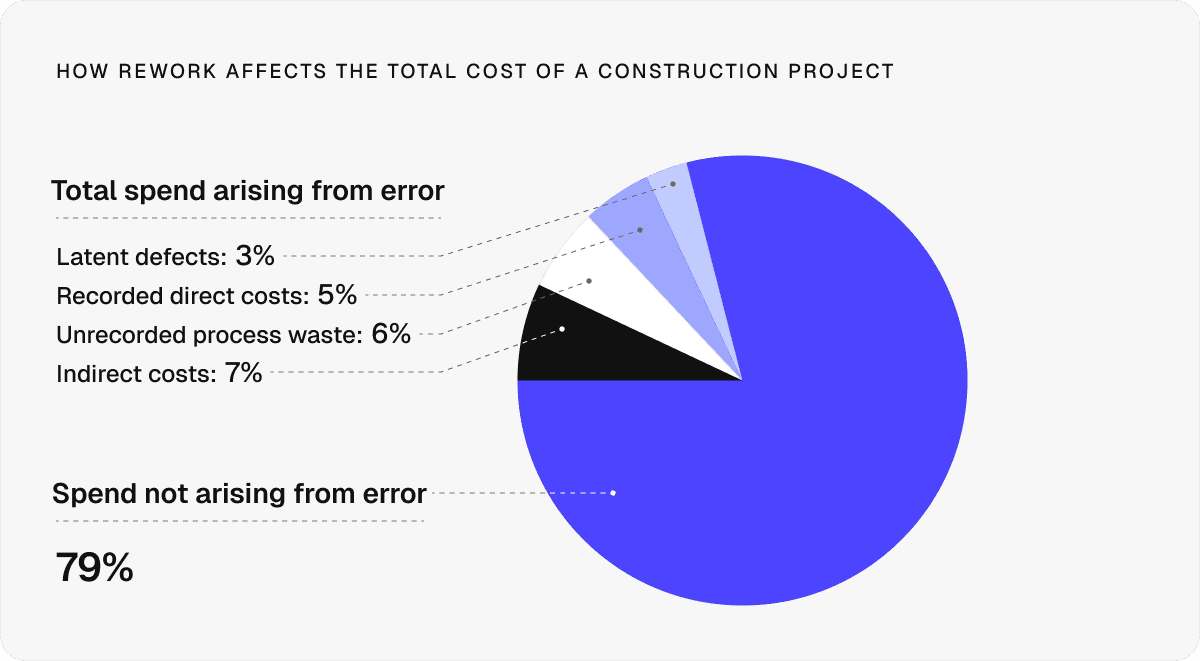
Since the need for rework typically stems from miscommunication and outdated information, reducing these gaps is critical.
Construction management software helps do just that by keeping teams aligned, with real-time updates and consistent processes that catch issues early and prevent repeat work.
4. It improves communication between the site and the office
Communication gaps between the site and the office are a common source of delays and errors in construction, as information often gets lost across emails, calls, and paper records.
Construction management software creates a shared system. Updates, documents, and issues are visible to everyone in real time, reducing back-and-forth, keeping everyone on the same page, and making it easier to act quickly when something changes.
5. It helps teams make faster, better decisions
When data is spread across different systems, it’s harder to get a reliable view of what’s happening on the site, which, in turn, slows down decision-making.
By bringing key data into one place and providing instant, real-time access to it, construction management software gives teams the clarity they need to act quickly and with confidence.
6. It standardises processes across projects
The way work is done often varies by team and site, which creates inconsistency, increases the risk of errors, and makes it harder to scale operations.
Construction management software helps by introducing consistent workflows, templates, and reporting structures. As a result, it becomes easier to repeat what works, onboard new teams, and maintain control across multiple projects.
7. It reduces risk and improves compliance
Construction projects involve complex regulations, safety requirements, and contractual risks.
Managing these risks and avoiding the disputes and compliance issues that often follow requires accurate, consistent information.
Construction management software delivers this information by standardising processes and keeping records organised.
With better visibility and traceability, teams can also find the necessary information faster and, in turn, manage audits, disputes, and day-to-day issues more efficiently.
8. It protects margins by reducing waste and delays
Construction costs in Europe have risen by 36% between 2015 and 2023, putting pressure on already tight margins, which are further impacted by delays, rework, and inefficiencies.
Construction management software helps protect margins by improving planning, reducing waste, and keeping projects on track, in terms of both schedule and budget.
What to look for in construction management software: 8 key characteristics
The right construction management software should, above all, be built to support the realities of construction work.
However, with the rapid growth of construction management software, not every available solution will deliver the same level of practical value.
The characteristics below will help you identify what makes a real difference in practice.
Characteristic | What it looks like in practice | Why it’s important |
1. Cloud-based access | The software runs in the cloud, so teams can access up-to-date information from any location and on any device. | It ensures everyone is working from the same information. |
2. Ease of use | The interface is simple and intuitive, allowing both office and site teams to use it without extensive training. | If the system is hard to use, teams won’t adopt it, limiting its value and slowing down workflows. |
3. Mobile-friendliness | Teams can access, update, and share information directly from the site using phones or tablets. | This keeps work moving on site and removes the need to return to the office to complete tasks. |
4. Flexible workflows | The system allows you to adjust templates, processes, and workflows to match different projects. | Construction projects vary, so the software needs to adapt without forcing teams into rigid processes. |
5. Strong integrations | The software integrates with other tools, enabling data to flow between systems without manual input. | It prevents duplicated work and ensures information stays consistent across platforms. |
6. Secure data management | The system includes user permissions and protects sensitive project data from unauthorised access. | With 43% of UK businesses experiencing cyber incidents, strong security is essential to protect operations and data.* |
7. Built-in support and training | The provider offers onboarding, guidance, and ongoing support to help teams use the system effectively. | Good support helps teams adopt the system faster and get more value from it over time. |
8. Relevant core functionality | The system includes essential tools like document management, task tracking, and real-time communication. | Without the right core features, the software won’t support day-to-day work or deliver meaningful improvements. |
*Source: UK government research on the economic impact of cyberattacks, based on data from the National Cyber Security Centre (NCSC)
8 key features every construction management software should have
A relevant feature set is a key part of good construction management software. But what does that actually include in practice?
Here are the eight essential features every construction management system should have.
1. Centralised document management
All project documents, such as drawings, risk assessments, and reports, are stored in one place with version control. This gives teams instant access to the latest information and prevents confusion and errors caused by working with outdated files.
2. Real-time communication and collaboration
Teams can share updates, messages, and files in one system instead of across emails and calls.
This feature matters because as many as 59% of construction owners report frequent communication breakdowns that lead to delays and rework.
3. Project planning and scheduling
Projects are planned with clear timelines, task dependencies, and resource allocation. Teams can track progress and adjust schedules in real time.
These functionalities help prevent delays by identifying issues early and ensuring everyone follows the same plan.
4. Cost control and budget tracking
Budgets, costs, and change orders are tracked in one system, making it easier to spot overruns in time. This is critical in an industry where UK projects have seen £19 billion in cost overruns.
5. Quality and safety management
Teams can run inspections, track issues, and manage quality and safety processes using standardised checklists and reports.
This feature is essential in the UK, where up to 40% of projects report quality issues.
6. Resource and asset management
Labour, equipment, and materials are tracked and allocated efficiently. Teams can see availability, assign resources, and adjust plans as needed.
Productive resource management matters in the UK, given that labour is scarce and materials are often wasted, which is partly reflected in the fact that construction accounts for around 62% of the country’s total waste.

7. Progress and asset tracking
Teams can track work progress and asset status in real time, often directly from the site.
Thanks to this feature, they can respond quickly to changes, keeping work on schedule and reducing delays.
8. Data and reporting insights
Project data is collected and turned into clear reports and dashboards.
This feature allows teams to monitor performance, identify trends, and make informed decisions throughout the project execution.
It moves teams from reacting to problems to managing projects more proactively.
How to choose the right construction management software: 8 practical steps
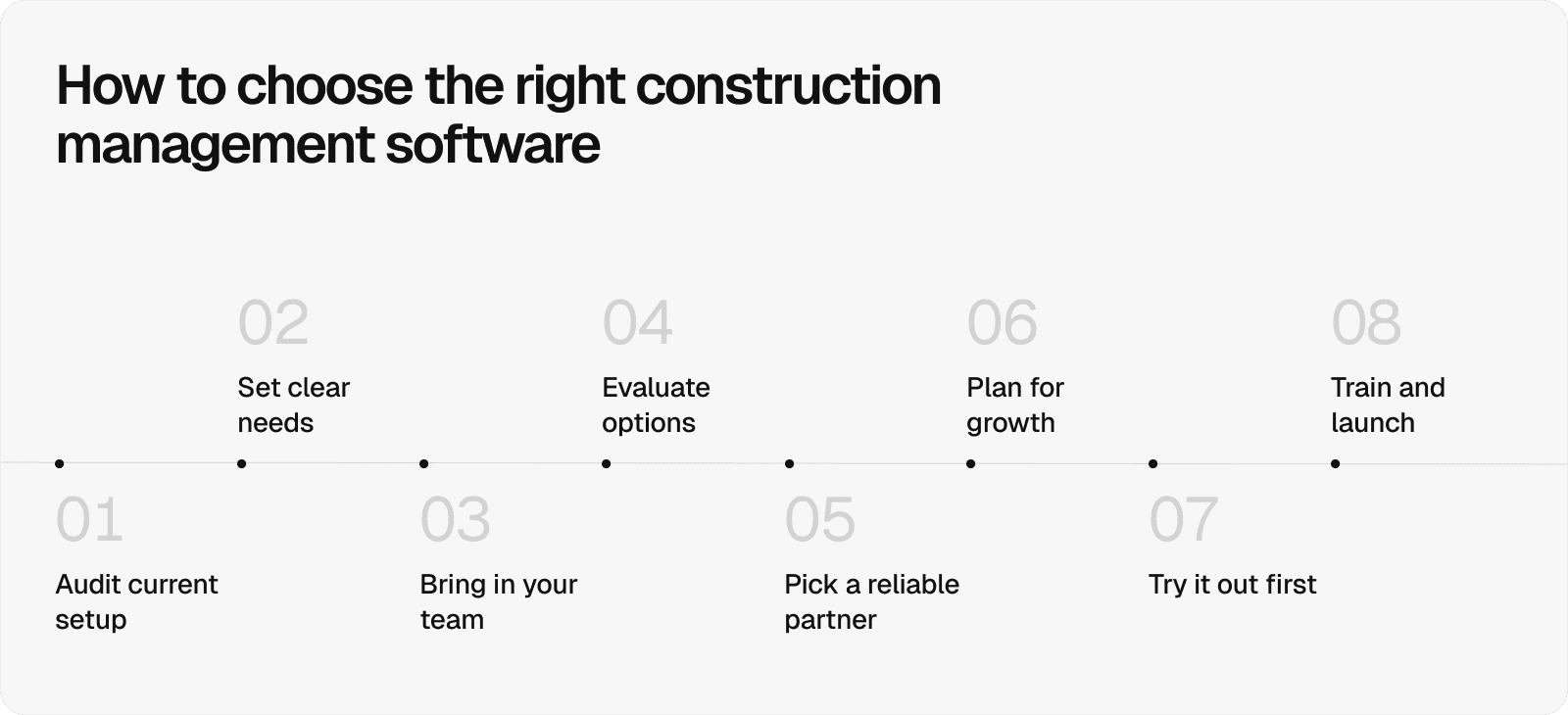
Once you know which characteristics and features to look for, the next step is choosing a system that fits your work in practice.
The eight steps below will help you assess your options, involve the right people, and make a decision that delivers value over time.
Assess your current tools and gaps: Review the tools and processes you already use to identify what’s working, what’s missing, and where manual work or duplication is slowing you down.
Define your needs and priorities: Be clear on your project size, team structure, and key challenges so you can focus on solutions that address your day-to-day problems.
Involve your team early: Include the people who will use the system in the decision-making process to ensure it fits how they work.
Compare options carefully: Look beyond surface features by reviewing usability, pricing, and real user feedback before making a decision.
Choose a partner, not just a tool: Select a provider that offers support, onboarding, and guidance to help your team get up and running successfully.
Check scalability: Make sure the system can grow with your business.
Test before committing: Use demos, trials, or pilot projects to see how the software performs under real working conditions.
Plan implementation and training: Ensure your team is properly trained and supported so the system is used effectively from the start.
Construction management software that works in practice: Why Onetrace stands out
Even with all the information outlined in this guide, choosing the right construction management software can be difficult.
So, rather than sorting through dozens of options, it helps to look at a solution that already covers the essentials and supports how work actually gets done.
That solution is Onetrace, purpose-built software for subcontractors, which is designed to give you full visibility across your projects, streamline compliance, and provide transparent proof of work.
It’s built around the realities of site work, helping you stay in control, work efficiently, and deliver consistent results, with features like:
Centralised document management: Store drawings, specifications, materials, and solutions in one place, with full visibility and traceability.
Digital signatures and compliance tracking: Request, track, and manage signatures for RAMS and Toolbox Talks in real time, with clear audit trails.
Time tracking and workforce visibility: Monitor attendance, working hours, and site activity with live data and GPS tracking.
Planning and scheduling tools: Assign teams, manage workloads, and adjust schedules quickly using a simple, visual planner.
Quality assurance and approvals: Run multi-stage approval workflows that catch issues early and reduce late-stage rework.
Material tracking and cost calculation: Track materials used on site and calculate project costs as work progresses.
Project tracking through drawings: Mark up drawings, organise work by zones or levels, and track progress directly on plans.
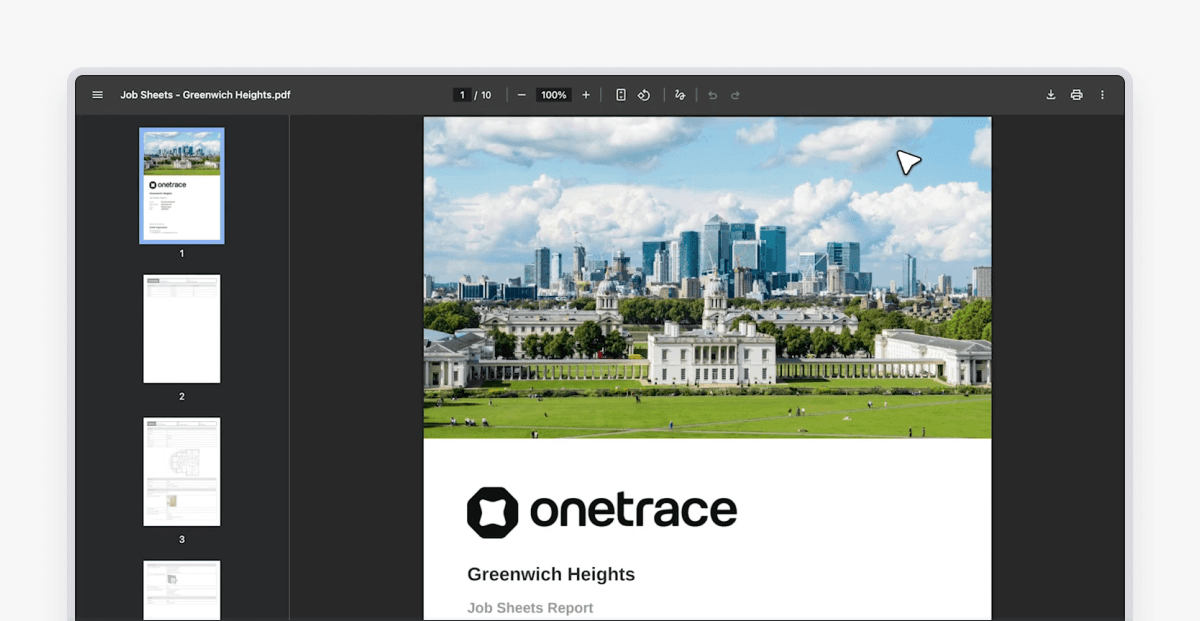
Reporting and proof of work: Generate structured, branded reports that support handovers, reduce disputes, and speed up payments.
Beyond features, Onetrace is designed to meet the key characteristics covered earlier.
It’s easy to use, even for teams with limited technical experience, and it’s built for mobile use on site, including offline access when connectivity is limited.
It integrates workflows into one system, keeps data secure, and scales from smaller jobs to large, multi-site projects.
Onetrace is also backed by a support team that helps you get set up, adapt the system to your workflows, and keep improving your use of it over time.
Book a personalised demo with the Onetrace team to see what this looks like in practice and start experiencing the many benefits of construction management software.
FAQ
What does construction management software do?
It helps teams plan, track, and manage construction projects by consolidating documents, communication, and workflows into a single system, so everyone works from the same information.
What is the most used construction management software?
There isn’t a single most-used option. Larger contractors often use tools like Procore, while subcontractors tend to use more specialised solutions like Onetrace, built around site workflows and compliance.
Marketing Team
@Onetrace
The Onetrace marketing team is passionate about sharing insights, ideas, and innovations that help construction businesses stay connected, compliant, and efficient. Combining industry expertise with a love for clear communication, we aim to deliver content that empowers professionals to work smarter and safer.