How to create a construction daily report [Step-by-step guide]

By
Marketing Team
@Onetrace
A construction daily report is a structured record of what happens on site each day, capturing key details like work completed, resources used, and delays encountered.
Regular reporting matters in construction, where up to 98% of projects experience cost overruns or delays.
Since construction issues are often linked to poor communication and gaps in information, it’s crucial to keep transparent, up-to-date records that give everyone a shared view of day-to-day site activity.
Plus, construction reports are part of the wider project documentation, which makes them essential for resolving disputes if they arise later.
With that in mind, this guide shows you how to build a well-structured construction daily report step by step, so you can get it right from the start and keep your approach consistent.
Key takeaways
A daily report is your single source of truth on site
It captures who did what, where, and with what resources. This makes it the backbone of tracking progress and keeping everyone aligned.Good reporting directly impacts project outcomes
Accurate daily records help keep work on schedule, improve communication, and support better planning of labour, materials, and equipment.Details matter more than summaries
Vague updates don’t hold up. Specific entries on work completed, quantities, locations, and causes of delays are what make reports useful and defensible.Daily reports protect you when things go wrong
Time-stamped records provide evidence for disputes, claims, and compliance checks, helping you explain delays, prove work done, and avoid costly disagreements.Digital tools turn reporting into a by-product of the work
With Onetrace, site data is captured as work happens and turned into structured reports automatically. This removes manual effort, reduces errors, and gives you ready-to-share reports for handovers, audits, and payments.
What is a construction daily report?
A construction daily report is a formal site record that captures all key activities, conditions, and events over the course of a working day.
It provides a complete account of what happened on site, including:
Who was present
What work was carried out
What resources were used
What (if any) issues, delays, or incidents occurred
Why is a construction daily report important?
A construction daily report is important because it gives a consistent, trustworthy account of what takes place on site each day, supporting the job in several key ways:
Keeping work on schedule: Accurate records of progress and delays help teams pick up where they left off and plan the next day properly.
Improving communication: Daily reports give everyone a shared view of site activity, reducing misunderstandings.
Tracking progress accurately: Regular updates provide a reliable view of progress against the plan.
Facilitating better resource use: Recording labour, materials, and equipment helps spot gaps, avoid waste, and keep work moving.
Strengthening accountability: A written record of who did what and when makes responsibilities straightforward and minimises disputes on site.
Improving safety management: Logging incidents, hazards, and site conditions helps teams address risks early and maintain safer working conditions.
Providing evidence for disputes and claims: Daily reports form part of the project record, giving you solid, time-stamped evidence if issues or claims arise later.
Demonstrating compliance for audits: Accurate records help show that work is being carried out in line with regulations and contract requirements.
Who makes the construction daily report?
The site supervisor or foreman makes the construction daily report based on day-to-day site activity. However, they don’t do so in isolation, as the report relies on input from several roles across the project.
The table below gives an overview of the key contributors to a construction daily report and their part in the process:
Stakeholder | Contribution | Importance |
Project manager | Reviews the report, approves content, and adds overall project context | Ensures alignment with programme and contract |
Construction manager | Oversees reporting quality and checks consistency | Maintains reporting standards across the project |
General contractor | Reports work completed, resources used, and site issues encountered | Represents overall delivery and site performance |
Subcontractors | Submit trade-specific work, labour, and materials | Captures detail across all scopes of work |
Health and safety (HSE) officer | Logs safety checks, incidents, and compliance records | Ensures accurate safety reporting and compliance |
To get full value from daily reports, input needs to come from all relevant stakeholders.
Missing details—especially from subcontractors or safety roles—can lead to incomplete records, making it harder to verify work, track delays, or support claims later.
Pro tip:
Train teams on what to record, how to record it, and why doing so matters before the work starts. When best practices are built into daily routines, the quality and reliability of the information improve.
How to build a construction daily report: 10 key steps
The exact steps for building a construction daily report can vary depending on the project, the contract requirements, and the way your team operates on site.
Still, the core principles stay the same.
Following these 10 steps will help you create a well-organised, consistent report that captures the right information and holds up as a reliable record in case of any issues.
1. Log project and report details to establish context
Start each report by recording the core details.
This information sets a clear reference point and ensures the report can be identified, tracked, and used in the appropriate context.
Include:
Project name and number
Site location (specific area if needed)
Client, contractor, and subcontractors
Report date and unique report number
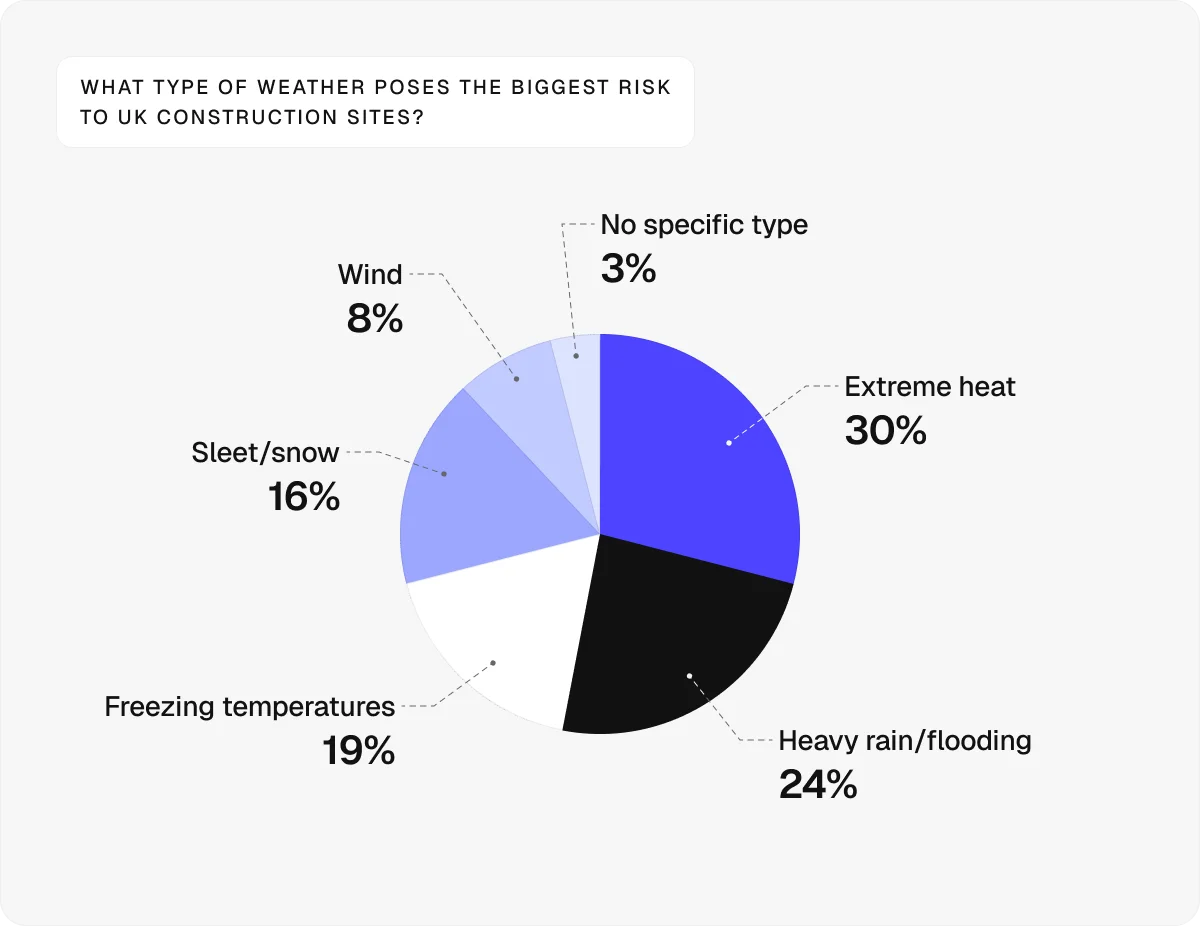
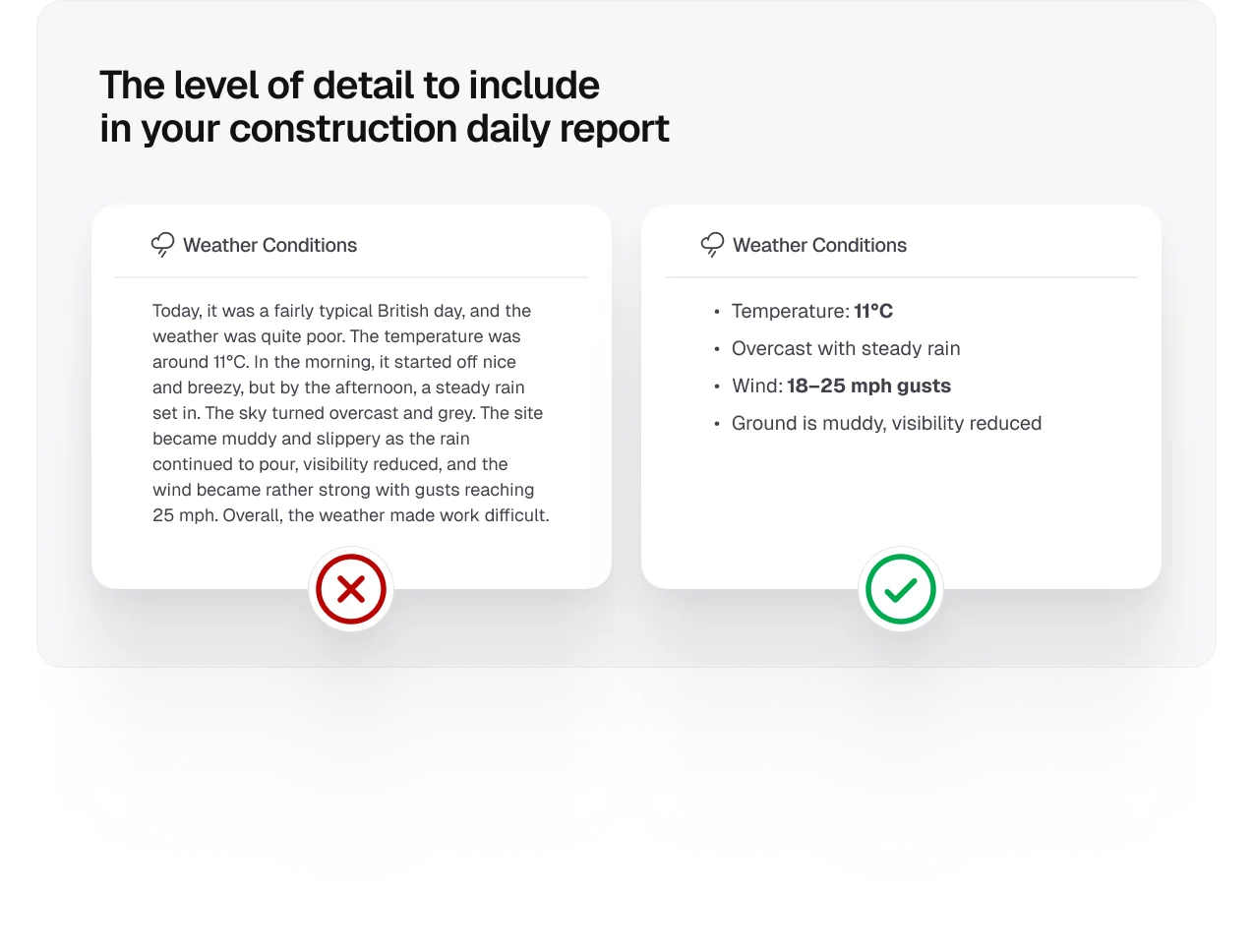
The introductory section should also include the weather conditions on that particular day.
Since the weather directly affects productivity, safety, and the sequencing of work, recording it properly provides a clear basis for assessing its impact on work and supporting any weather-related claims later.
2. Record workforce attendance to track who was on site
A construction daily report must contain the complete record of who was on site each day to show how labour was allocated and whether the right resources were in place to execute the work.
This section should cover:
Total number of workers on site
Hours worked or timesheets
Breakdown by trade (e.g., electricians and plumbers)
Key personnel (e.g., site manager and HSE officer)
Site visitors (e.g., consultants, inspectors, and vendors)
Accurate attendance records support productivity tracking and resource planning, while providing a traceable account of site presence if it’s ever questioned.
3. Document plant, equipment, and materials to monitor resource use
To accurately track costs and understand on-site performance, all activities must be linked to labour, equipment, and materials.
You can do so by recording the following information:
Plant and equipment on site (e.g., cranes and excavators)
Equipment usage hours
Materials used (including types and quantities)
Deliveries received (including materials, quantities, and suppliers)
Missed deliveries, shortages, or damage
These details also show whether the right resources were available when needed, which matters if delays or compensation claims are reviewed later.
4. Include completed work to measure daily output
This section is the core of the construction daily report.
Given the importance of this section, you should avoid vague statements like ‘good progress’. Go into detail, noting specifics like:
Concrete tasks completed (e.g., formwork installed, reinforcement fixed, concrete poured)
Quantities completed (e.g., cubic metres of concrete poured)
Exact location (e.g., Block A, Level 2)
Reference to relevant project documentation (e.g., drawings or specifications)
Without specific outputs, it’s hard to track performance or compare it against the programme.
Pro tip:
On larger sites, keeping track of exact locations and outputs can quickly become overwhelming. That’s why you should use construction site management software that offers structured site mapping.
With Onetrace’s Digital Site feature, you can organise your project by blocks, levels, and zones, making it easier to log work against the right location.
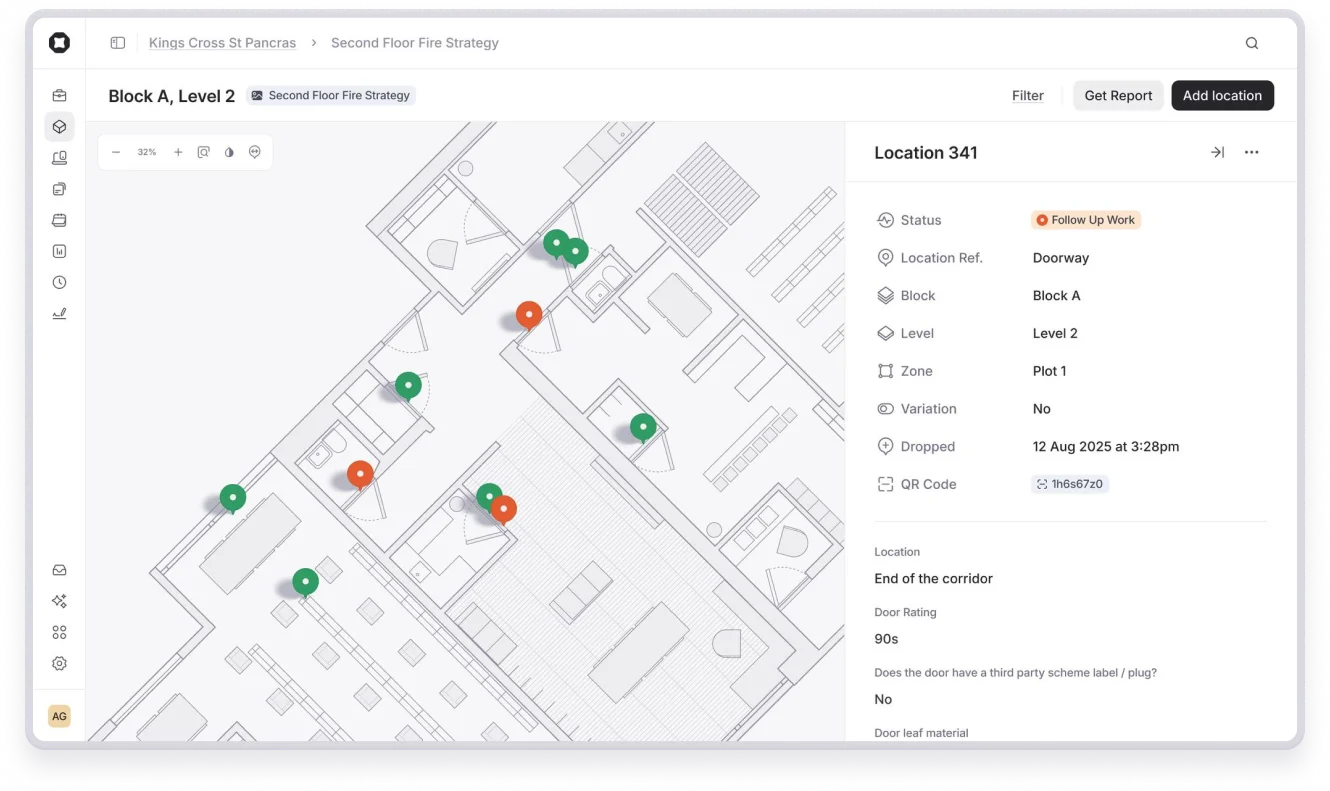
This approach keeps your data consistent and makes reviewing progress or generating reports much more straightforward.
5. Capture health and safety records to ensure safety compliance
Health and safety reporting shows how site risks are being managed day to day and whether safety procedures are being followed in practice.
This part of the report should go over:
Toolbox Talks carried out
Site inspections completed
Incidents, near misses, and accidents
Personal protective equipment compliance
Updates to risk assessments and method statements (RAMS)
Keeping this section updated helps identify patterns in incidents and near misses and address issues before they lead to accidents.
In the UK, maintaining accurate safety records also supports compliance with the Construction (Design and Management) Regulations 2015, which require proper management and documentation of site risks.
6. Track delays and constraints to identify the impact on the programme
Delays and constraints need to be recorded with both their causes and impacts.
In other words, it’s not enough to note that something went wrong. You also need to show what caused it and how it affected the schedule.
For example, you could write, ‘Rain prevented concrete pour, causing a one-day delay’.
This approach makes it easier to assess responsibility, track recurring issues, and support delay analysis if the programme is reviewed later.
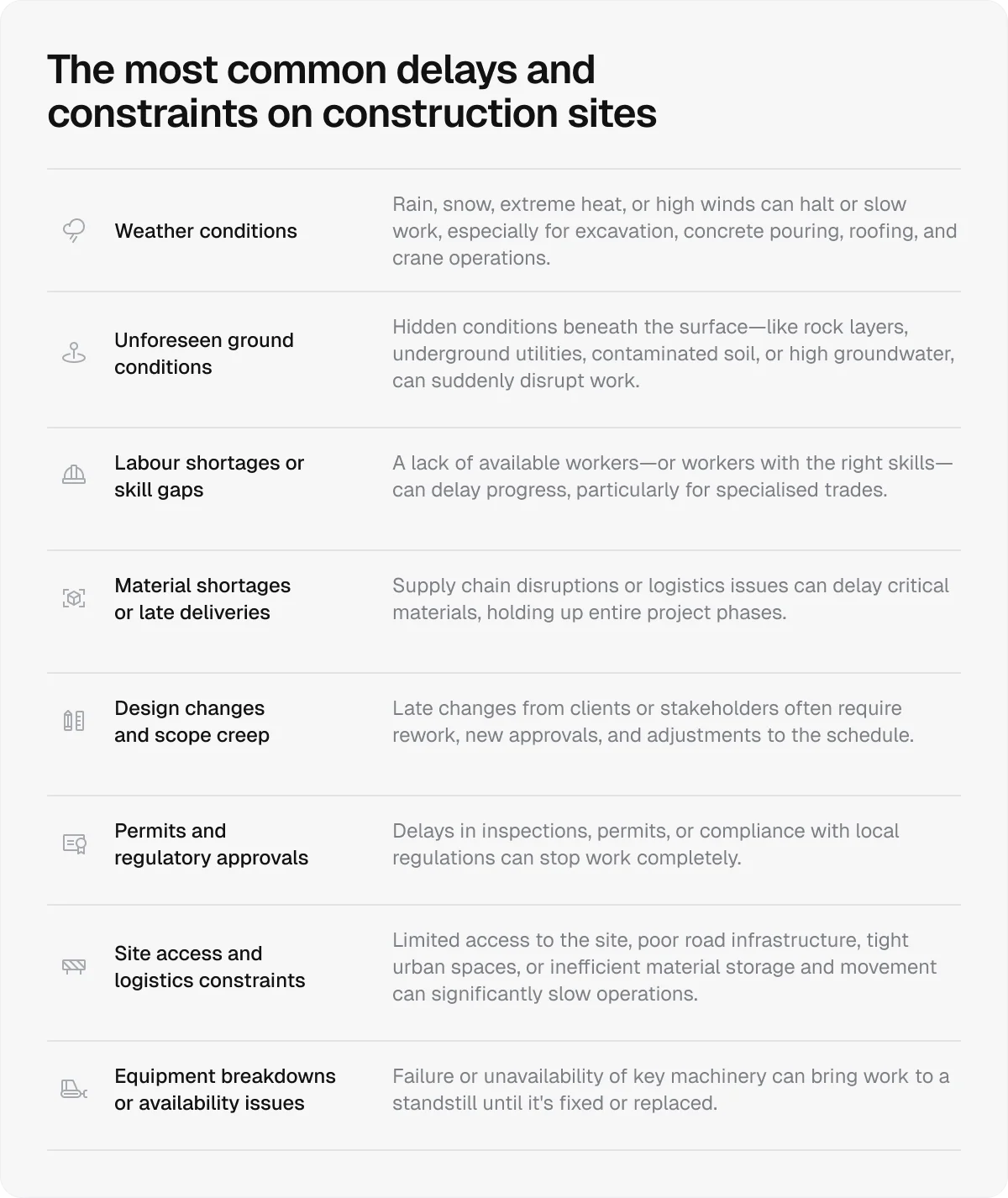
In many cases, this section will address weather conditions, as these delay over 70% of construction projects. However, you’ll also likely deal with:
Labour or material shortages
Equipment breakdowns or missed deliveries
Design issues or RFIs
Access restrictions or external constraints (e.g., permits and utilities)
7. Outline instructions and communications to document key exchanges
Instructions and key communications need to be recorded as they happen, especially when they affect scope, sequencing, or responsibilities.
This includes:
Instructions from the client or engineer
Site meetings and decisions made on site
Verbal instructions (recorded with context)
RFIs raised and responses received
Missing or unclear records can lead to disputes over what was instructed or agreed.
Keeping this section up to date helps confirm direction, avoid misunderstandings, and provides a reference point if decisions are ever questioned.
8. Review quality checks and inspections to ensure standards are met
Quality checks and inspections show whether the work meets the required standards and specifications.
This is where you record what was checked, what passed, and what needs attention (non-conformances).
When recording tests, be specific about which ones were carried out (e.g., concrete slump tests, pressure tests, and electrical checks).
Pro tip:
Build quality control into the work itself, not just the reporting.
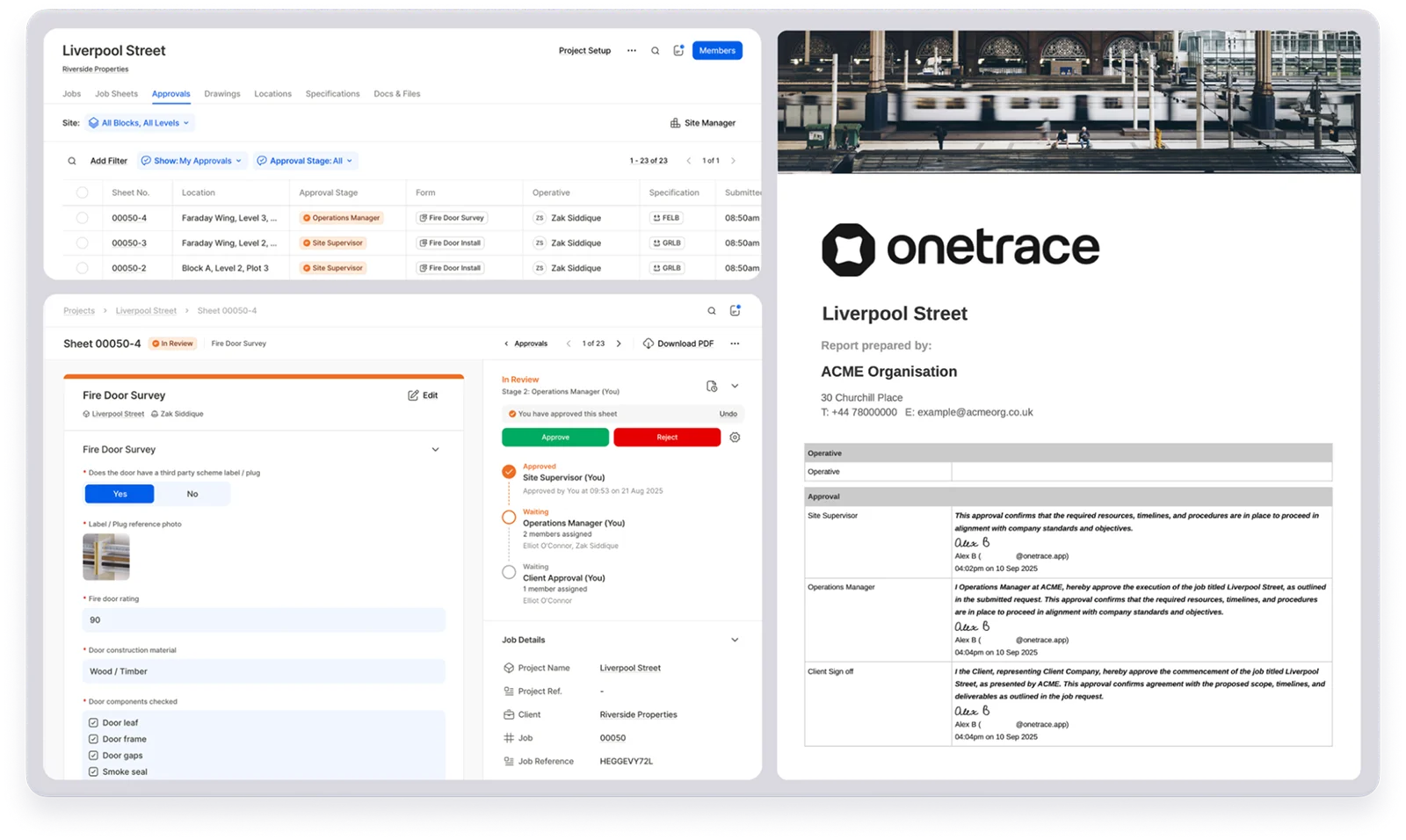
Using multi-stage approvals means work is reviewed and accepted as it’s completed, so by the time you write the daily report, the results are already verified.
With Onetrace, you can set up approval workflows, so job sheets move through defined review stages with feedback at each step. This helps catch issues early, prevents late-stage snagging, and spreads accountability across the team.
On top of that, Onetrace lets you generate approval reports that show exactly what was signed off, by whom, and when, giving you a complete, audit-ready record without extra work.
9. Add photos and attachments to provide visual evidence
Photos and attachments support the report by reinforcing recorded entries with visual evidence from the site.
In addition to supporting the accuracy of the record, the visual context helps others understand site conditions and progress without relying on description alone.
The images you include in your report should be time-stamped and back up key entries, such as completed work, delays, or defects.
Besides photo documentation, your construction daily report will benefit from adding attachments like:
Markups or sketches
Delivery tickets
Inspection records
10. Sign off and distribute the report
Before sending the report, review it to check for missing details, errors, or unclear entries.
If everything is in order, add the following details:
Who prepared the report (name, role, signature)
Who reviewed and approved it
Who it will be distributed to (e.g., client, consultant, and internal team)
Once signed off, the construction daily report becomes a formal project record and can be shared with the right stakeholders.
How to get construction daily reports right: 7 best practices
To get construction daily reports right, focus not only on what’s recorded, but also on how it’s collected and presented.
These seven practices will help you produce reports that are easy to understand, use, and rely on:
Use digital tools to manage reports: Software helps standardise reporting, save time, and keep records organised and easy to access.
Record information in real time: Capturing details throughout the day improves accuracy and helps avoid missing key events.
Use a standard format: A consistent structure makes reports easier to complete, read, and compare over time.
Be specific and factual: Precise, verifiable details make reports more useful and dependable later on.
Keep language simple and clear: Straightforward wording helps everyone understand what happened without confusion.
Use consistent terminology: Standard terms aligned with contracts reduce ambiguity and support clear communication.
Balance detail with clarity: Include enough detail to explain events without overloading the report.
Take the work out of construction reporting with Onetrace
There’s a reason digital tools are now standard for construction daily reports—and any other reporting required across a project.
They make it easier to capture information on site, keep it organised, and turn it into usable records without chasing data at the end of the day.
With a tool like Onetrace, all the information you need for your reports is already in one place:
Site activity and progress: Work completed on the site is captured through job sheets and structured inputs, creating a reliable record for reporting and handovers.
Labour and attendance data: Time on site is logged through timesheets, making it straightforward to generate reports for payroll, productivity, and resource planning.
Photos and site evidence: Visual evidence is collected in real time, supporting progress tracking, compliance, and client sign-off.
Material usage: As work is carried out, materials are recorded with quantities and details, helping track costs and resource use.
Location-based data: Information is organised by drawings, blocks, levels, and zones, so reports can be filtered by exact site areas.
Compliance and sign-offs: Documents and approvals are managed digitally, creating a full audit trail for safety and quality reporting.
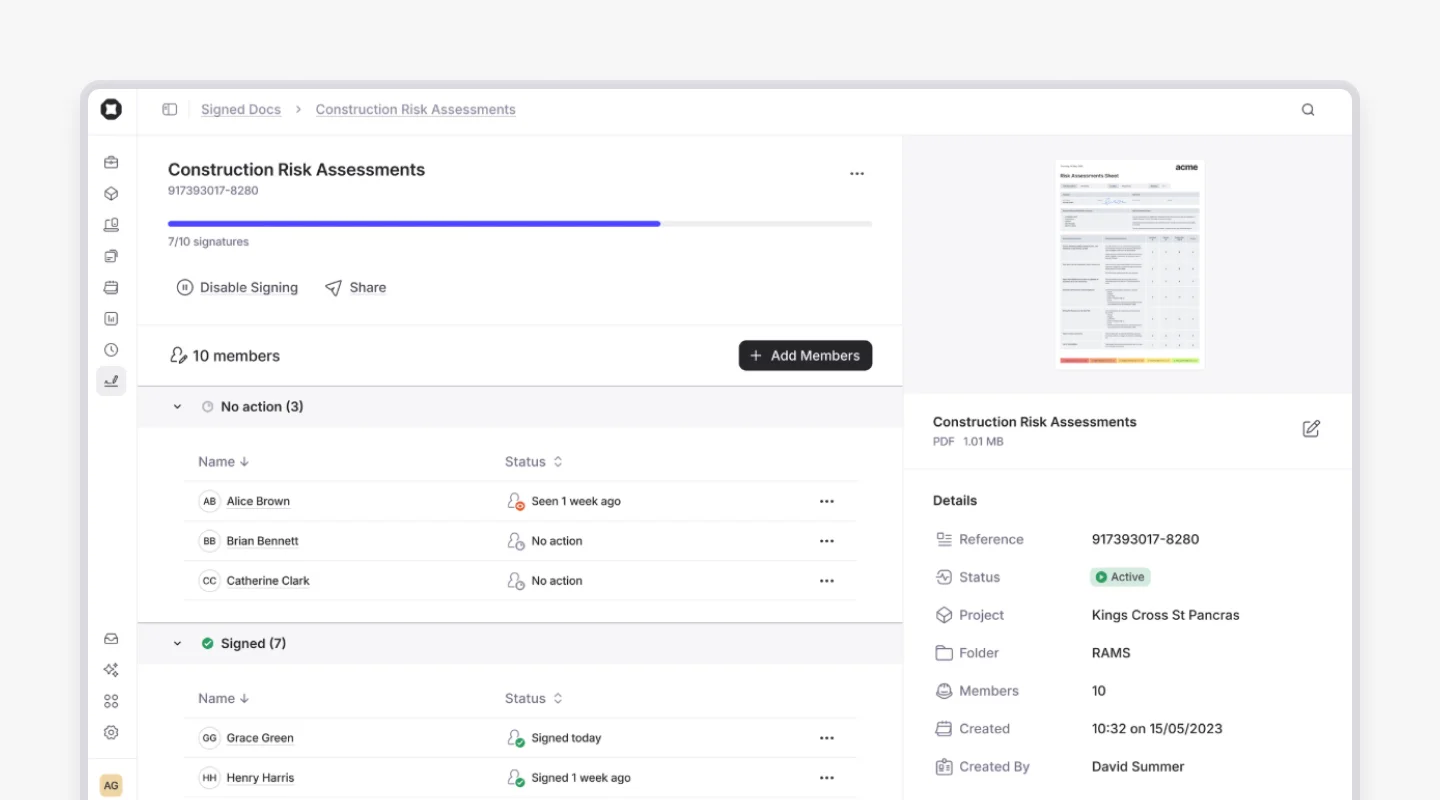
Onetrace also lets you create reports directly from this data, without rework or manual formatting.
You can generate:
Job sheet reports (PDF or Excel)
Location-based reports
Drawing markup reports
Timesheet reports
Signed document reports
Each report is structured, branded, and ready to share with clients, auditors, or internal teams.
Because the data is already captured during the work, reporting becomes a by-product, not an extra task.
If you want to see how this works in practice, book a personalised demo of Onetrace. We’ll show you how the software fits your existing workflow and reporting needs and how to get up and running quickly.
FAQ
What should be in a construction daily report?
A construction daily report should include work completed, workforce on site, materials and equipment used, site conditions, delays, safety incidents, and any key instructions or issues.
How to make a daily progress report in construction?
To make a daily progress report in construction, record site activity each day using a consistent format, capturing work completed, resources used, and any issues encountered.
Marketing Team
@Onetrace
The Onetrace marketing team is passionate about sharing insights, ideas, and innovations that help construction businesses stay connected, compliant, and efficient. Combining industry expertise with a love for clear communication, we aim to deliver content that empowers professionals to work smarter and safer.