Quality control vs quality assurance [Construction Guide]

By
Marketing Team
@Onetrace
Quality can make or break a construction project.
According to research from Australia, cited in a Scottish Government cost-benefit analysis, rework averaged 6.5% of contract value on projects without a formal quality management system. On projects with one, the average was just 0.72%. The contrast is stark and underlines the importance of a structured approach to quality.
Such an approach relies on two key disciplines: quality assurance (QA) and quality control (QC). While they work towards the same goal, they do it in different ways.
This quality control vs quality assurance construction guide breaks down the seven key differences between the two to help contractors and subcontractors understand where each fits, avoid gaps or duplication, and maintain quality from project start to completion.
Key takeaways
QA and QC work together, but they have different roles
QA sets the systems, processes, and controls that support quality, while QC checks whether the actual work meets the required standard.QA starts early, while QC happens throughout construction
QA can shape design, procurement, subcontractor selection, and work methods before construction starts. QC then carries out inspections and tests at key stages as the work progresses.Quality needs clear ownership and reliable records
QA is an organisational responsibility, while QC is usually assigned to people with specific inspection and testing duties. Both generate records that can provide evidence of how quality was managed and what was checked on site.QC findings can improve the wider quality process
Inspection results, defects, rework, and other project data can reveal recurring problems. QA can use these patterns to improve procedures, training, document control, and other processes.Digital quality control software can connect QA and QC in one workflow
Tools like Onetrace help contractors and subcontractors standardise inspections, capture evidence, manage approvals, and keep quality records in one place, while feeding site information back into the wider QA process.
QA vs QC in construction: 7 key differences
These seven differences highlight the distinct roles QA and QC play in keeping construction work to the required standard.
1. Purpose and objective
QA and QC have the same overall aim: to make sure the finished project meets the specification and delivers what the client expects.
The difference lies in how they work towards that outcome.
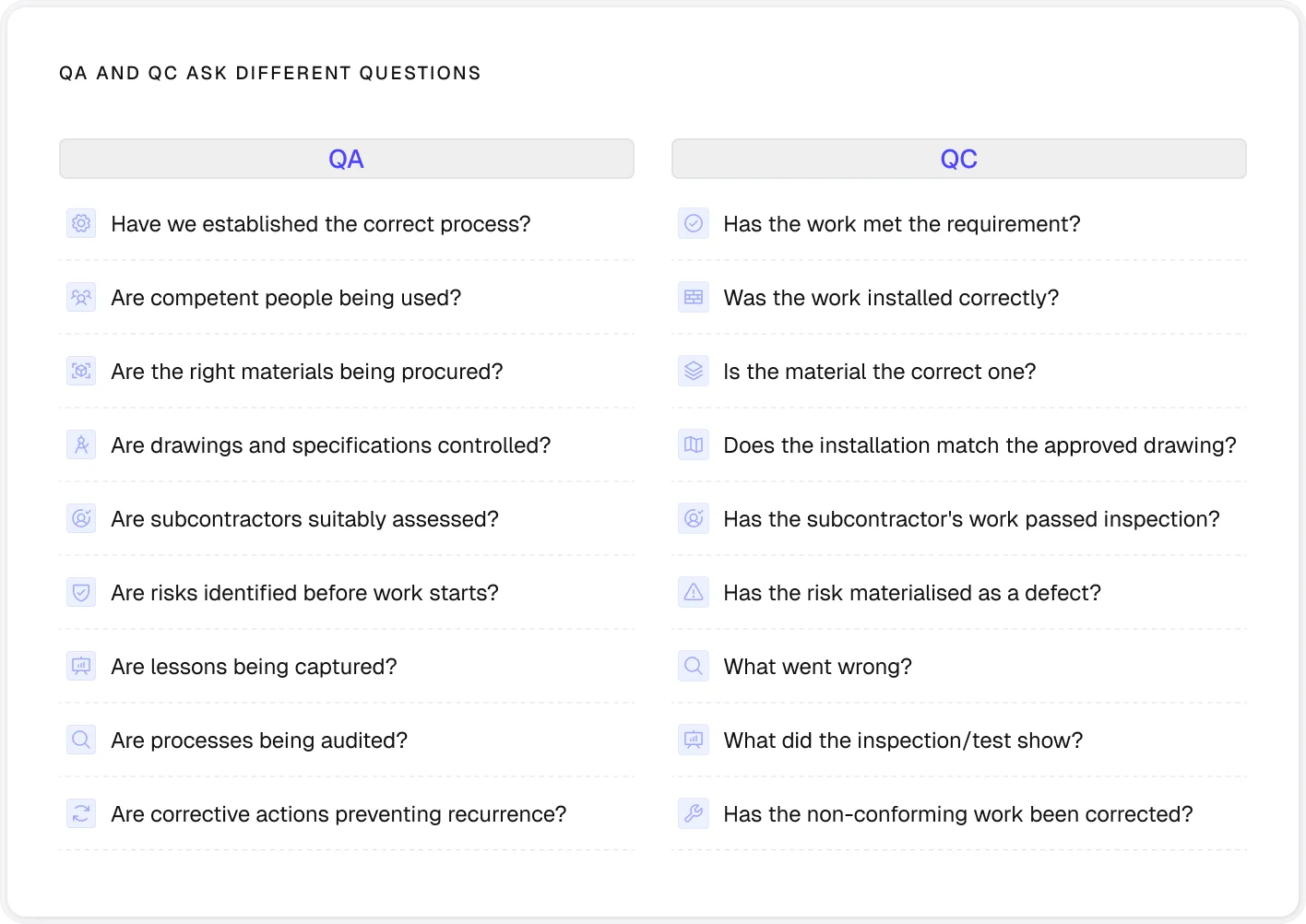
Quality assurance focuses on preventing problems before they happen. It does this by putting the right processes, standards, and controls in place before and during the work. For example, if a contractor knows that cavity barriers have been installed incorrectly on previous projects, the QA response might be to:
Improve the installation method
Check subcontractor competence
Provide targeted training
Define inspection points before work starts
The construction quality control process then takes over to verify the work meets those requirements. The site team might inspect the installed cavity barriers against the approved details, record any defects, and require them to be corrected before the work is covered up or handed over.
In simple terms, QA aims to reduce the chance of defects occurring, while QC provides the checks needed to catch problems that still occur.
2. Focus and scope
QA and QC differ in how broadly they look at a construction project.
Quality assurance covers the wider framework around delivery.
It can span design management, procurement, competence, subcontractor management, document control, materials, procedures, and project-level quality planning. In other words, QA looks across the different parts of the project that need to work together to support quality.
Quality control has a more defined scope.
It’s tied to particular materials, activities, work packages, or installations and checks them against the agreed requirements. This could mean inspecting reinforcement before a concrete pour, verifying that installed fire compartmentation matches the approved details, or testing a completed drainage system.

3. Timing and application
QA and QC differ in when they come into play during a project.
Quality assurance starts before construction begins.
It can shape decisions made during design, procurement, and subcontractor selection, as well as the methods and controls used on site. For example, QA might require a contractor to approve fire-stopping products and installation methods before they’re used on the project.
Quality control is applied as the work takes shape.
Inspections and tests are carried out at defined stages to check that materials and workmanship meet the agreed requirements. For example, a fire-stopping installation may be inspected before it’s covered up, when any issue can still be dealt with without opening up finished work.
This also means that QC isn’t limited to the end of the project. It needs to happen at key points throughout construction, particularly where later work would make defects harder, slower, or more expensive to correct.
4. Responsibilities and ownership
Quality assurance is an organisational responsibility.
It can’t sit solely with a quality manager because decisions made across all relevant project phases affect the quality of the finished work. Everyone involved has a part to play in making sure the agreed processes and requirements are followed.
Quality control is usually assigned to people with specific inspection and testing duties.
Depending on the project, this might include:
Site managers
Engineers
Supervisors
Quality inspectors
Testing technicians
Specialist subcontractors
Their role is to carry out the checks needed to confirm that the work meets the agreed requirements.
This, however, doesn’t mean QA happens in the office while QC happens on site.
QA needs to be built into how work is planned and managed on site, while the findings from QC inspections and tests should feed back into the wider quality system.
5. Quality tools
Quality assurance mainly relies on systems, documents, and processes to manage and verify quality. These can include:
The Quality Management System (QMS)
Checklists
Document controls
Audits
Management reviews
Together, these tools give the project team a consistent way to plan, manage, and improve quality.
Quality control relies more on tools and records used to inspect and test the work itself.
For example, an Inspection and Test Plan (ITP) sets out what needs to be checked, when the checks take place, who is responsible for them, and what evidence needs to be recorded. The checks may then involve measurements, visual inspections, material testing, or specialist equipment, depending on the work being carried out.
However, QA and QC toolkits are closely linked. For instance, repeated QC findings might show that an installation method or checklist needs to be improved, giving the QA team information they can use to strengthen the wider quality process.
Pro tip:
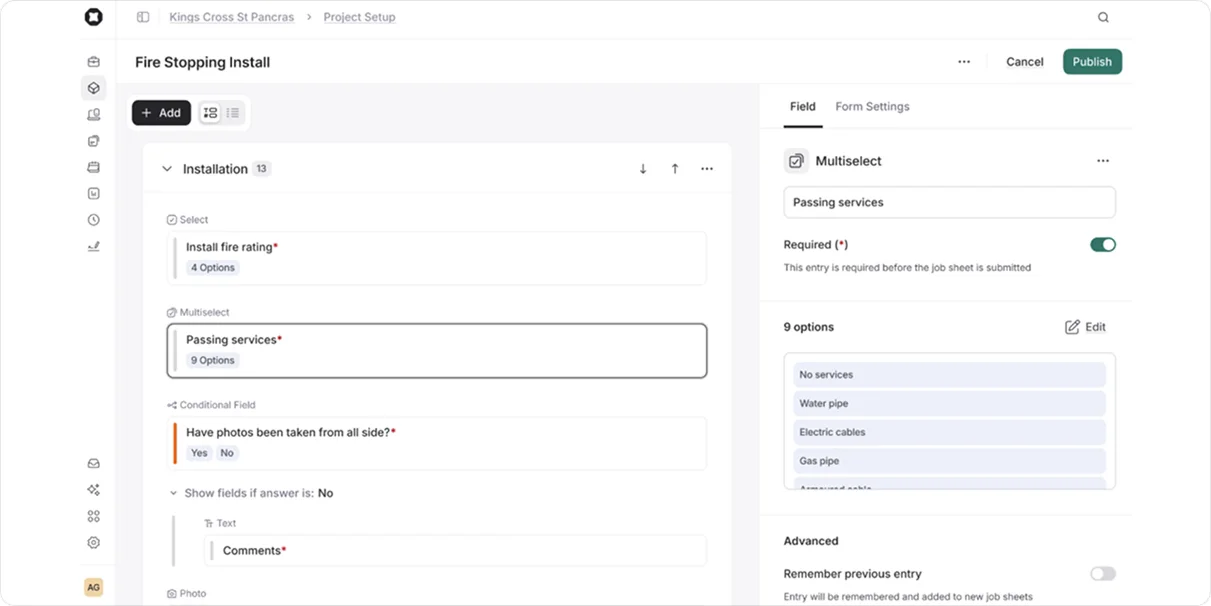
If you’re looking for one tool to bring inspections, evidence, and quality records together, quality control software like Onetrace is a strong choice.
Contractors and subcontractors can use it to standardise inspections and capture evidence on site, while the data collected can inform the overall QA process.
6. Documentation and records
Both QA and QC produce documentation, but the records serve different purposes.
QA records tend to show how quality is managed. These might include:
Quality plans
Audit reports
Competency records
Supplier and subcontractor documents and assessments
Document-control records
They provide evidence that the right systems and processes are in place.
QC records, by contrast, show what happened on the job. They usually include:
Inspection and test records
ITP sign-offs
Test results
Material certificates
Inspection photographs
Dimensional surveys
Commissioning records
Non-conformance reports
Snagging records
For contractors and subcontractors, both sets of records can be important long after the work itself is finished. They can show what was installed, who carried out the work, what was inspected, what evidence was captured, and whether any issues were resolved.
This is particularly important for higher-risk buildings in England, where the golden thread requires information to be maintained to demonstrate how the building complies with the Building Regulations 2010 and how building work has been managed.
7. Improvement and performance
Proper quality management doesn’t stop when an inspection is passed or a defect is fixed. The information generated during a project can also be used to improve how work is delivered in the future.
QA and QC contribute to this improvement in different ways.
QC uses project-level information to manage the work being delivered. An appropriate team records the issue, arranges the necessary corrective action, and verifies that it has been resolved.
QA looks across this information for patterns and recurring issues.
Audit findings, defect trends, subcontractor performance, rework, and lessons learned can reveal weaknesses in the way the project is planned or managed. These insights can then be used to improve procedures, training, document control, or other parts of the quality system.
For example, if several projects have defects because subcontractors are working from outdated drawings, QC will identify and record the individual issues. QA can then look at why the same problem keeps happening and introduce stronger document control procedures, clearer drawing registers, or better communication around design changes.
How Onetrace helps improve both QA and QC
QA and QC aren’t an either-or choice, as a strong quality process needs both.
Your quality control software should reflect this and help teams tackle the processes behind quality as well as capture what’s happening on site.
Onetrace is built to support both sides of the quality process for subcontractors.
It combines site-based data capture with approvals, documentation, reporting, and project information, giving teams a central record of what has been done and how it has been reviewed.
The table below breaks down Onetrace’s key quality features:
Onetrace feature | How it supports QC | How it supports QA |
Custom forms and checklists | Gives operatives a consistent way to record inspections, measurements, photos, and other site information | Standardised forms and project templates help teams apply the same quality process across projects |
Approval workflows and history | Allows work to be reviewed, rejected, and sent back for correction before it moves forward | Creates defined QA checkpoints and helps teams identify recurring issues |
Captures before, during, and after photos to show what was inspected or completed | Creates a traceable record that can support audits, compliance, and client sign-off | |
Links records to the exact area where work was carried out, making inspections and evidence easier to trace | Gives managers a more complete view of work across a project and helps keep quality information organised by location | |
Documents and files | Keeps drawings, RAMS, certificates, and other project information accessible to the people carrying out the work | Provides a central record of quality and compliance documents, with access controls and structured storage |
Reports | Turns inspection and job data into records that can be shared with clients or used during handover | Makes it easier to prepare evidence for audits and internal reviews |
QR codes and work history | Links a physical location or piece of work to its digital record, making previous work easier to find | Builds a longer-term history of work at a location, supporting traceability and future inspections |
API and integrations | Helps connect quality data with other systems and workflows so it’s not isolated in one platform | Supports a more connected flow of project information across the wider business |
These features help create a feedback loop that connects the processes set up through QA with the information gathered through QC:
Set the process
Carry out the work
Inspect and record
Review and approve
Identify patterns
Improve the process
To learn more about how Onetrace can support both QA and QC across your projects, arrange a tailored walkthrough with our team.
FAQ
What is the difference between QA and QC in construction?
The main difference between QA and QC in construction is that the former focuses on the systems and processes used to manage quality, while the latter is concerned with checking the work itself.
Which comes first, QC or QA?
QA comes first. It starts during planning and sets the processes, requirements, and controls that support quality. QC then applies inspections and tests as the work progresses to check that those requirements are being met.
Who gets paid more, QA or QC?
In construction, QA roles generally earn slightly more than QC roles at equivalent seniority levels, though pay heavily depends on whether a project separates the two functions.
Can QA and QC be the same person?
Yes. On smaller projects or within smaller businesses, one person may handle both QA and QC responsibilities.
Marketing Team
@Onetrace
The Onetrace marketing team is passionate about sharing insights, ideas, and innovations that help construction businesses stay connected, compliant, and efficient. Combining industry expertise with a love for clear communication, we aim to deliver content that empowers professionals to work smarter and safer.