Construction safety compliance software: What to look for

By
Marketing Team
@Onetrace
Construction consistently ranks among the UK’s highest-risk industries.
In 2025/26, it recorded the highest number of worker fatalities of any main industry sector, with 25 of the 126 workers killed in work-related incidents across Great Britain.
Combine this unsettling figure with the sector's persistent burden of workplace injuries and ill health, and it becomes clear why effective safety compliance is such a crucial part of running a construction business.
As construction becomes more digital, more firms are turning to construction safety compliance software to manage that responsibility.
But to truly protect your people and your business, the software you choose must be able to cover the many different aspects of safety compliance involved in construction work.
This guide will help you find just that.
Key takeaways
Keep safety compliance documentation organised and up to date
Centralise RAMS, certificates, and safety records, while tracking who has received and signed required documents.Use digital inspections to spot and address issues early
Capture checks, photographs, findings, and locations on site, with workflows for review and corrective action.Keep workers informed and compliant throughout the project
Manage inductions, Toolbox Talks, qualifications, and safety documents so teams have the right information before work starts.Maintain clear records of work, people, and building information
Workforce planning, location data, material records, and traceable evidence help support accountability and, where relevant, golden thread requirements.Use construction safety compliance software to bring everything together
Onetrace combines mobile site reporting, compliance documents, inspections, approvals, and reporting in one system, giving subcontractors a central place to manage safety compliance.
1. Regulatory compliance and construction safety documentation
Under the Construction (Design and Management) Regulations 2015, construction work must be properly planned, managed, and monitored, with the construction phase plan setting out the arrangements, site rules, and measures used to manage significant risks.
The trouble is that the rules around construction aren’t standing still.
Recent changes include:
The Building Safety Regulator becoming a standalone organisation in January 2026
New construction product rules coming into force the same month
New fire safety requirements for certain residential buildings taking effect in April 2026
However, the challenge isn’t just knowing that a requirement has changed. You also need to turn the updated requirement into something your teams can follow on site—and be able to show that you did.
Useful features for safety documentation
Centralised compliance document storage for RAMS, health and safety forms, certificates, and other project documents
RAMS distribution to get the right safety information to the right people
Automatic distribution of required documents when operatives are assigned to a job
Digital document signing and acknowledgement
2. Site inspections and proactive safety monitoring
Having the right safety controls in place is only part of the job. Contractors also need to check that those controls remain suitable, are still in place, and are being followed on site.
That’s why a well-built construction safety compliance platform should include strong inspection tools, allowing site teams to check the work, record issues, and show what was found.
Useful features for site inspections
Flexible inspection forms that can be adapted to different types of work, sites, and safety checks
Structured checklists to support consistent inspections
Conditional inspection logic to guide users through relevant questions based on their responses
Photo capture and visual evidence to document site conditions and completed work
Issue and risk recording so problems identified during inspections can be logged and followed up on
Location-based records that connect inspections and findings to specific areas of a site
Mobile and offline access so inspections can continue on sites with limited connectivity
Inspection status and history to show what has been completed, what remains outstanding, and how findings were handled
3. Quality assurance, corrective actions, and remediation
Safety checks only add value when teams act on the problems they identify.
The Health and Safety Executive’s plan, do, check, act approach treats health and safety management as an ongoing process, with organisations expected to monitor controls and improve them when they aren’t working effectively.

For contractors and subcontractors, this makes corrective action an important part of safety compliance.
If an inspection identifies a problem with an installation, working method, or safety control, a structured process is needed to record the issue, assign the required action, recheck the work, and confirm when it has been resolved.
Useful features for corrective actions
Multi-stage approval workflows so safety and quality checks are routed to the appropriate people
Role-based approvals for site supervisors, operations managers, and clients where required
Review, rejection, and approval workflows to make the status of submitted work clear
Rejection comments so reviewers can explain what needs to be corrected
Feedback to operatives so issues can be communicated directly to the people carrying out the work
Remediation workflows to record corrective actions when safety or quality requirements haven’t been met
Resubmission workflows so corrected work can be sent back for review
Approval status tracking to show which submissions are approved, rejected, or still awaiting review
Approval history providing a record of how each submission was handled
4. Worker information and site induction
The HSE says that every construction site needs suitable site rules and inductions, with workers given information on site-specific risks, control measures, emergency arrangements, incident reporting, and their own health and safety responsibilities.
Construction safety compliance software can help keep workers compliant throughout the project by assigning them the right information, collecting digital acknowledgements, and keeping a record of who has completed each requirement.
Useful features for worker information and site induction
Worker profiles and team management to keep relevant worker information organised
Site-specific instructions that give workers the information they need for a particular job or location
Toolbox Talk sign-off for documenting participation in site-specific safety briefings
Mobile document access and signing so workers can read and acknowledge information on site
Document status tracking to show which workers have viewed, signed, or still need to complete required documents
Pre-work compliance checks that can restrict job activity until required safety documents have been signed
Worker declarations to capture confirmation from the person carrying out the work
5. Workforce and subcontractor compliance
Construction projects often involve several organisations working on the same site, with responsibilities shared between main contractors, subcontractors, and specialist teams.
Keeping track of who’s working on which project, what information they’ve received, and which documents support their work can help maintain clear lines of responsibility.
Construction safety compliance software can bring these records together, helping contractors manage workforce assignments, track relevant qualifications and certifications, and control the safety information workers need before carrying out specific tasks.
Useful features for workforce compliance
Company and client records to keep key organisations and contacts organised
Main contractor and subcontractor records with active and archived project information
Worker and team management to keep track of who’s assigned to each project
Project assignments and workforce scheduling to coordinate teams across sites
Permit-style workflows for higher-risk or controlled activities that require specific checks, approvals, or sign-offs before work starts
Qualification and certification records to keep evidence of relevant training and competency
6. Fire safety, building safety, and golden thread evidence
For contractors working on higher-risk buildings in England, keeping reliable records of building work is an important part of the wider safety information that needs to be maintained.
The Building Safety Regulator’s guidance says relevant building information must:
Be kept digitally and securely
Be available when needed
Act as a building’s single source of truth
During construction, this includes information showing how the building work complies with building regulations, as well as records of changes to the work.
Construction safety compliance software can help build this record as work takes place.
For contractors involved in fire protection and other building safety-critical work, this approach can support the evidence and traceability requirements that can form part of a golden thread.
Useful features for safety-critical work
QR-code traceability linking physical installations to their digital records
Location-based records connecting evidence to specific areas of a project
Drawing pins and site plans showing exactly where work has been carried out
Material records capturing material types, quantities, manufacturers, and relevant specifications
Time-stamped photographic evidence showing work before, during, and after installation
Variation and change records providing a history of changes to the work
Location and drawing reports for reviewing completed work and outstanding items
7. Incident, accident, and near-miss response
Construction businesses need a defined process for recording incidents, near misses, and other safety events, then reviewing what happened and deciding what action is needed.
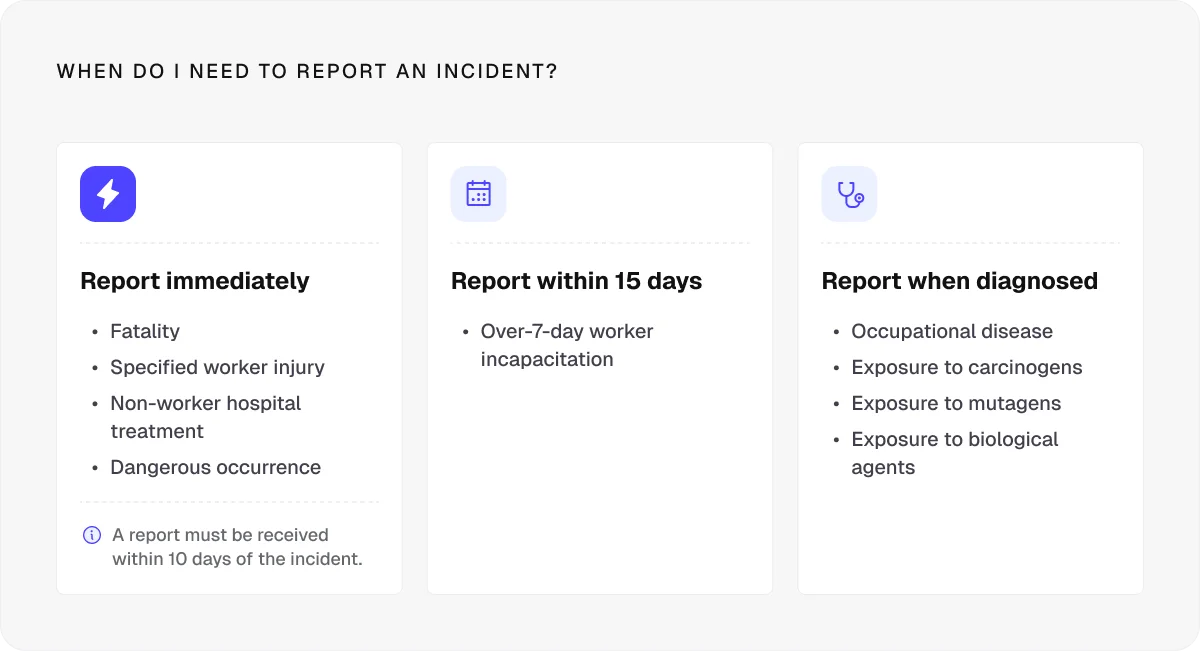
Some work-related injuries, diseases, and dangerous occurrences must also be reported under RIDDOR, so accurate records can form an important part of a contractor’s wider safety management process.
Useful features for incident, accident, and near-miss response
Custom incident and near-miss forms that can be adapted to different types of site events
Date and time records to establish when an incident or observation occurred
Photographic evidence to document site conditions, damage, hazards, or other relevant details
Drawing and location pins to show exactly where an incident or near miss took place
Pro tip:
Look for software that integrates with precise location tools to help teams communicate where incidents have occurred.
For example, Onetrace supports what3words, which divides the world into 3-by-3-metre squares and gives each one a unique three-word address.
This approach helps teams quickly direct people to first aid stations, emergency exits, or an incident location without relying on vague descriptions.
In an emergency, fire and ambulance services can also use what3words to identify precise locations on large or difficult-to-navigate sites.
8. Worker engagement and safety reporting
Effective safety management depends on workers being able to raise concerns, share information, and take part in the processes that keep them safe.
Digital software can bring that field-level information directly into the overall safety management process, so managers can see what’s being reported and respond where action is needed.
Useful features for safety reporting
Mobile safety reporting so workers can capture information directly from site
Custom forms for safety observations, site checks, and other worker-led reports
Photo capture to provide visual evidence alongside written observations
Operative declarations so workers can confirm relevant work or information
Offline reporting for sites where connectivity is limited
Worker notifications to keep teams informed when information or actions require their attention
Direct field-to-office information flow so observations and evidence can reach managers without relying on paper forms or manual re-entry
9. Audit readiness, client handover, and proof of work
Safety and compliance evidence often needs to move beyond the people who carried out the work. Principal contractors, clients, auditors, and accreditation bodies may all need to review records showing what was completed, where it was completed, and how it was checked.
This can become a significant administrative task when information is spread across job sheets, photographs, drawings, documents, and separate spreadsheets.
Construction safety compliance software brings all the relevant information together and makes it easier to turn day-to-day project records into structured reports and handover information.
Useful features for reporting
Customisable project reports so teams can choose the information relevant to each client or project
PDF and Excel exports for different handover, audit, and internal reporting requirements
Filterable reporting so teams can report on specific operatives, materials, forms, specifications, zones, or other project information
Client access controls so relevant project information can be shared with external stakeholders
Onetrace: Construction safety compliance software for subcontractors
Onetrace is subcontractor safety compliance software designed to bring project information, compliance records, site activity, and reporting into one central system.
For safety compliance to work in practice, site teams need to be able to access information and record what’s happening where the work takes place.
That’s why Onetrace also includes a safety compliance app construction teams can use on site, allowing operatives to complete forms, access drawings, capture photographs, record work, and sign compliance documents from their mobile devices. The app supports offline working, with data synchronised when a connection becomes available.
Besides offering robust mobile tools for site-level compliance, Onetrace provides the following safety compliance features:
Onetrace feature | How to use it for safety compliance |
Docs & Files | Keep RAMS, certificates, health and safety documents and other compliance records in one central location. |
Qualifications | Keep records of certifications and training, such as FIRAS, to help demonstrate worker competence. |
Build safety checks, inspections, and site-specific compliance forms around the work being carried out. | |
Distribute RAMS, Toolbox Talks and other safety documents, then track who has viewed or signed them. | |
Approvals | Set review stages for safety records and make sure work is checked before it’s approved. |
Operative declarations | Capture confirmation from workers that required information has been received or work has been completed. |
Link inspections, issues, and work records to precise areas of a project for clearer traceability. | |
Material tracking | Record materials, manufacturers, and installation information to support traceability and safe use. |
Reports | Turn compliance records and site evidence into branded PDF or Excel reports for audits and project handover. |
Record attendance with GPS-stamped clock-in and clock-out data to support workforce records. | |
Organise site visits, plan project activity, and keep teams aligned on who needs to be where and when. | |
QR codes | Connect physical work to its digital record, making information easier to retrieve for inspection and review. |
Schedule a personalised Onetrace demo to see how these features work in practice and how the platform can support safety compliance on your specific projects.
FAQ
What is the best safety software for construction?
The best safety software for construction depends on your project needs, but it should support risk management, inspections, worker compliance, document control, evidence capture, and reporting. Onetrace is a strong choice for subcontractor safety compliance software.
What are the safety requirements in construction?
Construction safety requirements include risk assessments, method statements, site rules, inductions, a construction phase plan where required, inspections, suitable controls for identified risks, and records of relevant safety activities.
How to make safety reports for construction sites?
Record the work, hazards, findings, photographs, locations, actions, and approvals, then compile the information into a structured report that can be shared with relevant stakeholders.
Marketing Team
@Onetrace
The Onetrace marketing team is passionate about sharing insights, ideas, and innovations that help construction businesses stay connected, compliant, and efficient. Combining industry expertise with a love for clear communication, we aim to deliver content that empowers professionals to work smarter and safer.