How construction crew scheduling works: A step‑by‑step guide

By
Marketing Team
@Onetrace
Construction crew scheduling is the process of organising labour within the wider construction schedule, so the right trades are on site at the right stage of work.
In today’s UK construction landscape, efficient crew scheduling does far more than keep work organised.
The industry is facing a massive labour shortage, with skills vacancies increasing by 419% since 2011. By the second half of 2025, 72% of small and medium-sized building firms reported struggling to find skilled tradespeople, which delayed projects for 49% of them and even led to cancellations for 22%.
At the same time, labour costs are expected to keep rising as demand for skilled workers grows faster than supply.
When skilled workers are harder to find and more expensive to hire, making the best use of the crews you already have becomes critical.
Construction crew scheduling helps you do just that, and this guide will show you how it works step by step.
Key takeaways
Construction crew scheduling involves far more than assigning workers to jobs
Contractors need to balance labour, timelines, trade dependencies, equipment, materials, and changing site conditions throughout the project.Strong scheduling starts with proper planning
Defining project phases, task dependencies, crew requirements, and realistic timelines helps reduce delays and labour clashes later on.Crew schedules need constant adjustment on live projects
Weather delays, absences, equipment issues, and project changes can quickly disrupt labour plans, making real-time updates essential.Centralised project and workforce data improves scheduling decisions
Keeping qualifications, availability, materials, and site updates in one place makes it easier to coordinate crews across projects.Construction scheduling software helps contractors stay in control
Tools like Onetrace help contractors manage crew planning, qualifications, schedule updates, field communication, and project tracking from one connected system.
What is construction crew scheduling?
Construction crew scheduling is the process of coordinating site labour around project priorities, deadlines, and trade dependencies so work can progress without unnecessary delays, disruptions, or downtime.
It plays a central role in keeping projects productive and manageable as conditions change on site.
To schedule crews efficiently, contractors typically need accurate, up-to-date records covering:
Project timelines and milestones
Crew availability and working hours
Trade skills, certifications, and competencies
Site inductions and compliance records
Labour costs and overtime limits
Equipment availability and operator qualifications
Site locations and travel time between jobs
Managing all of this information manually can quickly become overwhelming, especially across multiple projects or fast-moving sites.
That’s why modern construction crew scheduling increasingly relies on scheduling software rather than whiteboards, spreadsheets, or paper-based systems.
A well-chosen construction scheduling software helps teams update the programme in real time, improve visibility across projects, and respond faster when plans change.
How to handle construction crew scheduling in 10 steps
These 10 practical steps show how to handle construction crew scheduling more effectively, what to focus on at each stage, and how to keep work moving without any issues.
Step 1: Define project scope and labour requirements
Crew scheduling works best when you understand exactly what the project needs from start to finish.
That’s why you should start the crew scheduling process by defining the following:
Project phases: Each phase groups together a specific stage of work, such as groundworks, framing, mechanical installation, or finishing works.
Project milestones: Milestones are major deadlines or completion points that mark important stages of progress, such as structural completion, inspections, or handovers.
Key deliverables: Deliverables are specific outputs that need to be completed at different points in the project, including approved documents, compliance records, or signed-off work.
At this stage, contractors should also break down the trades required for each phase of work, along with expected skill levels, certifications, and approximate crew sizes needed to finish the job safely and on schedule.
Step 2: Map out tasks, durations, and dependencies
Construction crew scheduling requires a clear understanding of how work will move across the project and how different trades fit into that sequence.
During this step, teams should:
List all project tasks across each phase of work
Group related activities into work packages where appropriate
Link tasks to the trades responsible for completing them
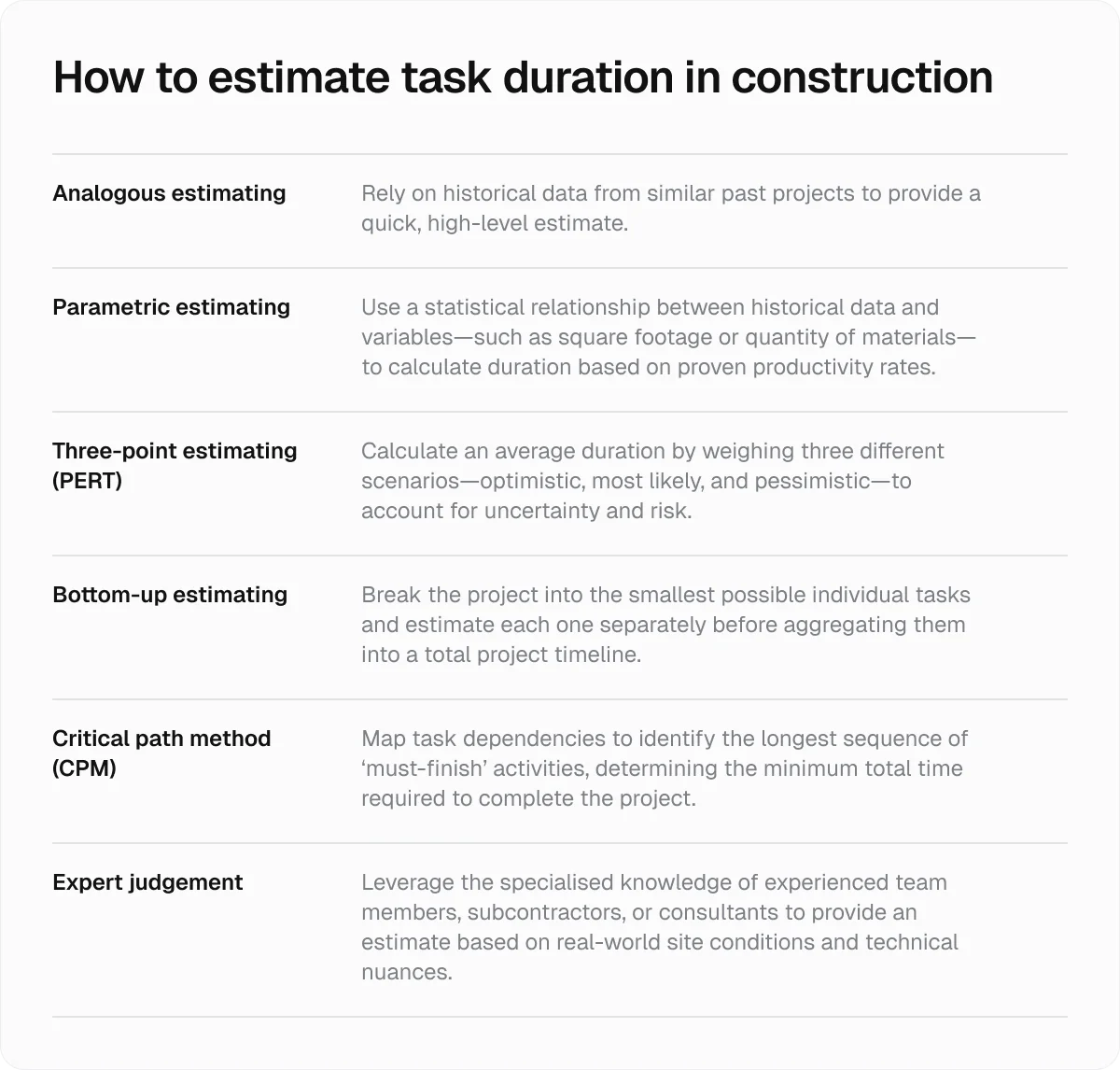
Estimate realistic task durations based on labour, site conditions, and project complexity
Teams also need to identify task dependencies to understand which activities can run in parallel and which rely on earlier work being completed first.
For example, roofing crews may not be able to start until structural framing has passed inspection, while decorators might need to wait for plastering and drying work to finish before moving in.
Mapping these relationships early helps contractors avoid scheduling crews too soon, leaving teams waiting on site, or creating delays by bringing trades in too late.
Step 3: Assess crew availability, skills, and certifications
Labour planning becomes much more accurate when contractors compare project demands against their available workforce.
This comparison should cover the following:
Crew availability, including holidays, shift patterns, existing project commitments, and rest periods
Trade skills, qualifications, and specialist experience across the workforce
Certifications, tickets, and compliance records required for specific types of work
Current workloads to avoid overbooking key people or leaving crews underused
Site locations, travel time, and workforce proximity across multiple projects
Keeping this information accurate and centralised makes scheduling decisions much easier, especially on projects involving several sites or specialist trades.
Among crew records, qualifications are particularly important, since assigning the wrong person to regulated or high-risk work can quickly create compliance, safety, and project delivery issues.
That’s why your chosen scheduling tool should have a documentation feature that makes it easy to store, track, and verify certifications across your workforce.
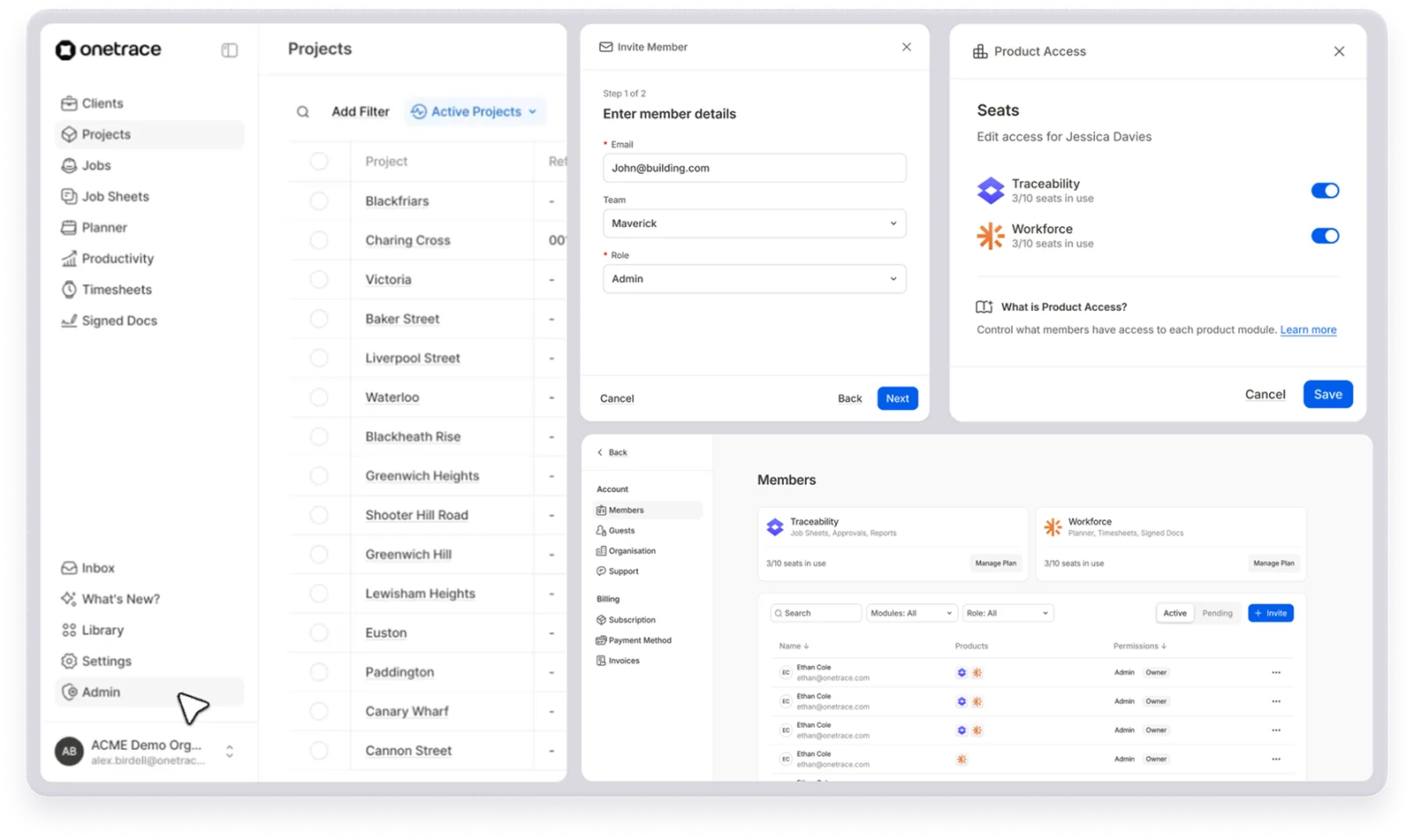
With Onetrace, you can keep workforce records, qualifications, and availability in one place, making it easier to identify who is qualified for specific tasks and assign the right people to the right projects more quickly.
Step 4: Confirm plant, tools, and materials availability
Construction crew scheduling primarily focuses on labour, but crews can’t work productively without the right equipment, tools, and materials.
Scheduling workers without checking resource availability first can leave teams waiting on site, delay follow-on trades, and increase labour costs through downtime and rework.
So, before building the schedule, you should also confirm the following:
Which plant and equipment are required for specific tasks (e.g., cranes, MEWPs, generators, and concrete pumps)
Whether tools and machinery are available and can be booked for the correct dates
Whether long lead materials will arrive on site before installation work is scheduled to begin
Which factors could affect access to materials or equipment (e.g., delivery timings, storage space, and site logistics)
Which factors could impact labour scheduling (e.g., resource shortages, booking conflicts, and procurement delays)
Step 5: Build a master schedule and assign crews
By this point, you should have enough information to combine labour plans, project activities, and resource availability into one realistic schedule.
To build a successful master schedule, you need to understand the following concepts:
Project timeline: The overall project timeline outlines the main phases of work, major activities, and planned completion dates across the build.
Critical path: Certain tasks directly control the final completion date of the project because delays to these activities will delay the entire schedule.
Schedule baseline: Once approved, the baseline schedule becomes the reference point used to track progress, measure delays, and assess project changes over time.
Float or slack time: Some non-critical tasks can be delayed slightly without affecting the final project completion date, giving contractors more flexibility when adjusting labour plans.
Float is especially important in construction crew scheduling because labour plans rarely stay fixed for long.
In 2024/25 alone, around 2.2 million working days were lost due to workplace injuries and work-related illness, making scheduling flexibility critical when managing labour across active projects.
Step 6: Balance workloads and resolve conflicts
Assigning crews across multiple jobs or overlapping phases of work can easily lead to labour clashes.
The table below outlines some of the most common scheduling conflicts contractors face and the typical adjustments used to keep labour plans workable:
Common scheduling conflict | How contractors typically resolve it |
A crew is booked on two sites at the same time. | Reassigning labour or adjusting task timings to remove the overlap |
Specialist trades are unavailable when needed. | Rearranging work sequences or securing additional qualified labour |
Some crews are overloaded while others are underused. | Redistributing work more evenly across teams |
Overtime levels are becoming too high. | Adjusting shifts, extending timelines where possible, or increasing labour capacity |
Delays on one project are affecting another. | Prioritising critical activities and temporarily moving labour where it’s needed most |
Labour gaps appear during key project phases. | Bringing forward available crews or hiring short-term additional workers |
Step 7: Factor in compliance, safety, and union rules
Construction crew scheduling needs to account for legal, safety, and workforce requirements that affect when, where, and how crews can work.
To do so, you must answer the following questions:
Do workers hold the licences, qualifications, and safety certifications required for assigned tasks?
Have all crews completed site inductions, training, and competency checks before arriving on site?
Do the schedules comply with the UK’s Working Time Regulations?
Are there any union agreements, shift rules, or site-specific labour conditions that could affect working patterns or overtime planning?
Does the schedule comply with health and safety responsibilities under the Construction (Design and Management) Regulations and wider Health and Safety Executive guidance?
Step 8: Communicate the schedule to the field
A crew schedule is only useful when site teams can access accurate information without calling, texting, or chasing updated printouts.
The most efficient way to distribute a schedule to the field (and the office) is through scheduling software, which allows all teams to work from a single source of truth.
Besides distributing the schedule among the team, you should also establish a standardised communication protocol that covers the following:
How crews receive daily schedules and task assignments
Where workers can access job details, site addresses, shift times, and special instructions
Who is responsible for communicating delays, reassigned work, or schedule changes
Which channels will be used for updates (e.g., mobile apps, dashboards, or messaging tools)
How teams confirm they have received and understood updated instructions
Step 9: Monitor progress and adjust in real time
No matter how experienced the team is, how detailed the planning was, or how much expertise the scheduler has, crew schedules rarely survive real site conditions unchanged for long.
From equipment breakdowns to weather delays, there are countless factors that can disrupt labour plans once work starts on site.
That’s why construction crew scheduling needs to be treated as a live process rather than a fixed plan.
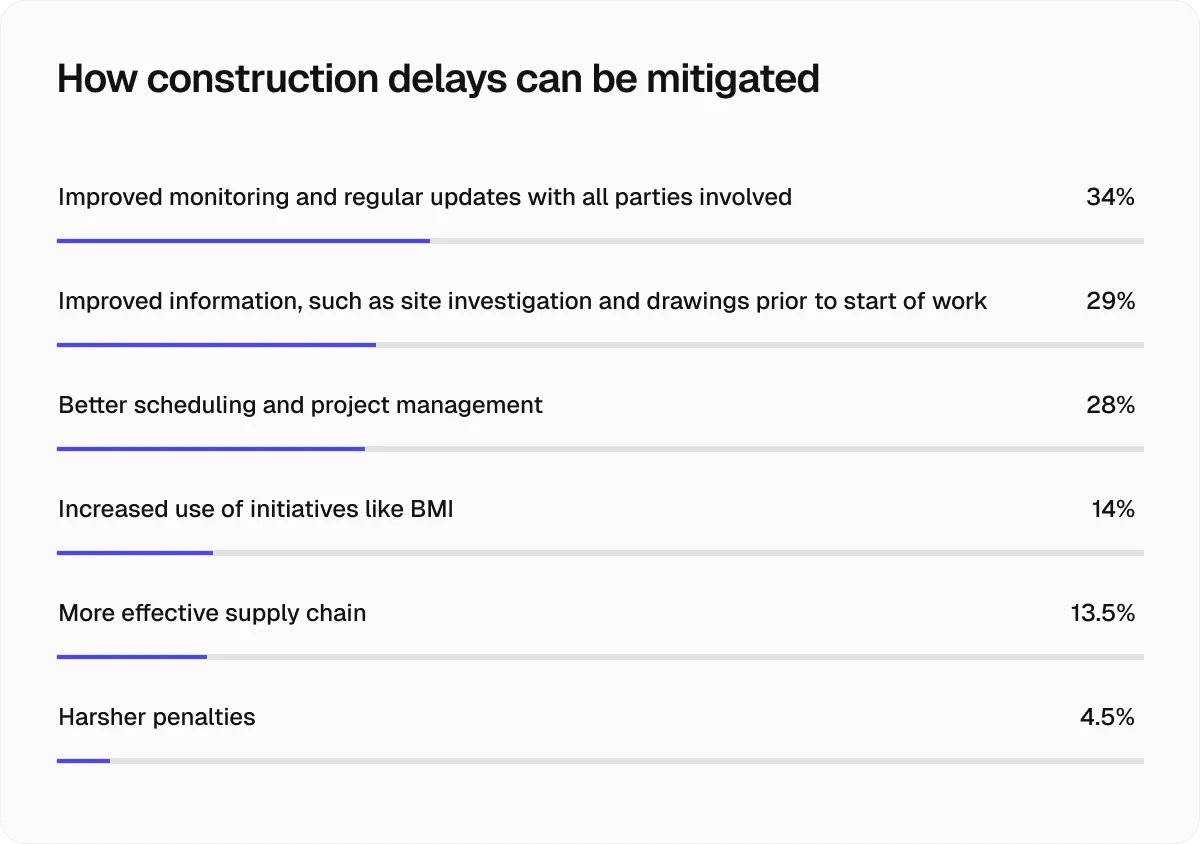
According to 34% of construction professionals, improved monitoring and regular schedule updates are also the most effective way to reduce project delays.
Here are the key steps of active schedule management:
Track actual site progress against the planned schedule.
Monitor delays, absenteeism, overtime, and labour availability.
Update schedules when work overruns or project priorities change.
Reassign crews between tasks or projects when needed.
Resequence work to reduce downtime and labour bottlenecks.
Hold regular coordination updates between the office and site teams.
Keep everyone working from the latest version of the schedule.
Step 10: Analyse performance and improve future schedules
Construction crew scheduling should improve from project to project, not restart from scratch every time.
After major phases or project completion, contractors should review planned versus actual labour hours, productivity levels, downtime, overtime, delays, and crew utilisation to understand where schedules held up and where they broke down.
These insights can then be used to improve future crew sizing, labour forecasts, task durations, and scheduling decisions.
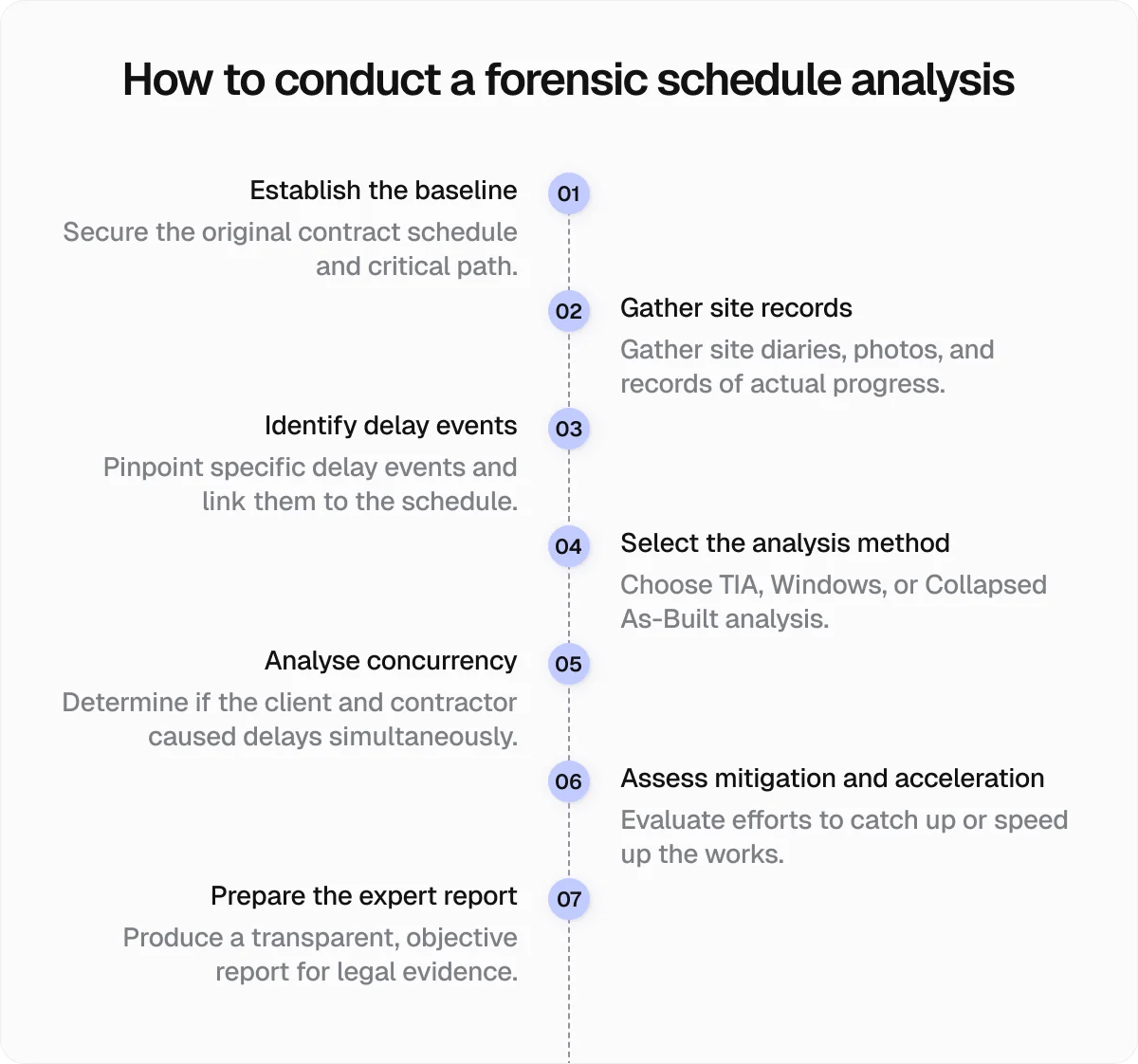
For more complex jobs, this process may extend into forensic schedule analysis, where teams review what caused delays, how labour plans were affected, and which scheduling decisions created knock-on impacts across the project.
How Onetrace supports construction crew scheduling from start to finish
Construction crew scheduling is difficult enough without relying on disconnected spreadsheets, paper records, group chats, or outdated schedules.
The right scheduling software helps contractors keep labour plans accurate, respond faster when conditions change, and maintain better visibility across projects, crews, qualifications, materials, and site progress.
With Onetrace, contractors can:
Plan and reschedule crews quickly using a visual drag-and-drop planner
Track operative availability, attendance, and working hours through live timesheets and GPS tracking
Keep office and site teams aligned through a mobile app designed for operatives on active sites
Share schedule updates, job information, and status changes in real time
Monitor project progress through daily reports and custom workflow statuses
Track materials used on site to improve visibility across resources
Export operational data for payroll and future scheduling analysis
Thanks to these features, Onetrace helps contractors build a scheduling process that is easier to manage and far more adaptable when projects change—because they always do.
If you want to see how these features work in practice, book a personalised Onetrace demo and walk through your own scheduling process, projects, and day-to-day site challenges with the team behind the platform.
FAQ
What is the L1, L2, L3, and L4 schedule?
L1, L2, L3, and L4 schedules are different levels of construction scheduling detail, ranging from high-level project timelines (L1) to detailed task-level schedules used for day-to-day site coordination (L4).
What is construction scheduling?
Construction scheduling is the process of planning, sequencing, and managing construction activities, labour, equipment, and timelines to keep projects on track.
Marketing Team
@Onetrace
The Onetrace marketing team is passionate about sharing insights, ideas, and innovations that help construction businesses stay connected, compliant, and efficient. Combining industry expertise with a love for clear communication, we aim to deliver content that empowers professionals to work smarter and safer.