How to write a construction safety report [+ Best practices]

By
Marketing Team
@Onetrace
A construction safety report is a formal written record used to document, assess, and communicate health and safety information on a construction site.
It forms a core part of effective construction safety management. The consequences of getting it wrong are felt in financial exposure, legal liability, and most importantly, lives.
With a fatal injury rate 4.8 times the all-industry average, 2.2 million working days lost each year to injury and illness, and £1.4 billion in annual costs to the sector, there’s little room for complacency in construction.
This guide is a practical starting point, walking you through writing a construction safety report in 8 steps and sharing best practices to make your reports clear, consistent, and compliant.
Key takeaways
A construction safety report is a legal tool, not just a paper exercise
UK law requires duty holders to identify, assess, and control risks on site. The safety report is how you show that duty is being met.The report should evolve as the project does
What was proportionate at the start of a project may not be sufficient six months in. As higher-risk phases begin, the depth of reporting needs to keep pace.Every hazard needs a control measure, and every action needs an owner
Listing hazards without controls, or recommending actions without named owners and deadlines, doesn’t meet Health and Safety Executive expectations.Near-misses matter as much as actual incidents
Many serious accidents are preceded by unrecorded close calls. Recording near-misses and non-compliances gives you the early warning data needed to prevent them.The right software makes the reporting process significantly easier
A platform like Onetrace helps you capture evidence, manage compliance documents, and maintain the audit trail your safety report needs.
What is a construction safety report?
A construction safety report is an evidence-based site document through which duty holders show that risks are being identified, assessed, and controlled throughout a project.
In the UK, there is a legal duty to conduct risk assessments and act on their findings under the Health and Safety at Work Act 1974 and the Construction (Design and Management) (CDM) Regulations 2015.
The construction safety report is part of how that duty is met in practice. It identifies hazards, records findings, assigns corrective actions, and creates an auditable trail that site managers, principal contractors, clients, and Health and Safety Executive (HSE) inspectors can all refer to.
These reports are produced at multiple stages of a project—from pre-construction to active site management—and updated as conditions change, incidents occur, and new information comes in.
How to write a construction safety report in 8 steps
Writing a construction safety report means bringing together evidence, site information, and concrete actions into a single document. These eight steps walk you through the process in more detail.
Step 1: Define the purpose and scope
A construction safety report can focus on a single area, such as a site inspection or a specific incident, or bring together risk findings, inspection results, and near-miss records into one comprehensive document, as this guide does.
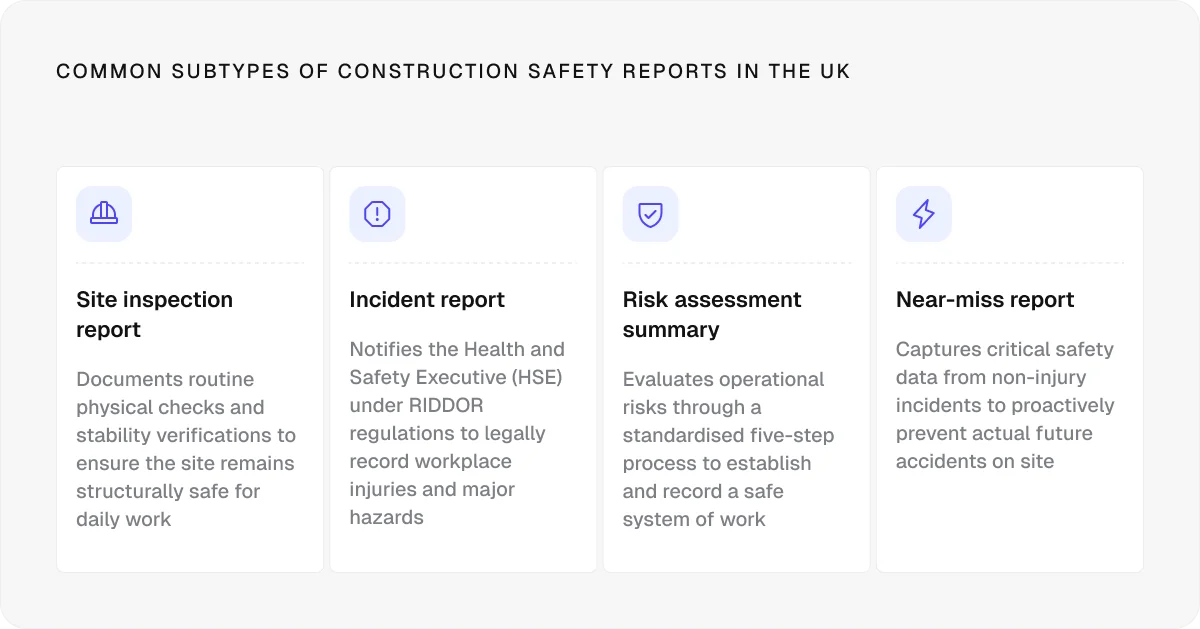
Either way, start by confirming:
The site location, project name, and date range
The parties involved (e.g., client, principal contractor, contractors, and subcontractors)
The scope of the project
Scope also means scale. A small residential build and a multi-million-pound high-rise carry very different levels of risk, and the depth of your report needs to reflect that. A report that’s too broad for a simple project wastes time, while one that’s too narrow for a complex site creates gaps that could have serious consequences.
In addition, the scope isn’t fixed.
As a project progresses and higher-risk phases begin—deep excavations, complex demolition, structural work—the report should evolve with it. What was proportionate at the start of a project may not be sufficient six months in.
Step 2: Gather relevant site information
Building a complete operational and contextual picture of the site is essential for a thorough construction safety report.
This means going beyond names and addresses to document:
The site’s physical layout, boundaries, and current phase of work
The number of workers on site, including subcontractors
Immediate surroundings, including nearby populated areas, roads, or protected natural habitats
Neighbouring businesses or activities that could introduce additional risk or increase the consequences of a hazard on site
As the project develops, this information will need to be updated. If details have changed since the last report, note what has changed and why.
Step 3: Reference the applicable legislation and standards
Every construction safety report should be grounded in the relevant UK legislation. Some regulations apply to almost every project, while others depend on the nature, scale, and location of the work.
The core frameworks most reports will reference include:
Regulation | What it covers |
Health and Safety at Work Act 1974 | The overarching duty of care for all employers and workers |
Construction (Design and Management) Regulations 2015 | Duty holder responsibilities across the project lifecycle |
Reporting of Injuries, Diseases, and Dangerous Occurrences Regulations (RIDDOR) 2013 | Reporting of injuries, diseases, and dangerous occurrences |
Control of Substances Hazardous to Health Regulations (COSHH) 2002 | Control of substances hazardous to health |
Provision and Use of Work Equipment Regulations (PUWER) 1998 | Safe use and maintenance of work equipment |
Dangerous Substances and Explosive Atmospheres Regulations (DSEAR) 2002 | Dangerous substances and explosive atmospheres |
Lifting Operations and Lifting Equipment Regulations (LOLER) 1998 | Lifting operations and lifting equipment |
Beyond the core Acts, a thorough report should reference the specific Approved Codes of Practice and British Standards (BS EN codes) relevant to the site’s activities.
Additional frameworks may apply for large or high-hazard projects.
For instance, COMAH (Control of Major Accident Hazards) safety reports come with extensive HSE documentation to guide you through the process, including:
Even when COMAH doesn’t apply, elements of this framework can provide a useful structure for reporting on complex or higher-risk activities.
Step 4: Document hazards and risk findings
This is the core section of a construction safety report. Its purpose is to list identified hazards, assess them, and connect them to a control measure—what the HSE refers to as taking ‘all measures necessary.’
Start with a systematic audit of the site before moving to solutions. Common construction hazards to look out for include:
Falls from height
Struck-by incidents
Excavation collapses
Hazardous substances
Lifting operations
Safety-critical tasks where human error could directly cause or fail to prevent an accident should be documented alongside physical hazards. That’s why you should also identify situations where workers are most likely to experience fatigue, miscommunication, or distraction, such as repetitive manual tasks, noisy multi-trade areas, and shift handovers.
Once hazards are identified, each one needs to be rated by likelihood and severity, with the risk rating calculated by multiplying the two.
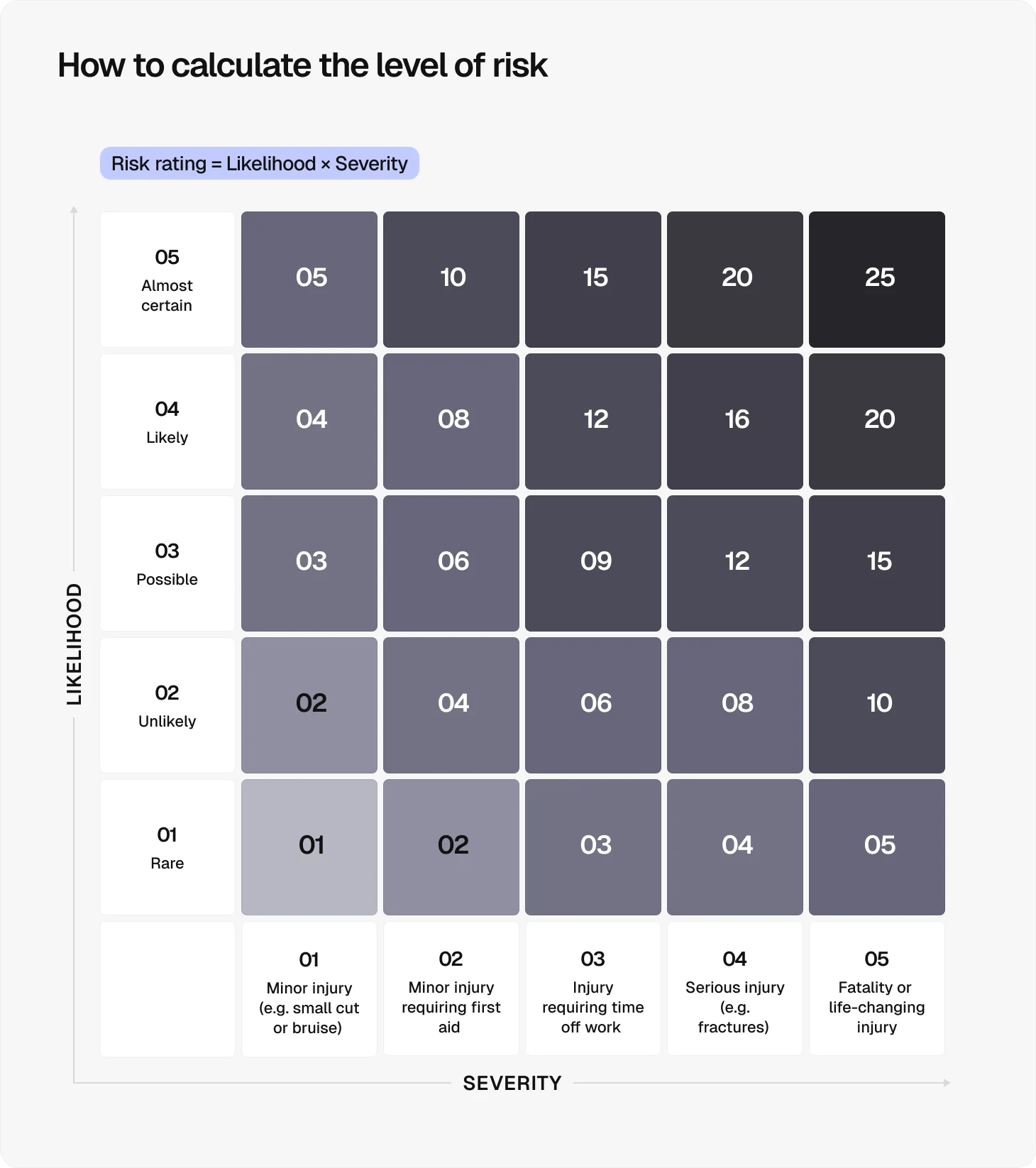
Risk matrices can be a useful tool for prioritising actions, but only use one if it genuinely aids understanding or has been requested. A number on a matrix means nothing if the person who produced it can’t explain what it represents.
The approach you take to assessing each risk should primarily reflect its complexity:
Risk type | Examples | Recommended approach |
Everyday hazard | Slips, trips, manual handling | Qualitative assessment |
Medium complexity risks | Working at height, COSHH | Semi-quantitative assessment using a risk matrix |
High-complexity risks | Crane lifts over live areas, deep excavations | Fully quantitative assessment using statistical data and probability modelling |
The findings need to be recorded consistently for every hazard identified, with each entry including:
Its location on site and the nature of the risk
The worst-case consequences should it occur
The control measures in place to prevent or limit it
Every identified hazard must connect directly to a control measure. A hazard listed without a corresponding response doesn’t meet the HSE’s standards.
Step 5: State corrective actions and recommendations
Documenting what controls are in place is necessary, but it doesn’t drive improvement on its own. That’s what corrective actions are for: turning findings into assigned, time-bound responses.
If a risk can be addressed through physical engineering, such as barriers, isolation, or automation, that corrective action should take precedence over procedural or training-based measures. A recommendation that relies solely on additional training won’t demonstrate that risks have been reduced to As Low as Reasonably Practical (ALARP).
When stating corrective actions, follow these guidelines:
Be definitive when correcting serious deficiencies: Every corrective action must have a named owner and a clear deadline. A vague recommendation with no timescale leaves the hazard unresolved and the report open to challenge.
Justify specific technical recommendations: If the action is to switch from standard scaffolding to a mast-climbing work platform, include the reasoning, such as ground conditions, load capacity, or proximity to the public. A bare instruction without justification doesn’t meet HSE expectations.
Distinguish between immediate actions and longer-term improvements: Immediate actions cover hazards requiring urgent intervention before work continues. Longer-term improvements involve structural or procedural changes with a defined programme and realistic deadlines.
Review and carry forward outstanding actions from previous reports: A closed-loop process, where actions are raised, assigned, tracked, and signed off, is what drives genuine improvement rather than only recording problems.
Step 6: Record any incidents, near-misses, or non-compliances
Under RIDDOR 2013, employers and contractors must report specified injuries, occupational diseases, and dangerous occurrences to the HSE within set timeframes.
Your construction safety report should detail whether any logged incidents triggered a statutory RIDDOR report and confirm whether reporting deadlines were met. For reported incidents, reference the RIDDOR report number directly. Where a report hasn’t yet been submitted, note this clearly and prioritise it accordingly, as statutory reporting deadlines may already be approaching.
This step covers two types of performance data:
Data type | What it captures | Examples |
Reactive data | Incidents and failures after they occur | Injuries, dangerous occurrences, lost time |
Active data | Safety gaps identified before an accident happens | Workers without correct personal protective equipment (PPE), missing edge protection, a subcontractor repeatedly failing to follow a method statement |
Near-misses are as important to record as actual incidents. Falls from height account for 53% of all worker fatalities in construction, and many of these incidents were likely preceded by near-misses that went unrecorded. A pattern of close calls on site is a warning sign that belongs in the report.
Pro tip:
Write this section as close to the incident or inspection as possible, while details are fresh. If a hazard requires immediate action, raise it before the report is finished.
Step 7: Include supporting evidence
A construction safety report stands or falls on the quality of its supporting evidence. Without it, findings can’t be verified, actions can’t be traced, and the report won’t hold up to scrutiny from clients or HSE inspectors.
Depending on the type of report and the findings it contains, supporting evidence can include:
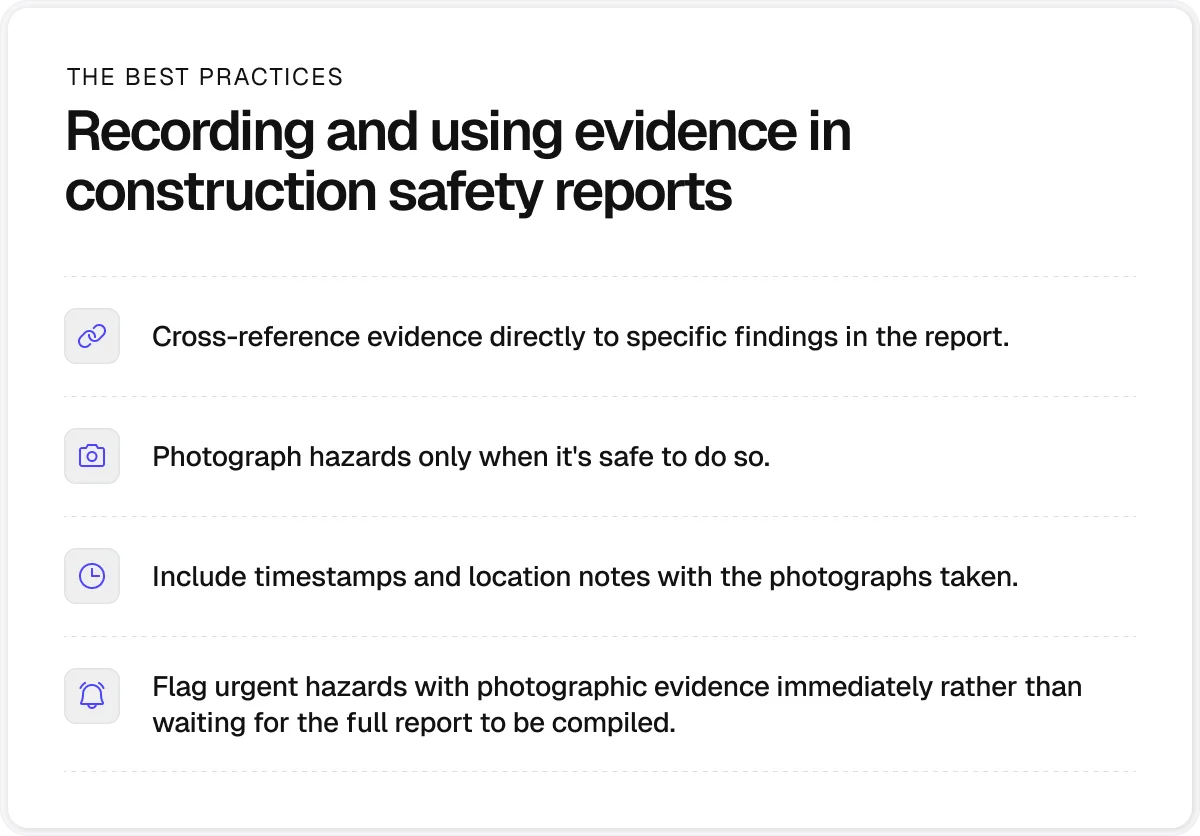
Photographs: Photos confirm what was observed on site and when, providing visual records of hazards, conditions, and control measures.
Site maps and layout drawings: Drawn to an appropriate scale, these show where hazardous activities or materials are positioned relative to site boundaries and the public.
Inspection checklists: Completed checklists confirm whether inspections were carried out, by whom, and when.
Toolbox Talk records: Signed Toolbox Talk records prove that safety information was communicated to workers on site.
Method statements: A method statement sets out how high-risk tasks will be carried out safely, providing a reference point for comparing planned versus actual site practice.
Witness statements: First-hand accounts from workers or supervisors support incident or near-miss records when the facts of what happened are disputed or unclear.
Pro tip:
Evidencing site safety thoroughly is much easier with construction site management software. A platform like Onetrace can help you capture and manage your supporting evidence in one place, through features like:
Centralised document storage: Keep RAMS, health and safety forms, contracts, and certificates in one secure and organised place.
Photographic evidence: Capture time-stamped before, during, and after photos for safety compliance and client sign-off.
Drawings and mark-ups: Upload site drawings and mark them up with pinpoint accuracy, sorted by block, level, zone, and core for smarter reporting.
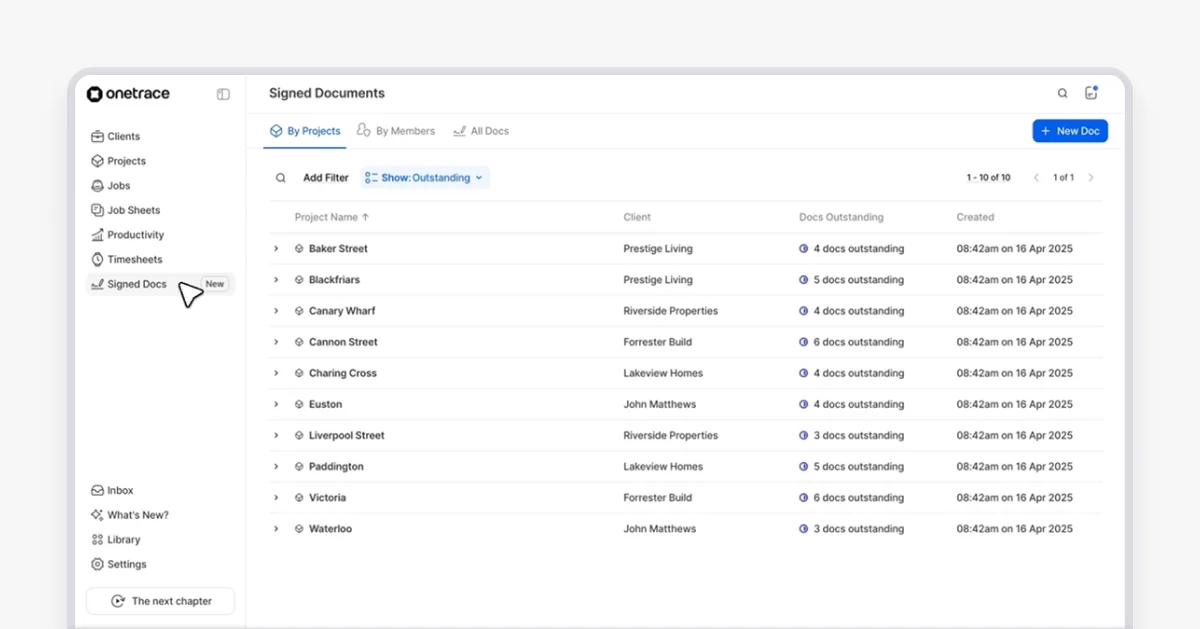
Signed documentation: Request and track signatures for RAMS and Toolbox Talks directly from the app, with full visibility of who has viewed, signed, or still has a document pending.
Every interaction is time-stamped, every document is traceable, and every report can be filtered by area, giving you the audit trail your safety report needs without the administrative burden.
Step 8: Sign off and distribute appropriately
Before the construction safety report is issued, it should be reviewed and signed off by a competent person. This is typically a site manager or health and safety officer, ideally holding a relevant NEBOSH or IOSH qualification.
If external specialists like scaffolding designers or asbestos surveyors have contributed to the report, their names and roles should be included in the sign-off section to establish accountability.
Once the report is signed off, make sure it reaches the right people:
The client and principal contractor
The HSE, if a RIDDOR-reportable incident is involved
Local emergency services and the local council’s emergency planning officer, if the project carries high-consequence risks
Besides distributing the report to third parties, you should file a copy for audit purposes, logging when the report was sent and to whom. Under CDM 2015, the health and safety file must be kept for the life of the structure. Check retention requirements for other report types and apply them consistently.
8 best practices for writing a construction safety report
These best practices will help you produce construction safety reports that are accurate, actionable, and audit-ready:
Use a consistent template: A consistent structure across all reports on a project makes auditing easier and ensures nothing is missed.
Write in plain English: The HSE champions plain English because your report may be read by a site operative, a senior client, and an HSE inspector. Write in a way that works for all three.
Be specific: ‘Unsecured scaffolding on the north elevation at grid line C4’ is far more useful than ‘scaffolding issue noted’. Vague observations are difficult to act on.
Stick to facts: Separate observations from opinions and never speculate about cause without evidence, particularly in incident reports where legal proceedings may follow.
Avoid blame language: The purpose of incident reporting is to identify systemic causes, not assign personal fault. Blame language also weakens the report’s usefulness if it’s used in legal proceedings.
Keep it relevant: Only include site, environmental, or historical data that directly supports your risk findings. Including generic background information that doesn’t connect to a hazard adds length without adding value.
Acknowledge uncertainty: Site conditions aren’t always predictable. A brief acknowledgement of how changing weather, ground movement, or supply delays might affect safety barriers in place strengthens your report.
Highlight revisions clearly: If the report is an update of a previous version, make all new or revised content explicit. Reviewers shouldn’t have to re-read unchanged sections to find what is new.
How construction management software supports safer reporting
Writing a thorough construction safety report requires consistent data capture, clear accountability, and a reliable audit trail across every stage of a project. Construction management software like Onetrace is built to support that process from the ground up.
Beyond evidencing, Onetrace helps teams manage safety reporting through:
Custom forms and templates: Build unlimited inspection and survey forms with mandatory fields to ensure nothing is missed, and save them as templates to keep reporting consistent across every project.
Approval workflows: Move job sheets through multi-stage sign-off chains with every decision logged, time-stamped, and audit-ready.
Timesheets and attendance: Monitor who is on site, when, and for how long to get the staffing visibility your safety report needs.
Ready to make safety reporting less of a burden on your team? Book a personalised demo, and we’ll show you how Onetrace can help.
FAQ
How do I write a safety report?
Writing a safety report means defining the scope, gathering site information, documenting hazards, stating corrective actions, recording incidents, including supporting evidence, and signing off with the right people.
What is a construction safety summary?
A construction safety summary is a condensed overview of a full safety report, covering the key hazards, controls, incidents, and corrective actions. It’s typically used to communicate the most important findings to senior stakeholders or clients who need the headlines without the full details.
Marketing Team
@Onetrace
The Onetrace marketing team is passionate about sharing insights, ideas, and innovations that help construction businesses stay connected, compliant, and efficient. Combining industry expertise with a love for clear communication, we aim to deliver content that empowers professionals to work smarter and safer.