13 proven construction document management tips for contractors

By
Marketing Team
@Onetrace
Construction document management is the process of organising, storing, sharing, and tracking the documents used throughout a construction project.
Getting this process right primarily means saving time.
After all, document-related tasks can consume many hours each week—time that could otherwise be spent managing site activities, coordinating trades, and resolving issues before they affect progress.
But time isn’t all that’s at stake.
Industry studies consistently rank poor information management among the leading causes of avoidable rework, which can account for up to 25% of project costs.
To protect against the many consequences of poor documentation practices, this guide shares 13 proven construction document management tips that can make a meaningful difference on the site and in the office.
Key takeaways
Treat document management as a project-critical process
Meticulous document management improves communication, reduces rework, supports compliance, and helps protect contractors when disputes arise.
Put clear processes and ownership in place
Define how documents will be created, reviewed, approved, and stored, and make one person accountable for keeping the system organised and consistent.
Keep information up to date and easy to access
Timely updates, strong version control, and mobile access help ensure everyone is working from the latest approved information.
Review and improve your processes regularly
Ongoing training, user feedback, and regular audits help identify issues early and keep document management practices effective.
Use the right software to support the process
Platforms like Onetrace centralise project information, automate workflows, simplify compliance, and make document management easier for both site and office teams.
What is construction document management?
Construction document management is the set of processes used to control how project information is created, reviewed, approved, shared, updated, and stored across every stage of delivery.
It ensures that everyone involved in a project can access the right information at the right time and that there’s a clear record of what was changed, when, and by whom.
Proper construction document management delivers several important benefits:
Better communication: Teams can access the same up-to-date information, reducing misunderstandings and delays.
Stronger version control: Everyone works from the latest approved documents, helping prevent errors and rework.
Faster decision-making: Project information is easier to find, review, and act on when issues arise.
Greater accountability: Accurate audit trails show who made changes, approved documents, or issued instructions.
Lower project costs: Fewer mistakes, delays, and duplicated efforts help keep budgets under control.
Improved collaboration: Contractors, subcontractors, designers, and clients can work from a shared source of truth.
Simpler compliance: Records are easier to produce during audits, inspections, and project closeout.
The importance of proper documentation becomes especially clear when disputes arise.
The majority of construction disputes involve documentation as a central element, whether to establish what was agreed, what was communicated, or what work was carried out. Even in the UK, where resolution times are relatively low by global standards, construction disputes can still drag on for around 12 months and involve millions of pounds.
Regulatory compliance is another important consideration.
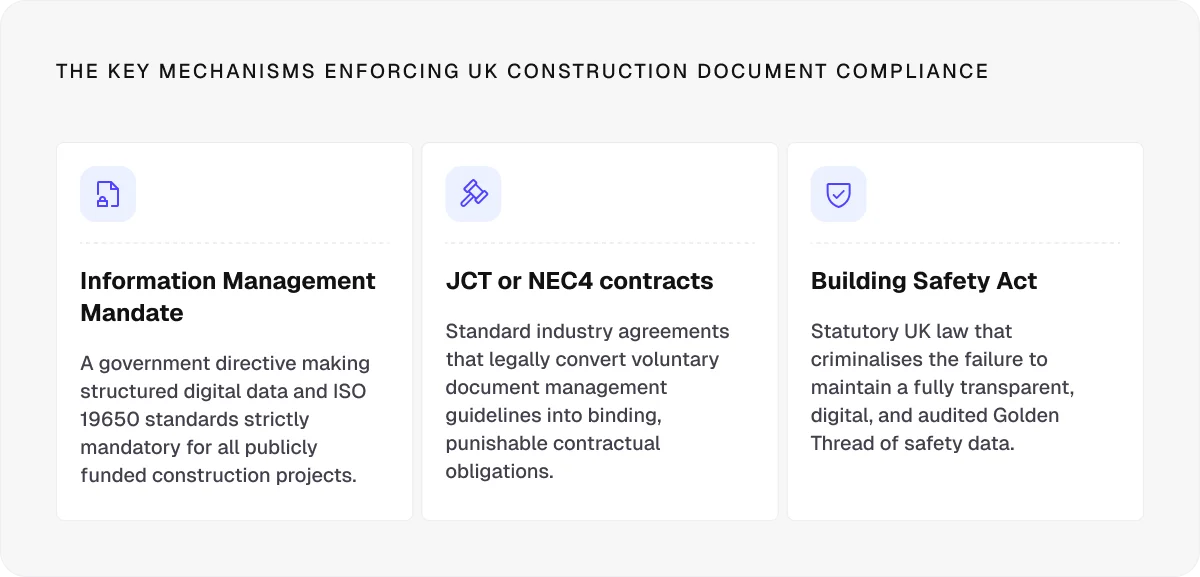
Increasingly, clients, government bodies, and major contractors expect firms to demonstrate structured information management practices as part of the tender process. Standards like ISO 19650 and information management requirements within modern construction contracts have made proper documentation a commercial necessity.
13 construction document management tips that make a real difference
Errors, omissions, and ambiguities are among the greatest causes of claims and disputes related to contract documentation used in construction. More often than not, they reflect broader weaknesses in the way project information is managed.
These 13 construction document management tips will help you tackle those weaknesses and other documentation challenges that can undermine project delivery.
1. Digitise your document management processes
Leaving the paper-based documentation behind might sound like an obvious step in the digital age, but construction is notoriously one of the least digitised industries in the world. Many firms still rely on paper records, which are ineffective for managing project information across multiple teams and locations.
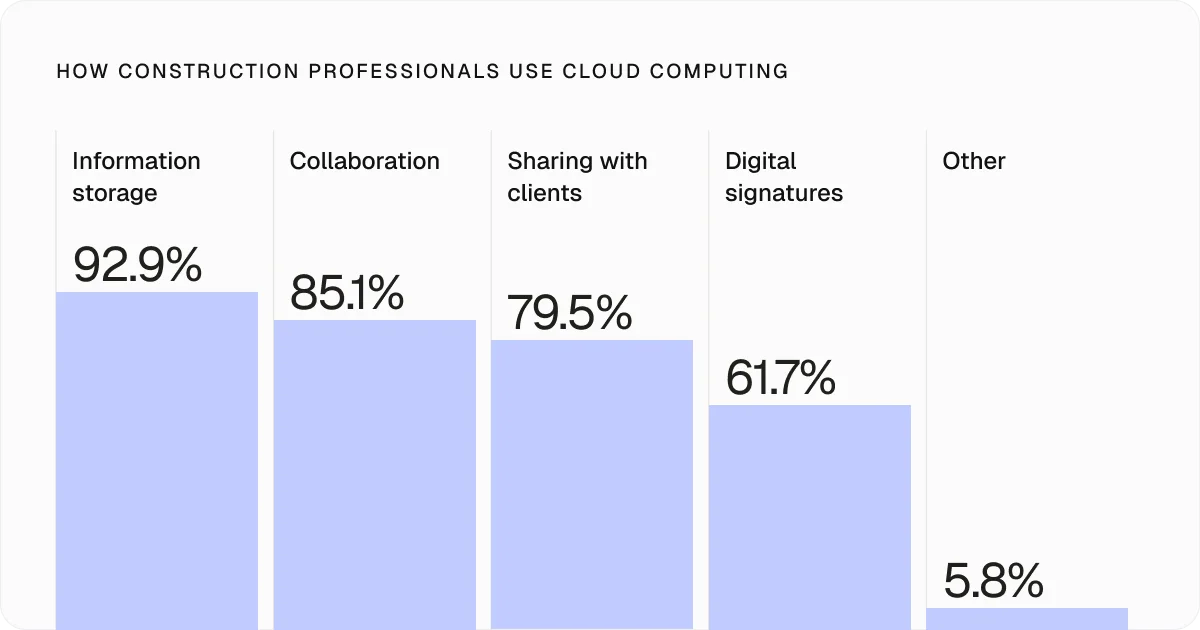
The good news is that digital adoption is accelerating, with around 86% of construction professionals now using cloud-based solutions.
2. Put a document management plan in place
Many of the construction document management tips in this guide depend on having a clear plan from the start. For information to flow consistently, the rules need to be defined before the first file is uploaded.
Your document management plan should cover:
Document ownership: Define who is responsible for creating, reviewing, approving, and maintaining different types of documents.
Folder structures: Create a logical filing system that reflects the project’s organisation.
Document workflows: Set defined processes for document submission, review, approval, and distribution.
Revision control: Establish how updates, revisions, and superseded documents will be identified and managed.
Access permissions: Determine who can view, edit, approve, and share project information.
Archiving procedures: Define how documents will be stored, retained, and retrieved after project completion.
Naming conventions: Create a standard approach to naming files so they can be found, sorted, and understood quickly.
Naming conventions deserve particular attention.
File names should be consistent, descriptive, and easy to follow, typically including details like the project name, document type, revision number, and date.
Just as importantly, the folder structure should work across different trades. For example, if a site manager needs a fire door specification, they should know whether it sits within architectural drawings, joinery records, or fire protection documentation solely based on pre-established rules.
A well-structured filing system makes information easy to find, even for people who are unfamiliar with the technical details behind it.
3. Give document management a clear owner
Construction document management is a team effort that includes roles like:
Project managers, who oversee document workflows and ensure information supports project delivery
Design teams and consultants, who produce and update drawings, specifications, and technical documentation
Contractors and subcontractors, who submit RFIs, shop drawings, product data, certifications, and other project records
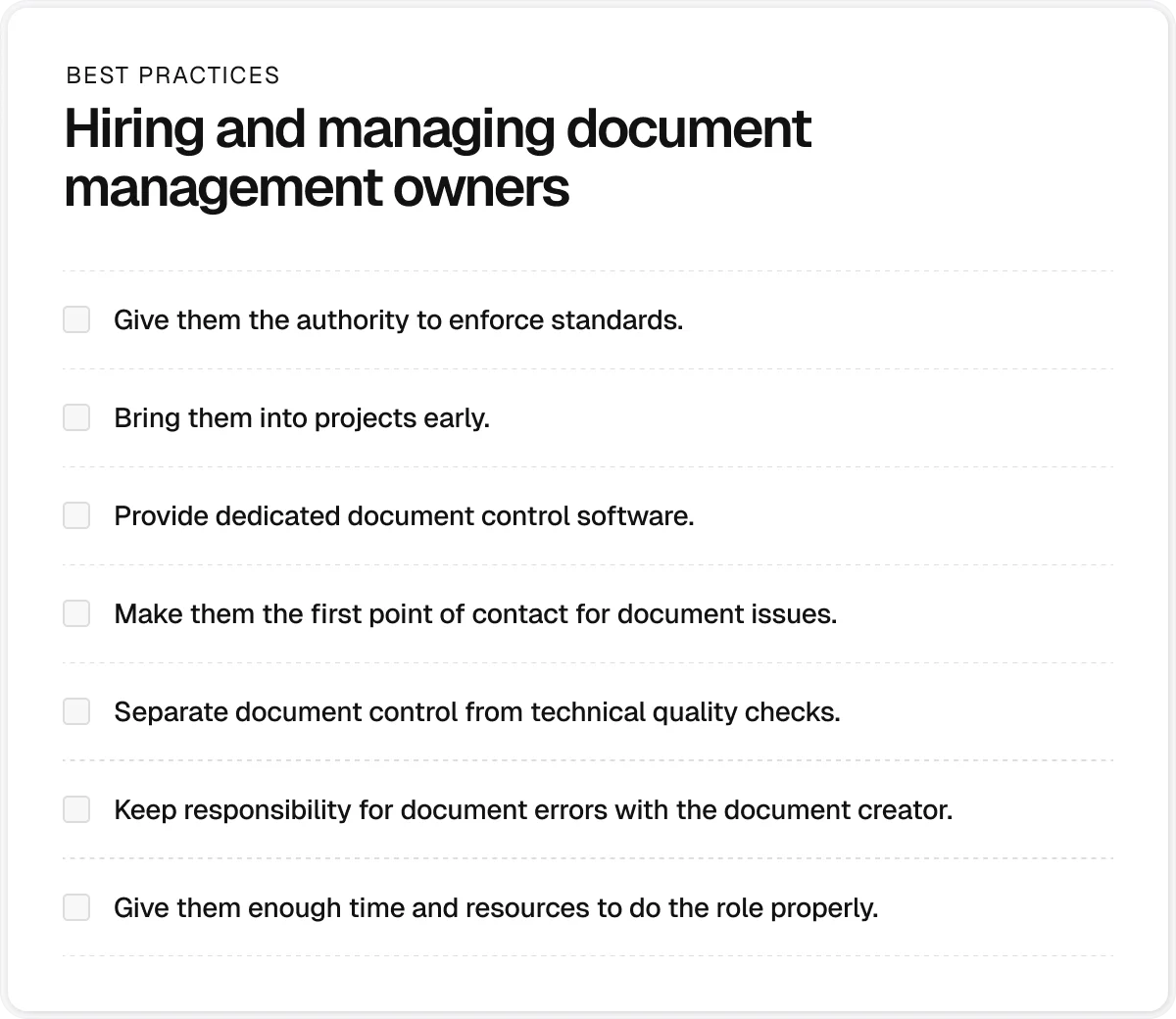
However, there should always be one person with overall responsibility for document management. Without clear ownership, inconsistencies creep in, standards are applied unevenly, and teams lose confidence that they’re working from the correct information.
This doesn’t mean one person should create, review, or maintain every project document. Instead, they should be responsible for:
Ensuring document management procedures are followed
Maintaining document quality and consistency
Managing access permissions and document distribution
Monitoring version control and approval workflows
Supporting users and resolving process issues
Identifying training needs and areas for improvement
The specific job title may vary from one organisation to another, but the principle remains the same: Document management works best when someone is fully accountable for keeping the system organised, consistent, and reliable.
4. Train team members according to their responsibilities
Simply handing out document management guidelines or system manuals to team members is rarely enough. Teams need practical training that reflects how they interact with project information on a day-to-day basis.
Depending on the role, training may cover:
Role | Training focus |
Site teams | • Drawing access and retrieval • Specification access • Mobile document use |
Project managers | • Review workflows • Approval processes • Document distribution |
Document controllers | • Version control • Metadata management • Audit trail maintenance |
Design teams | • Document creation standards • Revision procedures • Information exchange requirements |
Subcontractors and suppliers | • Submission requirements • Naming conventions • Approval procedures |
The ultimate goal is to create a culture where proper document management becomes part of everyday work rather than an administrative task people only think about when something goes wrong.
5. Listen to feedback from system users
Training is also an excellent way to test whether your document management processes are working as intended. If team members keep asking the same questions or making the same mistakes, there might be a flaw in the process.
To ensure the document management system is practical and easy to follow, you should listen to feedback from the people who will be using it every day and make changes where needed.
6. Create document registers
A single construction project can generate thousands of documents. So, even when team members know where information is stored, finding the right file can still take significant time.
Document registers are a handy solution to this problem.
They are like detailed contents pages for specific sections of your document management system. Alongside document names, they can include metadata like:
Document type
Author
Date
Trade
Location
Revision status
Thanks to this approach, team members should be able to find the information they need with as little searching as possible.
7. Centralise project information in one platform
Moving from paper to digital documents is an important first step, but it doesn’t automatically solve document management challenges. Digital files stored across disconnected tools can be just as difficult to control, search, and track.
Construction management software addresses this by bringing project information into a controlled environment that serves as a single source of truth for all the involved project stakeholders.
A well-designed platform allows you to:
Maintain version control across drawings, specifications, and other records
Control access through role-based permissions
Track document revisions, approvals, and user activity
Search documents using metadata, keywords, and filters
Automate review and approval workflows
Collaborate in real time across the office and the site teams
Access project information from any location or device
The simpler and more consistent the system, the easier it becomes for teams to find, share, and trust project information.
Pro tip:
The most effective document management systems connect documentation directly to compliance processes.
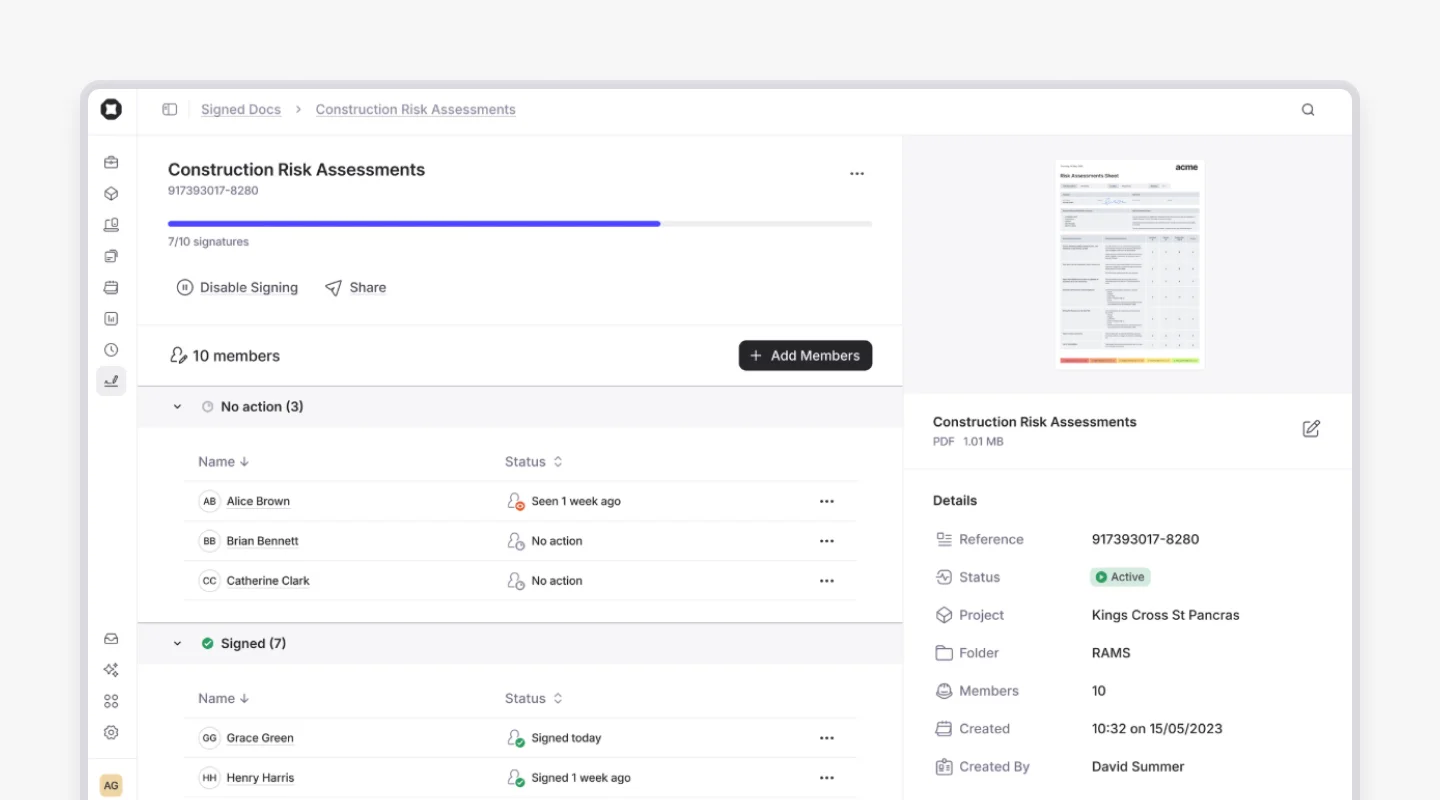
Take Onetrace’s Signed Docs feature as an example. Besides allowing contractors to store all compliance documents in a central location, it also lets them:
Request and track signatures digitally
See who has viewed, signed, or not yet acknowledged a document
Automatically assign required documents to operatives when they’re added to a job
Prevent work from progressing until required sign-offs have been completed
Export documents with a complete signature history for audits and client reporting
These capabilities add another layer of control to document management by ensuring important records are tracked, verified, and easy to retrieve when needed.
8. Update documents as changes happen
Where possible, changes should be reflected in project documents immediately. At the very least, they should be recorded and shared with relevant stakeholders as soon as practicable—for example, before the next shift begins or affected work continues.
This level of urgency helps reduce rework, avoid confusion, and ensure everyone is working from the latest available information.
9. Give site teams mobile access to documents
Most project information originates on the site. So, if you want project documents to stay accurate and up to date, site teams need a simple way to access and update information as work happens.
Mobile access allows them to view the latest documents, record changes, and share updates without waiting to return to the site office.
10. Maintain strict version control
Few document management failures are as costly as people working from outdated information. A single superseded drawing, specification, or change order can lead to rework, wasted materials, delays, safety risks, and disputes over responsibility.
Successful version control includes:
Clearly identifying the latest approved version of every document
Maintaining a complete history of revisions and approvals
Recording not only what changed, but also why the change was made
Tracking when changes were issued and who received them
Restricting edits to authorised users
Removing superseded documents from active circulation
Confirming that updated documents have been received by affected teams
11. Back up project information regularly
Hardware failures, software issues, cyberattacks, and human error can all put critical records at risk.
To protect against data loss, you should:
Schedule automatic backups
Store copies in multiple locations
Keep local backups alongside cloud-based storage
Test recovery procedures regularly
Document how information can be restored if needed
12. Maintain long-term access to project records
Document management doesn’t end when the project is complete. Many records need to be retained for years to support warranty claims, insurance requirements, audits, maintenance activities, and potential disputes.
An effective archiving process should do the following:
Define how long different records must be retained
Protect archived files from unauthorised changes
Maintain clear folder structures and metadata
Ensure documents remain accessible long after project handover
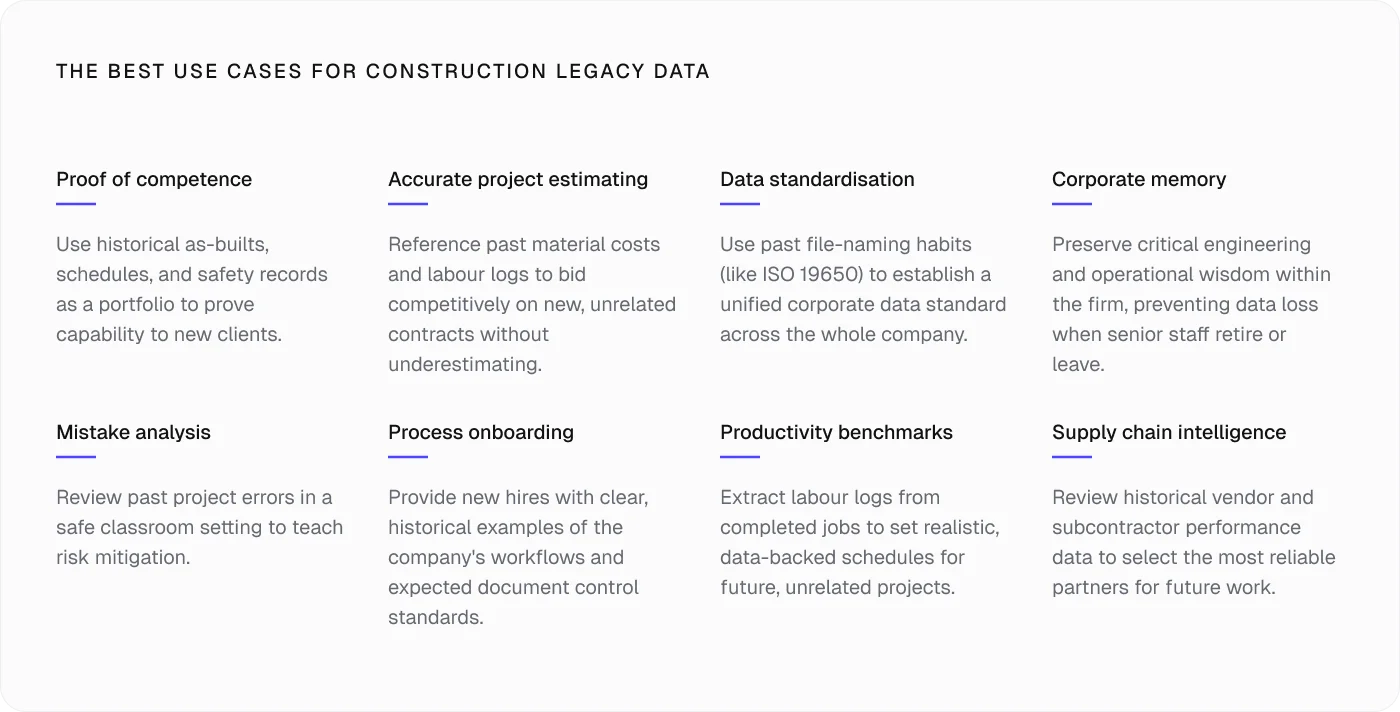
The value of project documentation often extends far beyond the project itself. Well-maintained records can help contractors demonstrate experience when bidding for new work, create internal knowledge bases, support staff training, and improve delivery on future projects.
13. Audit your document management processes regularly
As projects, teams, and business requirements change, your document management processes need to evolve with them. You should schedule regular reviews to assess how well these processes are working in practice.
Look for:
Recurring errors
Outdated procedures
Hard-to-find documents
Process workarounds
Pro tip:
When performing document management audits, don’t ignore seemingly small mistakes, such as incorrect document numbers or inaccurate revision labels. While they may seem harmless in isolation, these issues can quickly undermine the reliability of the system by introducing uncertainty about whether teams are working from the correct information.
Why contractors choose Onetrace for document management
Strong construction document management depends on having a system that keeps information organised, accessible, traceable, and connected to the work happening on site.
That’s exactly what Onetrace delivers through features like:
Centralised document storage: Keep drawings, specifications, RAMS, certificates, contracts, and other project records in one organised location.
Folder management and access controls: Structure information consistently and control who can view, edit, and share documents.
Mobile access for site teams: Allow operatives to access documents, capture evidence, complete forms, and update records directly from the site.
Offline functionality: Keep work moving even when connectivity is limited, with automatic synchronisation once a connection is restored.
Approval workflows: Route submissions through configurable review and approval stages, creating accountability and reducing quality issues.
Real-time visibility: Monitor document status, approvals, and project activity as work progresses.
Alongside these valuable capabilities, Onetrace prioritises simplicity, clear workflows, and straightforward navigation, helping teams adopt new processes quickly without extensive training or technical expertise.
If you’d like to see how Onetrace can support your document management processes, book a personalised demo with our team. We’ll show you how the platform can be configured around your workflows, documentation requirements, and day-to-day challenges.
FAQ
What is the best way to organise construction documents?
The best approach is to use a consistent folder structure, clear naming conventions, and strict version control within a centralised system.
Do small contractors need construction document management software?
Yes. Even on smaller projects, a dedicated document management system can help reduce admin time, improve compliance, and ensure teams are working from the latest project information.
Marketing Team
@Onetrace
The Onetrace marketing team is passionate about sharing insights, ideas, and innovations that help construction businesses stay connected, compliant, and efficient. Combining industry expertise with a love for clear communication, we aim to deliver content that empowers professionals to work smarter and safer.