Fire inspection software: What to look for before you buy

By
Marketing Team
@Onetrace
Fire is costly—both for the country and for the businesses caught up in it.
The latest UK Government research estimates that fire costs the English economy £12 billion a year. Meanwhile, UK businesses submit around £940 million in fire property insurance claims annually, with a major fire costing an average of £657,000—enough to put serious pressure on most SMEs.
Behind those numbers are fires that, in some cases, could’ve been prevented or caught earlier.
That’s where fire risk assessors and inspection contractors come in. Their day-to-day job is to find the faults, gaps, and hazards before they become bigger problems. But to do that properly, they need software that makes inspections easier to complete, evidence more straightforward to manage, and results simpler to share.
If you’re looking for fire inspection software that delivers these outcomes, this guide breaks down 10 features worth evaluating before you buy.
Key takeaways
Choose forms that fit the inspection
Custom fields, required questions, and reusable templates help teams record the right information consistently.Prioritise reliable fieldwork
Photo evidence, offline access, and location-based records help inspectors capture and trace findings on site.Build review and compliance into the workflow
Approval processes and centralised document management make it easier to review work and keep important records together.Make reporting straightforward
Professional reports and data exports help turn inspection findings into useful records for clients, building managers, and other stakeholders.Consider the wider platform, not just inspections
Onetrace combines inspection tools with scheduling, workforce management, documents, reporting, and API integrations, allowing fire protection contractors to manage more of their day-to-day workflow in one place.
10 features to look for in fire inspection software
The 10 features below balance flexibility and focus, with enough structure for accurate, consistent inspections and the freedom to adapt to different projects, teams, and types of work.
1. Configurable inspection forms
No two fire inspections are quite the same.
Different sites, building layouts, equipment, and types of work can all change what an inspector needs to check and record. So, a rigid checklist can leave you either missing useful detail or wasting time on questions that don’t apply.
That’s why you should look for software that lets you shape inspection forms around the work you actually do.
In practice, your chosen software should allow you to:
Only show relevant questions: Conditional questions can bring up extra checks when an answer calls for them, without cluttering every inspection.
Make key details required: Mandatory fields help ensure important information, such as ratings, measurements, or inspection results, isn’t skipped.
Capture information in the right format: Options like drop-downs, dates, checklists and yes/no answers make records more consistent and easier to review.
2. Standardised inspection templates
Even though fire inspections can vary from site to site, many checks repeat.
For example, fire door inspections typically cover details like the condition of the door, gaps, hinges, seals and door closers.
That’s why, alongside customising your inspection forms, you should also be able to save and reuse standard templates. This means your team can start with a proven structure for recurring inspections, rather than rebuilding the same form each time.
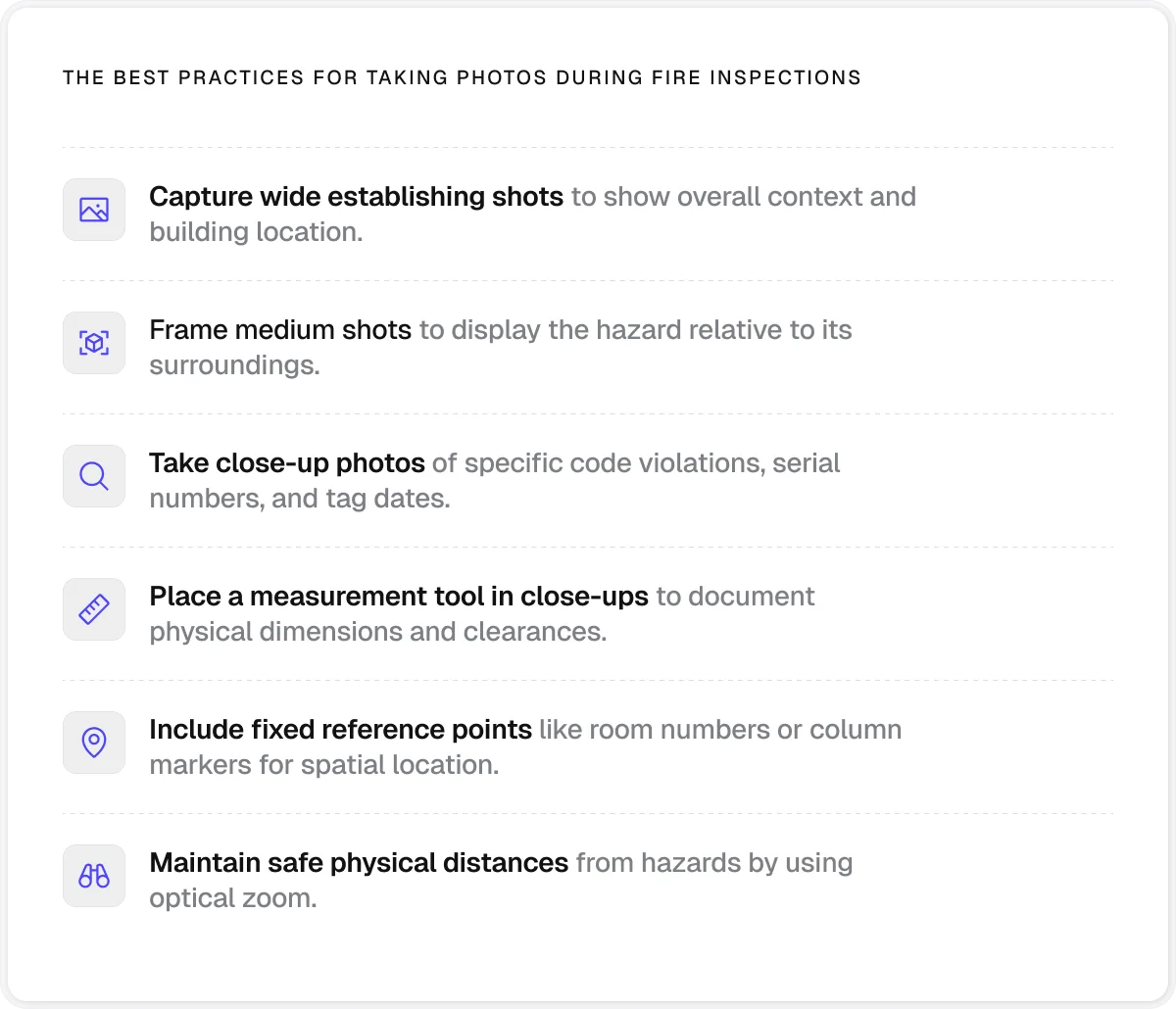
3. Photo-based evidence capture
Fire inspections often involve issues that are far easier to show than explain.
A photograph can make the condition of a fire door, an obstructed escape route, or a missing seal immediately clear, giving everyone involved a better understanding of what was found.
This makes photographic evidence an important part of the inspection record.
The software you choose should allow you to:
Capture photos as you inspect: Taking evidence on the spot avoids sorting through images and matching them to notes afterwards.
Document work before and after: Pairing photos of a defect with the completed work shows what changed.
Keep photos with the relevant record: Images should remain linked to the relevant job, location, or inspection.
Include evidence in reports: Bringing inspection photos into the final report lets clients and other stakeholders review the evidence alongside the rest of the inspection record.
4. Offline mobile access
Fire inspections rarely happen in perfect conditions. Basements, plant rooms, stairwells, and other areas can have weak or no signal, but that shouldn’t stop an inspection halfway through or force inspectors back to paper notes.
That’s why well-built fire inspection software should offer offline access, allowing field teams to keep working even when the network connection drops. A robust offline setup should include:
Offline access to inspection data: Pre-loaded forms, drawings, and other project information let inspectors carry on working without a live connection.
Automatic syncing: Data captured offline should transfer back to the central system once the device reconnects, avoiding duplicate entry later.
Reliable mobile performance: The fire inspection app should remain responsive in the demanding environments where inspections actually take place.
5. Location-based inspection records
Knowing where an issue was found can be just as important as understanding what the issue was. On larger sites, inspectors may check multiple floors, zones, or areas, so it’s easy for records to become vague or disconnected from the physical location.
Location-based records tie inspection information to a specific place, giving teams a better way to find previous work and track what has happened over time.
Useful capabilities here include:
Pinpointing inspection locations: Drawings with pins can show exactly where an inspection, finding, or piece of work relates to.
Structuring complex sites: Blocks, levels, and zones help organise records across larger or multi-level projects.
Linking physical locations to digital records: QR codes, NFC tags, and other location-based tools can connect an asset or area to its inspection history, helping operatives find previous records and add new work from the same location.
QR codes, in particular, can add a useful layer of traceability to recurring work.
Onetrace lets teams generate batches of unique QR codes, place them on or near completed work, and scan them to access the associated job history.
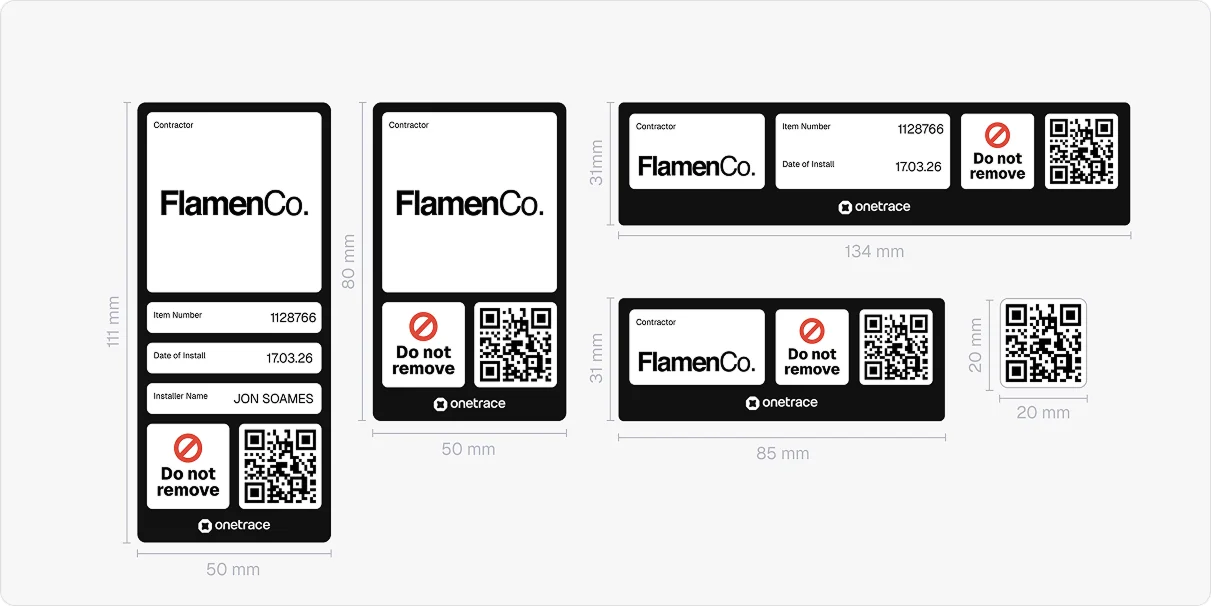
This approach allows operatives to continue adding records to a single thread, which is useful when the same location needs to be revisited for future surveys, maintenance, or remedial work.
6. Built-in approval workflows
A fire inspection can uncover issues that need checking before the report goes to a client or the work moves on.
For instance, a reviewer may need to check whether a fire-stopping repair has been completed correctly, whether damaged emergency lighting has been replaced, or whether a faulty alarm component has been properly rectified.
To maintain quality mid-work, the fire safety inspection software should feature built-in approval workflows that allow relevant stakeholders to review completed work, flag anything that needs attention, and approve it once it meets the required standard.
For accountability’s sake, the software should also keep a record of every approval decision, including who approved or rejected the work, when they made the decision, and what feedback they provided. This way, potential disputes can be resolved by reviewing the facts at hand instead of relying on memory or scattered paperwork.
7. Centralised document management
Teams may need to manage checklists, RAMS, certificates, previous reports, product information, and other relevant project information. When these are spread across email threads, folders, and paper files, remedial work can get delayed, and teams might be left scrambling for evidence during an audit.
That’s why it’s worth choosing software that gives your team one place to store, organise, and share project documentation. Since you’ll be sharing documents with clients or external stakeholders as well, another useful capability is controlled access, which allows you to set permissions around who can view particular documents.
Pro tip:
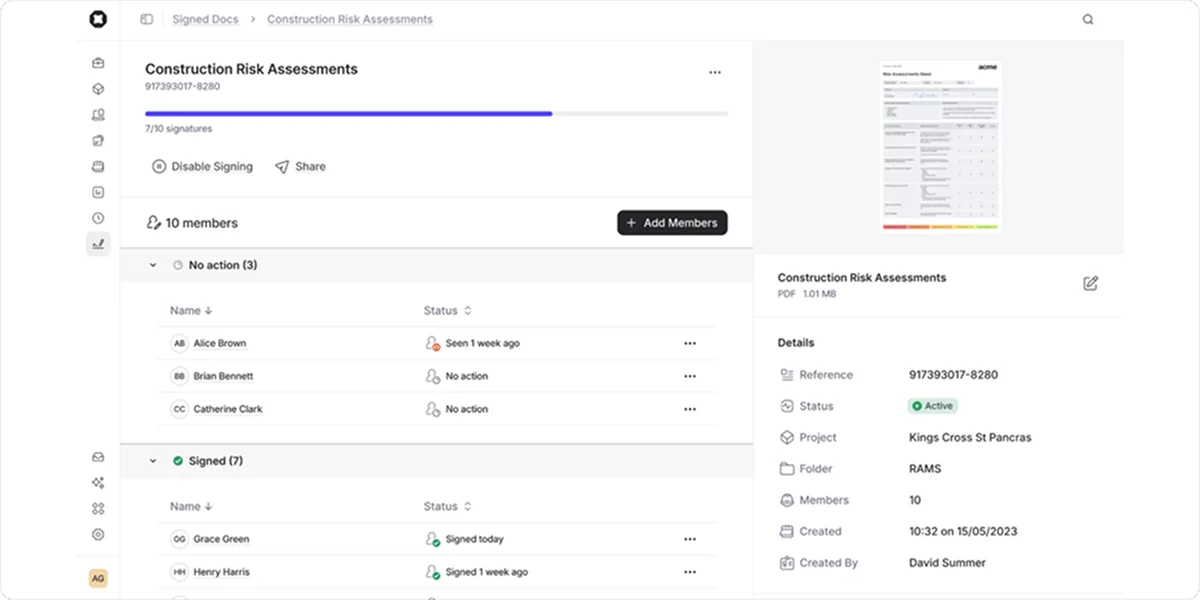
Storing documents in one place is a solid first step, but in an industry as compliance-heavy as fire safety, it’s better to pair centralised document management with sign-off tracking.
Onetrace’s Signed Docs feature lets teams send compliance documents to the relevant people for digital signatures. Teams can then track who has viewed or signed each document, see what is still outstanding, and export completed documents with their signing history when a record is needed.
8. Professional reporting and data export
A fire inspection is only useful if the findings can be passed on and acted on.
Clients, building managers, and other responsible parties may need inspection records, photographs, and supporting information to understand what was found and what needs to happen next.
Having professional, shareable inspection reports is especially important in the UK, where fire safety duties include keeping records of risk assessments, findings, and fire safety arrangements.
For higher-risk buildings, these records also form part of the golden thread of building information.
The Building Safety Regulator expects relevant information to be kept digitally, securely, up to date, accessible, and usable, providing an accurate record of how building safety risks are being managed.
To meet these regulatory requirements, your chosen fire safety inspection software should make it straightforward to produce the information others need and export it in a usable format when required.
9. Contractor and team management
Fire inspection contractors may have several operatives carrying out inspections across different sites. Behind the scenes, managers need to coordinate these jobs and keep track of who is assigned to each inspection and what work still needs to be done.
That’s why the right software should offer capabilities like:
Job assignment: Allocate inspections and follow-up work to the right operative or team.
Workforce visibility: See what work has been assigned, what is underway, and what still needs attention.
Site and project oversight: Manage work across multiple projects without relying on separate spreadsheets or disconnected systems.
10. API integrations
Fire inspection teams often have to move information between the field and the office. Manually copying inspection data into other systems creates many opportunities for errors.
API integrations allow different software systems to share data automatically, helping inspection software fit into the tools your business already uses rather than becoming another standalone system. These tools might include:
CRM and ERP systems: Connect customer, project, and business data with inspection records.
Scheduling and workforce platforms: Keep job assignments and field activity connected to wider planning workflows.
Document management systems: Move reports and supporting documents between the inspection platform and your existing document storage.
Property or asset management software: Keep inspection information connected to the wider records for a building, site, or asset.
Pro tip:
API integrations are valuable, but they aren’t the only way to avoid juggling multiple systems.
Another option is to use inspection software that also includes scheduling, workforce management, document management, and project records, so you can manage more of your day-to-day workflow in one place.
This means that you’ll have fewer systems to manage, less duplicated information, and a smoother handover between the office and the field.
Onetrace gives you both options: APIs to connect with the systems you already use and a single platform that covers those functions natively.
Onetrace: One platform for all the work around inspections
Onetrace started as passive fire protection software, which gave it a strong foundation in the needs of contractors working in that field.
Today, Onetrace has a much broader scope, bringing together the work that sits around inspections and installations. You can use it to:
Carry out surveys, inspections, installations, and remedial work relying on customisable forms
Capture photos, checklists, notes and other evidence as work happens on site
Pin work to drawings and specific locations, with sites organised by blocks, levels, and zones
Create a digital record of work that can be accessed and updated over time
Manage specifications, materials, and rates alongside the work itself
Schedule operatives, assign jobs, and keep field teams working from the latest information
Complete timesheets and track attendance without adding unnecessary admin
Manage all project documents in one place, organised by files and folders
Build approval and QA processes into projects, including feedback and multiple stages of sign-off
Generate professional, branded reports for clients, auditors, and internal teams
Keep a full audit trail of the work, from the information captured on site to approval and handover
This means that Onetrace ticks all the boxes for well-designed fire inspection software, while also giving contractors room to manage other types of work as their needs grow.
To learn more about these features and their benefits for your business, book a personalised demo with the Onetrace team.
FAQ
What is fire inspection software?
Fire inspection software is a digital tool for carrying out inspections, capturing findings and evidence, managing inspection records, and producing reports.
What is the best fire inspection software?
The best fire inspection software depends on your team’s needs. If you want a platform built specifically around fire and life safety inspections, Inspect Point is worth considering. However, if you want a broader platform that covers inspections alongside project, workforce, documentation, and field operations, Onetrace is a stronger fit.
How to choose a fire door inspection company?
Look for a company with the right experience, competence, and approach for the type of building and inspection required. Ask about their qualifications, relevant experience, inspection process, and reporting, as well as their approach to recording and communicating findings.
Marketing Team
@Onetrace
The Onetrace marketing team is passionate about sharing insights, ideas, and innovations that help construction businesses stay connected, compliant, and efficient. Combining industry expertise with a love for clear communication, we aim to deliver content that empowers professionals to work smarter and safer.