Construction management plans explained: Complete guide

By
Marketing Team
@Onetrace
A Construction Management Plan (CMP) is a document that shows how construction will be carried out, including ways to limit its impact on the surrounding area.
This document is crucial because poorly managed construction work can disrupt roads, harm the environment, and create safety risks.
In 2024/25, there were four fatal injuries to members of the public linked to UK construction activities, which highlights how serious these risks can be for those not involved in the work. That’s precisely why a CMP is usually required by your Local Planning Authority before work can even start.
To help you put one together properly, this guide breaks down what a CMP must include and how to create it step by step.
Key takeaways
A CMP is about managing impact, not just construction
In the UK, a Construction Management Plan focuses on how your project affects the surrounding area. It covers traffic, noise, safety, and environmental impact, and is key to getting approval before work starts.The contractor leads because they understand the reality on site
The main contractor is best placed to create the CMP, as they control how the work is delivered. Input from planners, consultants, and subcontractors helps ensure the plan reflects real site conditions.A strong CMP covers both planning and day-to-day operations
It should include site setup, logistics, traffic management, mitigation measures, and communication plans. Each section plays a role in reducing disruption and keeping the project compliant.Getting approval depends heavily on logistics and traffic planning
Councils focus closely on how vehicles move, when deliveries happen, and how roads are affected. Poor planning here leads to delays, safety risks, and a higher chance of rejection.A CMP must be kept up to date during construction
Plans change once work starts, so the CMP needs to reflect what’s actually happening on site. Using a tool like Onetrace helps you track activity, manage changes, and prove compliance, turning your CMP into a live, working tool.
What is a Construction Management Plan?
A Construction Management Plan (CMP) is a formal document that sets out the strategy, controls, and procedures for managing construction activities in line with planning requirements.
It defines how a project will be organised and executed, while demonstrating the processes used to identify, control, and monitor risks to the surrounding area.
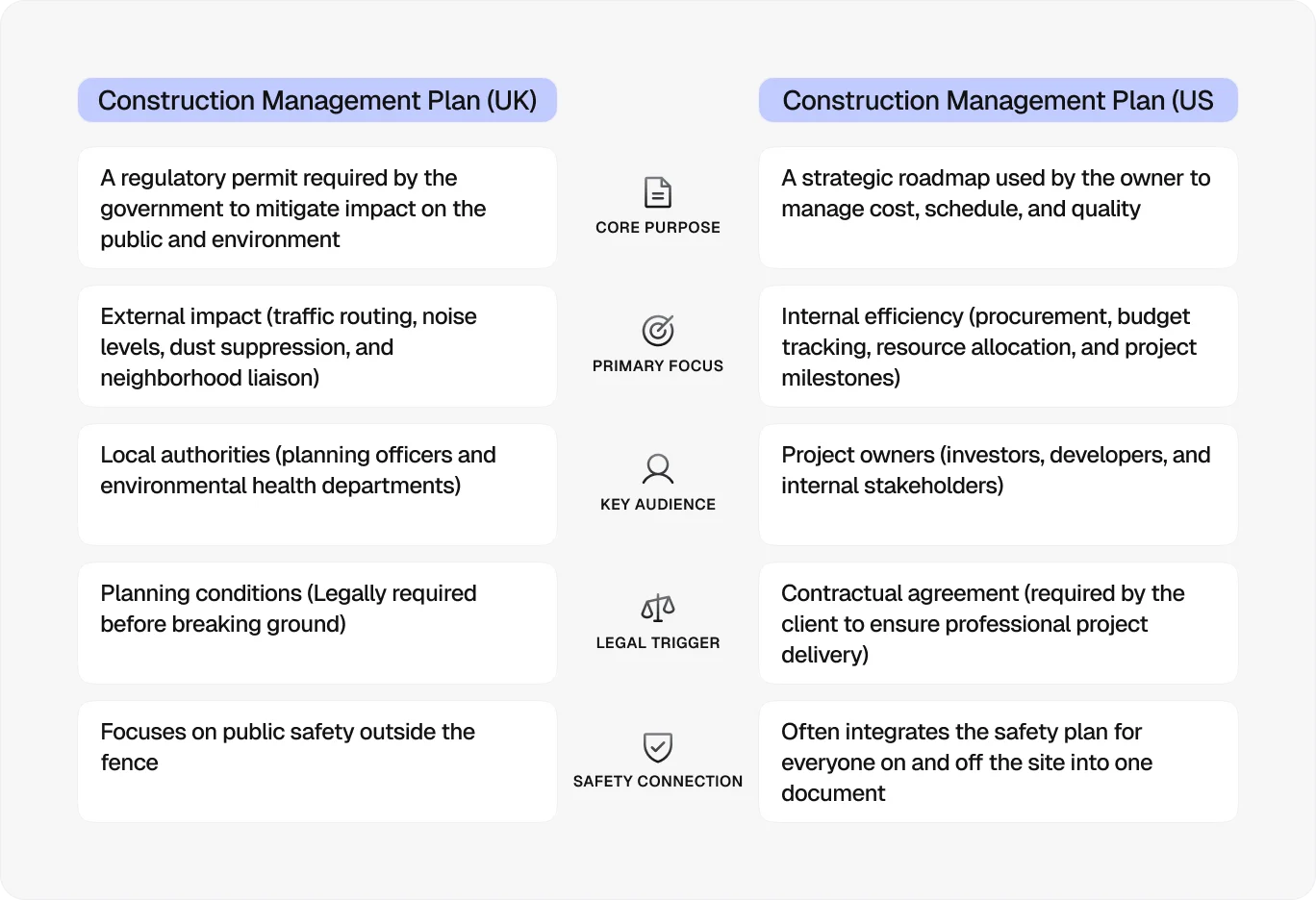
It’s important to note that this definition of a CMP is specific to the UK construction planning context. In the UK, a CMP is primarily used to secure approval before construction begins and is mainly concerned with the external effects of construction.
As such, it focuses on impacts like traffic disruption, noise, dust, and public safety risks. It also shows how the project will comply with relevant regulations, such as:
Outside the UK, the term is usually used to describe an internal project management document.
In the US, in particular, a construction management plan focuses on delivery, covering programme, cost, procurement, and resource planning. Risks to the environment and the public are addressed as part of overall project coordination.
Who makes a Construction Management Plan?
In the UK, a Construction Management Plan is usually prepared by the main contractor, often on behalf of the developer. This is because the contractor is responsible for the actual execution of the work.
They understand the build sequence, logistics, deliveries, and day-to-day operations, so they are best placed to set out realistic measures for managing impact and staying compliant.
Other parties may contribute to the CMP as needed, including:
The client, who provides the project scope and ensures the CMP aligns with planning conditions
Architects and engineers, who advise on constraints, phasing, and technical aspects of the works
Transport planners, who develop routing strategies, traffic management, and delivery plans
Environmental consultants, who advise on noise, dust, air quality, and mitigation measures
Subcontractors, who provide input on specific activities (e.g. lifting operations) to ensure the plan reflects how work will be carried out on site
What should be in a Construction Management Plan?
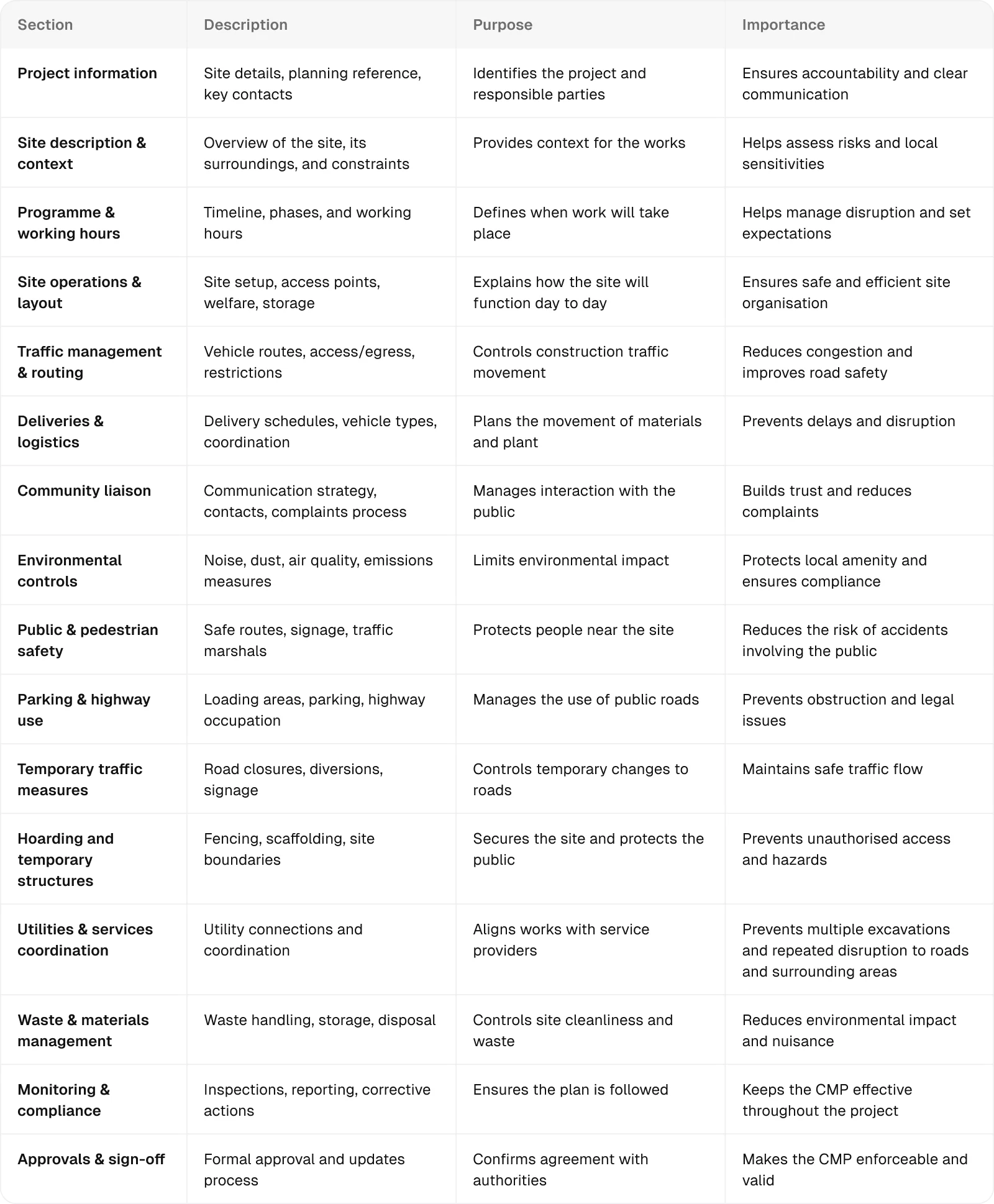
Some Local Planning Authorities provide specific templates that set out exactly what must be included in a Construction Management Plan.
Where this isn’t the case, your CMP should cover the key sections outlined below:
How to build a Construction Management Plan in 10 steps
Building a Construction Management Plan comes down to understanding your site, planning how the work will be carried out, and setting out straightforward measures to manage its impact on the surrounding area.
Here’s what that process looks like step by step:
1. Review planning and contract requirements
Start by understanding what your CMP needs to satisfy.
To do so, you must:
Check planning conditions from your Local Planning Authority
Identify any specific requirements (e.g. delivery hours, routing, noise limits)
Review contract documents and the employer’s requirements
This establishes the theoretical framework your CMP must follow.
Engaging with key authorities immediately is critical, as early input helps prevent rework and reduces the risk of the CMP being rejected by the Local Planning Authority.
2. Undertake site and context analysis
Once you know the theoretical requirements, you need to understand how they translate to real site conditions.
You can build a complete picture of your site and its surroundings by:
Noting existing site conditions, including current access points, boundaries, and nearby infrastructure
Identifying sensitive receptors, such as schools or housing
Reviewing the surrounding highway network
Checking any physical constraints, such as narrow roads, weight limits, or low bridges
A strong understanding of realistic site conditions leads to a more credible CMP.
3. Define construction strategy
The construction strategy defines the way the project will be delivered in line with the planning requirements and site constraints.
The most important part of this step is breaking the project down into phases and sequencing individual activities, as this allows you to control how and when impacts occur across the project.
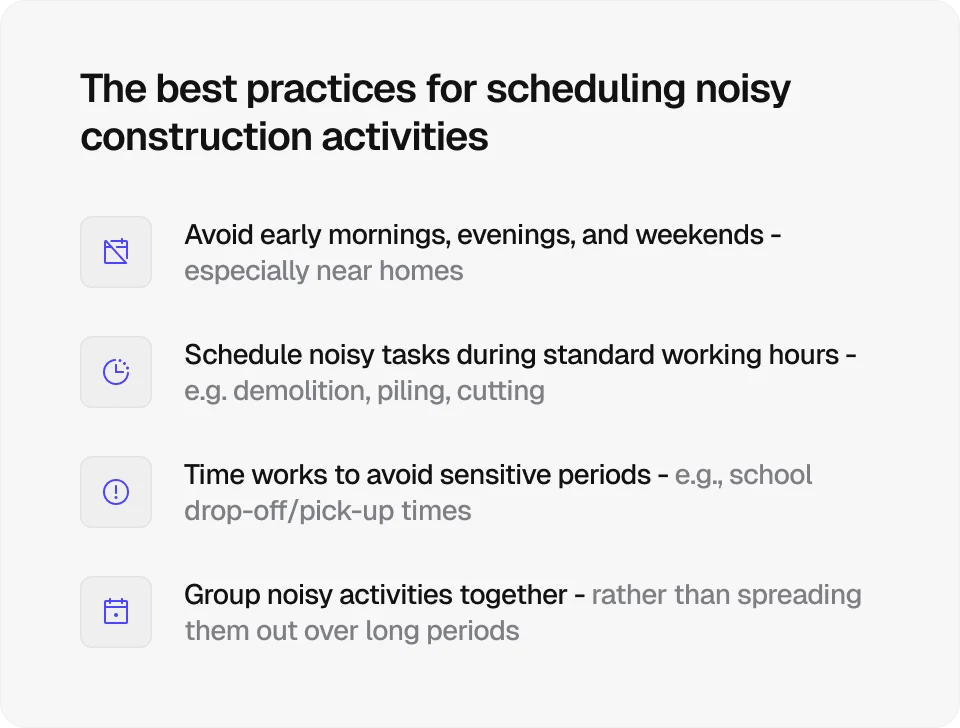
Since the goal of the CMP is to minimise impact on the surrounding area, you should prioritise approaches that help you do just that, such as phasing works to avoid overlap, reducing vehicle movements, or carefully scheduling noisy activities.
4. Develop logistics and traffic strategy
Planning the movement of materials and vehicles to and from the site is central to controlling the project’s impact on the surrounding highway network.
This is often the most scrutinised part of the CMP and key to approval because it directly affects congestion, road safety, and the public experience of the works.
To plan and control construction traffic properly, you should:
Define delivery routes and access points
Set delivery timings and frequency
Account for local restrictions (e.g. schools, peak hours, weight limits)
Identify suitable vehicle types and sizes for the route
Plan the safe entry and exit of vehicles to and from the site
5. Plan mitigation measures
This is where you turn identified risks into practical control measures targeting:
Traffic disruption and congestion
Noise and vibration
Dust and air quality
The safety of the public
General site impact on neighbouring properties and businesses
The exact control measures depend on the specific site conditions and risks, but they generally focus on reducing impact at source.
For example, you can schedule deliveries outside peak traffic periods, use acoustic barriers for noisy works, and apply water suppression to control dust.
6. Design site layout and operations
At this point, you have all the pieces in place; you just need to bring them together into a workable site setup that demonstrates your plan can be delivered in reality.
To do so, you must:
Plan layout for storage, welfare, and access
Define hoarding and security arrangements
Ensure safe separation of vehicles and pedestrians
7. Establish a communication and consultation strategy
Even with strong controls in place, some disruption is unavoidable. That’s why you must set out your approach to dealing with those affected by your construction works.
This includes:
Providing direct contact details for the site team, including a named contact for queries and complaints
Setting up a complaints procedure to log, respond to, and resolve issues promptly
Notifying residents and businesses in advance of disruptive activities (e.g. road closures, noisy works)
Using on-site signage or display boards to share key information about the project
Giving regular updates where work is ongoing, or plans change
8. Coordinate with third parties
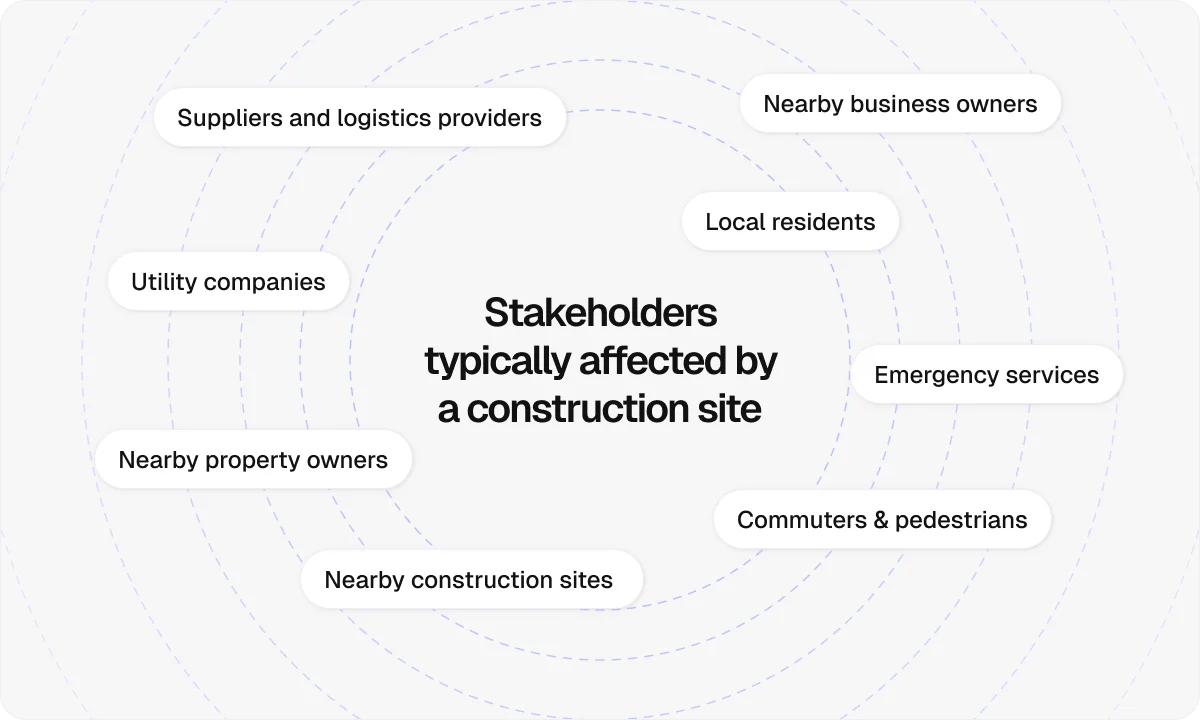
Besides the members of the public and local community, there are several other stakeholders you need to coordinate with, including:
Utility providers (water, gas, electricity, telecoms)
Nearby construction sites
Suppliers and logistics providers
9. Prepare supporting documentation
Your CMP should be backed up with supporting documentation, including:
Traffic management plans
Routing and swept path analysis
Drawings and environmental assessments
These documents strengthen your submission and improve clarity.
10. Review CMP against guidance and policies
To reduce the risk of your CMP being rejected, you should conduct a thorough review before submitting it to your Local Planning Authority.
If you’re working with a template, check that every required section is completed and supported with enough detail. If not, use local guidance as a benchmark to make sure nothing important has been missed.
How to keep your Construction Management Plan compliant during construction
Even after submitting your CMP, your work isn’t done.
That’s because construction work rarely goes exactly according to plan. Site conditions change, deliveries shift, and some measures that looked good on paper don’t always work in practice.
If the CMP isn’t updated to reflect this, it quickly becomes out of date, which can lead to miscommunication, non-compliance, and delays.
The most effective way to keep your CMP accurate and compliant is to actively monitor what’s happening on site and feed that back into the plan. This is where using construction site management software like Onetrace makes a real difference.
With Onetrace, you can:
Capture real site activity as it happens: Operatives can record work through photos, checklists, and notes, creating a live record of deliveries, conditions, and issues on site.
Build a clear audit trail for compliance: Every action is logged with evidence, making it easy to show that your CMP measures are being followed if challenged by clients or authorities.
Plan and adjust work to avoid clashes: A visual planner lets you schedule teams and activities clearly, helping you prevent overlapping work, reduce congestion, and keep deliveries and site operations coordinated.
Standardise checks and controls: Custom forms with mandatory fields ensure key CMP requirements (e.g. inspections and safety checks) are consistently completed without gaps.
Keep documentation centralised and accessible: All records, drawings, and compliance documents are stored in one place, so everyone is working from the same, up-to-date information.
Generate detailed reports when needed: Structured reports can be produced instantly to demonstrate compliance, support reviews, or share updates with stakeholders.
Using a system like this turns your CMP into a live, working tool that supports day-to-day decision-making, not just initial approval.
To get started with Onetrace, arrange a tailored walkthrough with the team where you’ll see how the platform fits your workflows and supports your CMP in practice.
FAQ
What is a CMP plan?
A Construction Management Plan (CMP) is a document that sets out how construction activities will be managed to reduce disruption to the surrounding area.
What should a CMP include?
A CMP should include project details, site operations, traffic and logistics plans, mitigation measures, and communication procedures.
What are common CMP mistakes?
Common CMP mistakes include missing key details, not reflecting real site conditions, and failing to update the plan during construction.
Marketing Team
@Onetrace
The Onetrace marketing team is passionate about sharing insights, ideas, and innovations that help construction businesses stay connected, compliant, and efficient. Combining industry expertise with a love for clear communication, we aim to deliver content that empowers professionals to work smarter and safer.