"/><stop offset="1" stop-color="rgb(178, 176, 181)"/></linearGradient><clipPath id="SCmwci64M-1912537238-stroke"><use href="%23SCmwci64M-1912537238"/></clipPath><path d="M 10.959 0 C 11.141 0 11.311 0.09 11.412 0.241 L 12.338 1.625 C 12.439 1.776 12.609 1.866 12.791 1.866 L 17 1.866 C 17.552 1.866 18 2.314 18 2.866 L 18 15.455 C 18 15.756 17.756 16 17.455 16 L 0.545 16 C 0.244 16 0 15.756 0 15.455 L 0 2.866 C 0 2.314 0.448 1.866 1 1.866 L 5.174 1.866 C 5.375 1.866 5.559 1.756 5.654 1.579 L 6.346 0.287 C 6.441 0.11 6.625 0 6.826 0 Z M 9 5 C 6.791 5 5 6.791 5 9 C 5 11.209 6.791 13 9 13 C 11.209 13 13 11.209 13 9 C 13 6.791 11.209 5 9 5 Z M 9 7 C 10.105 7 11 7.895 11 9 C 11 10.105 10.105 11 9 11 C 7.895 11 7 10.105 7 9 C 7 7.895 7.895 7 9 7 Z M 3 4 C 2.453 4 2 4.45 2 4.993 C 2 5.536 2.453 5.985 3 5.985 C 3.547 5.985 4 5.536 4 4.993 C 4 4.45 3.547 4 3 4 Z" id="SCmwci64M-1912537238" transform="translate(11 12)"/></defs><use fill="url(%23SCmwci64M-1912537238-linear-gradient)" height="16px" href="%23SCmwci64M-1912537238" id="SCmwci64M" width="18.000044141px"/><use clip-path="url(%23SCmwci64M-1912537238-stroke)" fill="transparent" href="%23SCmwci64M-1912537238" stroke-dasharray="0" stroke-linecap="butt" stroke-linejoin="miter" stroke-miterlimit="10" stroke-width="0.5" stroke="rgba(255, 255, 255, 0.1)"/></svg>)
Golden thread software
Onetrace captures golden thread evidence as your team works on site: every fire door, compartment line and firestopping job, recorded, located and approved in real time, all in one system.


Onetrace captures everything the golden thread asks you to prove
Product & batch
Location, pinned to drawing
Installer & date
Inspection & sign-off
Change history
Tested detail






Bring everything together, so you're not switching systems or chasing paperwork to prove jobs you already know were done right. You get on with the work. Onetrace builds the record.

Audit prep that doesn't need preparing
The record's built by the time someone comes asking. No scramble, no late nights pulling together handover packs.
A record that actually holds up
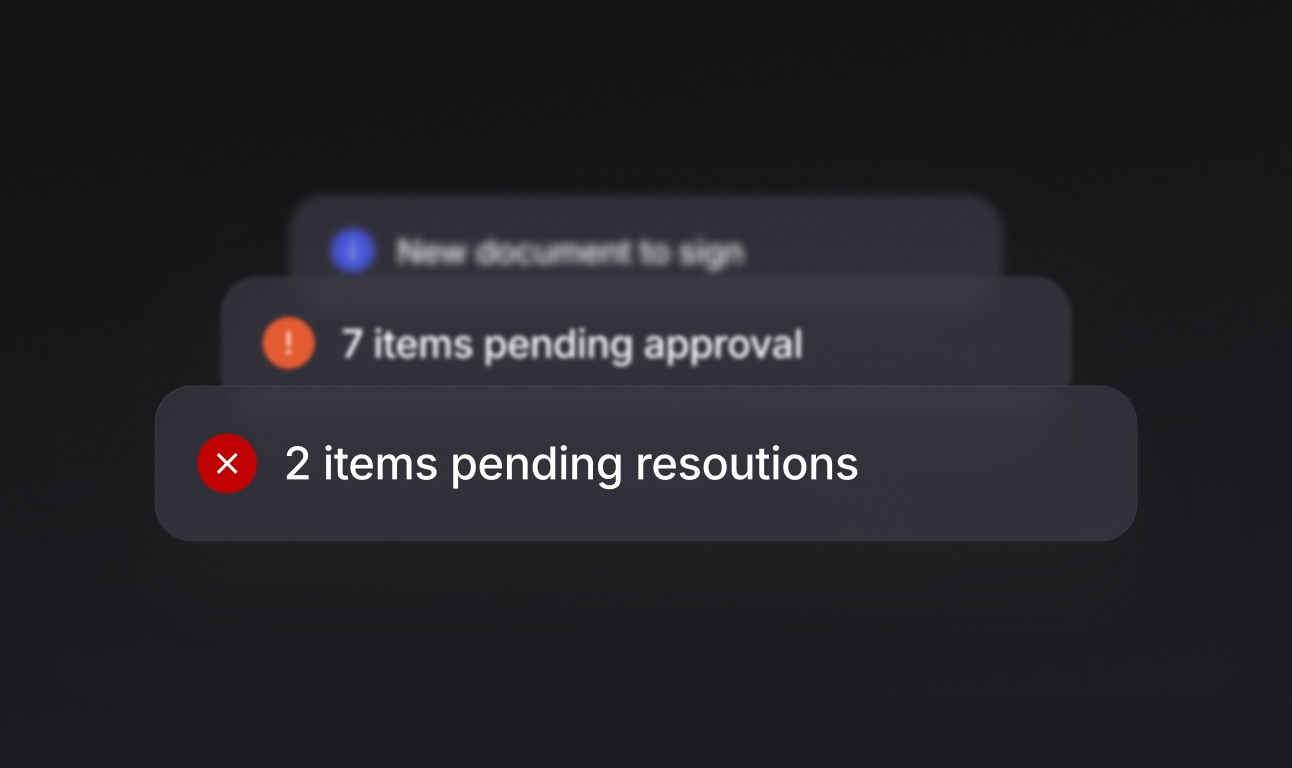
Every job's evidence is timestamped, located and approved as it happens, so it survives scrutiny months or years later.
A single source of truth
Forms, drawings, approvals, materials and reports live in one place, not scattered across phones and spreadsheets.

Built to scale with you
Used by businesses running a handful of guys on one site, to those with of operatives across dozens of projects.
How it works
Managing work across
all your jobs
Bring everything together, so you're not switching systems or chasing paperwork to prove jobs you already know were done right. You get on with the work. Onetrace builds the record.
Plan the work
Schedule jobs, allocate the right people to the right site, and get RAMS, drawings and forms into their hands before they arrive.
Carry out the work
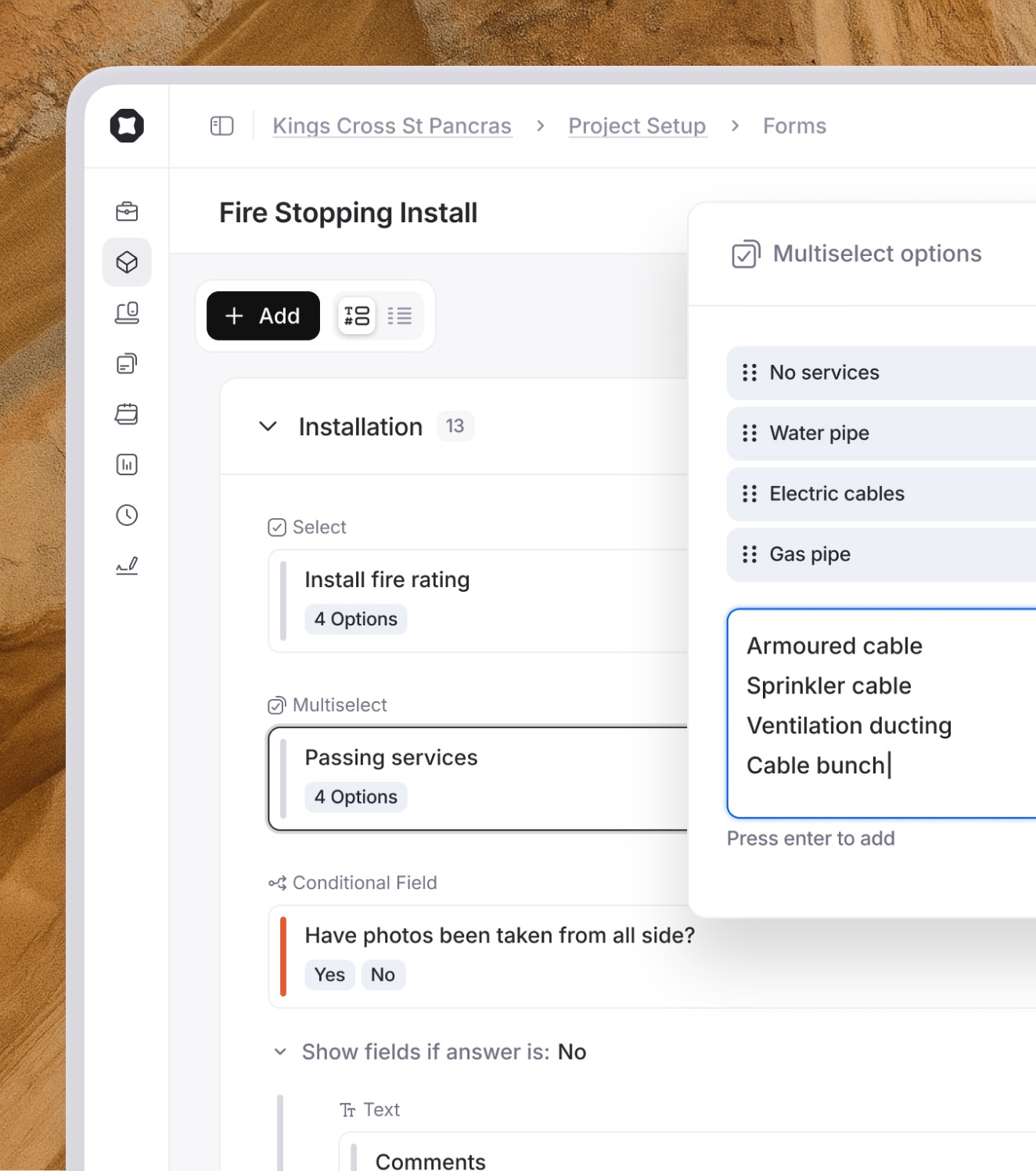
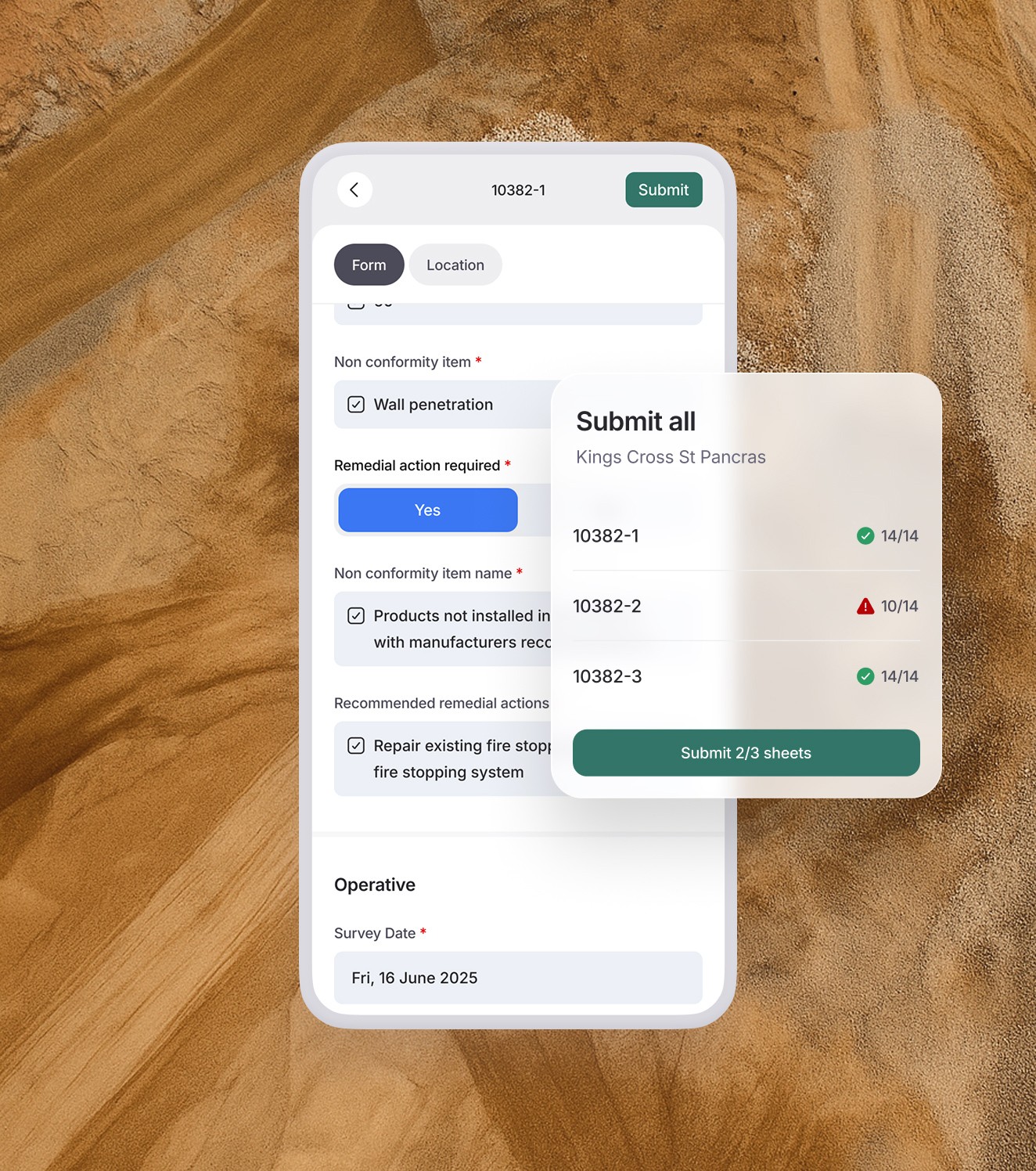
Operatives do their surveys, installs, inspections and maintenance on site, with tailored forms and custom workflows.
Capture evidence
Photos, materials, batch numbers and locations are captured as the work happens and pinned straight onto the drawing
Reporting & handover
Audit-ready reports generate instantly, branded in your livery or your client's: the golden thread, built as you go.
" width="18.718749983825685px"><g d="M 3.5 2.5 C 2.953 2.5 2.5 2.953 2.5 3.5 C 2.5 4.047 2.953 4.5 3.5 4.5 C 4.047 4.5 4.5 4.047 4.5 3.5 C 4.5 2.953 4.047 2.5 3.5 2.5 Z M 18.062 5.063 L 18.062 15 L 0 15 L 0 0 L 7.906 0 M 6.5 8 C 6.5 6.343 7.843 5 9.5 5 C 11.157 5 12.5 6.343 12.5 8 C 12.5 9.657 11.157 11 9.5 11 C 7.843 11 6.5 9.657 6.5 8 Z" fill="transparent" height="15px" id="XYo8hOS5j" transform="translate(0 4)" width="18.06245px"><path d="M 1 0 C 0.453 0 0 0.453 0 1 C 0 1.547 0.453 2 1 2 C 1.547 2 2 1.547 2 1 C 2 0.453 1.547 0 1 0 Z" fill="rgb(17, 17, 17)" height="2px" id="mjnBVEOoD" transform="translate(2.5 2.5)" width="2px"/><path d="M 18.062 5.063 L 18.062 15 L 0 15 L 0 0 L 7.906 0" fill="transparent" height="15px" id="rNlfDLPFo" stroke-dasharray="" stroke-linecap="butt" stroke-linejoin="miter" stroke-miterlimit="10" stroke-width="1.8" stroke="rgb(17, 17, 17)" width="18.06245px"/><path d="M 0 3 C 0 1.343 1.343 0 3 0 C 4.657 0 6 1.343 6 3 C 6 4.657 4.657 6 3 6 C 1.343 6 0 4.657 0 3 Z" fill="transparent" height="6px" id="ZnlozwkM7" stroke-dasharray="" stroke-linecap="butt" stroke-linejoin="miter" stroke-miterlimit="10" stroke-width="1.8" stroke="rgb(17, 17, 17)" transform="translate(6.5 5)" width="6px"/></g><path d="M 5.01 8.219 L 3.209 8.219 L 3.209 5.022 L 5.01 5.022 Z M 8.219 3.209 L 8.219 5.01 L 5.022 5.01 L 5.022 3.209 Z M 3.196 5.01 L 0 5.01 L 0 3.209 L 3.196 3.209 Z M 5.01 3.196 L 3.209 3.196 L 3.209 0 L 5.01 0 Z" fill="rgb(17, 17, 17)" height="8.218749983825685px" id="e1BcHiaZh" transform="translate(10.5 0)" width="8.218749983825685px"/></g></svg>)
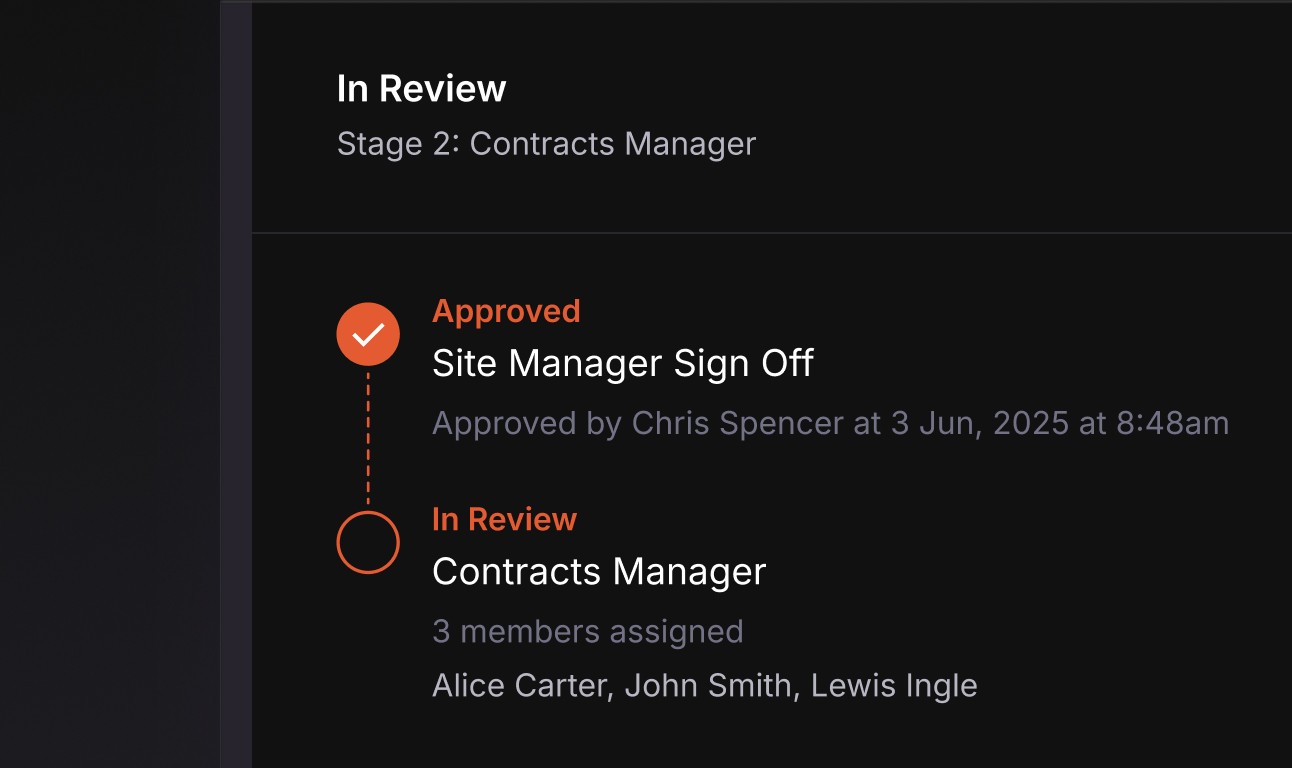
Approvals
Streamline checks and maintain quality with built-in multi-stage approval flows.
" width="16.325000000000045px"><path d="M 0 16.325 L 0 0 L 16.325 0 L 16.325 16.325 Z" fill="transparent" height="16.32499999999999px" id="FqHxXs_nm" stroke-dasharray="" stroke-linecap="butt" stroke-linejoin="miter" stroke-miterlimit="10" stroke-width="1.8" stroke="rgb(17, 17, 17)" width="16.325000000000045px"/><path d="M 0 10.617 L 0 9.148 L 9.156 0 L 10.562 0 L 10.562 1.273 L 1.188 10.617 Z" fill="rgb(17, 17, 17)" height="10.61721px" id="gA0xvYLHz" transform="translate(2.5 3)" width="10.56248000000005px"/><path d="M 0 7.203 L 0 4.547 L 4.531 0 L 7.188 0 Z" fill="rgb(17, 17, 17)" height="7.203100000000006px" id="UlIZkZee2" transform="translate(2.5 3)" width="7.1875199999999495px"/><path d="M 0 2.547 L 0 0 L 2.539 0.008 Z" fill="rgb(17, 17, 17)" height="2.5468699999999984px" id="y20xU8NSF" transform="translate(2.5 3)" width="2.5390599999999495px"/><path d="M 2.703 7.469 L 0 7.469 L 7.461 0 L 7.461 2.711 Z" fill="rgb(17, 17, 17)" height="7.46875px" id="yWAl71kb7" transform="translate(6 6)" width="7.4609799999999495px"/><path d="M 2.734 2.719 L 0 2.719 L 2.734 0 Z" fill="rgb(17, 17, 17)" height="2.7188000000000017px" id="P_hPR4EgL" transform="translate(10.5 11)" width="2.734299999999962px"/></g></svg>)
Materials
Create a core database to accurately track materials used and project costs.
" width="16.990030000000047px"><path d="M 0 6.2 L 0 0 L 6.2 0 L 6.2 6.2 Z" fill="transparent" height="6.200000000000003px" id="GxgFy8Jj3" stroke-dasharray="" stroke-linecap="butt" stroke-linejoin="miter" stroke-miterlimit="10" stroke-width="1.8" stroke="rgb(0, 0, 0)" transform="translate(0 1)" width="6.2000000000000455px"/><path d="M 0 6.2 L 0 0 L 6.2 0 L 6.2 6.2 Z" fill="transparent" height="6.200000000000003px" id="WMjpCwv8X" stroke-dasharray="" stroke-linecap="butt" stroke-linejoin="miter" stroke-miterlimit="10" stroke-width="1.8" stroke="rgb(0, 0, 0)" transform="translate(0 1)" width="6.2000000000000455px"/><path d="M 0 6.2 L 0 0 L 6.2 0 L 6.2 6.2 Z" fill="transparent" height="6.200000000000003px" id="IqliuRksj" stroke-dasharray="" stroke-linecap="butt" stroke-linejoin="miter" stroke-miterlimit="10" stroke-width="1.8" stroke="rgb(0, 0, 0)" transform="translate(0 11)" width="6.2000000000000455px"/><path d="M 0 6.2 L 0 0 L 6.2 0 L 6.2 6.2 Z" fill="transparent" height="6.200000000000003px" id="HEqm39QbO" stroke-dasharray="" stroke-linecap="butt" stroke-linejoin="miter" stroke-miterlimit="10" stroke-width="1.8" stroke="rgb(0, 0, 0)" transform="translate(10 11)" width="6.2000000000000455px"/><path d="M 0 0 L 0 7.995" fill="transparent" height="7.994870000000006px" id="Nx4B05EyG" stroke-dasharray="" stroke-linecap="butt" stroke-linejoin="miter" stroke-miterlimit="10" stroke-width="1.8" stroke="rgb(0, 0, 0)" transform="translate(13 0)" width="1px"/><path d="M 0 0 L 7.99 0" fill="transparent" height="1px" id="M5oNOBhlY" stroke-dasharray="" stroke-linecap="butt" stroke-linejoin="miter" stroke-miterlimit="10" stroke-width="1.8" stroke="rgb(0, 0, 0)" transform="translate(9 4)" width="7.990030000000047px"/></g></svg>)
Rates
Reduce errors and manage project costs by project type, region, client and more.
" width="17.125px"><path d="M 17.125 8.063 L 10.125 8.063 L 0 8.063 L 0 0 L 7.469 0" fill="transparent" height="8.062549999999987px" id="IbrqQb57B" stroke-dasharray="" stroke-linecap="butt" stroke-linejoin="miter" stroke-miterlimit="10" stroke-width="1.8" stroke="rgb(17, 17, 17)" transform="translate(0 2)" width="17.125px"/><path d="M 0 4.231 L 0 0 L 16.2 0 L 16.2 4.231 Z" fill="transparent" height="4.231279999999998px" id="gYXewIYq2" stroke-dasharray="" stroke-linecap="butt" stroke-linejoin="miter" stroke-miterlimit="10" stroke-width="1.8" stroke="rgb(17, 17, 17)" transform="translate(0 13.5)" width="16.19999999999999px"/><path d="M 0 7.609 L 0 0" fill="transparent" height="7.609375px" id="g8tK0R052" stroke-dasharray="" stroke-linecap="butt" stroke-linejoin="miter" stroke-miterlimit="10" stroke-width="1.8" stroke="rgb(17, 17, 17)" transform="translate(13 0)" width="1px"/><path d="M 3.98 0 L 0 2.298" fill="transparent" height="2.2979699999999923px" id="qzSTzahtt" stroke-dasharray="" stroke-linecap="butt" stroke-linejoin="miter" stroke-miterlimit="10" stroke-width="1.8" stroke="rgb(17, 17, 17)" transform="translate(10 3.5)" width="3.9801989384999956px"/><path d="M 4.168 2.386 L 0 0" fill="transparent" height="2.3857500000000016px" id="Hmw9xdzBJ" stroke-dasharray="" stroke-linecap="butt" stroke-linejoin="miter" stroke-miterlimit="10" stroke-width="1.8" stroke="rgb(17, 17, 17)" transform="translate(10 2)" width="4.167500000000018px"/><path d="M 4.111 2.373 L 0 0" fill="transparent" height="2.3732049999999987px" id="Mq9y2fUR2" stroke-dasharray="" stroke-linecap="butt" stroke-linejoin="miter" stroke-miterlimit="10" stroke-width="1.8" stroke="rgb(17, 17, 17)" transform="translate(12.5 3.5)" width="4.110509720249979px"/><path d="M 4.111 0 L 0 2.373" fill="transparent" height="2.373199999999997px" id="L0u3r5NTy" stroke-dasharray="" stroke-linecap="butt" stroke-linejoin="miter" stroke-miterlimit="10" stroke-width="1.8" stroke="rgb(17, 17, 17)" transform="translate(12.5 2)" width="4.110500000000002px"/></g></svg>)
Guest access
Give clients and auditors project access for better collaboration and visibility.
" transform="translate(3 6)" width="18.3125px"/><path d="M 0 0 L 0 19.969" fill="transparent" height="19.96875px" id="Sxx0Bcte_" stroke-dasharray="" stroke-linecap="butt" stroke-linejoin="miter" stroke-miterlimit="10" stroke-width="1.8" stroke="rgb(17, 17, 17)" transform="translate(15.5 2.5)" width="1px"/><path d="M 0 0 L 2 0 L 2 2 L 0 2 Z" fill="rgb(17, 17, 17)" height="2px" id="fAIOK4nO7" transform="translate(6 11)" width="2px"/><path d="M 0 0 L 2 0 L 2 2 L 0 2 Z" fill="rgb(17, 17, 17)" height="2px" id="ThOGVTY6y" transform="translate(10 11)" width="2px"/></svg>)
Timesheets
Automatically record team time without paper or Friday chasing.
" width="17.8749499999999px"><path d="M 0 0 L 17.875 0" fill="transparent" height="1px" id="RtXBFVoCR" stroke-dasharray="" stroke-linecap="butt" stroke-linejoin="miter" stroke-miterlimit="10" stroke-width="1.8" stroke="rgb(17, 17, 17)" transform="translate(0 16.5)" width="17.8749499999999px"/><path d="M 13.343 3.048 L 2.956 13.164 L 0.01 13.176 L 0 10.104 L 10.375 0 Z" fill="transparent" height="13.17604px" id="xKITcYLF4" stroke-dasharray="" stroke-linecap="butt" stroke-linejoin="miter" stroke-miterlimit="10" stroke-width="1.8" stroke="rgb(17, 17, 17)" transform="translate(1 0)" width="13.343119999999999px"/></g></svg>)
Signed docs
RAMS, toolbox talks and H&S docs, signed and tracked in a click.

site manager
Build your digital site
Organise your site by blocks, levels and zones, so operatives can drop pins with ease, and your data stays structured and searchable.

" width="19.124515000000002px"><path d="M 4.5 0 L 2.562 0 L 0 4.951 L 19.125 4.951 L 16.594 0.01 L 14.563 0.01" fill="transparent" height="4.951250000000002px" id="wDgRp56U5" stroke-dasharray="" stroke-linecap="butt" stroke-linejoin="miter" stroke-miterlimit="10" stroke-width="1.8" stroke="rgb(17, 17, 17)" transform="translate(0 14)" width="19.124515000000002px"/><path d="M 6.511 0.005 C 11.631 0.194 14.354 6.185 11.129 10.167 L 10.968 10.358 L 6.261 15.75 L 1.554 10.358 C -1.975 6.317 0.895 0 6.261 0 Z M 6.261 1.8 C 2.441 1.8 0.397 6.297 2.909 9.175 L 6.261 13.014 L 9.612 9.175 C 12.124 6.297 10.08 1.8 6.261 1.8 Z" fill="rgb(17, 17, 17)" height="15.749949999999998px" id="brsdlGa15" transform="translate(3.5 0)" width="12.52144753015902px"/><path d="M 1.5 0 C 0.68 0 0 0.68 0 1.5 C 0 2.32 0.68 3 1.5 3 C 2.32 3 3 2.32 3 1.5 C 3 0.68 2.32 0 1.5 0 Z" fill="rgb(17, 17, 17)" height="2.9999949999999984px" id="BW0MsFDIm" transform="translate(8.4 5)" width="2.9999949999999984px"/></g></svg>)
Upload drawings
Upload drawings and mark them up with pin-point accuracy.
" width="18.704552000000007px"><path d="M 7.757 10.273 L 0 5.136 L 7.757 0 L 15.513 5.136 Z" fill="rgb(255, 255, 255)" height="10.272599999999997px" id="CNY0ctSFe" stroke-dasharray="" stroke-linecap="butt" stroke-linejoin="miter" stroke-miterlimit="10" stroke-width="1.8" stroke="rgb(17, 17, 17)" transform="translate(1.5 0)" width="15.513369999999995px"/><path d="M 1.505 0.008 L 0 0.998 L 9.352 7.195 L 18.705 0.998 L 17.2 0 L 9.345 5.083 Z" fill="rgb(17, 17, 17)" height="7.194659999999999px" id="oJmMkDlnf" transform="translate(0 8)" width="18.704552000000007px"/><path d="M 1.505 0.008 L 0 0.998 L 9.352 7.195 L 18.705 0.998 L 17.2 0 L 9.345 5.083 Z" fill="rgb(17, 17, 17)" height="7.194599999999994px" id="ZJ8flxqMo" transform="translate(0 11.5)" width="18.704552000000007px"/></g></svg>)
Blocks and levels
Organise drawings into blocks and levels, creating buckets for your data.
" width="18.05079101257322px"><path d="M 1.801 14.249 L 1.801 16.25 L 3.802 16.25 L 3.802 18.051 L 0 18.051 L 0 14.249 Z M 11.927 16.25 L 11.927 18.051 L 6.124 18.051 L 6.124 16.25 Z M 18.051 14.249 L 18.051 18.051 L 14.249 18.051 L 14.249 16.25 L 16.25 16.25 L 16.25 14.249 Z M 0 6.124 L 1.801 6.124 L 1.801 11.927 L 0 11.927 Z M 18.051 6.124 L 18.051 11.927 L 16.25 11.927 L 16.25 6.124 Z M 3.802 0 L 3.802 1.801 L 1.801 1.801 L 1.801 3.802 L 0 3.802 L 0 0 Z M 18.051 0 L 18.051 3.802 L 16.25 3.802 L 16.25 1.801 L 14.249 1.801 L 14.249 0 Z M 11.927 0 L 11.927 1.801 L 6.124 1.801 L 6.124 0 Z" fill="rgb(17, 17, 17)" height="18.050740603637696px" id="U3j1chbLL" transform="translate(0 0)" width="18.050791012573242px"/><path d="M 0 4 L 0 0 L 4 0 L 4 4 Z" fill="transparent" height="4px" id="zXXs5i8fH" stroke-dasharray="" stroke-linecap="butt" stroke-linejoin="miter" stroke-miterlimit="10" stroke-width="1.8" stroke="rgb(17, 17, 17)" transform="translate(7.025 7.025)" width="4px"/></g></svg>)
Zones and cores
Further organise your pins into zones and cores for smarter reporting.
“The Onetrace system enabled us to capture industry-leading evidence, giving clients the most robust golden thread at the click of a button.”
Jay Sefton
mobile app
Built for teams on the ground


Built to handle scale. Backed by real people.
Secure, scalable and built for the golden thread
" width="17.843799999999987px"><path d="M 0 6.606 L 0 0 L 15.95 0 L 15.95 6.606 Z" fill="transparent" height="6.606250000000003px" id="BcE7MHNhb" stroke-dasharray="" stroke-linecap="butt" stroke-linejoin="miter" stroke-miterlimit="10" stroke-width="1.8" stroke="rgb(0, 0, 0)" transform="translate(1 0)" width="15.950000000000045px"/><path d="M 17.844 0 L 0 0" fill="transparent" height="1px" id="D1EiFrxUe" stroke-dasharray="" stroke-linecap="butt" stroke-linejoin="miter" stroke-miterlimit="10" stroke-width="1.8" stroke="rgb(0, 0, 0)" transform="translate(0 10.5)" width="17.843799999999987px"/><path d="M 10.875 0 L 0 0" fill="transparent" height="1px" id="PJNR_zWN9" stroke-dasharray="" stroke-linecap="butt" stroke-linejoin="miter" stroke-miterlimit="10" stroke-width="1.8" stroke="rgb(0, 0, 0)" transform="translate(0 15)" width="10.875px"/></g></svg>)
Secure and compliant
ISO 27001 certified.
GDPR compliant.
" width="15.875px"><path d="M 0 3.688 L 0 0 L 10.27 0 L 13.375 3.813 L 13.375 8.094 L 13.375 16.188 L 6.688 16.188 L 0 16.188 L 0 13.813" fill="transparent" height="16.187549999999987px" id="GC6P5ru9U" stroke-dasharray="" stroke-linecap="butt" stroke-linejoin="miter" stroke-miterlimit="10" stroke-width="1.8" stroke="rgb(0, 0, 0)" transform="translate(2.5 0)" width="13.375px"/><path d="M 0 4.325 L 0 0 L 10.2 0 L 10.2 4.325 Z" fill="transparent" height="4.325000000000003px" id="bW8C0YVyZ" stroke-dasharray="" stroke-linecap="butt" stroke-linejoin="miter" stroke-miterlimit="10" stroke-width="1.8" stroke="rgb(0, 0, 0)" transform="translate(0 6.5)" width="10.200000000000045px"/></g></svg>)
Built to scale
From a single site to multiple projects at once.
" width="18.075000000000045px"><path d="M 0 0 L 0 3.575" fill="transparent" height="3.575000000000003px" id="nT1F_qUbC" stroke-dasharray="" stroke-linecap="butt" stroke-linejoin="round" stroke-width="1.8" stroke="rgb(17, 17, 17)" transform="translate(9 14.5)" width="1px"/><path d="M 0 0 L 2.529 2.529" fill="transparent" height="2.5293000000000063px" id="Dw1Xi5RsF" stroke-dasharray="" stroke-linecap="butt" stroke-linejoin="round" stroke-width="1.8" stroke="rgb(17, 17, 17)" transform="translate(13 13)" width="2.5293000000000347px"/><path d="M 0 2.529 L 2.529 0" fill="transparent" height="2.5293000000000063px" id="m88_xwE0O" stroke-dasharray="" stroke-linecap="butt" stroke-linejoin="round" stroke-width="1.8" stroke="rgb(17, 17, 17)" transform="translate(2.5 13)" width="2.5293199999999842px"/><path d="M 0 0 L 3.575 0" fill="transparent" height="1px" id="BSi8TpOXh" stroke-dasharray="" stroke-linecap="butt" stroke-linejoin="round" stroke-width="1.8" stroke="rgb(17, 17, 17)" transform="translate(14.5 9)" width="3.5750000000000455px"/><path d="M 0 0 L 3.575 0" fill="transparent" height="1px" id="M3rDN0z9M" stroke-dasharray="" stroke-linecap="butt" stroke-linejoin="round" stroke-width="1.8" stroke="rgb(17, 17, 17)" transform="translate(0 9)" width="3.5750000000000455px"/><path d="M 0 2.529 L 2.529 0" fill="transparent" height="2.5293199999999985px" id="FAK5s3jwV" stroke-dasharray="" stroke-linecap="butt" stroke-linejoin="round" stroke-width="1.8" stroke="rgb(17, 17, 17)" transform="translate(13 2.5)" width="2.5293000000000347px"/><path d="M 0 0 L 2.529 2.529" fill="transparent" height="2.5293199999999985px" id="v6Uivt_C8" stroke-dasharray="" stroke-linecap="butt" stroke-linejoin="round" stroke-width="1.8" stroke="rgb(17, 17, 17)" transform="translate(2.5 2.5)" width="2.5293199999999842px"/><path d="M 0 0 L 0 3.575" fill="transparent" height="3.575000000000003px" id="vWO5b2Sr4" stroke-dasharray="" stroke-linecap="butt" stroke-linejoin="round" stroke-width="1.8" stroke="rgb(17, 17, 17)" transform="translate(9 0)" width="1px"/></g></svg>)
Real human support
Dedicated customer success and live help chat support.
Technology
Empowering operatives
Our mobile app is designed for the people on the ground—fast, simple, and reliable, even on complex sites and in tough environments.


Drawings and data are pre-downloaded, so work continues uninterrupted—even without a signal.
FAQ
Golden thread FAQ
Our mobile app is designed for the people on the ground—fast, simple, and reliable, even on complex sites and in tough environments.
What is the golden thread of information?
" height="11.273420000000002px" id="e0NiCacYi" transform="translate(0.363 0.363)" width="11.273419999999987px"/></svg>)
Does golden thread compliance apply to every building, or only high-rises?
What do I actually need to prove for the golden thread as a passive fire protection subcontractor?
Can Onetrace bring across records from our current system or paper files?
Does Onetrace work offline on site?
What support do we get if we switch to Onetrace?
What reports can Onetrace generate for handover?
I've been using Onetrace for a year now, and it has been incredibly handy for generating reports and easily sharing them with clients. But beyond that, the customer service is outstanding.
MB
Marjorie Barja
YY Security
I have had an incredible experience overall working with the team at Onetrace. Not only has their app helped us streamline and customise our services but also their team have always been helpful and open to ideas for features while valuing us as clients and what is important to us.
SW
Simon White
Optimal Fire
From day one, the service has been nothing short of amazing. Daniela, Natasha, and Fatah don’t just help — they genuinely go above and beyond every single time. Any issue or question I’ve had was handled instantly, with care and professionalism.
YO
Yehuda Orzel
PFP Fire Stopping
Our clients and staff are very happy, its useability for our site team and back office is great and the reports produced for our clients are informative and professional. I wouldn't hesitate to recommend this to other business's looking for great software.
JM
Jason Metcalfe
Rooms Group
I am so pleased with Onetrace, it allows me to do everything i need from a firestopping point of view and a building company when it comes to reporting. The team are constantly updating and improving their features, forever pushing the limits of what the app is capable of.
NR
Nathan Rosel
Greenville Fire Protection
Brilliant software and excellent customer service. Easy to use and caters for all of our needs. Any time we have had any questions or issues we have been able to resolve over the phone without any delays or problems. Highly recommended.
DW
Daniel Winder
Cotswold Fire
Absolute game changer for photographic reporting. I use this for fire protection seals. The set up is easily customised to individual requirements and saves having to upload photographs and information manually.
RD
Rachel Donnellan
Fleet Insulation
I have found Onetrace to be an extremely useful software but most importantly the support and speed of response by the team within the software is second to none. Their willingness to listen to and act on customer feedback is so refreshing.
GN
Garrett Nolan
Kavco Group
Always a pleasure dealing with the team at Onetrace! The service is great, the product is so easy to use and I would highly recommend.
HD
Heather Darroch
Target Maintenance GE
Would highly recommend this system. The whole interface and functionality of the system is brilliant compared to other systems i have used in the past, so easy to navigate around and very easy to use.
JD
Jonathan Field
Fireseal
Excellent system/App. Flexible enough to accommodate to our needs and well thought through. The online help in particular deserves a 6th star.
DS
David Shipway
PS Applications